

Conflow
-
Posts
1,934 -
Joined
-
Last visited
Posts posted by Conflow
-
-
Hi Lin and Wilburke,
Lin if you remember (its so long ago) I posted about a Program called "BSR-ScreenRecorder" which I desperately needed
to recover photo-shots from old PTE 4.2 Exe's for the reason that I had a Computer-Wipeout and lost all Media except
those Exe's which were on CD's. It worked well for me with little loss of quality and as I appreciate that you are trying to
help Wilburke but good recapture Programs are like Hen's teeth. The recent 5.52 version of BSR-Recorder is something
else ~ it is really good and it may resolve your searches issue.
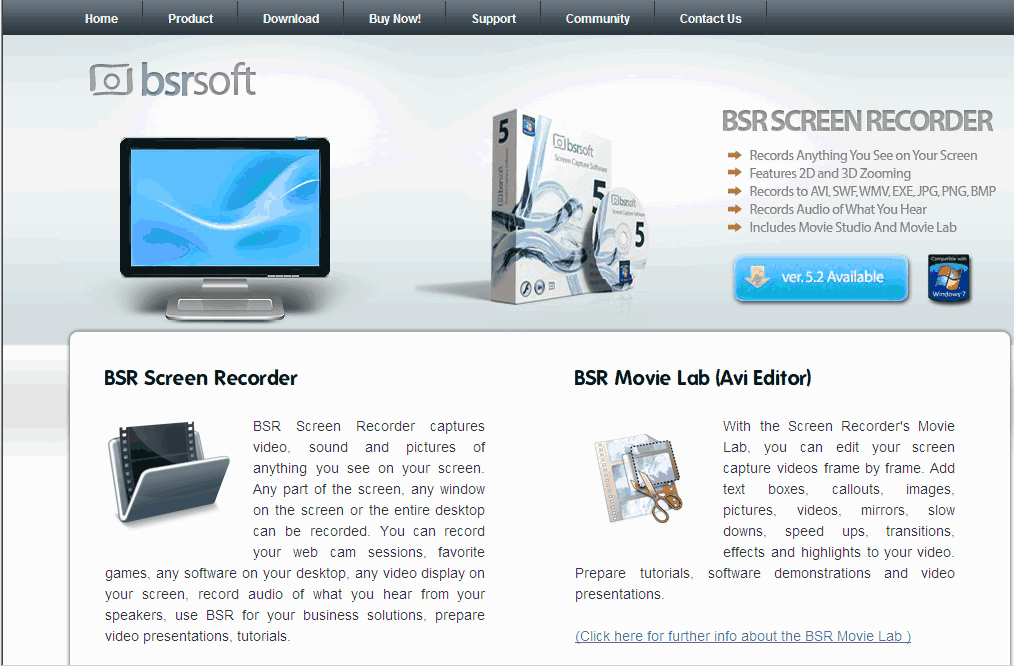
Here below is a Link to their Site and attached are a few bits & pieces which may help ~ Not included are the 4.38.mB of
Screenshots which are available on their Site. (I've no idea if they offer a Free-trial)
Brian.(Conflow)
Link:
http://www.bsrsoft.com/index.asp

-
DG
Dave,
Many thanks for that Link to the 'New PTE.7 Tutorial' from WnSoft and not forgetting
others who have contributed. I must say that I like Ronnie had never realised than an
official edition of a full 'Help-Manual' existed.
Again many thanks for that Link.
Brian.(Conflow)
-
Colin,
Apology, I couldnt get back to you earlier ~ I had a look at the Data you attached in your last Post and the File was
as you said ~ 384mB.and 14027Kbps at 50Fps ~ Wow !
I was just about to ask you to 'downsize' it to to 1280x720 pixels at 6000Kps and 25.Fps which would have given
you a File-size of 42.mB but Davegee beat me to it. I take Dave's point about a 'bug' in PTE but also Samsung
outputs that File at 50.Fps whereas the HD-TV Standard is 1920x1080 at 25.Fps ~so~ 50.fps doubled the File-size.
Personally speaking ~ I would consider re-setting your Samsung to a less demanding format and/or half its Framerate
this solely to give you a chance of becomming familiar with the Samsung without the worry of added burdens. Anyway you
seem to have it sorted for the time being as far as PC's are concerned, but do look forward to making a genuine TV-DVD
because what you choose to do now will impact on making TV-DVD's in the future, been there,got the T-Shirt etc,etc.
Brian.(Conflow)
P.S. When you have time do try the 'Prism-Converter' its really good and it also converts to AVI + ASF which PTE likes.
-
I have purchased a Samsung camcorder and produced a 3min 25sec video which was 348mb in size.
I moved the video to the timeline and received the message that the video needed to be converted for a smoother play back.
Within the video converter, I clicked on the optimizer button and waited until it was completed.
When previewing the video, there was no sound for the first few seconds and then the sound started but was all out of synch.
Could anyone please assist with this problem?
Colin
Colin,
Are you sure of your figures,ie:- 3min-25s Mp4-Video of 348mB ? ~ Should that not be 34.8mB (which is about right).
To get any Mp4-Video decompiled and converted into something which PTE can use is a very tricky job indeed for the
reason that Mp4 is highly compressed and when one tries to decompress it with most Converters the Soundtrack falls
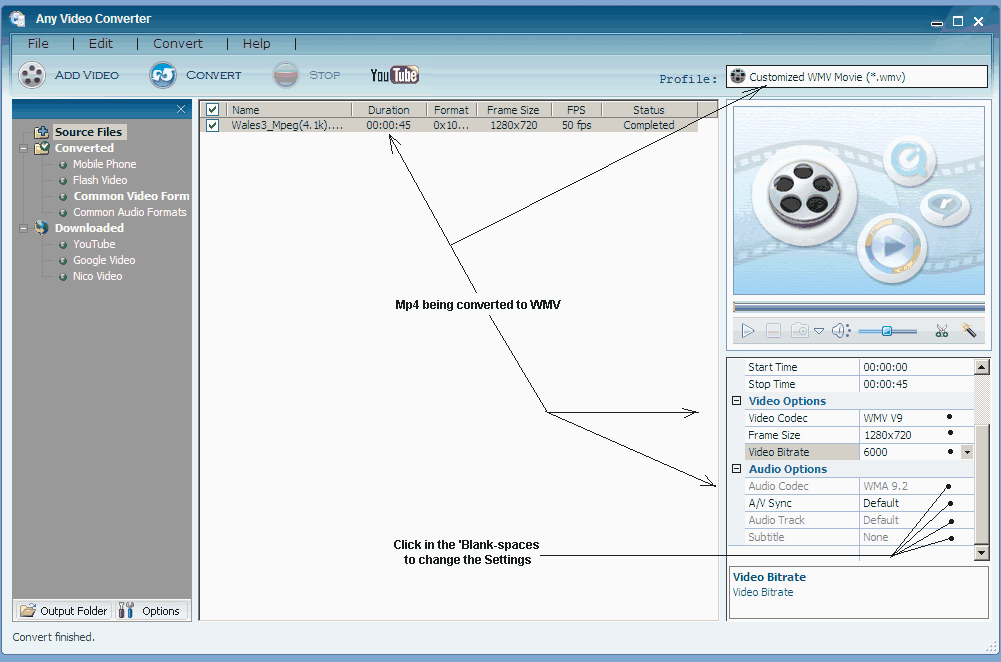
apart and breaks up. You need to get your Mp4 into something like 'Windows-WMV format' and the only Converter that
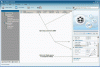
I know of which works perfectly is "Any Video Converter". Having said that you need to have its Video Bit-rate set
to something near 6000 (see the Screenshot below). The resultant WMV will be about 1.5 times bigger than the Mp4
and of near same quality as the Mp4 ~ I have been using this Program for nearly 2 years 'fault-free'.
(You might note that I am converting a HD-Mp4 Video 1280x720 pixel and 16:9 Format)
Brian(Conflow)
Download Link: http://snapfiles.com/get/anyvidcon.html
Settings shown in Image below.
-
Been using PTE since 2002 ~ Fantastic-Tool for 'Business & Technical Engineering Presentations'...
Its ability to Start/Stop/Reverse/Forward with full Sound-Synchronisation is unbelievable. Its probably
the best tool available for this job and it far excels 'Powerpoint' in scope of Image-size and quality
and its so easy to to make a copy 'On the Fly' (on-site) for my Clients.
Brian.(Conflow)
-
Lin,
I absolutely agree with you and many thanks for the very accurate 'overview' which you gave ~ I hope others will take it on board when buying !!!
For others...
Concerning "Intergrated Pc/Laptop Systems" its always advisable to purchase "Top of the Range Products" like Asus -Acer -Hewlett Packard etc;
for the reason that there are no 'latency' delays between the (intergrated) Processors and the VGA-System and to ensure that the (intergrated)
Cache-Memories are way larger than conventional PC-Cache Memory consequently the Read/Write speeds are some 5-10 times faster than normal PC's.
Having said that ~ "you cant make a Pig out of a Sows Ear" ~ and to get those speed benefits you need to get the best 'Intergrated Laptop Product'.
Someday they will make Desktops like this which perform like Ferrari's
All the best...
Brian.
-
Joy,
The best way of confirming this is do as follows:-
Look at the Back/or/Underside of your DVD-Player and see if there is a 'Playable Format Label'
It should tell you what DVD-Video-Formats are compatible with the Player,examples:-
Mpeg2,Mpeg4,VCD.sVCD,and any others not shown here.
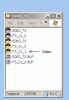
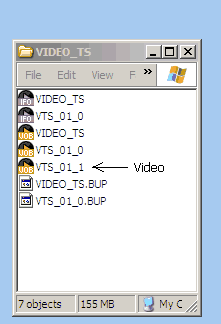
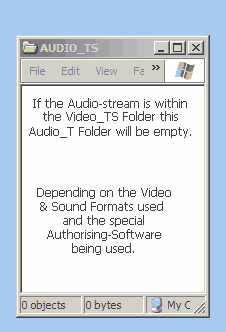
Of course to replay a (full) DVD the Disc should contain the following Folders:
** Video_TS Folder
** Audio_TS Folder
** Notepad type Files
A)
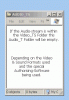
Put the Disc into your 'Win-PC' and open the Disc and see if those folders are there. If one
of those is missing or a component is missing or of wrong format ~ the DVD will not replay.

Do the same again but this time use the Mac-Computer and see if the Folders are there, but
remember they may be in a different format ??
As for good 'Authorising-Programs' these are like 'Hens-Teeth' may I suggest you contact the
following: Tom.95521 or Nobeefstew who have wide experience in these.
For myself (Windows) I use 'DVD-Flick' and 'Freemake' and also used an old copy of Nero.
I'm not sure what you would use on a MAC ~ Tom would probably advise on that.
Brian (Conflow)
-
Hello Brian
Thanks so much for taking the time to reply in so much detail - not all of which I understand!
I was under the impression that if I chose to export the show to a 'DVD-video disc' as it calls it under the publish menu - that this would be playable on a standard home DVD player which it always has done before. As I am doing this from the windows/fusion 3 part of my MAC I wouldn't have thought the MAC side of it would have any influence on the final outcome. As far as I understand choosing this option will create a DVD movie for ordinary DVD/TV players?
If this is not the case - do you know of any other DVD authoring software that will convert Pics to Exe shows into shows which are playable on standard DVD player. (I can't really see what the MAC has to do with it when I am using Windows 7/Fusion 3 on it.) Sorry if I have misunderstood something.
Thanks again
JOy
-
Joy,
You wrote..."I am using PTE 7 Beta 12 - Deluxe version and I have created my show and also created a DVD video version of it which has
run smoothly and come up with the 'successful tick' at the end. (On my MAC Computer)...
**
Yes thats possible if the Mac has the "Quicktime-Player" usually installed by default on Macs. "Quicktime" will play Windows-Media and
Mac-Media and it looks as if Fusion-3 has created a 'Windows-DVD'. This Widows-DVD will not work on a Mac-PC (its a different System).
The native default Video-System on a MAC is "MOV-Video" which is quite different from the Windows-System and "Quicktime" will ply MOV.
By the way the "Quicktime-Player" also incorporates a Video-Converter for Window/MAC Media.
You need to check this out ??
You wrote..."There is clearly something on the DVD but when I come to play it on my DVD Player or on my Computer it appears blank"...
**
Yes that is correct...DVD-Players do not support MAC-Media nor (original) Windows-Media. The Media must be in Mpeg-Format or sDVD etc.
You Wrote..."I transferred the whole thing back to my old PC - did exactly the same thing and it worked fine"
**
Yes that is correct because its 'Windows-Media' running on a 'Windows-PC' thats the way it should work.
Hope this helps,
Brian (Conflow).
-
Hi Guys,
Yes,I agree with Tom on this problem and I doubt if Igor can do very much about it.......Lets re-cap the historic situation,viz:-
* Some time ago Igor & Team had to make a compromise concerning Video-Bitrates and Members PC's and Monitors.
* Igor recommended to use 1280x720 pixels (16:9 Format) and Mp4-ASP as the Codec-System best suited to a wide range of Users.
* That specification made it possible for Pte-Users to enjoy Pte-Slideshows in DVD/HD Format on Medium-Spec PC's~Laptops and TV's.
* At that time Igor did advise on the stress's imposed by 1920x1080 HD-Video Formats using the full Mp4-ASF Codec-System.
* Using that HD-Specification would have denied many PTE-Users the enjoyment of seeing their Slideshows in Video and DVD/TV formats.
* Furthermore one has to realise that the 1920x1080 HD-Format uses RGB Color-Space for correct rendition of DVD/TV Imagery.
* The formats 1280x720 and 1080x608 use sRGB Color-Space. Having said that there are very few Monitors capable of full-RGB replay.
* Virtually all of the PTE-Programming and your personal Camera-Engineering is in sRGB Color-Space with a few exceptions in RAW or MOV.
Conclusion
Its a "Catch-22 situation" does Pte cater for the vast majority of their users or a minority of Hi-End Users, and again having said that how can
one get a Slideshow running properly in HD-1920x1080 sRGB (Hybrid) without an 'Ultra-Fast Monitor' and PC ~ thats probably the reason why
many of the Commercial Video-Studios use CRT-Monitors (no time lag) and capable of rendering sRGB and RGB.
Personal Note
Personally I have found the 1280x720 System more than adequate for my usage and much superior in performance than "average" Wide-Screen
TV's can render ~ unless of course you are lucky enough to own a good 'Multi-Media Television' or Wide-Screen CRT-Monitor (expensive).
And to those I920x1080 HD Users ~ We are talking about (worldclass) BBC-Color HD-Standards here ~ is your equipment capable of that ??
And more important ~ Where and how are you going to show it if complimentary equipment is not available ??
Hope this helps,
Brian (Conflow)
-
Hi Lin,
May I submit a word of caution concerning 'Passmark-Software' which is used to rate Video-Cards (Your-Link suggestion).
We have used this program rating here in our Workshops and although it may give an accurate rating for "Plug-in" Video-Cards
we have found that its way off the mark when it comes to 'Intergrated-Graphic Systems' tied into Multi-Core Processors PCs
such as manufactured by Intel and used by Hewlett-Packard and other Laptop vendors.
Modern 'Intergrated Graphic-Systems' are surprisingly functional and efficient mostly because they have direct access to the
cache-memory of the Multi-Core Processors. With Windows.7 most modern 'Multi-Core Intergrated Systems' can way outperform
the vast majority of Plug-In Graphic-Cards available today. The exceptions are those 'Hi-End Cards' costing $XXXX which demand
a more robust PC Power-Module adding to the costs ~ most PC owners forget about that !!
The problem with most of these Benchmark-Programs is that they tend to be 'absolute' and ignore 'usage-application' and product
category. There is one hell of a difference between a Volkswagen and a Ferrari ~ boths cars are designed for different purposes
and having said that, its a pity Passmark-Software does not make that differentiation.
Brian (Conflow).
-
Dave,
My interest in your problem is because we have 3 HP-Laptops in daily usage in our Workshops all of which play virtually
any Video-Format without problems. Having said that, this was not always the case for the reason that HP-Laptops tended
to be aimed at the Business-User and consequently were never loaded with the essential range of Video-Codecs necessary
for satisfactory Multi-Media operations.
You will also find that the 'Windows-Media Player' installed on the HP-Laptops is restricted to (Licenced) Windows Media
only and its not much use for anything else. Something like VLC-Player is a good alternative option as it comes with its
Codecs on board. However even with that you will need to scan the Laptop to assertain if you have the complete suite of
Codecs installed. WARNING: Do not load any of those Universal-Codec Paks on top of any 3rd Party Player like VLC
as you will create 'dupicates' which will really mess things up. Better by far to download individual Codec-Sets directly
from their Manufacturer as these always have their own individual containing Folder.
You will need to check if you have the following (basic) 32Bit-Core components installed:-
** DirectX-10 (Not12)
** AC3-Audio
** DivX
** XVid
** FFdshow
** Halli-Splitter
** AviSynth 2.5
The latter is important as it links all the Laptop-Codecs to a Common-File ~ "Usage on demand system" ~ which plays everything.
Just for encouragement our 3.HP Laptops are:- Windows XP-3 with Dual-Core Intel Processors. 2Gb RAM. 945 Intergrated-Chipsets
considered by some purists to be sub-standard !! Sorry to dissapoint them as our Laptops play everything in 1280x72 HD.Format
and in PTE.Exes with images of 4000x2248 pixels. We also use the 1280x720 HD.Format for direct TV viewing and making DVD's.
Below is a 'Universal Codec-Scanner' whichs list all Codecs on the Laptop with Manufacturers Name & Series ~ it also manages them
and prevents duplication and interaction. The secret of good Video-rendition is Codec Management.
Yes ~ HP-Laptops are well capable of doing your job....Hope this helps...
Brian (Conflow)
-
Hi Guys,
As I said above we have used Avast for the past 2 years....
1)
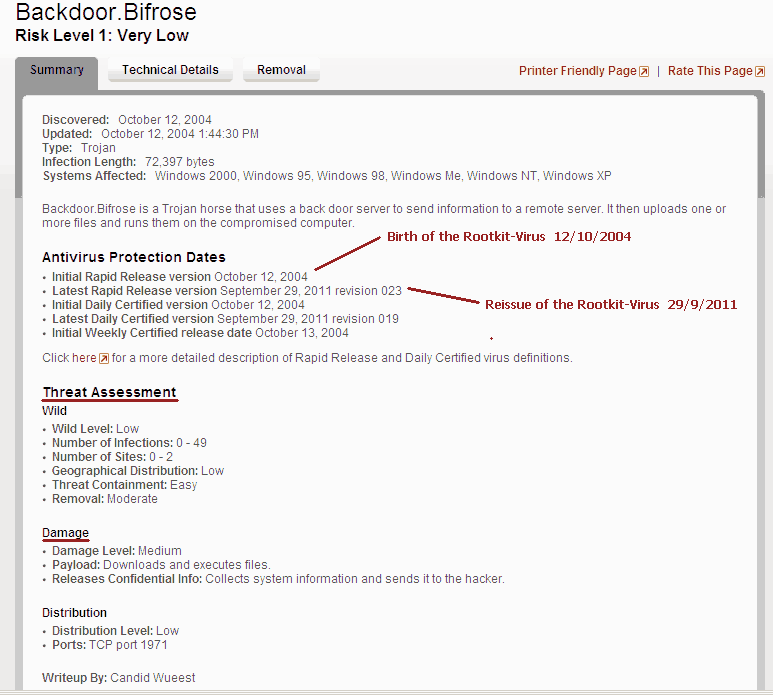
Avast detected an 'unknown' infection on 26-29th September and so did Norton and others. (Avast was 1st to do ao).
2)
This 'infection' was announced on Sky TV-News some time before on account it was considered to be 'incurable'.
3)
Norton and others had no answer to this ~ please Google: "Backdoor-Bifrose" if you dont believe me.
4)
Avast (auto-updated) their Virus-Engine & Definitions late on Thursday-night the 29th Sept (First to do so).
5)
The only (fully-automatic) Malware-Program which removes this is Malwarebytes.Org ~ this is not an AV-Program
and you neeed its recent up-date to remove this infection..
Some Notes
Gary ~ Yes you had 2 Bifrose-Rootkit infections as seen in your Attachments. You removed these with the ICO-utility.
Barry and others ~ Its very likely that you were also infected but the infection was automatically removed with AV-updates.
Concerning PTE
This has nothing to do with PTE-Exe's but 'Wild-Card' infections can and will try to access any Exes with active script-operands.
Should this activity be detected by Avast it will 'flag' that Exe as being infected ~ rightly so until Avast has a solution to the infection.
But unlike other AV-programs, Avast does not delete your Exes it simply 'Sandboxes' them for further attention.
The Rootkit
More on this dangerous Bifrose-Rootkit can be had on Google and yes as its a Wildcard" it can attack anything with Scripts.
Unfortunately it can also damage certain System Cab-Files if removed in any un-orthodox way.
The proper title of this Root-Kit is "Registry-Mart" ~ it copies sensitive registry data for sale to 3rd.parties.
It effects all Windows-platforms with the exception of Win7 64.Bit System ~ 32.Bit is not exempt.
See Report "Attachment".
Brian (Conflow)
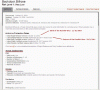
We were also hit see Malware-Log
-
PTE Deluxe with Videobuilder has some iphone and ipad presets that work great. The only negative feature is the larger file sizes for video compared to .exe format. If you do not own PTE Deluxe then you will need to create the intermediate AVI file.
Tom
Tom and Ronnie,
Tom thats exactly what I was alluding too, of course it can be done with PTE-DeLux but limited as you say.
But knowing Ronnie and the amount of Productions he has done he may need to convert these to iPad1/2 thats
the reason for the (Free) Connverter suggestion above which of course is complimentary to your suggestions.
Regards,
Brian (Conflow).
-
Conflow
You will notice I didn't say there was anything wrong with Avast and I have no wish to move away from it. The post was to ensure Igor knew, so he could get it sorted quickly. However, some will believe its a PTE issue and when the word virus is mentioned they panic.
Sooner or later, it seems to occur to most virus programs, certainly 4-5 come to mind that have all had their moments. Most put right the problem in a day or so and many people may never become aware of it.
Barry,
Thats fair comment ~ I now get the 'jist' of what your're doing.
For Avast Users
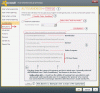
Avast is one of the very few AV-Programs which uses (professional) 'Sandbox-Utilities' very much like 'Professional Norton Executive'.
1)
It checks everything coming-in and going-out from your PC together with active supervision of your running Programs.
2)
If it see's something like an 'active-script' execution or a Program running 'scripts' which it does not recognise it will 'Auto-Sandbox' it.
3)
Its up to the "User" to tell it that such 'auto-scripts' are quite normal and benign whereafter it checks and excludes them from 'Sandboxing'.
4)
Having said that, Avast now recognises the 'genesis and behaviour' of such selected Programs and it wont interfere with these unless there has
been radical changes in behaviour of such ~where after~ again it will "Warn-You" of such changes.
5)
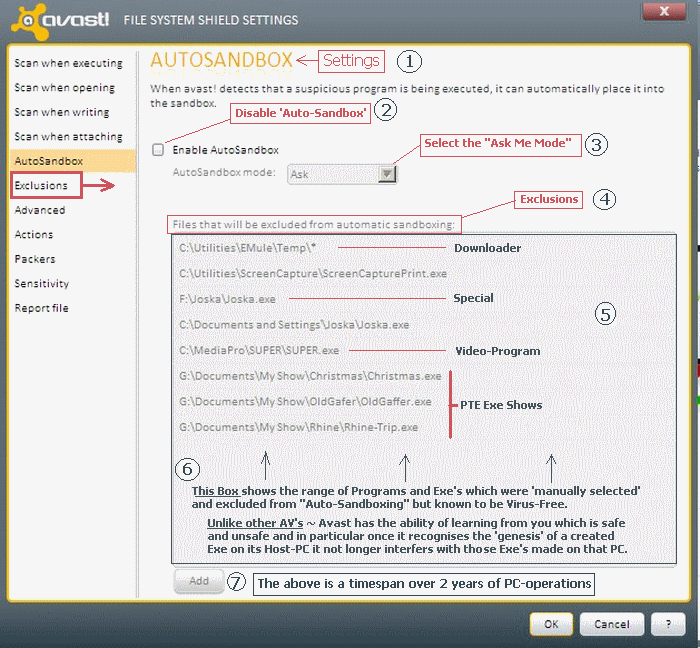
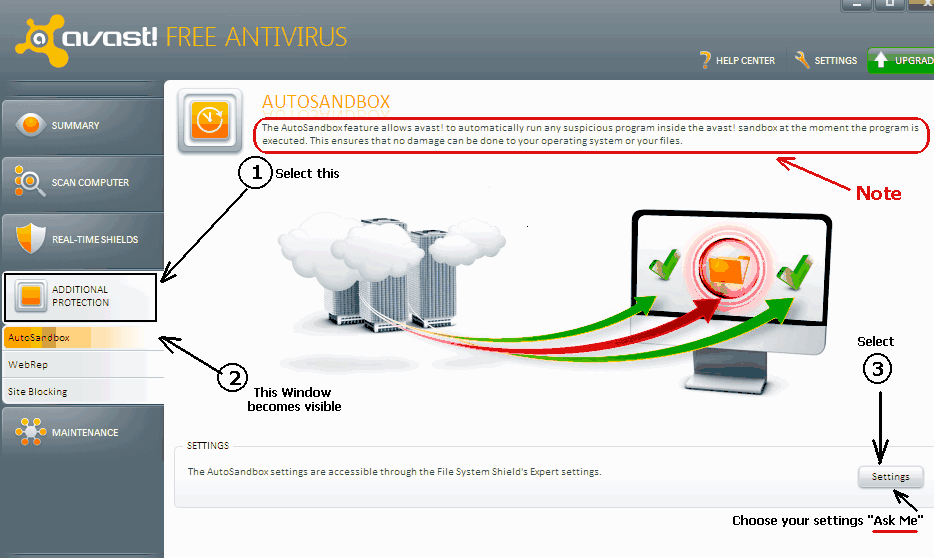
The 'Attachment' shows you ~ How to manually set-up the 'Sandbox-Utility' so you have absolute control over it.
Hope this helps...
Brian (Conflow)
-
Igor and the wnsoft team
Avast Virus Software
This morning I went to run a short demo I made yesterday in pte7 and it was intercepted by Avast virus software and removed without giving me any option to stop it. I had to retrieve the file from the virus vault, but if I run it, Avast intercepts it again. I have informed Avast via a feedback system they have within their software, but perhaps the wnsoft team would carry more weight.
This needs to be fixed and quick
Barry,
There is nothing wrong with AVAST A/V we have been using it for years. Its just that you haven't read the Manual
and what its doing is normal behaviour. You have not gone into Settings and personalised its 'Sandbox-Settings'
and to do what you need it to do !! (See below).
Brian (C0nflow)

-
I am thinking of buying an iPad2 and would be interested to know how you rate it, especially how it plays back a PTE slide show.
Does the exe file have to be converted to HD (H264) before it can be played or will it play the exe file normally?
Ronnie,
In a 'nut-shell' the iPad1 and iPad2 will only play 'Apple-Approved-Media' available from the Apple-Mac Store also
when you mention H264 & Mp4 these will have to be in (Apple) iPad-Formats not in Microsoft-Windows format.
Also you need to consider the extremely strict Apple-DRM uility found in all iPads.(DRM=Digital Rights Management).
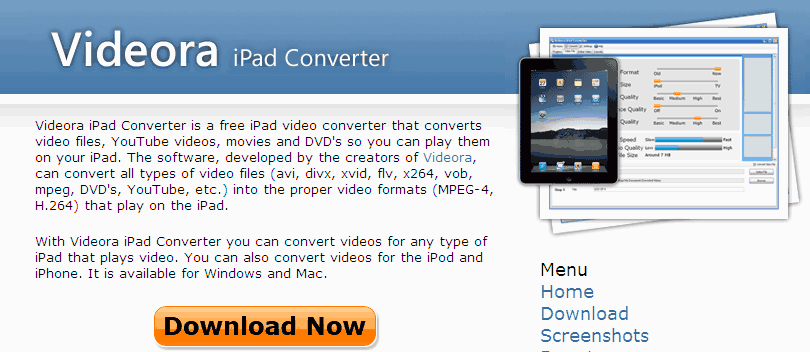
The best way of doing what you want is to use an "H264/Mp4 Converter to iPad-Format" such as the example below.
I'm sure others will offer some advice generally along the same lines.
Brian (Conflow)
Link:
http://www.videora.com/en-us/Converter/iPad/

-
Hi All,
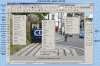
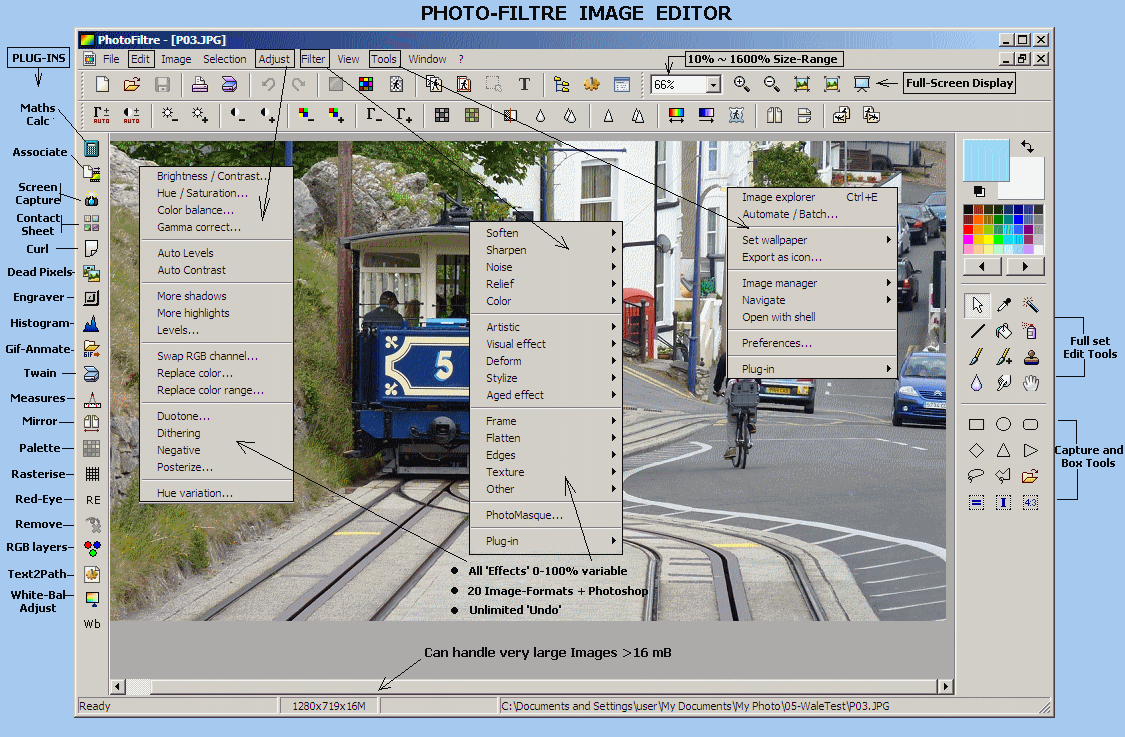
Following on from Ken's recommendation may I also suggest that you give "Foto-Filtre" a trial run.
This relatively unknown program is a classic in its own rite and it offers a unique range of Tools
which other expensive 'Pro-Programs' simply omit. Apart from its superb rendition qualities it can
also handle Images in excess of >16.Mb in size which other Editors simply choke on.
Here 'attached' is an edited Snapshot of its Main-Page and a Link to a secure Download-site.
The site also publishes 67 Reviews of the Program. (Interactive downloadable Tutorial attached).
Link: http://www.snapfiles.com/get/photofiltre.html
Brian (Conflow)
-
Seahog,
Following on from previous Posts and in particular Xavers advice (Post#3 above) may I also suggest
that you click on the (Old) Program Folder and make a Copy-Zip File of it complete with your Pte
Product-Key within that Folder.
Put the Zip-File somewhere safe "Off-PC2" perhaps on a CD or Memory-Pen for future retrieval in the
event that you may might a PC-Failure or have a change of PC. The effort is well worth it....
Brian (Conflow)
-
Hi Barry,
From past experience I know that you want things as simple as possible ~ particularily in a Caravan.
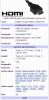
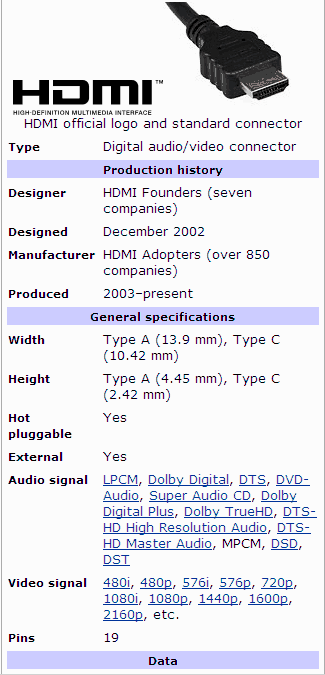
The 'HDMI-System' is essentially a Home-Video System which requires your Slideshows presented to it
in the HDMI-format which is usually the DVD-Format where the Sound-channels are LPCM or MPCM.
It seems as if your sound-channels are in Mp3/Wav which wont work.
You dont say which Audio/Video Format you are using ??.......
The other way is to 'mess-around' with the wiring such as Ken suggested and provide a seperate Amp plus
Speakers particularily if the TV has no sound-input facilities
There is an easier way to get it to work...examine the TV-Set and see if it has a USB-Input or does it have
a Camera-Card input ?? ~ If so slap the whole Show on to a Memory-Pen or onto a SD/MMC/MS Card then
select the 'Media-Program' with your Remote-control...this should work immediately with no loss of apparent
quality.
Brian (Conflow)
HDMI Specs below.
-
Hi Lin,
Yes I completely agree with you ~ the "S10-Flash Program" is really superb I have been using it since March 2009.
I will go as far as to say that it beats many MPeg-Videos hands down both in quality of Image-reproduction and its
smoothness of operation. The Program is less than 2mB in size and comes with its own 'Off-line Viewer' no need to
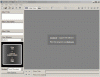
go on line for Testing purposes. Here below are some small Gif-Screenshots taken directly from its Viewer.
Brian (Conflow)


-
AVAST ~FALSE POSITIVES~ EXPLAINATION
Firstly its rather a nice gesture from Avast to place Pte on their Global Acceptance List ~ other Anti-Virus Vendors should take note.
Secondly, the 'so-called' False-positives experienced by some Pte-Users are definitely not false-positives but are in fact proper
Avast-Program behaviour....let me hasten to explain,viz:-
Recent versions of Avast are now incorporating very advanced features akin to 'Corporate Anti-Virus Software' costing hundreds of Euro's.
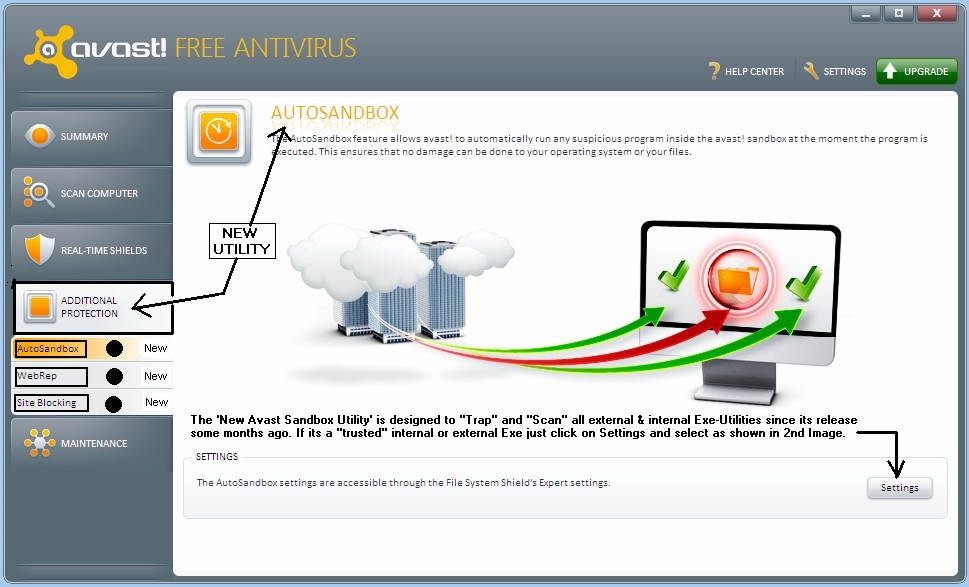
Avast now features 3 new Utilities: Auto-Sandbox, Web-Rep, Site-Blocking and these are only found in Corporate-AV Software and to the
best of my knowledge they are certainly not offered in any other Freeware Anti-Virus utility.
The "Auto-Sandbox" is designed to 'trap' any self-executing File or Script within an Isolated-Container called a 'Sandbox' whereafter the
PC-User can run the 'Flagged-Program' within the Sandbox in a quarantined environment to the full extent of that Programs abilities.
Avast gives both a Visual-Warning and a Voice-Warning to that effect ~ these are not 'False-positives' but correct Program behaviour
requesting a user response before any further action is taken ~ suggest Users read the Help-Notes ~ Here are your options....
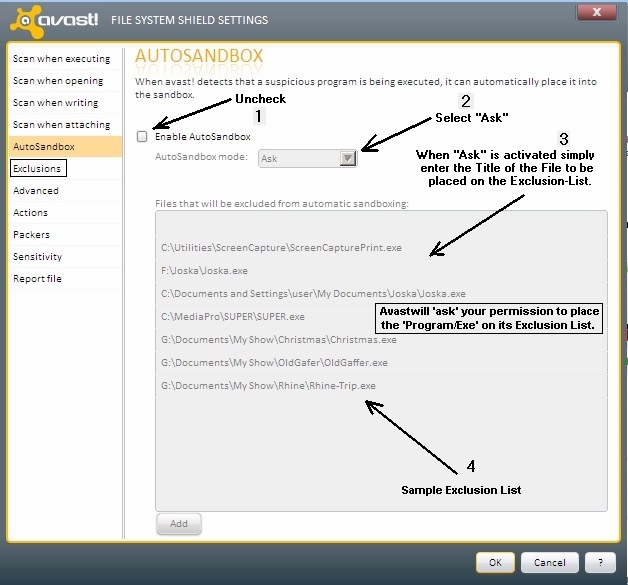
1) 'Turn-Off' the Auto-Sandbox and let the Avast-Program run like any other 'freebie' Anti-Virus Software.
2) 'Turn-On' the Auto-Sandbox and let it proceed to check the Quarantined-Program and run it if you wish within the Sandbox.
3) 'Alter' the settings of the Auto-Sandbox so that it asks your permission to put the Program into its Exclusion-List
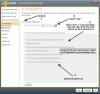
So you can make those choices I have attached 2 Snapshots which explains all......Hope this is helpful.
Brian (Conflow)

-
Lumenlux,
You wrote that the Laptop was originally configured with 256.Mb of RAM and was allowing 192.Mb for general usage
after deduction 64.Mb for Graphics ~ thats not quite correct,ie:-
Because the Laptop was fitted with 256.Mb RAM it would be using about 64.Mb to run the Operating-System and the
balance of 192.Mb would be shared between the Page-File System using about 25% of your 192.Mb leaving you with a
balance of some 128.Mb of actual User-RAM for graphics rendition purposes.Discounting that used by its VGA-Adaptor
you only have some 128.Mb (max) to play around with. This would be just sufficient to run a "Basic PTE-Slideshow" with
some Transitions but Object/Animatons and PZR would be a No,No ~ and the Shows should be less than 80.Mb in size.
Then it was upped to 2.Gb of RAM ~ something is very wrong here !! Had this been an (original) XP-Computer it would
have come pre-fitted with at least 560.Mb of RAM because XP needs +300.Mb for its Op/System never mind all its other
Programs. Most XP-Laptops are fitted with (minimum) 1.Gb of RAM for the reasons above allowing some 600.Mb for usage.
You would need to investigate that Laptop in detail ~ Is it an XP-Laptop or was it a 2000-Laptop upgraded to XP ??
I cant answer that !! ~ But if it was the latter 2000 that cant be done because the Hardware-Bios System was never
designed to accomodate that amount of memory ~ it simply wont work.
Hope this can provide some help for you...but more Laptop detail is needed.
Brian (Conflow)
-
Peter,
Firstly many thanks to you and Eric for the help in sorting out my 'Start-Window' problem.
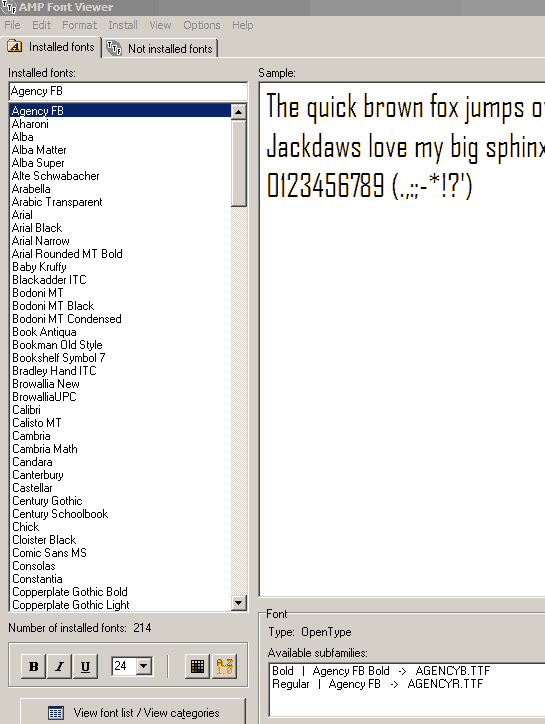
The following Program ~ "AMP Font-Viewer" will help you sort out your Font problems in that
it can find all Fonts installed on any Windows-PC. It can also 'install & uninstall' Fonts
and identify 'True-Type Fonts' which are prefered above Non-True Fonts. Hope this helps.
Brian (Conflow)
Link:-
http://www.snapfiles.com/get/ampfont.html
Screenshot:-

Heated Debate
in General Discussion
Posted
Hi Dave,
You Wrote..."One Pass -Bit Rate with a variable Bit Rate value"......."Two Passes -Bit Rate with a variabe Bit Rate"
Yes I can explain this to you: When your Video-Converter or Authoriser-Software is activated you may have a choice
of I-Pass or 2-Pass. (Some software's do not provide that choice).
* 1-Pass is where the System scans each Video-Frame just before Burning it.
* 2-Pass is where the System preliminary scans all Frames (Logs each) and then Burn's each in sequence.
2-Pass is the better of both as it tells the System the total 'Video File-size' of all Frames and each Frame size
consequently its more accurate and virtually error free ~ yes it occupies more space but its temporary whilst the
program is open.
Variable Bit-Rate:- Sometimes this is automatically applied (you have no choice) but good Programs allow you to
choose the limits of the Variable Bit-rate depending on the quality you want. Personally I use a maximum High of
8000kB/s and a low one of 2000kB/s which includes the Audio in AC3-Dolby. The reason for this is that I can nearly
guarantee a 90~95% Replay success-rate on virtually all modern DVD-Players and some not so new but at times
I do get failures on very old Players's. In essence VBR allows the System to calculate the averages of Frame-Data
content and when used with 2-Pass it can allocate more resources to more complex Frames and visa versa.
When it comes to Computer-Replay the sky is the limit up near 16,000.kB/s with PCM-Sound but it depends on the
Read/Write speed of the PC and (minimum) of Twin-Processors ++2.gB of RAM.
Its only really required with HD-Video of 1920x1080 with extremely good Photographs and Fades-to-Black (Top-End stuff)
and there's no guarantee that all modern DVD-Players will handle it ~ and that includes some PC-Monitors !!.
Hope this helps,
Brian. (Conflow)