Ken Cox
-
Posts
8,069 -
Joined
-
Last visited
-
Days Won
2
Everything posted by Ken Cox
-
have a go here Ron http://www.scantips.com/basics1f.html http://www.scantips.com/ ken
-
early bird gets the worm -- i got it at 03:01 am -- 49.99 mb but locked now 07:14 am ken
-
i used the nav bar as an example -- nav bar is a button buttons created within the show proper are lost when you dvd the show make separate shows open each -- create avi for each open as many as you want do not click finish on any shows until the burn is complete see what i told Michelle here c/w picts http://www.picturestoexe.com/forums/index.php?showtopic=3876 import them into your authoring program if you configure the layout of the authoring program properly you will separate buttons to navigate the dvd HAWK might jump in here [ when he gets up] and go a bit deeper -- he has found a move on Nero that enable go back to start - which i think you are looking for -- i have not tried it yet but he is excited -- he has been hunting it for a month ken
-
if i read this right what you are asking is for example is the nav bar active/seen when a show is burned to dvd no it does not appear on the tv screen or is it active only the buttons/icons that are put in by your dvd authoring program are active - by the dvd player's remote/or set controls is this what you are asking ken
-
am i ever glad you got it, i couldnt afford to fly to your state -- my expense account flew away with retirement 12+ years ago merry xmas ken
-
you say I get the avi file successfully burned, but when it plays, it is only the audio and there is no slideshow you do not burn the avi file first you said I imported the file into Roxio DVD Builder 7 and still the same thing. you create the avi and import the resulting file into roxio i am doing the steps as write this and when i created the avi its name is WALMART TEST PUSH R-L_vid629.avi that is the file that i would import to roxio from where i saved it D:\P2E SHOWS - d 1pictures WORKING FOLDER\1_walmart aug 19 05 ken
-
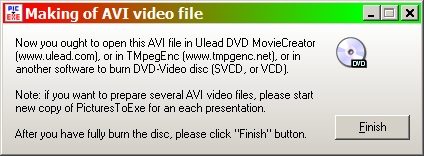
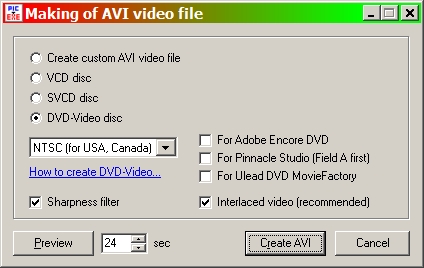
Michelle is this the screen [make avi .jpg] that you are not touching till the burn is complete and did you preview the show as per the second screen prior to making the avi -- did you have sound at this point ken
-
the support people have had a alittle problem see http://www.picturestoexe.com/forums/index.php?showtopic=3874 ken
-
I will add that if you are planning on burning to dvd to show on tv --- the text position is best placed in the object editor when you are running 1024 788 as a minimum -- there are cheat lines as to where you are going outside the screen area - you could do rough setup using 800 600 but then swing to 1024/768 experiment is the best route and ask - we will try to help you as best as possible ken
-
Ron next newest and next oldest both take me to a blank screen same as you pictures to exe takes me to http://www.picturestoexe.com/forums/index.php?showforum=2 tried it with three options to view pages and all react the same myself i prefer outline rather than standard or linear but if thread gets too long like Pinned: Suggestions for the next version i use standard ken
-
:*~*:..:*~*:..:*~*:..:*~*:..:*~*:..:*~*:.**:.:*~*:..:*~*:..:*~ The Cox Family wish you BEST WISHES FOR THE FESTIVE SEASON AND THE NEW YEAR Ken and Shirley :*~*:..:*~*:..:*~*:..:*~*:..:*~*:..:*~*:.:*~*:..:*~*:..:*~* Photo by Hank Nienhuis

-
Igor Another one to add to the new KB/FAQ section of the forum ---- hint hint nice job Jeff and thks for hosting it Roger ken
-
Well Bill you can take my test tour dqwn - it served it's purpose, it wont break loose much space but it is a start. ken
-
Richard right on sometimes one cant see the bushes for the trees now get the show made for xmas and relax hope all your problems are as easy to fix ken
-
Gilbert once you have mp3 basics digested see how to rip a cd with windows media player at http://www.google.ca/search?hl=en&q=how+to...+with+wmp&meta= at this point in your learning curve take a music cd that you own and rip it with windows media player - make sure you save the files as mp3 - you will have to rename the resulting files so keep the case with the titles handy when you master this, and learn how to insert the music files into your show and you are going to go commercial/public will be time to look for royalty free music see Barry Beckham's collection -- he is a member of the forum and his music is available www.beckhamdigital.co.uk http://www.beckhamdigital.co.uk/royaltyfreemusic.htm do a search of the forum for royalty free music -- it is a subject that has quite a few entries good luck ken
-
For starters see http://en.wikipedia.org/wiki/MP3 ken
-
John one of the quickest/easiest ways to test it is no borders/fancy frames and by experimentation we have found full screen setting at 95% to 98% setting in the little box with black background burn to dvd and try it on your tv ken
-
John see http://www.picturestoexe.com/forums/index.php?showtopic=3741 http://www.picturestoexe.com/forums//index...t=ST&f=2&t=2899 http://www.picturestoexe.com/forums//index...t=ST&f=4&t=2738 http://www.creativecow.net/articles/gerard.../pixel_madness/ ken
-
well if you have yur reg key copy it to a floppy download the latest version of the program install it and then install the reg key and label the floppy and put in a safe place ken
-
you are going to need the original correspodance when you got your reg key and write to igor for instructions ken
-
RIGHT ON WE AIM TO PLEASE KEN
-
dave welcome to the forum in some instances it is best to try running it from the hard drive not from the cd and for a newbie try running a straight synchronize show rather than a customized sync show saveas and create as under different names when making major changes especially when syncing ken
-
Linda see PhotoWatermark http://www.photowatermark.com/index.php?op...ntpage&Itemid=1 ken
-
John from http://www.picturestoexe.com/forums/index.php?showtopic=1408 this may be dated but it has not changed Dec 15 2003, 04:23 AM Post #1 Administrator Group: Admin Posts: 897 Joined: 6-December 02 Member No.: 1 How to prepare and then burn DVD-Video or SVCD disc Using PicturesToExe you are able to produce AVI video file which can be easily burned as DVD-Video disc with help of any special software (read below). Even it is possible to create SVCD disc on usual CD-R disc with high quality of image and sound (almost as DVD-Video). PicturesToExe provides fast and lossless transferring of video and audio for converting into DVD-Video format. This allows to keep excellent quality of your presentations and very smooth transition effects. Advice: please create usual EXE files for playing of presentations on PC, and DVD-Video disc if you want to play your presentations on DVD players connected to TV. Newest version of PicturesToExe is 4.20 beta: http://www.wnsoft.com/apr/apr_beta.zip 1) Preparing of AVI file file in PicturesToExe: Start PicturesToExe; open your project; and then call AVI video output dialog ("AVI button in the main window of PicturesToExe"). Choose "NTSC" TV system, if you live in United States, Canada, Japan, Taiwan or South Korea. Choose "PAL/SECAM" TV system you live in Europe, Australia, Africa, or in any other country. Select "DVD-Video disc", if you have DVD-Writer or "SVCD disc" if you have usual CD-R/RW drive. "Interlaced for TV" option is highly recommended to get excellent quality and smoothness of transitions on TV. You can click "Preview" button to immediately see the resulting presentation playing as video file. In this mode, please ignore that transitions may be shown not so smooth. But on burned DVD-Video disc all transition effects will play excellent as in usual EXE file. Also we recommend to make sure that text fonts are enough large to be readable on the screen of TV. Now click the "Create AVI file" button and PicturesToExe will produce video file within 10-30 seconds. Important note: Please don't click "Finish" button until you didn't fully burn the DVD-Video disc. and from the help file of the program a screenshot for you I hope Dave and i caught your mistake in time ken

-
with nero vision xpress import them all and see if nero says you have too many - it willl try to adj thesize if it is able to burn carry on select the menu background , buttons title etc and burn 1 gb is going take some time so dont get impatient and do not close all the instances of p2e till have the dvd in your dvd player working ok with nero vision express you have the option of making another -- this one will take less time good luck ken