Roan Jon
-
Posts
21 -
Joined
-
Last visited
Everything posted by Roan Jon
-
Hi Socu, New version of this style (confetti) for PTE 12 Multicolor confetti-2.ptestyle
-
Thank you for your comment. I agree, everyone can use PTE however they like. And it’s not really that important. But I think the purpose of this forum is to report any issues. And if I can help improve this wonderful software, I’d be very happy to do so. Sorry for my English, it was translated by a text translator. Roan
-
Hi Igor, When I click the play button in the preview window and let the video play all the way to the end, then I click on a view. (The first time, everything works normally.) If I repeat the process, when I select a view, the video starts playing without me pressing the play button. Can you reproduce this issue? Test-3.webm
-
Thanks Igor, Test build 4 I confirm that it's OK for me
-
Here is a video Cursor-test.webm
-
The problematic PC is configured in French (France). There is no keyboard software or remapping application installed. Standard French keyboard (AZERTY) I tried another standard Logitech keyboard. But the problem persists.
-
I just tested it on another PC—an old laptop. The text displays correctly. I think it really is a PC configuration issue. Sorry. Thanks, Roan
-
Correction. I hadn't restarted PTE 12 after changing the keyboard; So, with the English keyboard configuration, "Hello" is spelled correctly everywhere.
-
With the English keyboard layout, When I type "Hello" in the comment field for style creation, I get "elloH". However, when entering text in the Object/Animation section, "Hello" is written correctly.
-
So, with version 11, it's exactly the same problem. For me, all the words display correctly (in French), but the cursor doesn't shift for the first letter (that letter ends up at the end of the word). If I type "Bonjour," it writes "onjourB". If I type "Merci," it writes "erciM". If I type "Grand soleil," it writes "rand soleilG". We have the same problem with the object/animation window when using text: the first letter shifts to the end.
-
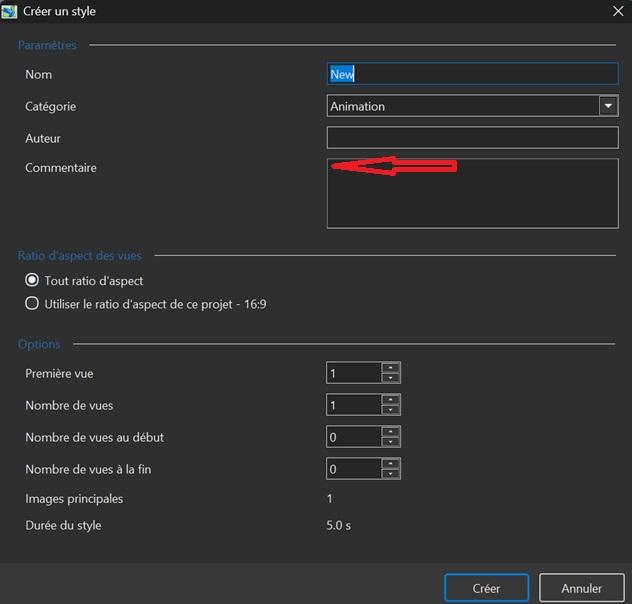
This happens when I click on the red arrow. So, in the top left of the comment field box.
-
Yes, it's the comment box field. The vertical cursor line is blinking correctly. I can paste text from Windows. I can see the context menu when I right-click. What's strange is that it doesn't happen every time. Only on the first letter I type. Perhaps it's a problem with my setup or my keyboard... Thanks
-
Hi Igor, When I create a style and want to add text to the comment box (if the box is empty), the cursor doesn't move when I type the first letter. I think this problem was present in previous versions. It's really a very minor detail. Roan
-
Strange behavior regarding the "Transitions" project option: [SOLVED]
Roan Jon replied to Roan Jon's topic in Troubleshooting
Hi Igor, I just tested build 3. Everything is working well. Good job. Thanks. Roan -
I check the "Transitions" project option and see that only "Fade" is selected. I select a slide on the timeline. I click "Configure Slide" and choose a custom transition. I click "Manage Transitions" and then "Change Transition Settings." I make a modification or simply duplicate an option. I confirm the change and confirm the transition. I check the project options: everything looks normal (OK). Now, I go back to the transition I just set up and decide to switch to a standard "Fade" transition instead. When I check the "Transitions" project option again, the custom transition I had modified is selected. Even if I uncheck it, it remains selected. I have to restart the project in PTE 11 to fix the issue. PS: The same thing happens if I create a new transition. PTE 12.01 Windows 11 Thanks. Roan
-
Thanks for the tip. It actually works. But I think this is not a very logical solution for PTE users
-
Hello, I have an error with custom transitions in the executable file. It's about transition with video. Test Custom Transition.pt.zip