SoCu
-
Posts
49 -
Joined
-
Last visited
SoCu's Achievements

Junior Member (2/6)
-
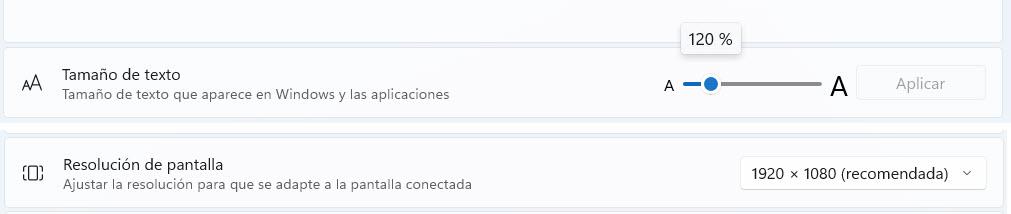
Set to 120% and it looks good now. I'll have to get used to the big font, 😀👀 Edited: I knew it was too big, I don't know why, but it doesn't respect the size. I set it to 120% and I see that Windows changes it to 175%. Thanks.

-
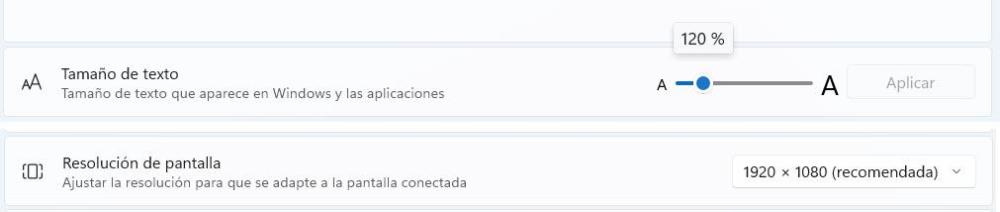
I posted the message in the other subforum; I thought it was a problem with version 12. Text size 120% Screen 1920 x 1080
-
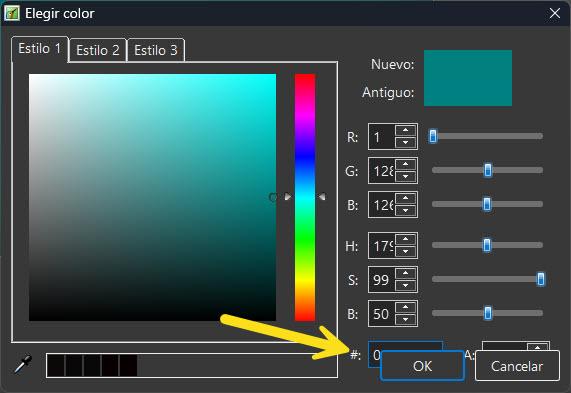
Hi, the buttons in the color selection window are displayed on top of other options, hiding them.
-
Hello, since it’s been a few years now and it still doesn’t seem to be there, I’d like to bring this post back up and make a new request to see if the warning message mentioned by jienense could be added. I think it’s helpful to know which fonts aren’t installed on your system but are used in the project.
-
- 2
-

-
The thing is, when I open this project in version 11, I don't have that problem.
-
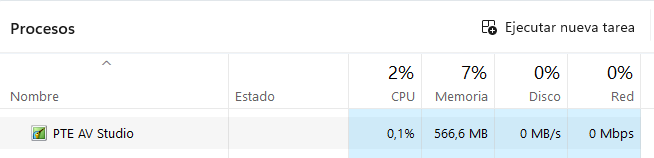
Hi, the app freezes when you least expect it; the slide disappears, and nothing is displayed. I've also noticed that the *.lock file remains at 0 KB. I close the app, but I can't delete that file. I check the task manager, and PTE is still running, even though I've closed it. These crashes happen almost constantly Thank you. Bloqueo.mp4
-
Well, what can you do ¯\_(ツ)_/¯ But can PTE Video Optimizer create a reversed video, or can it only play one?
-
Hi, is it possible to add an option to reverse a video? For example, a video that shows an image appearing from right to left; once it appears on the screen, it disappears by reversing the video from right to left.
-
Hi, I'm trying to import an MOV video that doesn't have a background, but it's displaying a black background. I've tried setting up the chroma key, but it doesn't look right. I created that video with a green background, and adjusting the chroma key settings helps a little, but no matter how much I fine-tune it, the image has a green tint, or the video's color quality deteriorates. Why can't MOV videos without a background be used? Thank you.
-
When you save a project, it saves unused material
SoCu replied to SoCu's topic in PTE AV Studio 12 Beta
Yeah, AleAle5025, when I start a project, I create a new one that is, I don’t use one I’ve already been working on and I delete its contents. But of course, when you’re adding styles or transitions, you test them out, and if you don’t like them, you don’t use them. I think they shouldn’t be saved if they aren’t applied when you save the project—they should still be there in case you need to undo changes (Ctrl+Z), but once you save it, you won’t use (Ctrl+Z) again, so they shouldn’t be saved. As a temporary solution to prevent unused resources from being saved, once the project is finished, you have to copy all the slides and paste them into a new project; this way, those unused resources aren’t saved. -
When you save a project, it saves unused material
SoCu replied to SoCu's topic in PTE AV Studio 12 Beta
It seems to work when it feels like it, hehe, Today, with two projects I've tested, it keeps saving resources that aren't used. The styles were tested in the project at some point, but since they weren't applied, it's an impossible task to have to keep opening and closing PTE every time a transition is tested so it doesn't save those resources. This has happened to me before when I exported a transition to keep a copy; it saves resources that aren’t part of that transition. Well, if you already know where the problem might be, then it can be fixed. Thanks. -
When you save a project, it saves unused material
SoCu replied to SoCu's topic in PTE AV Studio 12 Beta
Sorry, Igor, but I can't find that menu option to remove transitions locally. I understand that it's under Project Menu > Project Options (Ctrl+P), in the “Transitions” section, but nothing appears in the “Embedded Transitions” list.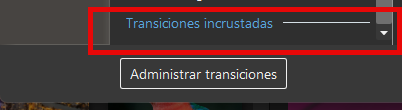
-
Thanks, Igor, for keeping it in mind, even if we have to wait a few years before we can use it, haha. What I'm most excited about is being able to have multiple tracks or timelines for video or images—it opens up a whole range of possibilities for working better and faster.
-
When you save a project, it saves unused material
SoCu replied to SoCu's topic in PTE AV Studio 12 Beta
Hi, thanks to both of you for responding. To prevent that from happening, do I need to create a project, and once it’s finished, create a new one to paste the slides into? It must be because something isn’t working right. I understand that this material is needed so the user can undo changes (Ctrl+Z), and when the program closes, it should delete them, but that’s not the case—when the program reopens, the transition folders with the video files are still there. I passed the project on to another user, and when they opened it on their computer, they were still there. This doesn’t just happen with projects; I’ve also noticed it when I’ve exported transitions or styles to send to another user. I saw that the file was much larger, and it was because it contained material that didn’t correspond to what was used in the styles or transitions. As I said, it can take me a while to finish a project, and I close it many times and reopen it, and the folders with unused material are still there. It doesn’t happen all the time, but now that I’ve been working on a project, I’ve seen it again, and I’ve mentioned it. Igor, regarding the project I sent you, I don’t know if the transitions folder was deleted when you opened it, but I still have it. -
Hello, I’d like to make a request for the new version: if possible, could you add a couple of options to the Watermark section? I think it would be useful to have a new section that lets you specify when to start and stop displaying the watermark. Most of the time, at least in my case, I usually place an introductory video—or what’s called an “Intro”—at the beginning of the project, so it’s preferable not to show the watermark while that Intro is playing. I know another option is to place an image as a watermark on the second slide and then copy it to the rest of the slides one by one, but of course, when there are a lot of slides, that method is a bit… Thank you.