SoCu
-
Posts
100 -
Joined
-
Last visited
-
Days Won
8
Everything posted by SoCu
-
Thanks, I’m glad you like them and that they can be put to use.
-
Hi! In case you like geometric shape transitions, here is a link if you want to try them out. https://www.mediafire.com/file/owcke2r14qhaw8z/Geometric_shape_transitions.rar/file
-
Well, I think it’s an option worth considering. Since photos are the most commonly used content, I’d say the most useful features are photo restoration prompts, as well as quality enhancement, and a whole host of other things. You can already use it on WhatsApp with Meta AI, or in a browser with Gemini, and many others, but having it more readily available within PTE would be really interesting. Although, as they say… you’ve opened a can of worms, there will be both positive and negative opinions, but to each their own. But the ones who need to look into this interesting possibility are Igor and his team. Edited Sorry about the translation, it doesn't really translate the way I wrote it.
-
That's great, jkb, thanks. I was asking about the option to select all tracks because I thought that was how it was supposed to work. Using the shift key worked for moving all or part of them.
-
Hello, good morning. I have several audio tracks on the timeline, and I’ve had a problem with the audio—it’s shifted, so the keyframes I’ve set on the audio tracks are no longer in their correct positions. I don’t know what caused this, because I haven’t added any slides or changed the slide duration that would cause this misalignment. Since the audio tracks are joined at different points, I couldn’t select a single track and move it; I think it would be helpful to be able to select all the audio tracks and move them all together. I’m not sure if this is possible; I’ve tried several methods using the keyboard and mouse, but I can’t seem to select all the tracks—or sections of a track on the same timeline. When I press Ctrl+A, it selects all the slides, but not the audio. Is there a way to select all the audio tracks that are placed on one of the timelines? If it’s not possible, then here’s my request: to have this option included in a future update. Thank you.
-
Hi! A bit of confetti is always a nice touch. Here is a style available in two formats, for 16:9 and 9:16 projects. https://www.mediafire.com/file/la51jrl1avh3knp/Style_Confetti_Explosion.rar/file
- 1 reply
-
- 3
-

-
I don't think you'll have any problems with 7-Zip. As for WinRAR version 7.23, you might run into some issues with older versions of WinRAR, but if the file extracted without any error messages, there shouldn't be any problems with the installation.
-
Hello Georges, there are four transition files; I assume you've installed all four. And they're applied just like any other transition, there's nothing special about them. I've checked the transition files, and they contain the videos. Take a look in your installation folder, just in case they didn't install properly for some reason, and make sure the installation folders contain all the videos.
-
Hello, I’m sharing these script-style fonts with you. https://www.mediafire.com/file/ulcm7t4fw0b6aq8/Script_Lettering_Style.rar/file
-
I have created some new transitions that are slightly lighter in file size by using blend masks and eliminating the alpha video. I will leave the link to the previous ones so they can be used in version 11, while these new ones are for version 12 only.
-
Hello everyone, I leave you the link to these transitions in case someone wants to try them. Edited: I have created some new transitions that are slightly lighter in file size by using blend masks and eliminating the alpha video. I will leave the link to the previous ones so they can be used in version 11, while these new ones are for version 12 only. PTE AV Studio v.11 y v.12 https://www.mediafire.com/file/l4jq6xlu6ze3stv/Light_Leaks_Transitions_2.rar/file PTE AV Studio v.12 https://www.mediafire.com/file/tv281dluq0b7yb5/Light_Leaks_Transitions_2_%28PTE_12%29.rar/file
- 1 reply
-
- 3
-
-

-
Hello, I’m sharing these 15 styles with you; I hope you like them. They are for creating slides with text, images, or both, with the option to change the background. https://www.mediafire.com/file/h5pvsstzbo9mxv4/4K_Floral_Styles.rar/file
- 1 reply
-
- 2
-
-
Well, let's welcome the other updates.
-
I don't know, but I still don't understand why they wouldn't update an app with new features that users are asking for, to make it better, just to avoid raising the price. You don't necessarily have to raise the price to improve the app. I have apps that get updated with very powerful features, in some cases, they’ve even had to almost completely overhaul how the app works to add them, and they haven’t complained about the work involved, nor have they raised the price because of it. Maybe they figure that the better the app is, the more people will buy it because it offers more and better features than other apps.
-
Well, I don't know, but I think preventing a program from moving forward with improvements, and letting it stagnate isn’t a very good idea, especially when more users are asking for them. I also don’t think those improvements should be based on the number of people requesting them; even if there’s just one person who thinks something could work better, whether to make the work easier or to add new features, if they’re meant to make the program better, they should be taken into account and not fall on deaf ears. I think we all want the program to be as good as possible, the better it is, the more we all stand to gain.
-
Thanks, Denis. Even so, I think having a magnified area would provide a more detailed view and make it easier to work.
-
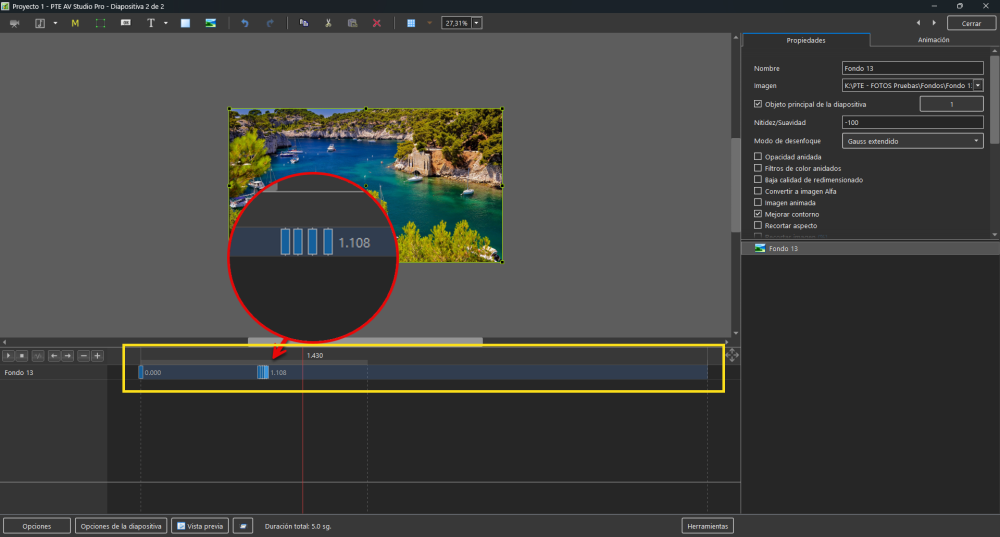
Hi, would it be possible for PTE to zoom in on the O&A timeline? Or maybe I’m mistaken and it’s already possible, but I just can’t figure out how. If this option isn’t available, it would be great to have it so we can have better control over keyframes, especially when we need to adjust them in more detail at a specific position. Right now, it’s very difficult to adjust them exactly as we want; being able to zoom in on the timeline would make the workflow much smoother than it is now. Thank you.
-
Hi, I'm sharing these 25 transitions with you; I hope you like them. https://www.mediafire.com/file/axil9uivaf91bf1/Light_Leaks_Transitions_1.rar/file
-
Hi, here are some transitions for you; I hope you can use them if you like them. https://www.mediafire.com/file/gw0ot8t04q2z5o3/4K_numeric_transitions.rar/file
-
Thanks, Roan Jon, I've already downloaded it. Before installing it, I'm going to try to fix a couple more versions that have the same issue. If I can do it the way Igor says, I think I downloaded them from here, but I can't find the post to report it.
-
Hi, here is the link to the project. Regarding the samples of these styles, I believe they were posted here, though I’m not entirely sure, they did display color back when I first tested them. The other example, the one with the confetti showing the gold color, was a video; I’m not sure why, but it displays correctly now. The two examples I’m showing in this project are the ones that aren't displaying in color right now. https://drive.google.com/file/d/1GTQ7BD8k-86kT4dPmlv614pGlKcofkjv/view?usp=sharing
-
I have to say that I’ve tried changing all the settings in this section, and even disabling it, but it doesn't show any changes.

-
Hi, I’m not sure if something changed in the latest update, I’m on version 12.0.4, build 1, but I can’t see the actual colors of the styles. For instance, I applied a style featuring colorful confetti, but it’s displaying in white. With another confetti style that is supposed to be gold, the confetti appears black. Unless the settings changed for some reason, I haven't altered anything myself, I’ve tried looking for an option to change this behavior but haven't found anything. Can anyone tell me if I need to adjust a setting, or why this is happening? Thanks.

-
Yes mhwarner, it’s clear that other programs offer more creative options in the text editor than PTE does, so I think this is an area for improvement in future updates. I know that any change takes work, and that’s not an excuse for not continuously improving PTE to make it an even better program, but the problem arises if you’re thinking of creating a style that any user can freely use: having to enter text, which can’t be done within PTE itself, and having to create text in other programs to import it as a PNG image isn’t efficient at all. I do create them using templates when I use them for my own projects, you can even include TIFF files in the Project, but it still means having to use other programs.
-
It may have nothing to do with it, but in one case, Windows left me with a folder as read-only.