

SoCu
-
Posts
66 -
Joined
-
Last visited
Everything posted by SoCu
-
Hi, I'm trying to import an MOV video that doesn't have a background, but it's displaying a black background. I've tried setting up the chroma key, but it doesn't look right. I created that video with a green background, and adjusting the chroma key settings helps a little, but no matter how much I fine-tune it, the image has a green tint, or the video's color quality deteriorates. Why can't MOV videos without a background be used? Thank you.
-
When you save a project, it saves unused material
SoCu replied to SoCu's topic in PTE AV Studio 12 Beta
Yeah, AleAle5025, when I start a project, I create a new one that is, I don’t use one I’ve already been working on and I delete its contents. But of course, when you’re adding styles or transitions, you test them out, and if you don’t like them, you don’t use them. I think they shouldn’t be saved if they aren’t applied when you save the project—they should still be there in case you need to undo changes (Ctrl+Z), but once you save it, you won’t use (Ctrl+Z) again, so they shouldn’t be saved. As a temporary solution to prevent unused resources from being saved, once the project is finished, you have to copy all the slides and paste them into a new project; this way, those unused resources aren’t saved. -
When you save a project, it saves unused material
SoCu replied to SoCu's topic in PTE AV Studio 12 Beta
It seems to work when it feels like it, hehe, Today, with two projects I've tested, it keeps saving resources that aren't used. The styles were tested in the project at some point, but since they weren't applied, it's an impossible task to have to keep opening and closing PTE every time a transition is tested so it doesn't save those resources. This has happened to me before when I exported a transition to keep a copy; it saves resources that aren’t part of that transition. Well, if you already know where the problem might be, then it can be fixed. Thanks. -
When you save a project, it saves unused material
SoCu replied to SoCu's topic in PTE AV Studio 12 Beta
Sorry, Igor, but I can't find that menu option to remove transitions locally. I understand that it's under Project Menu > Project Options (Ctrl+P), in the “Transitions” section, but nothing appears in the “Embedded Transitions” list.
-
Thanks, Igor, for keeping it in mind, even if we have to wait a few years before we can use it, haha. What I'm most excited about is being able to have multiple tracks or timelines for video or images—it opens up a whole range of possibilities for working better and faster.
-
When you save a project, it saves unused material
SoCu replied to SoCu's topic in PTE AV Studio 12 Beta
Hi, thanks to both of you for responding. To prevent that from happening, do I need to create a project, and once it’s finished, create a new one to paste the slides into? It must be because something isn’t working right. I understand that this material is needed so the user can undo changes (Ctrl+Z), and when the program closes, it should delete them, but that’s not the case—when the program reopens, the transition folders with the video files are still there. I passed the project on to another user, and when they opened it on their computer, they were still there. This doesn’t just happen with projects; I’ve also noticed it when I’ve exported transitions or styles to send to another user. I saw that the file was much larger, and it was because it contained material that didn’t correspond to what was used in the styles or transitions. As I said, it can take me a while to finish a project, and I close it many times and reopen it, and the folders with unused material are still there. It doesn’t happen all the time, but now that I’ve been working on a project, I’ve seen it again, and I’ve mentioned it. Igor, regarding the project I sent you, I don’t know if the transitions folder was deleted when you opened it, but I still have it. -
Hello, I’d like to make a request for the new version: if possible, could you add a couple of options to the Watermark section? I think it would be useful to have a new section that lets you specify when to start and stop displaying the watermark. Most of the time, at least in my case, I usually place an introductory video—or what’s called an “Intro”—at the beginning of the project, so it’s preferable not to show the watermark while that Intro is playing. I know another option is to place an image as a watermark on the second slide and then copy it to the rest of the slides one by one, but of course, when there are a lot of slides, that method is a bit… Thank you.
-
Hi, I have a project with two slides. I tried adding a transition, and then added another one at the end. But when I save the project or export it, I see that the file is much larger, and I noticed it creates a folder with the video files containing the transition I tested. Maybe I’m doing something wrong, but this also happens in version 11. When the project is saved, shouldn’t it only save the footage actually used in the project? Thanks.
-
Hello, I’d like to make a request to see if these features can be included in this version. Copy properties from a keyframe; be able to select a keyframe, and from the mouse drop-down menu, have a “Copy Properties” option, so that you can then select one or more keyframes and “Paste Properties.” I know there’s a clone function, but I think having this option is faster than duplicating keyframes and moving them to the right place. Thank you
-
Hi, I’ve already asked about this in another post, and they directed me here. I see now that it’s not good news; I was hoping that, given how much gameplay potential those timelines offer, they would be included in this update. I understand that programming can be complicated, and as more features are added over time, it can become even more complicated, Since it seems like more people are asking for it, I thought this would have been considered a long time ago to make this leap in this version
-
Thanks, Bruno. I already tried organizing them into categories based on the number of images, and it’s a mess—it didn’t work out well for me. And now that there’s a search function and a filter, I don’t find it very practical. I’m just saying this is my experience; maybe that system works well for others. When using other programs—it doesn’t have to be this type—I miss that feature here. And now that there’s a filter, I think it would be better if the list were displayed the way I described. Again, this is just my opinion; it doesn’t have to be practical for everyone else. I’m just basing this on my experience with other programs.
-
Yes, Bruno, but what I mean is setting up a filter for two images, so that you don't have to go through each category one by one to see the images in each one, but rather display a list of all the images across all categories. I'm not sure if, for this, there should be a default “All” category that, when selected, displays all the styles using that filter.
-
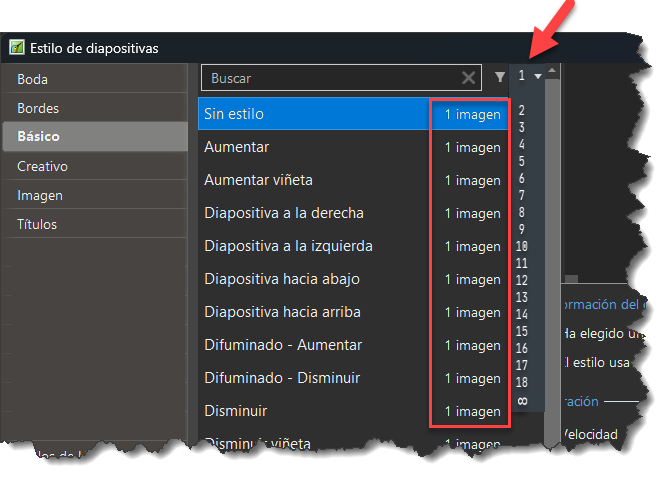
Hi Igor, it seems that displaying a list of the number of images only works within a single category. Is it possible to make it display a list of the number of images across all categories?
-
Hello, I know that this request may be somewhat difficult for programmers to implement, but having a second timeline would make work much easier and allow certain tasks to be completed much more quickly. For example, placing an image with a transparent background to play for a certain amount of time. This image could be text. With this option, there would be no need for a text editor or text styles, which, incidentally, are few and far between, poor, and simple. The possibilities are endless, and it would be quick to work with. I hope you can see this possibility, just like having two timelines for audio. What do you think? Would it be possible? Thank you.
-
I have attached the image, let's see if you can see it now.
-
Hello, is it possible to add an option to the slide styles window where you can choose to display styles that have or require a certain number of photos? For example: (the layout is a bit messy, but I hope you get the idea) Thank you
-
Hello, yes, it seems to have exported correctly now. Thank you.
-
Hello, I don't know if this happens to anyone else, but I tried to export a category from Transitions, from version 12, and in two tests the file size was created with a different weight, and not the correct one; it has a very small weight. Then I tried with version 11, and it created the file with a much larger weight, which I suppose is the correct one.
-
thank you CorVdK, I'm testing version 12, and I thought you were a bug in this version.
-
Hello, when in the “Timeline” section, if an image is added, the previous image changes the viewing time.
-
Yes, in the search filter, to display a list of styles that use one image, two images, three images, etc. Search for: “Pagina” and in the results displayed: Pagina and Página “Arbol” and displayed: Arbol and Árbol “Cancion” and it shows: Cancion and Canción “Camara” and it shows: Camara and Cámara “Musica” and it shows: Musica and Música It should also not take into account upper and lower case letters, although it already does this, but I don't know if it does so for accented words. Yes, other programs I have used also do not take into account “diéresis” umlauts (¨), such as in pingüino. They do take into account the “Virgulilla” tilde (~), and the PTE searches for it, but there are keyboards that do not have the letter Ñ, ñ.
-
Hello, this search option is interesting and useful. I agree with alexroma's request to add a filter to show transitions and styles by number of slides. I would also ask, if possible, that it not differentiate between accented and unaccented letters, to avoid having to do two searches. Thank you.
-
Hello, I have removed all transitions, and using only those built into the program, the transition window does not experience any delay. I created a project from the main menu > File > Templates > Create Template, and the window closes properly, and the main program window works immediately. But I've been doing more tests with the transitions I had before removing them, and when I press only the “Close” button in the “Transitions” window, it behaves differently. Let me see if I can explain. With all the custom and built-in transitions, I'm going to use only the ones built into PTE. 1. I add a transition to the slide (I click “OK” and the window closes slowly). 2. I display the Transitions window, the cursor is on the transition I have added (I close the “Cancel” window without changing the cursor, the window closes quickly). 3. I display the Transitions window, I move the cursor to another transition (I close the “Cancel” window, the window closes slowly). Every time I apply a transition, it closes slowly. Every time I close the Transitions window without changing the cursor to another transition, it closes quickly; if I change the cursor, even if I don't apply the transition, it closes slowly. And with version 12, the same thing happens: I have set all the transitions and the Transitions window becomes slow when closing.
-
Hello, That delay was also present in the previous version. The hard drive is an NVMe M.2 SSD. Regarding Controlled Folder Access, I can't tell you how it is, since I have Defender disabled and I use ESET instead. It's funny, I tried moving the transitions to another hard drive, and when I made that change, the Transitions folder remained in the C:\Users\user\Documents\PicturesToExe\Styles and Transitions folder. Now I've reconfigured the transitions in the Documents folder, and the Transitions folder has remained on the other hard drive. The files are transferred, but only that folder remains, as if it were blocked. It's true that Windows 11 sets all folders to read-only, but it moves the rest of the folders, except for the transitions folder. With Defender disabled, I don't know if changing “Controlled folder access” from PowerShell would work.
-
With the antivirus disabled, the same thing happens. From the “Slide Options” button, when you click “OK,” there is a delay when closing the window, and the same thing happens when you click “Cancel.” Once the window is closed, you can use other slides. However, from the “Options” button, the opposite occurs. When you click the ‘OK’ and “Cancel” buttons, the window closes quickly, but once the window is closed, you cannot use other slides or do anything else, as if the program were frozen. To measure the time it takes, I would say that: From the “Slide Options” button, it takes 8 seconds for the window to close. From the “Options” button, it closes quickly, but it is blocked for 8 seconds. I know it's strange, because I could think it might be a graphics card problem, but if that were the problem, the same thing would happen with the Slide Styles window, and that window closes quickly.
