

Ken Cox
-
Posts
8,069 -
Joined
-
Last visited
-
Days Won
2
Everything posted by Ken Cox
-
I never make a show without control and i will not change my screen resolution for anybody as was said earlier -- they pitch it and i am sick of "wiki type royalty free music" ken
-
well i would hate to admit it but i would enjoy studying your shots i dont go to galleries ken
-
INMHO this forum is not the ultimate judging panel -- some people would like to study the photos and are not really interested in the sound -- if the show was being viewed in an open office they would have the sound turned off -- if they used a headset they might be accused of "dawdling" on the job -- why cant people post 2 shows - control or no control -- especially when it is so easy to do -- I have brought this point up many times -- I have downloaded 99.9% of posted shows and have seen very few where the sync'ing of the sound had any bearing on the flow of the slides If an author uses narration to match up with slide timing i can see control or if they are making a specific show such as Peter's "Kaleidoscope " where the music is really combined with the slides too many times the viewer asks about how the picture was taken - there would quite likely be more if they could study the picts - a well presented show would have the details of the music used at the end and if the show was put together properly, those details would stay on the screen long enough for the viewer to make notes ken
-
Jeff see http://www.picturestoexe.com/forums/index....ost&p=56021 ken
-
also see http://www.picturestoexe.com/forums/index....amp;#entry42914 and http://www.picturestoexe.com/forums/index.php?showtopic=4976 ken
-
Eric see my early notes at http://www.picturestoexe.com/forums/index....ost&p=24927 you may be able to equate some of my values to your file sizes been a lot of water under the bridge since then but i entered a lot of values when when first started into burning - way before present Video Builder also see thread http://www.picturestoexe.com/forums//index...;f=4&t=1350 there is a wealth of info there ken
-
did you make a new show using the new sized picts with a new name ken
-
Eric did you visit http://www.wnsoft.com/apr/aspect-ratio.htm and i dont think that even if you had a Nero suite or the like you would be able to do it without some fiddling around -- you would have to make 2 separate shows to the video_ts/audio_ts state -- put them in properly named folders and make a file disc with nero -- you get a lot of warnings but you ignore them and burn to a dvd no guarantees tho:) ken
-
Flip 3D - new transition effect in future version 5.6
Ken Cox replied to Igor's topic in General Discussion
Igor - i thought you would have had your owl flipping about slick ken -
do a search on forum for youtube - many members have put shows up there ken
-
P-F If you have a look at Frans' 8 shows http://www.picturestoexe.com/forums/index....ost&p=56247 he starts each one with a curl from desktop - and they loook sharp to my tired eyes -perhaps drop him a line and ask for his settings ken
-
please explain further "the transitions disappear" have you tried shutting down the program when did this first start ken
-
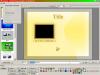
tv safe zone video builder this setting ensures your text in the menu is placed proper fyi - keep text in from right ken
-
GREAT ken
-
It is my understanding ' WITH VER 5 IT IS set by default to go to a different folder and the last version stays-- if the person wants to delete the "old" that is his option - but in my opinion that is not wise if they are not sure if the last install is going to be totally backwards compatible. i should have been more clear in my initial reply as to the way ver 5 installs -- as you said they can coexist ken
-
over your existing 5 it will go in a new folder so remember to update your shortcuts ken
-
keep your 4.48/9 and just install the latest 5 over your existing 5 it will go in a new folder so remeber to update your shortcuts ken
-
Anyone successfully tried up grading XP with service pack 3
Ken Cox replied to a topic in General Discussion
Sorry i forgot to mention that MS does recommend shutting off anti virus ,s pybot etc - wheh btw i did on first system - remembered to do it while it was assessing the main system -- got them all shut off before the actual process took place ken -
Lin would eagle not blink with the lightning? ken
-
Anyone successfully tried up grading XP with service pack 3
Ken Cox replied to a topic in General Discussion
the AMD problem was fixed that is why there was such a delay and confusion do a google re xp sp3 problems ken -
How do I easily make a pan - zoom slideshow?
Ken Cox replied to Bill Artman's topic in General Discussion
Bill Tom might need a pm - he has not been on forum lately also make sure your "show tv safe zone " is turned on also see http://www.picturestoexe.com/forums/index....ost&p=56020 Ken -
Anyone successfully tried up grading XP with service pack 3
Ken Cox replied to a topic in General Discussion
I am not having a problem with PTE and i have sp3 installed - my procedure/notes - no guarantees - my second system will not run the ver 5- not enough graphics power the install is supposed result in a faster system - i have not seen a gain on my main system but my second system shuts down and starts faster fyi only I have installed xp sp3 on both my systems now before i did the install i followed the instructions below and made the new boot disk -- apparently once sp3 is installed your original xp disk is no good if you have to do a xp repair -- i made sure the disk would boot before i installed the sp3 package -- i used the big download to install it on the slow #2 system -- let it run off and on for a week or so then from the windows download site i did the install on my main system -- 66.9 mb download and it still took 1 hr +- for the install ken THIS IS PROCEDURE I USED TO MAKE DISK http://www.winsupersite.com/showcase/xpsp3_slipstream.asp BUT I ALSO GOT INFO FROM THIS SITE http://www.pcmag.com/article2/0,2704,2325399,00.asp I GOT THE IMAGBURN PROGGIE TO DO ITS THING - THEN USED http://www.winsupersite.com/showcase/xpsp3_slipstream.asp INSTRUCTIONS C/W PICTURES AND NERO TO MAKE DISK KEN Bootstrap and Burn You're not done with your old XP disc yet; you still need to pull the boot loader off the old disc so you can make the new one bootable. The easiest way to do this is using ImgBurn, available free from www.imgburn.com. Install ImgBurn, start the app, and click Write files/folders to disc on the first screen. Choose the Advanced tab, followed by the Bootable Disc tab, and from the Extract Boot Image list select the drive containing your XP disc. Click the Save icon and save the BootImage.ima file to your C:\SP3 folder. ANOTHER LINK FOR INFO HERE http://www.helpwithwindows.com/WindowsXP/w...sp2-bootcd.html -
you might try making 2 pte shows under different names 1 a 4/3 ratio and 2 a 16/9 ratio shows project options/screen/aspect ratio of a slide also make sure tv safe zone is checked objects and animations/tools making 2 dvd shows under different names when you get in video builder,try setting the aspect ratio to 16.9 -- also make sure tv safe zone is checked in video builder as well also Deb make sure video builder is not set to PAL ken
-
Have just asked Tom if he can add to the thread seem to remember JEB and somebody else doing shows with narration Maureen has also done narrations with shows ken
-
Xaver search for shows by Peter Coles -- he likes to narrate them - see if you can follow his speech/narration - somebody might give you a link to other narrators on the forum if we mention it then if you a represtative sampling you can determine if it is you or them ken
