Ken Cox
-
Posts
8,069 -
Joined
-
Last visited
-
Days Won
2
Everything posted by Ken Cox
-
Fades can they really be adjusted In AND Out?
Ken Cox replied to Peter S's topic in General Discussion
Peter i et the following project options effects effect duration 4000 seems to be fine for me ken -
view unclick show tree ken
-
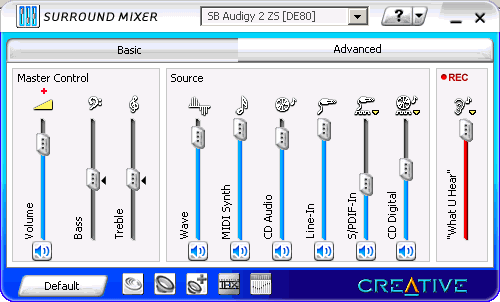
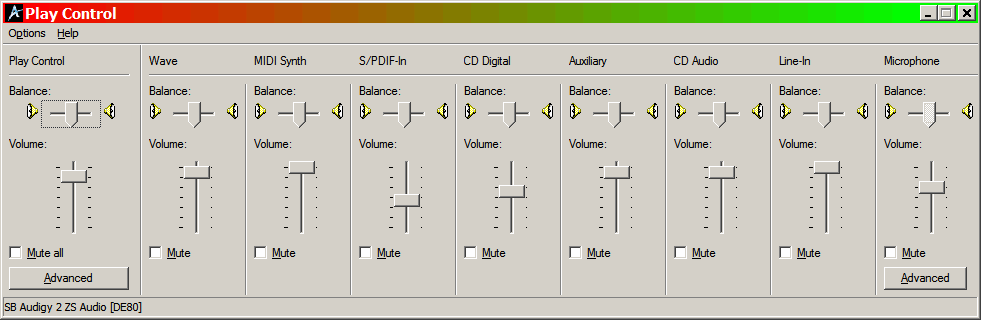
Minstral keep in mind that midi files will not work oin a vcd/svcd/dvd -- it is computer dependant sound also the other sound cards where the midi will not play may not have midi turned on i have a creative sound card and the control settings look like these 2 screen shots ken
-
i had that problem years ago - i sent midi to Igor and it was corrupt suggest you update to 4.48 and start/run/dxdiag make sure your direct x is 9.0c -- update link http://tinyurl.com/2n3rey and run the sound tests in dixdiag ken
-
I think Ronnie has a method thru adobe ken
-
Paul I put together a quick show and using your original and my 2 resized -- separated by black slides, then viewed it on the monitor and my tv -- worst case test. the original actually was soft compared to the other 2 on the tv ken
-
Paul looks excellent to me on my 19"flat screen lcd at 1024/768 when viewed with irfanview at your original image size: 3451 x 2535 details on the petal edges is great but there does seem to be a texture [grain as you called it] in certain parts of the petals -- shadow areas of the red the yellow petal also shows some texture in the shadow of the lower left of petal -especially where theyellow petal looks like it has been cut - but when resized to 1280/960 or 1600/1200 it disappears when saved at 80% quality 1600/1200 = 282 kb 1280/960 = 177 kb i think you better resize - you might be asking too much better homes and gardens will be calling you ken mediafire link for download http://www.mediafire.com/?f1hjfvqt90d
-
if you do not have 9.0c get it here Latest Version DirectX 9.0c (Aug 07) http://www.microsoft.com/downloads/details...;displaylang=en ken
-
give us the the link that is indicated for your file the link should be something like this http://www.mediafire.com/?f1gx9zex4by image quality: RAW (12 bit) -- have you converted the picture to a jpeg and added to your show? ken
-
from the dxdiag screen directx version ken
-
put picts in a zip upload to http://www.mediafire.com/ max file size is 100 mb then post link for all to share ken
-
you are choosing the wrong option video/create avi file and do not close the program until nero is done ken
-
i recently made 8 shows and for 1 example show the pte = 31 kb exe = 64 mb the dvd was 725 mb due to time constraits i did not make iso or mpeg - [ver 5] as i was working with 4.48 and imported the temp avi to my Nero Suite as well it had a nero menu so the finished dvd size would be basically the same size whether i did it with v5/vb or 448/nero ken
-
R MOUSE THE MPEG and read its properties ken
-
at a certain point of the encoding process of the vb, the menu/pictures come on the screen as you work thru the process of setting up the process at one point it tells you how big the show will be does this happen? it almost sounds like your codecs are mixed up try making only the mpeg -- does it play check it's size -- it should be close to the above size ken
-
ver # ? ken
-
i think this will get you going open notepad on your desktop copy the long file name into notepad -- make sure you get all figures save it as pte.reg put the reg key [pte.reg] in the main pict to exe program folder now when you open video builder it is going to ask you for the location of the pte.reg direct vb to that place[program folder] and it should get registered now also save the reg key to a floppy and save it in a safe place also see http://www.picturestoexe.com/forums/index....ost&p=41315 http://www.picturestoexe.com/forums/index....amp;#entry41329 ken
-
or read the pdf's you have downloaded:) but dont feel bad when we went to the ver 5 with the smart's there were a lot of shortforms came out right quick and they stumped quite a few of us ken
-
O&A = OBLECTS AND ANIMATIONS KEN
-
BUTTONS print the pages:) ken
-
Buttons you might have a look at this freebie for playing swf files http://www.globfx.com/products/swfplayer/ it has a great interface and will be your default swf player ken
-
you had the friday the 13th curse Brian:) k
-
TO HELP SOLVE THIS conundrum - an intricate and difficult problem ) MAKE A FRESH SHOW and use this piece but differnt picts then make another using original picts and the problem music tell us what happens ken
-
and you updated as well? ) ken
-
mark as a test replace the show with 2 or 3 new pieces of music save under a different name basic slide time to music is 4 secs --so 40 slides you need a minimum of 160secs of music not counting fades/transitions and try it unsynced and report back ken