

Ken Cox
-
Posts
8,069 -
Joined
-
Last visited
-
Days Won
2
Everything posted by Ken Cox
-
Mario year or so ago there was a recurring question asked -- this was early dvd era "What resolution should still photos be?" a member directed us to the adobe forum http://www.adobeforums.com/cgi-bin/webx/[email protected] i think i had to register but now that i was in i browsed http://www.adobeforums.com/cgi-bin/webx/.3bb684c4/ and they have the same problems we have and if they buy boxed adobe products they get a book yet they still cant do what they want or do not know how thus the forum, in our case the guys that are experimenting are sharing and if asked will tell all, write manual's etc for a little piece of graphics software ken
-
Mario did not mean to single you out but approx a year ago a question came up that had been brought up before many times and many times since What resolution should still photos be? a member directed us to the Adobe forum http://www.adobeforums.com/cgi-bin/webx/[email protected] i had to register at the time to view http://www.adobeforums.com/cgi-bin/webx/.3bb684c4/ they have many packages and if you buy their products in the box you get a manual yet when cruising their forum they got the same questions/problems as we have for products that are seldom less than $100 and we hear from people that they bought such and such product and now they have to pay for a plugin etc to really do the job - Igor just raised the price with the advent of the deluxe burner pkg. - and all we got is homemade manuals - homemade shows - written by ordinary people that are more than willing to share their expertise and guys like me that try to share tips and where to find information for all to share ken
-
for an explanation of string see http://www.guru.to.it/en/tips/regkey_en.htm ken
-
THERE ARE MORE LINKS POSTED HERE http://www.picturestoexe.com/forums/index.php?showforum=8 get yourself a 3 ring binder 500 sheets of paper a fresh printer cartridge and print out the instructions that are availabel but you never hear people that are doing all the complaining about lack of info say that they have tried all the different sections of the forum or that they have used the forum search i never knew about the forum for 6 months after i purchased my ver 3.4, by that time i had -- without instruction manual -- produced a number of small shows -- granted my shows are not the quality of the majority of shows posted but at least i tried it seems how matter how we try it is never enough myself if and when i read instructions i print it out and with the step by step instructions i make the moves - video on the other hand is fine but unless you have two monitors your system is tied up while it plays and how do you print it? i have found that trial and error - practice - communication - try again works good enough for this old guy - -and MSN video works great when i want to talk somebody thru a problem or they want to do the same for me and years ago igor supplied these links http://www.picturestoexe.com/forums//index...hl=inna+malkova and for years there are tutorials posted at http://www.picturestoexe.com/forums/index.php?showtopic=87 http://beechbrook.com/pte/index.asp?catego...4&view=View ken
-
I would get ver 4.48 asap make sure you have directx 9c http://www.microsoft.com/downloads/details...;displaylang=en and see http://www.picturestoexe.com/forums/index....amp;#entry37203 ken
-
FROM THE HISTORY FILE THAT COMES WITH MAIN DOWNLOAD PicturesToExe v4.40 (March 28, 2005) + Improved file transference of a project into another disk or PC. (Copy the main folder of your project (which may contain embedded folders with pictures or music) and PicturesToExe will find new file paths.) KEN
-
we wish:) ken
-
yes Igor made that change quite some time ago just move allimages, music and the pte to the newly created and named folder and reopen the the pte ken
-
do you suppose you could reduce my weight with your 3d squish page effect:) ken
-
"sorry... made a mistake while editing." Marjolaine i will try to delete your double post' ken
-
see http://www.guru.to.it/en/tips/regkey_en.htm ken
-
additional macbeth url / info http://www.akdart.com/macbeth.html ken
-
GILBERT SUPPLY URL/ DATES etc FOR Pictures to EXE Version 5 Beta ! tutorial and maybe somebody can help you in your quest ken
-
hastinga if you get an answer/fix for your borders save the edited pictures with different names - if you plan on making a dvd there has been some waviness on the right side vertical borders ken
-
Why do you people insist on buying something when http://www.eye4u.com/home/ gives a free colour monitor set up scale years ago when i was into darkroom in the 70's,i purchased the macbeth colorchecker chart and it is still available http://www.wordsandpeople.com/colourtools/cc.htm http://www.rawworkflow.com/products/gmb/ey...lorchecker.html when i got into computurs i scannned it in and adjusted the graphics card and my monitor until the white was white, then saved the scan when i get a new monitor or graphics card i first check my reference scan then i go to http://www.eye4u.com/home/ to double check the gray scale. when i was learning basic colour i read that the meter in your camera or colour analyzer in your darkroom, converts all colour to a standard 18% gray - and all camera shops sold the Kodak 18% grey card for photographers to put in their bag. Photographers would put the 18% gray card in the scene and take a picture of it . http://en.wikipedia.org/wiki/Gray_card now what has changed in today's world i have suppplied my reference macbeth colorchecker to people and they have used it to check their monitor/graphics card setup - attached same to post ken

-
THERE USED TO BE A COUPLE DUTCH/BELGIAN VOLUNTEERS but never see French, Italian, etc:( ken
-
i had some problems getting vb to work at one point and did the reinstall as Igor suggested it also i now open vb directly as Stu suggests ken
-
try reinstall the whole program and try reeboot ken
-
Lin I'm glad you got your sight back and have not let your imagination go stale keep up the good work ken
-
with nero dvd selected you want to select to make a file disk then select the source files and select the burner drive that has the blank disk in it and follow the nero instructions to complete the task ken
-
Thks Lin and Jeff ken
-
try changing aspect ratio on dvd player is nz pal or ntsc were you set on the right one in vb according to http://en.wikipedia.org/wiki/NTSC nz is pal according to my data pal is 768/576 try making the dvd folders option - and let vb do it's thing and see what happens ken
-
Casp see Igors coment re space req'd --VERY IMPORTANT YOU ADHERE TO IT http://www.picturestoexe.com/forums/index....ost&p=42952 ken
-
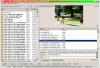
drag them to wherever you want them in the file list on the right copy/paste move functions are all there -- r mouse a hilighted to see commands in this screen shot the hilighted slide on the right can be dragged to any where in the sequence along the bottom beside the clear list button is a pair of up and down arrows to move the hilighted slide next to the arrows are another pair of icons -- the first one will show your slides horizontally - again move slides about -- the other one is a white table that will alow you to move the slides as well as edit them etc with right mouse commmand -- whatever program that you have designated to edit your jpegs will open ken
-
you are stretching things by try to do too much you could be disappointed when it fails because of computer storage limitations you would be better to do separate shows/discs -- 3 each and 1 with 4 in an earlier post i gave links to likely the most informative sites to answer all your video questions see http://www.picturestoexe.com/forums/index....ost&p=44139 ken

