Leaderboard


Popular Content
Showing content with the highest reputation on 07/08/2026 in Posts
-
voici mon premier diaporama avec le logiciel PTE 11 "Here is my first slideshow using PTE 11 software." (Google Translate)2 points
-
Hi, We're glad to introduce a new PTE AV Studio 12 - a powerful software for photo slideshows and AV shows. What's New in version 12 The new version includes many improvements, new effects and creative possibilities: - Blending Modes (Multiply, Screen, Overlay, and more) - Video Speed Control and Slow-Motion with frame interpolation - Sound Object and built-in Sound Library - Export Vertical and Square Video for YouTube Shorts and other social media - New AV1 Video Encoder - HEIC Image Support for iPhone photos on Windows - Improved Chroma Key for Video Clips - New Dynamic Gradient Map effect in the Mask container - Quick Search in styles and transitions. New built-in slide styles and transitions And more. Read a full list of new features: https://wnsoft.com/pte-av-studio/whats-new-12/ Download for Windows and Mac: https://www.wnsoft.com/pte-av-studio/download/ Prices and Editions There are two versions: - PTE AV Studio 12 Pro - 145 EUR (VAT is included) - PTE AV Studio 12 - 74 EUR (VAT is included) Buy full version: https://www.wnsoft.com/pte-av-studio/buy/ Upgrades Upgrade from PTE AV Studio 10 or 11 Pro to PTE AV Studio 12 Pro - 48 EUR (incl. VAT) Upgrade from PTE AV Studio 10 or 11 to PTE AV Studio 12 - 35 EUR (incl. VAT) I hope that you will enjoy using the new PTE AV Studio 12! Thank you very much for your support and help with Beta testing! P.S. You can still find the Beta discussion here1 point
-
This is the same video with 2 different edits to show how you can reframe a 360 degree video after capture.. It needs to be edited in special software provided by the drone company.1 point
-
Kieron, thanks, I've updated the link. Try again.1 point
-
The first video shows a timelapse from a recent photography workshop and a few images produced at the workshop. The second video shows the same series of images from the workshop made into an AV. Mark1 point
-
Nice results from the shoot. Looked like a great facility to do the club shoot - nice to have all the equipment to do three shoots at once1 point
-
Hi Rosemary, Please read the 11 mini tutorials for all the new major features in PTE AV Studio 12: Every publication tells about a new feature, includes screenshots or a video demonstration, and sample projects: https://www.pteavstudio.com/forums/tags/new feature/ 2. The online help has updated articles for new features: https://docs.pteavstudio.com/en-us/12.0/v12_wn/main 3. Also read the What's New page on our website: https://www.wnsoft.com/en/pte-av-studio/whats-new-12/ It tells about new features and includes screenshots and video demonstrations.1 point
-
Updated version of PTE AV Studio 12.0.1 is available for PC and Mac Download: https://www.wnsoft.com/pte-av-studio/download/ Fixed an issue where some slide styles could not be applied to slides. Fixed the video file extension not updating correctly in the Save File dialog after changing the export format (between MP4 and AV1). About window shows: 12.0.1 Build 1.1 point
-
The Online Help for Version 12 has been updated in line with the "What's New in Version 12" posted by Igor: https://docs.pteavstudio.com/en-us/12.0/v12_wn/main Links have been added to each paragraph as appropriate. There is obviously more work to do but the OH is an ongoing and evolving document and if anyone wishes to contribute it will be hugely appreciated by the PTE community. "How to" articles are largely driven by Forum Posts for which there is no obvious answer in the OH and these will continue to be added when they arise. DG1 point
-
Hi, In PTE AV Studio 12, we fully rewrote the interpolation algorithm between keyframes - it has greatly improved the smoothness of speed modifiers over long time intervals. For example, if you use a speed modifier ("Smooth") to create a long panorama (20 seconds) with a fast pace of movement, V12 demonstrates a smoother beginning and ending for the animation than V11. At slow panning speeds, there is no noticeable difference between V11 and V12. LongPanorama.zip1 point
-
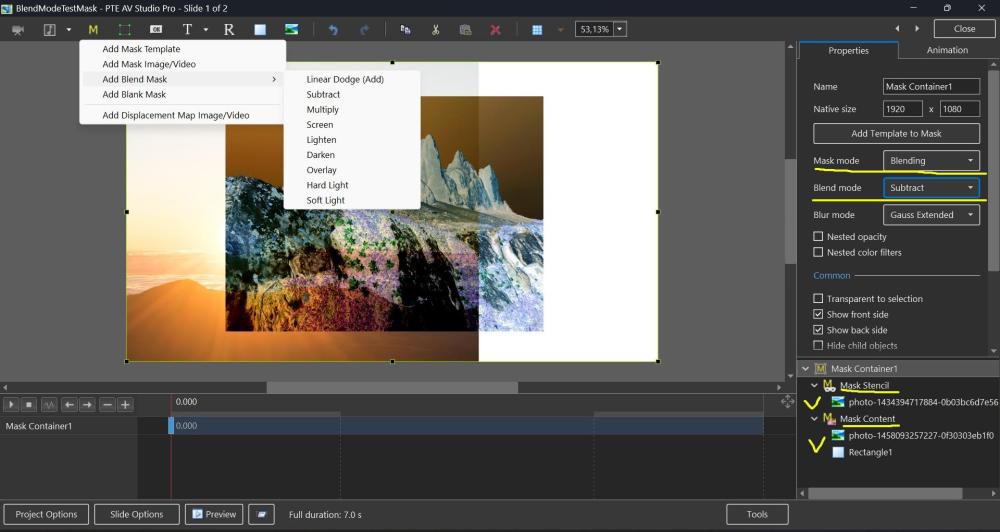
Hi, In PTE AV Studio 12 we've added a new "Blending" mode to the Mask container with support for 9 blend operations: Linear Dodge (Add), Subtract, Multiply, Screen, Lighten, Darken, Overlay, Hard Light, and Soft Light. To use: place the first image into the Stencil, and the second image into the Content of the Mask container. You can add video, text object, rectangle object, or multiple objects (several images, for example). Watch a video example. Click the play button: BlendMode.mp4 BlendMode.zip
 1 point
 -
Hi, In PTE AV Studio 12 the Chroma Key function for video clips has been completely rewritten. It now works reliably with all popular background colors: green, blue, red, and more. Background removal quality is significantly improved. Edge handling is especially enhanced: color spill is eliminated and object outlines are clean and sharp. Click to play: ChromaKey-V11-vs-V12.mp41 point