
digartal
-
Posts
393 -
Joined
-
Last visited
-
Days Won
71
Everything posted by digartal
-
Even modern cameras with Animal detect features have these problems. I use AI but in a paid appliciation - Topaz Photo. It has now gone to a subscription type application but I have had it since the start. It also has a un upsize application as AI edited images are generally a lower resolution. For me it is a worthwhile inventment to upgrade regularly. If you are interested, have a look here - https://www.topazlabs.com/topaz-photo?srsltid=AU7gw4Xfkq6viLMGx2BZyOjtE18_1-MjfCziRU7qcXV5Q8BoJHJXlYS7
-
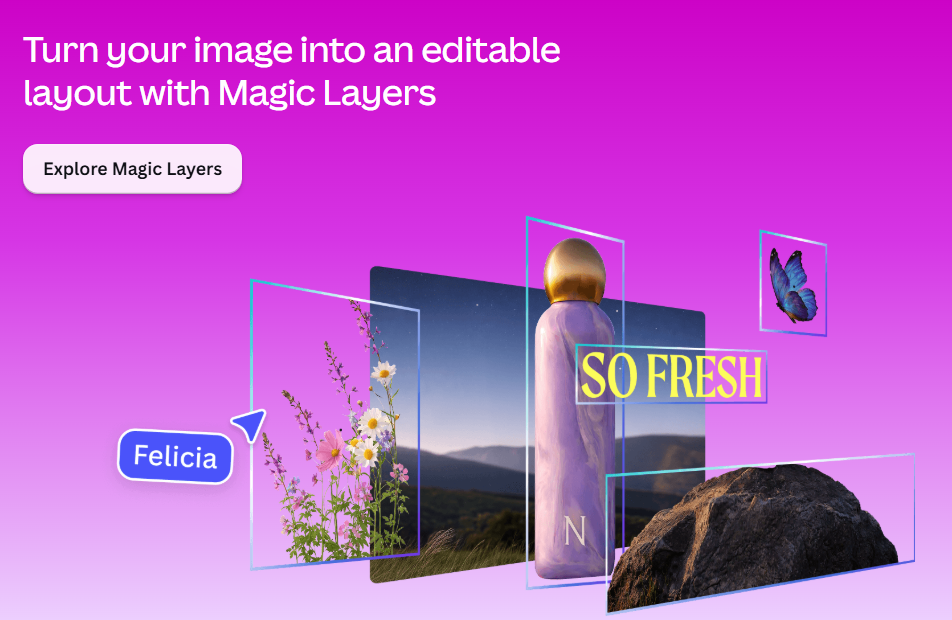
I understood so my explanation was also misunderstood as I was thinking of something similar to what Igor suggested. I asked AI and got the following reply. The first 2 are only available in PS. Compatible Text Editing File Formats PSD / PSB: Adobe Photoshop formats that store individual elements, effects, and text vectors on separate, editable layers. TIFF: A flexible bitmap image format that can optionally save Photoshop layers intact if compatibility settings are enabled. XCF: The native layered image format used by GNU Image Manipulation Program (GIMP). PDN: The native file type for Paint.NET which preserves unflattened layers. SVG / AI: Scalable vector graphics and Adobe Illustrator files where text remains vector-based and editable. [1, 2, 3] Interestingly, Canva (an Australian company who purchased Affinity) have release a product called Magic Layers. I don't subscribe to Canva Pro but here is some info showing a flattened image and editable layout created. Cheeers Mark
-
So I am guessing you want that particular style and edit and a normal text box in O & A would not work. The other thing is will the viewer be actuaslly able to edit a TIFF file either with access to software or knowledge? If you just replaced the Image in O & A they could add the text they liked?
-
In my experience I agree with Nelson and JKB. I have owned PTE for many years (probably V1 in the 90's) and always found the developers very reasonable, responsive, supportive and I am not aware of any other applications that have this contact with the developer support from. One of the other major competitors is no longer being developed or availalble so I appreciate the support and development assistance of PTE. Sometimes in life we don't always get what we want. Furthermore, while not a developer, I do know some software has some legacy platform problems and what is requested may not actually be viable/possible using the existing code/platform. I certainly appreciate the time and effort by the developers in implementing the recent changes for V12 and the updates since. Also compatibility with new hardware is a problem. I do notice updates and changes to suit Apple OS changes regularly even though I am not an Apple user. There is an old saying, you attract more flies to honey than you do to vinegar. Seeking support for changes in an empathetic manner I have found is more productive. Thank you to Igor and the team for your assistance and support, I certainly appreciate it.
-
Thanks. I just used the free ChatGPT. I am in 2 minds about the development of AI and where it is going. The green washing of the impact on the environment as well as the unkown use and potential are a concern. Luckily for me, I live within waking distance of a creek that has been 1 and 4 each time I visit. On saying that they are more active at present as it is the mating season. Have manged to capture briefly 2 males fighting and a courtship on camera/video. Cheers Mark
-
This story is based on a local platypuses in a creek not far from my home. Pip is a curious cartoon like AI created young platypus who lives in a beautiful Australian creek in the northern rivers of NSW.
-
Very effective, I appreciate you sharing. Thank you.
-
Thanks appreciate this, now have to create a project to use it.
-
FREE PTE AV 12 Zigzag Fold Transitions
digartal replied to Aleina Show's topic in Styles & Templates
Fantastic - thanks for sharing. Appreciate the skill involved creating this and thanks so much for sharing. -
Keep On Going - A music video based on the 1930s Dust Bowl
digartal replied to mhwarner's topic in Slideshows & AV Shows
Very well done and enjoyable to watch. Great work by all involved. -
Rolling West - a road song about traveling in the Western US.
digartal replied to mhwarner's topic in Slideshows & AV Shows
Very well done from the title slide, the song, music and images all blended very well together. Nice work and thanks for sharing. Mark -
10 Free PTE AV Studio Transitions - Mesh Transitions
digartal replied to Bad Dancer's topic in Styles & Templates
Thanks for sharing. -
Free PTE AV Studio project - Scrapbook Slideshow ID 31072026
digartal replied to Bad Dancer's topic in Slideshows & AV Shows
I downloaded the project and stared to edit it with my images. I ran into a few hurdles. The first one was it kept going back to the downloaded directory. I discovered the PTE project File is a text document and opened it in Notepad++. There I used Find and Replace to edit the directory reference to the new location. I also created a spreadsheet of the images to include the Slide No, Image No, Image Size and text. This made the image and edits easier to keep track of the changes. This is the first edit using my images from various places I visited in July. I have made a couple of other version since, changing music and other text. As a photographer, I would not normally make a show like this from scratch as I like to feature the images and not the application features. Thanks for sharing, it was a fun exercise. -
Thanks Alex
-
Free PTE AV Studio project - Scrapbook Slideshow ID 31072026
digartal replied to Bad Dancer's topic in Slideshows & AV Shows
Great show, well composed and a good idea. Thanks for sharing. -
Some photographers will walk a kilometre to a carefully planned location 4.5 kilometres from the Byron Lighthouse, then wait 45 minutes for the Moon to rise perfectly behind it—because apparently disappointment needs good composition too. Right on cue, the clouds staged a flawless photobomb, hiding the Moon at the exact moment of truth. Then, just as surrender seemed the only sensible exposure setting, the Moon popped above the clouds and lit them up brilliantly, proving Mother Nature enjoys delivering punchlines more than photographers enjoy sticking to the plan. Made into a timelapse style with PTE.
-
Hi jienense I can confirm the missing images are in the new downloaded file. Just ran the project and got the error message to say there are missing. I browsed to the folder they were located in and got the ticks to show they were found on a Windows PC. Thanks Mark PS The 4 missing files although they are located, the reference to the location in Slide 7 also needs to be updated in the Objects and Animations Tab Once I saved the project it updated when opened the next time. Thanks again for sharing this detailed project.
-
Milky Way over The Byron Lighthouse Timelapse
digartal replied to digartal's topic in Slideshows & AV Shows
Thanks -
Ticket to the Tropics: Cinematic Style Slideshow
digartal replied to Alex55's topic in Styles & Templates
Love it - very well done. Great use of the new features. Thanks for sharing. -
A short AV made of images after a visit to Whian Whian Falls last week. A simple dissolve of images from the top of the falls. This is another version of the same images using the Camera 2 Template provided by jienense. I made some changes to the end and although it was meant to show the 15 different camera captures, I useed the complete series in this instance. Using shared tmplates does help with my learning as I re-engineer/design the template even with the different language barrier. thanks for sharing. Mark
-
- 1
-

-
I am guessing it it a younger Igor barking instructions and pointing. Nice production, well planned and executed. Flows well and the time passess quickly so it hold your attention. Congratulations. Mark
-
Nice work, well done. A lot of effects and images so qute a few hours as you mentioned. I think you got the music first, then the words and created the images to the words with the timing - great job. The AI image generation would have taken a lot of time and practice. Despite what people think, you just don't type in a prompt to get images like that. A few observations from me. Maybe a little too much of the text "Turning music into gold". Warping the text around the images was well done and it may have been the learning? If you are like me, when I find out how to do something, I then have a tendency to use it probably too much but that is me. When I first started out on the digital AV jouney over 30 years ago, I remeber what the judge said who was a good friend. "Just because there are hundreds of effects in an application, you don't have to use all of them in the one show". A reference from the AV slide days and how little control you had with fades etc unless you had multiple prjectors etc. Congratulations - great effort. Av's can be very subjective (like photography) but as long as you are happy, that is the important thing. Thanks for shring. Mark
-
Camera 2 Transitions For PTE AV Studio 12 (and sound)
digartal replied to jienense's topic in Styles & Templates
Fantastic, well done. Brings back memories of my trip to Barcelona last year. Thanks for sharing the project. Is it alright to edit for my images? I have had a look already and I am learning by reverse engineering or editing. Loved the video use as well. Have lots of camera and 360 degree images of Sagrada Família and can use some of them for a show using this template as well as other Europpena locations. Thanks for sharing. Mark -
Milky Way Over Byron Edit Using V12 Features
digartal replied to digartal's topic in Slideshows & AV Shows
Thanks
