

jienense
-
Posts
165 -
Joined
-
Last visited
-
Days Won
22
1 Follower

Recent Profile Visitors
2,612 profile views


jienense's Achievements

Senior Member (4/6)
-
Hi Igor, I've tested the new version, and it works correctly with the TIFF files in the styles. Thanks.
-
Thanks, I wasn't aware of that function when creating the style; it's really good to know.
-
Good morning, Igor. I wanted to thank you for all the trouble you've taken and for your assistance. However, I don't think the issue is limited to that specific TIFF file; I downloaded two TIFF files from the internet and created a simple style (Zoom only) for each image, yet the problem persists when applying the style. I believe the issue lies in the process of applying the style to TIFF images—there seems to be an error.
-
Let me see if I can explain this clearly: if I provide the style and you want to change "Halloween Party" to "Halloween Night"—well, if I create the style in PNG format, you won't be able to edit the file. However, if I create it in TIFF format, anyone who wants to can edit it to their liking—using an editing program like Photoshop or GIMP, for example.
-
Thanks for confirming the issue. I’ve reduced the TIFF file as much as possible, but the problem persists. I know the file size is much smaller in PNG and doesn't cause issues, but if I want to share it with others so they can edit it, PNG wouldn't work.
-
Right, but the intention was for it to be editable—hence the TIFF file. It supports that format in principle, so why the error?
-
Hello everyone, I am creating a style and using a .tiff file (among others). Creating the style causes no issues, but when I apply it, the .tiff file does not appear, even though the system shows it as present. Before creating the style: After applying the style: Style: https://www.mediafire.com/file/kicqmqlvbzpqsii/Halloween.ptestyle/file
-
I would like to create something similar in PTE.
-
Thank you for sharing. Such beautiful transitions!!!
-

FREE PTE AV 12 Zigzag Fold Transitions
jienense replied to Aleina Show's topic in Styles & Templates
I love these kinds of transitions, thank you -
I'm still not quite understanding... If, when creating a backup, it now creates a zip folder with all the files, which is difficult to navigate when dealing with complex projects, what difference would it make? What difference would it make if it created the same thing, but, for example, in three folders: audio, images, and video? When you need to find a file, I think that would be easier. You mention that the .zip file is just a backup file, but it turns out that more and more projects from other users are being shared online as zip files created as backups. Therefore, I think that if the zip file is better organized, it can't be a problem for anyone. Please forgive me and Google for the translation
-
10 Free PTE AV Studio Transitions - Mesh Transitions
jienense replied to Bad Dancer's topic in Styles & Templates
Thank you so much, beautiful transitions, the new masks in PTE work wonders. -
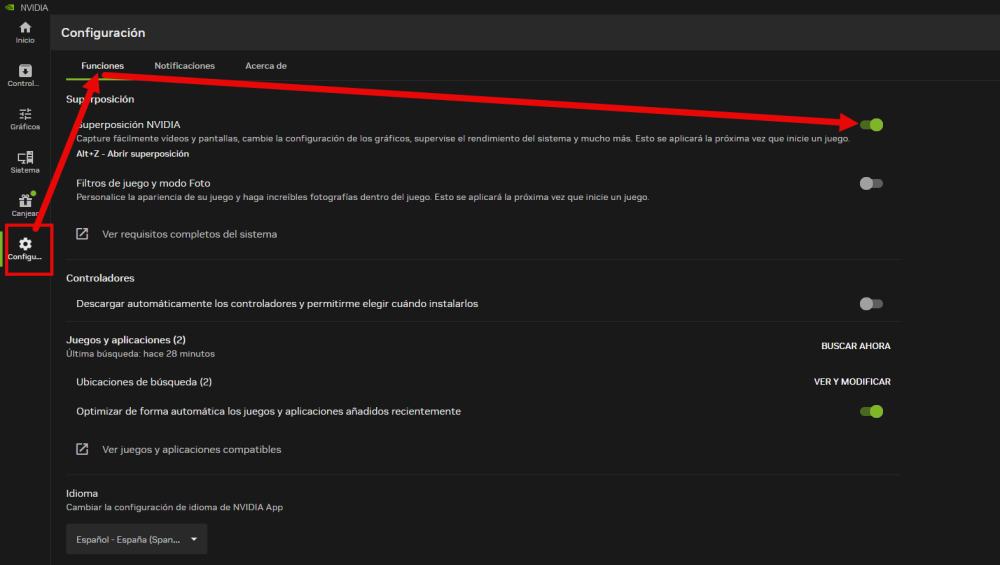
Try enabling this option and see if ALT+R works properly in PTE. When I enable it, it stops working for me.
-
It still wasn't working for me; apparently, Nvidia was the culprit. It also uses that keyboard shortcut. NVIDIA GeForce Experience / NVIDIA App This is the integrated performance overlay for GeForce graphics cards. To activate/deactivate it: Press Alt + R
-
With version V12.0.2, the "Alt+R" keyboard shortcut doesn't work for me either, but it does work with the menu.

