Ken Cox
-
Posts
8,069 -
Joined
-
Last visited
-
Days Won
2
Everything posted by Ken Cox
-
well if you go full screen you eliminate the chance of vertical edges on r side of tv to wiggle/shimmer "In fact I entered the DVD version in a club competition and was a bit embarrased, because of the quality." compared to what -- did you ask how other shows were made? -- it is a club -- the object of belonging to a club is to share info- the same as this forum:) read some of the threads in the video section http://www.picturestoexe.com/forums/index.php?showtopic=3943 http://www.picturestoexe.com/forums/index.php?showtopic=3992 at present time i show all these test demos made with ver 5 on tv as the avi function is not enabled there used to be a member that said " think outside the box" star wars were made with "a box" Juriassic park was one of the first -- commodore 64 days/video toaster ken
-
smooth as silk perfect on monitor and on svhs tv a keeper:) ken
-
some theory http://www.scantips.com/basics11.html years ago board makers supplied vcd's to demo what their boards would do and there were games that could be downloaded -- they wanted to sell product and what better way than to have freebies likely for a standard office installation you can get away with the minimum but when you are a gamer you need power -- well games are graphics and p2e is graphics of a different sort -- if i had kmow 3 yrs ago next month how things were going to proceed i would likey have bought the top ATI all in wonder $600 instead of the $300 model i chose -- prices incldes taxes generally speaking i have no problem playing a store bought dvd movie in my old system with 1:33 ghz processor and 16 mb ati all in wonder card - but it would not play Igor's first v5 demo without constant jerkiness and have no problem playing dvd movies in #1 system but along comes ver5 and the jerkiness appears in some cases ken
-
Dave from the services offered on your website, "How could an AV Sequence help your business ? A DVD, aimed at the prospective guitarist, but covering similar ground to our school presentation, is available at £15 (deductible when a booking is made). Yours sincerely, Dave Windle " you should really consider making the shows more "dvd compatible" -- use no borders or frames as Robert suggested.Then if the need arises you just make the avi and burn ken
-
Ron try http://www.davewindle.com/Willwin%20Home.htm http://www.davewindle.com/index.htm http://www.davewindle.com ken
-
Lin just a little jiggle +- 10 secs into show - plane sequence zooming on goats smooth and no error messages ken
-
well Ken here is list that you can refer to:) ken http://www.pcworld.com/reviews/sfchart/0,t...csBoards,00.asp
-
John my 2 systems sit side by side but i had the router before the 2nd system i am able to access the internet from both i am connected via "my network places" NIC card to router i have one keyboard mouse and monitor and they are connected via a KVM switch http://www.startech.com/ststore/catlist.cf...tegory=c80&mt=c both systems identical anti virus anti spyware etc #1 is my main new system, and my tech cloned it to the #2 system which is less than half the power of the new suystem thus am unable to run ver 5 on it scanner runs on #1 printer runs on USB on #1 and printer port on #2 i use #2 for weekly mail backup and to test software -i have folders set up to share stuff as needed - i cannot transfer files via icq on #2 and camera is on # 1 - wont run on #2 tho it used to depending what evil thing i am up to #2 will be doing internet stuff while i am burning dvd's on #1 this is about all i can tell you as my tech did all the brain work no third party firewall to drain resources or my pocket:) ken
-
Robert the jerkiness starts with your first text/title 10 secs from time i clicked the exe and jerks with each zoom guess i do not have the hp to run it the way you designed it ken
-
John router theory http://www.cable-modems.org/articles/inter...re_firewall.htm my xp firewall is turned off and i use no other back in 98 days i had zonealarm and mcafee's when i got the router a lot of problems i was having went bye bye when this system was built no firewall ken
-
Robert get rid of the jerkiness and you have a winner always ceases to amaze me what has been accomplished in the world by manpower alone ken
-
do not forget to save all info key etc to floppy, cd etc remember "Jesus Saves" ken:)
-
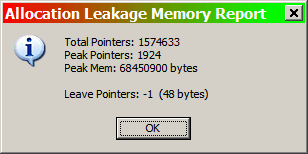
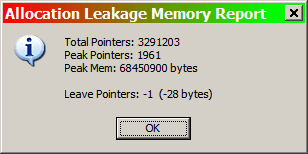
the original exe is 13+- mb + the 2 bat files 1 kb each exe has music mem test 2 is 10.2 +- mb no music -=- no bat files mem test 3 is 10.469 +- mb no music -- no bat files each exe file is different in size ALSO see http://www.google.ca/search?hl=en&q=ALLOCA...le+Search&meta= to see what Igor is up to ken
-
JP i just emailed you the origial zip 12+ mb BUT it bounced too big:( ken
-
Lin- from my collection http://www.fleetairarmarchive.net/Aircraft/Harvard.htm http://www.partnersinrhyme.com/soundfx/airplanesoundfx.shtml ken
-
Richard see http://www.guru.to.it/en/tips/regkey_en.htm http://www.picturestoexe.com/forums/index....t=0entry16569 http://www.picturestoexe.com/forums/index....st=entry11790 for starters also you should get ver 4.48 and do you have any of the original communication when you got your key if you do you should include it with your request ken
-
4:31 PM 5/4/2006 memory test ver 3 01:3:28 MINS/SECS NP 00:37:00SECS NP 00:45:28 SECS NP 00:52:26 SECS NP +- 1 MIN ALLOCATION LEAKAGE MEMORY REPORT -- STUPID FINGER HIT RESET ON STOPWATCH - RDG WAS JUST COMING UP TO 1 MIN THO' 01:00:33 MINS SECS NP 00:51:31 SECS NP 00:42:65 SECS NP KEN

-
JP firat entry of thread there is a link to get zip http://www.picturestoexe.com/forums/index....st=entry27936 ken
-
Robert i use print screen 2000 v 5.1 alt print screen command save it to my collection of screen shots as a jpg or gif whatever strikes my fancy and then add it the same way you added your error messages picts ken
-
LIn if you have google earth he will likely send his co ordinates another great waster of my valuable time:) http://earth.google.com/ ken
-
10:45 AM 5/4/2006 memory test ver 2 00:44:00 secs NP 00:40:00 SECS NP 01:34:00 MIN/SECS NP 02:02::22 MINS /SECS ALLOCATION LEAKAGE MEMORY REPORT 10:51 AM 5/4/2006 02:19::84 NP 10:57 AM 5/4/2006 03:03:22 NP KEN

-
Judy site is active right now http://beechbrook.com/pte/ 06:55 edst Bill would have told forum if he was having probs ken
-
PUSHU from my notes -- key tips like these i keep in the program's folder for reference ken merge mp3's using soundforge or - audacity 19:08 5/28/03 new project import audio just open a mp3 file and then Click on EDIT and select all, then copy...close window, open a NEW file and paste, minimize that one, open another mp3 file, Edit select all, copy, close the window, open the new one your making or rather maximise and paste can do that as many times as you want Ken, Al is right, it's not so complicated! Try to do this way: 1) Open Audacity 2) Project > Import Audio 1 3) Project > Import Audio 2 4) Select <---> symbol (top left), and move forward the 2nd file. 5) Play to check if the effect is right. 6) If so, File > Export as Mp3 (or if you prefer as a Windows Wav). 08:58 7/14/03 Posted: Jul 13 2003, 10:23 AM http://www.picturestoexe.com/forums//index...ct=ST&f=2&t=847 Lately, there's been lots of questions on how to create a slideshow with multiple songs. The show would hang when the song changed. There were some solutions given, but I was still confused after reading them. After fiddling around for a while, I stumbled onto the solution. Just thought I'd share it here...in very simple terms. Yes, you have to make all of the music tracks into one single track. To do this, download the free Audacity software. If you use mp3 tracks like I do, you'll also need to download the free LAME software. 1) Open up Audacity. 2) Under Project, import your music files. 3) Use the "time shift tool" to locate the end of track #1. 4) Use the "selection tool" to copy and paste track #2 . 5) Copy & paste the remaining tracks in the same way. 6) Export your combined single file. (mp3 needs LAME file) 7) Add this combined single file into your pic2exe slideshow. There might be a better way to do it, but this works. Try it. It's lots easier than I probably made it sound! ;-) Joyfully, -david soderman- <>< Alan Lyons Posted: Jul 14 2003, 07:20 AM David, Have a look at where the two tracks meet. I have not tried Audacity yet but there should be drag bars at both ends of a track, by playing with these you can create a crossfade over the two tracks which sounds much smoother than just laying them in train on the MP, Alan -------------------- Alan Lyons Dublin Ireland 3:20 PM 9/14/2004 ContaxMan Posted: Sep 14 2004, 07:41 AM Senior Member Group: Members Posts: 114 Member No.: 736 Joined: 9-July 03 The waveform display in PTE is simply to help with positioning image transitions to the music, e.g. you may wish to have a particular slide appear at a peak in the sound wave. It is not a music editor - you need to stick to Audacity or similar. To combine music in Audacity simply get the two pieces onto the screen, select one waveform by dragging over it, press CTRL C (to copy it), position the cursor at the end of the other wave, press CTRL V (to paste). You will then have the two waves combined. Look at the Audacity link where you'll find links to tutorials etc. http://audacity.sourceforge.net/windows.php?lang=en I hope this helps. -------------------- Roger ContaxMan Posted: Sep 14 2004, 01:41 PM Senior Member Group: Members Posts: 114 Member No.: 736 Joined: 9-July 03 I've located this in the tutorial material available when you download Audacity. Try this: Open the background music). Select Import Audio... from the Project menu and open the other sound , e.g. a recorded narration. Listen to your sound using the Play button. Audacity automatically mixes them together. Choose the Time Shift tool and adjust the position of one track or the other until they're synchronized the way you want them. You can even move tracks around while they're playing. If you hear clipping which wasn't present in either of the original files, it means that the combined volume of the two tracks is too loud. If so, elect one or both of the tracks and then use the Amplify... effect to reduce the volumes until you don't hear clipping anymore. Save as mp3 for pte. -------------------- Roger York, North Yorkshire, UK 4:59 PM 10/7/2004 Printable Version of Topic Click here to view this topic in its original format WnSoft Forums > PicturesToExe > Music Posted by: John C Oct 7 2004, 04:12 PM I have a question. I want to be able to fade music at the end of a slide show. If I download 'Audacity', will it do that for me? Thanks, John Catalano Posted by: ContaxMan Oct 7 2004, 04:14 PM Yes - it's very easy to fade music with Audacity. Posted by: Ken Cox Oct 7 2004, 04:41 PM Roger I recommended 'Audacity' to John but i could not tell him how to fade the music -- will you explain it for us? ken Posted by: shelton Oct 7 2004, 04:57 PM I'm not Roger but the way that I do it is go up to the selection tool at the top left. It's the large I. You select the amount at the end of the song that you want to fade out and go up to effect and click on fade out. That's it. Hope that this helps.
-
Maureen plse send Andrew the total specs of your powerhouse it may put some light on the subject -- Andrew will likely determine if your system is that much different ken
-
Dan you have the basic version of nero that likely came with your burner you can do a file disk with it but will not be as easy as if you had a suite bet the winner at the derby and maybe you can the then buy the suite:) ken