nobeefstu
-
Posts
1,971 -
Joined
-
Last visited
Everything posted by nobeefstu
-
Gilbert, You have not offered much detail to help to trouble-shoot your issue. Since your proceedure has worked for over 2500 times ... I can only guess there is something different or changed in your OS since your last build a few days ago.
-
elke, Findiing your lost images can be a daunting task. First and foremost you must determine if the files are just missing and need to be found or completely lost and can not be found ? ----------------- Identify how many files are missing and their filename(s). Pte missing errors window You can call up Pte's missing files window at any time with F5 key. You have to manually write your missing list ... or Use a screen capture tool (like Faststone v5.3) that will capture scrolling windows and make a image of the missing list. ------------------ Once (or if) you find or locate all images and other source files ... you can just copy them all directly into the same folder (without any sub-folders) Also copy your .pte file to that same folder. Double-click the pte file copy (within folder) and Pte will now find all the relative source files. It is not necessary to restore the original paths and directory structure using this senerio.
-
gilbert, What KB/MB file size are your scanned images used ? Do you mean to say you have 2500 images ? First impression when a window goes almost transparent ... is that the pc is low on resources to perform its task. Note: Unless your actually testing Pte latest beta's ... I personally advise not to buld any permanent slideshows with beta versions. There is usually unknown issues and several features not fully enabled which may lead to undesirable results.
-
Raydene, Ok. We now know you use multiple Pte versions installed on your pc. Using multiple versions of Pte on the same pc can get confusing at times and requires some user disipline. It appears your default Pte program for opening .pte files is PicturesToEXE v4.48. Any .pte file you have on your pc will double-click open into PicturesToEXE v4.48. Pte does not identify file version to open with its corresponding program version. You did correct. The only way is to use File|Open when requiring a particular version Pte other than PicturesToEXE v4.48. File opened by double-click in v5.52 ... cause its my default. I also use multiple versions Pte. Notes on Test.zip Your High Red pte file is a v5.0 file. The Use Own Icon checbox is enabled. The icon file used is C:\Pics 2 Exe\5.0 FINAL FINISHED\5.0-PROJECTS\High_Red_Photos\3-k.ico. Your icon is embedded into the High_Red_Test.exe and the K icon appears normal as expected on my desktop. So in conclusion your Pte v5.0 program is working correctly. Conclusion The .pte file will not change to the file version that creates the exe ... you must Save As to create a new .pte file (also use a new filename as not to overwrite your original file.) However, the exe created will be of the version Pte program you have open to make it. Yes ... reinstall v5.0. Normal install will make all your .pte files open with double-click as default with v5.0 and no longer with v4.48 ... which may be contributing to your what version your actually opening and using issue. User disipline File|Open will be required when wanting to open a .pte file with a different version Pte.
-
Raydene, If the pte file is a v5.0 file ... it should work the same. Its when you open a older v4 pte file into a v5 pte program some changes may be required. You can try your last v5.10 installer or download lastest final build v5.52 from Pte site. WnSoft - Pte Site - http://www.wnsoft.com/download.htm -------------- However, I would not install any new pte versions yet. Your attached jpg file concerns me ... the right side image is a windows default icon for executables with no icon information. Windows resorts to that default icon when it can not find any icon data in a 32 bit executable file. Do your icon tools allow you to extract or see icon files within your executable file ? If yes ... look wihin the executable to see if the K icon file info actually exists in the pte exe file. If no ... please make a new executable of just a single slide without music of a pte file with your selected K icon. Zip both the .pte file and exe file ... upload as attachment to your post and I will check it out. Better to check out first ... then later proceed to reinstall or new install versions.
-
Raydene, Yes, your icon worked perfectly. I actually used v 5.11 of Pte to test your icon file. I no longer use or have v5.0 (July 17, 2007) installed to qualify a possible bug in that version. If you re-install Pte ... why not install a more current version like 5.11 (February, 2008) or v 5.52 (July 11, 2008).
-
Raydene, I have checked out your K icon file ... and all appears to be correct. I loaded your icon into a project of mine and all worked as expected. Are you sure you loaded your icon file properly within Project Options|Main tab ... and also enabled checkbox - Use Your Own Icon for Slideshow or Screensaver File ?
-
Raydene, Since you have made them before and they worked ... Im sure you know they need to be 256 color format. Why dont you upload it as a attachment to your post and I will check it out. Put the icon file in a zip might be a better idea.
-
Vexing problem with Screensavers in Win XP
nobeefstu replied to Ed Overstreet's topic in General Discussion
Peter, Do you have a actual copy of the Weblink icon file stored on your pc ? Does it have multiple icon formats ? What size Vista desktop icons are you using and does your selected Weblink icon match the desktop format ? -
Vexing problem with Screensavers in Win XP
nobeefstu replied to Ed Overstreet's topic in General Discussion
Ed, Im not a big user of screensavers for some years ... but I tried a few tests since your post, as I also have XP SP2. I named the pte screensaver using a short file name ( 8.3 chars) as windows does for theirs. Im a firm believer in 8.3 filenames to avoid any possible issues. I then copied the screensaver to the Windows/System32 folder. Then opened display properties|screen tab and selected, previewed, applied, and closed out. Reopened and screensaver was still enabled. Rebooted and screensaver was still enabled. So no problems here. Right-click your screensaver file within the system enviornment (Windows/System32 folder) to see if you get a test, configure, install file option. Configure wont apply to pte screensavers cause theirs no config setup data in the scr file. -
mfetterhoff In Pte Project Options| Screen... did you build your show with widescreen pc or dvd screen aspect ratio ?
-
gHamer Peter I tried quickly to track down these postings with no luck ... so I could add the link when I originally posted. I do know it exists in the Pte User Guide ( 4mb version) bookmark under Problems (bottom page 9) Link :WnSoft - PicturesToExe User Guide
-
ghamer, Another thought ... Do you have a ATI video card with screen calibration sottware? Is your issue only in Full Screen with D3D Acceleration enabled on your slide show ? Test your slide show in Window Mode to verify difference.
-
mfetterhoff, There are times you may want or need Interlaced vs Progressive. Best to read these links from Wikipedia.org for a better understanding: Links : Progressive Interlaced
-
Isabel, Make sure your trying to load the PTE Key (not the VideoBuilder Key) Make sure your Pte key file has : [HKEY_CURRENT_USER\Software\PTE] ... in its string If you also have a VideoBuilder Key : [HKEY_CURRENT_USER\Software\WnSoft\VideoBuilder] ... in its string.
-
Isabel, Its best to browse for your reg.txt file ... pte requires a certain byte file size. The string you copied and pasted may not meet the 231 byte requirement. If you still want to copy and paste just select all first ... then paste. I have never tried the paste method.
-
Igor, Relating to Create HD Video for Pc : Since installing and testing with v5.6 beta 6 ... the task processes have now closed out properly and CPU returns normal. I have tried various cancel or X out senarios and have not been able to reproduce the process not closing issue I had using beta 4. So beta 6 appears to resolve the issue. I have been able to create-convert and play HD Video for PC with no issues with both beta 4 and 6. Tests included were SD 1024x768 (L,M,H) and HD 1280x720 (M,H) ... They look great !
-
mfetterhoff, What version of PTE are you having ths issue with ? Since v5.56 beta testing is in progress ... its always best to identify your Pte version in your comment. This helps to address and isolate user issues from program issues. I agree with Dave that one of your biggest limitations is your 64mb video when using O&A with D3D Acceleration.
-
Thought I let you know - 5.6 beta 4 When creating a HD Video and I decide to abort or cancel file process and then completely close PTE program ... my Task Manager still shows processes 'Burn.exe, Video Builder.exe, and Apr.exe' still running - with 50+-% CPU Usage. Added Note : Opppps ... I just realized were on beta 6 now ...sorry if issue has been addressed (getting beta 6 now)
-
Loukas, Are you using Create Avi | Custom or Create HD Video ( in beta Pte 5.56) ? HD Video uses mp4 format (.mp4 extention) and requires Media Player Classic HomeCinema player. Since you are a unregistered user ... is your slide show over 10 slide limit ?
-
Welcome, mfetterhoff What version of Pte are you using to create avi file? What Mpeg4 codec are you using ? Did you read these other topics? Topics Making AVI, installing mpeg4 codec - WnSoft Forums Who can give instructions to make an avi-file - WnSoft Forums
-
Adding to Brian's post above ... Make sure your DVD Burner's Firmware is upto date. Pte can have some issues with old burners and/or old firmware. Also, depending on your PC's capabilities ... its sometimes required to disable Hardware Acceleration (D3D) in Project Options|Screen. If enabled video process also uses Hardware Acceleration to produce faster compilation time. Also. try lowering your Burn Speed and make sure you have plenty of hard drive space. Making videos requires lots of drive space to process.
-
Music assigned to menu in VideoBuilder 5.5 does not play
nobeefstu replied to mcinal's topic in General Discussion
mcinal, Exactly what 5.5 version of PTE are you using ? If its any of the current Beta Releases ... this possibly may be the issue. Beta issues may frequently have some existing features or settings disabled for expressly testing new program features . I suggest you use Pte v5.52 final release to avoid any issues. -
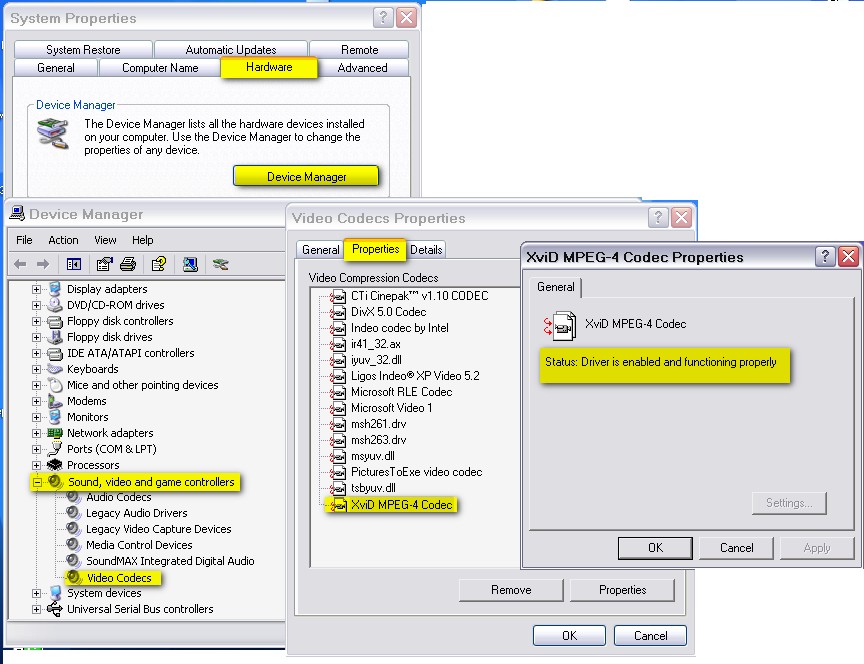
harryo, Follow Ken's post above .... ( Ken, this time you Beat Me ) See Attachment below to find your Codecs installed and its status ... without use of third party tool.
-
Music assigned to menu in VideoBuilder 5.5 does not play
nobeefstu replied to mcinal's topic in General Discussion
mcinal, You may need to check your Audio Format Options in Video Builders Project Options. Do you send your DVD sound thru some type of sound/theater system ? Some cases using theater sound systems require LCPM setting.