nobeefstu
-
Posts
1,971 -
Joined
-
Last visited
Everything posted by nobeefstu
-
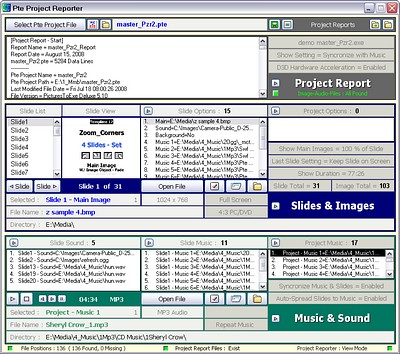
Thanks to All who commented and dowloaded Pzr 360 Transitions I hope it helps in making your slideshows easier. Soon To Come !! Pte Project Reporter It will be ready in about a week ... my testers are busy testing. Summary: Easily scan, display and view major details of your PicturesToExe Slideshow Projects (.pte project files only) in one simple step. Save the project details to a Project Report file(s) with just a click of a button. This program offers some nice features and functions in a user friendly GUI layout. I hope the .pte file settings I have pre-selected to scan and display are detailed enough for most PTE users general needs. Pte Project Reporter is FREE TO USE and is designed for use on PicturesToExe v5.1 .pte and newer project files. Older version files can be scanned but may lack details and/or miss report data due to its older file format. Pte Project Reporter does not scan executables or retrive any file data from the compiled project. Pte Project Reporter can save the scanned data list of each .pte project file to a Project Report text file so you can easily add additional slideshow notes. Project Report also creates a html file of your slideshows Main Images (thumb view size without image target links - supports slides of jpg & bmp image formats only). Pte Project Reporter does not harm, edit or alter the PicturesToExe .pte file or its file contents. Heres a sneak preview: Thats enough for now ... Thanks Again
-
current slide in fullscreen slide list
nobeefstu replied to ferrolux's topic in Suggestions for Next Versions
ferrolux, Pte displays the selected/highlight color from your Windows - Desktop Settings. You may want to check your Appearance setting of Selected Items to verify your current color in use. If you accidentally click the open space/background of the panel you will lose the highlighted item. In that case just look at the bottom bar of the panel which shows the filename currently displayed/selected. -
simonr, Just open PTE and select View | Language from the top bar menu buttons. Select your desired default language.
-
Try using the forums Search for Proshow ... youll find lots to read about.
-
Hello, Ken Hawks method works just fine. Since the new v5.1 now has additional ways to Customize Slide timing settings and older versions do not ... maybe some users older version files slide timings are using the new global timing which is different than what they had previously. I personally have not tested for this possibility. The v5.1 feature: + "Wait for a key press to show next slide" option in Project options available again. You can overwrite global value in a properties of a slide.
-
Jean, You must correctly follow the steps as described by Peter in above post. I believe you may be failing to use File|Open of the 2nd pte file after you copy the slide(s) from 1st pte file. You issue is probably from having both pte files opened at the same time. Peters sequence states: ... Copy Image In the same instance of PTE... File...Open...<target project>.pte First image in <target project> comes up as already selected Right click on it and... Paste Image ...
-
Are copying and pasteing thru PTE program ... or using a text editor to produce your new file ?
-
Tom, This does work well behaved when importing ... use Show next slide after indicated time interval in the Customize slide timing. I used this setting for most slides to produce Pzr 360 templates. The slide using the above setting is referenced by this parameter ... Pers_EndAction=timer When slide is using default timing the parameter is ... Pers_EndAction=
-
JK and Tom, It use to be relatively easy in v4 series to add additional slides. V5 series has several new Main - values/parameters that also need to be calculated. These calculations are the opt_synchpos timing of each slide and count totals. Making a tool to join addittional slides would not be too difficult ... but combining two complete different shows together eludes me in the current file configuration since each show also needs/has its own set of parameters/global values. Since Igor mentioned this feature is soon to be available ... I didnt see the need of creating such a tool.
-
peterandjean, Can anyone tell me if it is possible to add part of previous PTE file into another PTE file : Its possible ... Not a easy task for the average user if they are unfamilar of the internal workings of the .pte file. Check this link: http://www.picturestoexe.com/forums/index.php?showtopic=6983 --------- Also could you add 2 complete PTE files together before saving to DVD :
-
Judy Ive just tested here and when I used a short loop music as background with repeat after playing and the show set to Repeat until ESC ... Music seems to play thru without beginning again at first slide. Music setting plays independent of slides in Timeline.
-
pumpkin Your issue seems a bit unordinary ... since all seemed to appear complete. Did you burn a .pte file or some other file format (such as Mpeg2 or AVI) directly thru VideoBuilder ? Tell us some steps/settings you made to produce your VideoBuilder DVD. File size and overall burn time to create the DVD. Test with a DVD RW disc if possible so as to not waste additional discs.
-
Connection impossible serveur regnow.com
nobeefstu replied to quicksilver's topic in General Discussion
I dont speak French either ... so Im guessing JP is having some sort of issue in accessing or using Regnow by the comments already made. One suggestion is to make sure to turn off any Pop-Up Blocking programs ... as alot of these type sites can not communicate properly being blocked. -
Mary, After re-reading your above post ... I just now realize you may have a .pte file shell open problem in your OS registry. I suspect when you dbl-click any of your .pte project files ... PTE program does not open to the correct file. xahu34 reported on this same issue as he was experiencing the problem not long ago. You too may need to edit the .pte file Open command/action parameter in your OS registry. This is accessed from Windows main bar-Tools|Folder Options|File Types tab ... look for .pte file extention and click the Advanced button to correctly edit the %1 to "%1" Read this post: http://www.picturestoexe.com/forums/index....ost&p=49701
-
Brian, You are quite correct. I guess many users who create a ISO image file are unaware or fail to follow ISO 9660 file system standards/requirements. So its best to keep it simple and basic as you suggest ... to avoid these issues altogether.
-
zke, After reading your last post ... I see you made a working DVD. It seems just your output screen ratio settings needed to be configured properly. Am I correct in asuming this time you made a ISO file to burn to DVD ? With Video Builder you can burn directly with Burn DVD Disc without the ISO files and other check boxes. Creating ISO files are mainly used for multiple/additional copies at later times. So just use checkbox Create DVD Disc at this time (since your new to producing video ) * Also to save wasting DVD discs till you get sorted ... you can first test with Create MPEG2 Files checkbox and disable Create DVD Disc checkbox. Preview the MPEG2 results ... if satisfied then Create DVD Disc of your .pte file. *There are alot of variables involved for new users to acquaint themselves with when it comes to producing DVD videos.
-
Problems burning PTE to Ulead DVD Movie Factory 4
nobeefstu replied to ryt's topic in General Discussion
ryt, It appears to me your disc issue may be similar to this recent post. For details read: Burning a DVD-error message - WnSoft Forums http://www.picturestoexe.com/forums/index.php?showtopic=7972 -
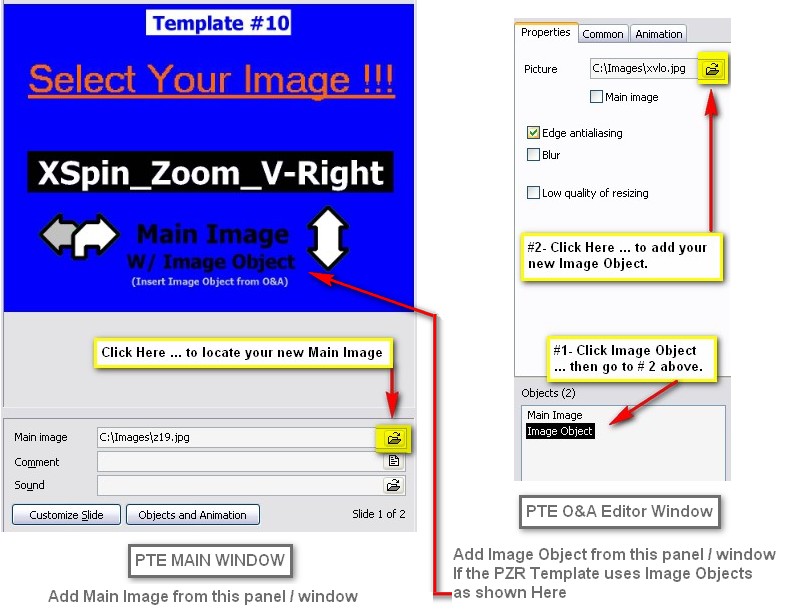
What A Ride, The beauty of using any Templates in PTE ... is you can always change any existing Image used in a Slide to a new/different Image. Just click/select from the Slide List (far right panel) in PTE Main Window the Main Image you want to change ... and just follow the details in the below attached image. To add/change the slides that are using Image Objects you need to open the O&A Editor window ( Objects & Animations button) of the selected Main Image/Slide. Pictures are better than words ... for this tutorial. Note: Dont forget to File| Save As in PTE to your own filename and folder location ... otherwise the pzr template will be overwritten when you use Pzr360 again.
-
Mary, Maybe not quite misunderstanding ... but may be expecting more of a result. Clicking the black 'Preview' button just enables/indicates your in a Preview Mode. The Preview Mode text and rectangle is just a indicator ... not a clickable action/button. Preview Mode just allows you click any of the template buttons to view the small template images window only (in the top right panel) without adding any slides/templates to the slide list. Its not meant to provide a full image preview of the template images ... as displaying them in full view didnt account for much since they are such low quality and non replaceable in Pzr360 anyway. Clicking the images also has no effect since they too have no clickable action/button. All you had to do was click the 'Open Template" button ( that pops up on the left panel below the 'Create Template' button)when the (red rectangle) Completed indicator appears. The programs right panel is used as function indictaors and also has no clickable action/buttons. the Help says: ------------------- General Use Notes: ------------------ - Add your slide templates from any of the buttons of assorted slide types. Press 'Create Template' button to build the 'pzr template.pte' file. Press 'Open Template' button to open the completed template file in PTE to add your own images and prefered Project Options. - 'Preview Mode'just allows view of the default slide template images used in the template file without adding any slide selections to the Slide List. Hope this clears up some of your questions. So no bugs ... just maybe your expectations were more.
-
Are you able to access your Vista Drives in Pte v5.1 from your Xp OS ? Note: Just because a drive may be in your Network ... does not make it a Mapped (Network) Drive. You need to physically Map it yourself. If you right-click a mapped drive you should also be able to disconnect it at logon. Sorry not to be of more help.
-
bwat, Im not familar Vista OS. To verify your network drives are truly mapped ... Open My Computer and you should visably see the drive icons of all your Vista drives including those of any mapped drives from your network. You should be able to click any of those drive icons to open to the drives root directory. (Im not talking accessing from Windows Explorer) If you dont see any drive icons of your network drives in My Computer window ... you need to map them.
-
bwat, You most likely need to Map your network drives. Right-click desktop My Computer icon to map your drives selections. Or use the Tools drop-down menu.
-
While having some free time ... I decided to create a free tool ! Pzr 360 Transitions - A tool which creates a PTE v5 template (.pte) file of pzr slide transition effects for you to easily insert your own image files. Fast and easy to use. - Requires Pte v5.1 - Requires D3D graphic acceleration capable video card *I wish to thank Lin and theDom for graciously accepting to test my beta version ... even though I released this full version before Lin had time to get his pc issues sorted. Find it hosted at Beechbrook.Com - PTE Presentations : beechbrook.com - Pzr 360 Transitions - Templates Enjoy.
-
Jill, I know of no easy way to accomplish this ... short of using command line tools or if you know where the Show Desktop.scf resides on the users pc . You could also just build a separate "Menu Show" in Windowed Mode where you have capability to minimize. Use the keyboard WinKey This is caused by using full screen D3D graphic acceleration drivers in v 5. Any v5 pte show using this feature will have this desktop flicker. For "Menus" ... dont use D3D setting. If your "Shows" dont require D3D setting ... disable the checkbox also.
-
I agree with Brian. I believe majority of LT & NB owners purchase average store bought machines which come supplied low level graphic performance. Its when the sales clerk says it has enhanced graphics system for games, etc ... the buyer believes the pc should play most anything. Even high level LT & NB equipment cant compare with high level Desktop performance. *Adding one point which most users seem to forget ... its when using the D3D setting in PTE is where the majority of laptops or notebooks have issue using PTE v5. Without D3D setting these pcs should do fine.