nobeefstu
-
Posts
1,971 -
Joined
-
Last visited
Everything posted by nobeefstu
-
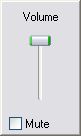
Heres a simple way to get just the (system) volume control slider for use in your slideshows. Create a button or object or run it any way you like. Action on mouse click: Run Application or open file "C:\WINDOWS\system32\Sndvol32.exe" -t or ... "Sndvol32.exe" -t *Use for XP ... not sure of compatability with Vista. *This is manual control only ... no auto fading. Once focus is off the volume control ... it closes itself *Note: Be sure to run/show the volume control at the end of the slideshow ... so the user can restore to their orig volume setting if need be. Heres an image of the volume slider. Small, simple ... sweet.

-
Picture is jerky in the transisition to next slide
nobeefstu replied to jongru4's topic in General Discussion
oooopps ... Al, thanks for clearing up my misinterpretation ! jongru4, How about creating a simple test Mpeg 2 file ... of about 20 slides with transitions of your show and testing it directly in WMPlayer. It seems strange that your quirk issue repeats itself every 4-5 slides using "all transitions". I fail to see cycling thru that amount of transitions produces a repeat quirk every 4-5 slides. I need to give this more thought I would still suggest creating the DVD with Video Builder (not DVDit) as a test to confirm the same behavior. ** be sure to still use Al's suggestions in above post. just to help ... a few details please : How many slides in your show ? How large file size is final output Mpeg2 ? Are you using default or modified Video Builder/Project options (video and audio) ? -
Picture is jerky in the transisition to next slide
nobeefstu replied to jongru4's topic in General Discussion
jongru4, You need to fix these quirks in the slideshow first ... before proceeding to create a DVD slideshow. Any playing defects/quirks in the original (preview) composition will be visually recreated in the DVD compilation. DVD shows fps is not going to match the superior pc shows fps ... allowances must be expected and adjusted for. First try and disable Hardware Acceleration checkbox in the PTE-Project Options/ Screen/ Screen Options if its currently enabled. Are the quirks still in PTE preview ? If not ... your best bet is to keep the transitions simple and not use "all of them". Just use the basic transitions ... or try and locate/remove the transitions that are promoting the offending quirks. -
Sure ... - First create your slideshow .pte file - Open Video Builder - Select your .pte file from the files view panel (top right panel) - Click Add button or drag it to the video project list panel (bottom panel) - Click Next button (bottom right). *make sure Create Menu checkbox is checked before proceeding. - You are now on the DVD menu build page ... right-click the pte show (thumbnail image) shown in the DVD menu (right panel) - Click Select Frame in the pop-up menu. -The Select Video Frame window will appear. - Click the Play button or drag the slider to any slide image your prefer to be as your new thumbnail image to be shown in the DVD menu. -Click OK button (once you have found your new thumbnail image). -The DVD menu should now display your new thumbnail image selection. *Note : The new thumbnail image selection is only viewable in the DVD menu (and burned to disc). The original thumbnail image is not changed in the .pte file (files view panel of Video Builder) to the new thumbnail image. You can not select thumbnail images from other files/folders ... the image must be contained within in the current .pte file selected.
-
Picture is jerky in the transisition to next slide
nobeefstu replied to jongru4's topic in General Discussion
jongru4, Is this behavior in the final DVD output when played/displayed on TV ... or is in Video Builders preview/build window while its creating/processing the MPEG2 file ? Does the MPEG2 file created by Video Builder have the same behavior when directly played in WMPlayer on your pc? Have you tried creating the DVD with Video Builder (not DVDit) as a test to confirm the same behavior? -
Kim, Please read the posting link below ... as it relates to your same issue. Trial Banner - WnSoft Forums http://www.picturestoexe.com/forums/index.php?showtopic=7247
-
TracyH If Ron's comment above did not solve your issue ... the blank icon/thumbnail may just be how your slides/show is setup. Its possible to use any selection of slide image within a .pte show (than that currently displayed) as the thumbnail image when building your DVD menu/template. Add your .pte file to the project list. Click Next button. In the menu build page displayed ... right-click the pte show you want to change Click Select Frame in the menu. Play or drag the slider to any slide image your prefer. Click OK button.
-
We can view the TV Safe Zone ... is Fit to TV Safe Zone possible or is this function not a practical solution? This will quickly fit images for DVD production shows and help avoid the tv cropping effect many users experience. Users now currently compensate for this cropping effect by using Additional Options and set to a % of the slide to show main images.
-
Bob, For best image display and viewing I suggest ... yes. Images for DVD are best resized to the ratio of the intented DVD output ratio. Its normal for TVs to overscan ... therefore up to 10% of the image will be lost from all four sides. All TVs do not overscan the same ... so the cropping effect can be different from TV to TV. (TVs will not display all of the image even though there is more image available.) This is the cropping you are seeing. To avoid this cropping effect ... follow the advice in the above post. I recently happened upon this Image Cropper tool for DVD (PAL or NTSC) production. It can even add a Safe Zone Area (adjustable) to your image so none of your image will be lost off the edge of a normal TV screen. Simple and easy to use ... best of all its free and requires no installation ! It may just solve your DVD image confusion. Image Cropper http://www.darkwood.demon.co.uk/PC/crop.htm
-
Freddy, I have not experienced the multi show DVD-RW behavior that you are having issue with. My recent test of 2 shows (total 1.84 G) on a DVD+RW disc have played correctly on two different tv/video players. Some other users may have the same issue as you ... but I have not seen any posts/reports of it. * I prefer to use DVD+RW discs vs DVD-RW discs http://en.wikipedia.org/wiki/DVD_plus_RW http://www.cdfreaks.com/reviews/Why-DVDRW-...erior-to-DVD-RW
-
Freddy, It is somewhat strange behavior ... esp since you got the second multi-show DVD to play correctly. I gather you have tried to repoduce the first multi-show on another/new DVD-RW and ended with the same issue of failure to play second show ? With all the different burners, all the different disc formats, all the different brands of discs, and all the different pc configurations involved in the production ... its amazing more issues or failures have not occurred when playing on all the different tv/video players out there worldwide.
-
Veronica2, See Ken's post/link above. PTE-Video Builder can produce MPEG-2 files which can be playable on a Mac. QuickTime has the ability to play back MPEG-2 content via the QuickTime MPEG-2 Playback Component. Apple - QuickTime - MPEG-2 Playback http://www.apple.com/quicktime/mpeg2/
-
Freddy, Have you tried buring your multi-show DVD on DVD-R or DVD+R discs ? Your DVD Player might not be able to play DVD-RW rewritable media correctly.
-
Sam, Have you so forgotten your own post made below : The v5 Apr.ini file is now located in XP here: C:\Documents and Settings\All Users\Application Data\PicturesToExe\Versions\5.0\apr.ini Note: Making this GfxEditorPath setting in the Apr.ini does not alter/change Windows Explorer-File Type default Open File settings. This setting is only useable in PTE/Open Picture.
-
oi72 You may want to compare your XP and Vista for specification differences in the System Information/Summary and Task Manager/Performance. This will atleast provide you a bit more insight of what you may need to do to improve your Vista. Check System Information/Summary : Total Physical Memory Available Physical Memory Total Virtual Memory Available Virtual Memory Page File Space : Page File used/available Check Task Manager/Performance : Totals Physical Memory Process count Commit Charge -------------------- I can only guess your Vista machie is running considerable more services and thus has to use more resources to perform these services. All these services can pay a toll on overall performance/processing. SuperFetch, ReadyBoost, AeroGlass , Vista Annimations, System Restore, Access Control, Indexing etc. ** Drive compression can be a major slowdown in processing.
-
chalkiewhite, Verify that Video Builder is registered. Open Video Builder Click- Help/About If it says Unregistered Version ... re-enter your Video Builder registration key again. ** General practice once you enter your registration key ... you must close and restart Video Builder for the registration to properly take effect. Easy Test : Create just a Mpeg2 file of your show ... do not burn DVD yet. During preview of create Mpeg2 ... verify trial banner is not being displayed. No need to create whole Mpeg2 to verify if trial banner exists. If trial banner is gone ... you can now burn DVD.
-
Dave, I agree ... My search found that the ATI-Radeon X300 SE to be a an entry-level video card in the 3D arena. The HyperMemory technology simulates 256 MB video memory by using 128MB of the system’s RAM memory. For your info -ATI Chips Comparison Table from Hardware Secrets http://www.hardwaresecrets.com/article/131 For your info-Nvidia Chips Comparison Table from Hardware Secrets http://www.hardwaresecrets.com/article/132
-
Gail, Does your DV camera allow you to save the DV data to an AVI type-1 file ? Type-1 files store the interleaved data as one stream in the AVI file. If you can try and load it into Video Builder ... but if you see a big Red X its not compatable. I believe AVI type-2 files wont work. Type-2 files split the interleaved data into separate audio and video streams. I recall awhile back that a pte user was able use AVI type-1 files in Video Builder. When I find the Post ... I will add the link here. ** See Ken's post below for the link Edited : Ken ... great find ... thats the post !
-
Dave, You might want to verify your Direct X version. You could also reinstall Direct X to be assured. For XP : use Direct X 9.0c For Vista : use Direct X 9.0c or Direct X 10 ( only if your Radeon X300 SE video card is compatable to use Direct X 10 )
-
gail See this Post/Topic: (You can ignore the Movie Factory reference ... as this does not relate to you.) http://www.picturestoexe.com/forums/index....ost&p=44486 Heres a link to download Xvid v113: http://www.divx-digest.com/software/xvid.html#downloads There are other codecs available ... but you must decide freeware vs shareware. **Remember ... both you and your intended users pc must have the same codec installed when playing/using the stand-alone AVIs ... otherwise the AVIs wont play because it needs to be decoded by the same codec to play in Win Media Player. ------------ Thers is no issue with Vista and the PTE Codec. Its just your using it to create a stand-alone custom AVI which is not the intended purpose of the PTE Codec. The PTE Codec (gives high quality reproduction) is for importing the Custom Avi to another third party video software. It creates a Temp Avi ... and PTE must remain open while the file is in use in the other software. Read Fred's comments. Note: There is no need to create a Custom AVI to burn a DVD ... just use Video Builder. Even if you may not have purchased the Deluxe edition yet ... you can still create a DVD using the Video Builder which contains a "Created with Trial Version of Video Builder" banner. Just click - Burn DVD Video Disc/OK and not the Load a Key button to perform the trial
-
Peter, The only other contrbution I can make in addition to the above posts is ... does you PC meet the specfications to use v5 and all its available features ? First & Foremost : contained in the PTE FAQ #5 Question: What are the system requirements for slide shows? Answer: For slide shows with Pan/Zoom effects: PC with 1.4 GHz CPU, 256 MB of system memory, video card with 128 MB of video memory. Windows XP, Vista, 2000, 2003, Me, 98 or 95. DirectX 8.1 or later. For slide shows created with simple effects: PC with 500 Mhz CPU, 64 Mb of system memory, any video card. Any version of Windows. To use full feature pan/zooms requires you and your future/proposed viewers both must meet the system requirements. In some cases it requires alot more system memory and video performance (pending each pc setup/config settings)
-
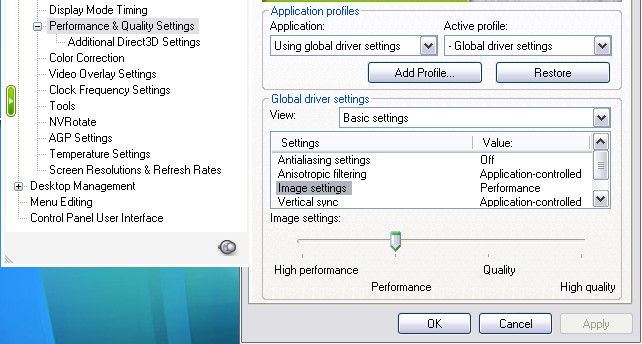
Barrie, Being your Acer laptop is quite new in operation ... your Nvidia - Ge Force 8600M GT graphics display properties may need some tweaking/adjustments. *You also may want to check your current installed Nvidia driver versions to those available at the Nvidia site. I rarely find store bought pcs have the most recent dated drivers installed - usually this requires the user to perform updates once up and running at home. Open Nvidia Graphic Display Properties : -Check your Display Mode Timimg -Check your Performance & Quality Settings Image Setting : adjust slider control range - High Performance thru Quality (or variations between) The setting above can show dramatic/immediate results. This may help to achieve that little extra you require.
-
Craig, Read and follow Als (above) Post completely ! You are not going accomplish a expireable client proof slideshow in a DVD movie format. Video Builder can not copy protect or expire a video disc/content. You need to burn yourshow.exe to a cd/dvd as a data disc. PTE does not provide provisions to burn data discs ... you must use your own current burning software.
-
submarine, I agree with Robert ... create a small size show for your first tests/burns of a DVD. Please provide a little clarity on the file size you have posted "some 1.17gbytes" ... am I correct to understand this is the projected DVD file size and not your exe file size. One cannot overlook some trivial details. PC and hardware specs would be quite helpfull.
-
Mr T. Thanks for the final update. Sad to hear it required a complete format to get it corrected. I hope what ever program is the culprit ... its one you can live without. You have shown great patience thru this test ordeal ... where many a user today just wont.