All Activity
- Today
-
Thanks, Denis. Even so, I think having a magnified area would provide a more detailed view and make it easier to work.
-
Thank You JKB, I was actually using the Jump and not the Pan.,..appreciate it...
-
Easy use a Modifier - Pan Z Oscillation & set the number of repeats to what you want. Jill
- Yesterday
-
How to make a object pulsate or throb directly toward screen, similar to a bass speaker with volume turned up. I'm using PTE ver 12.
-
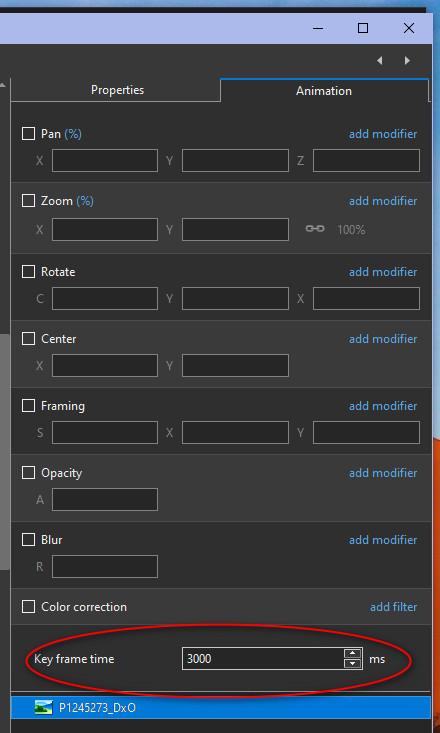
Hi It's notpossible to zoom in. To adjust key frame, you can use the key frame time. (1/1000 s). Denis
-
 MuckEye joined the community
 -
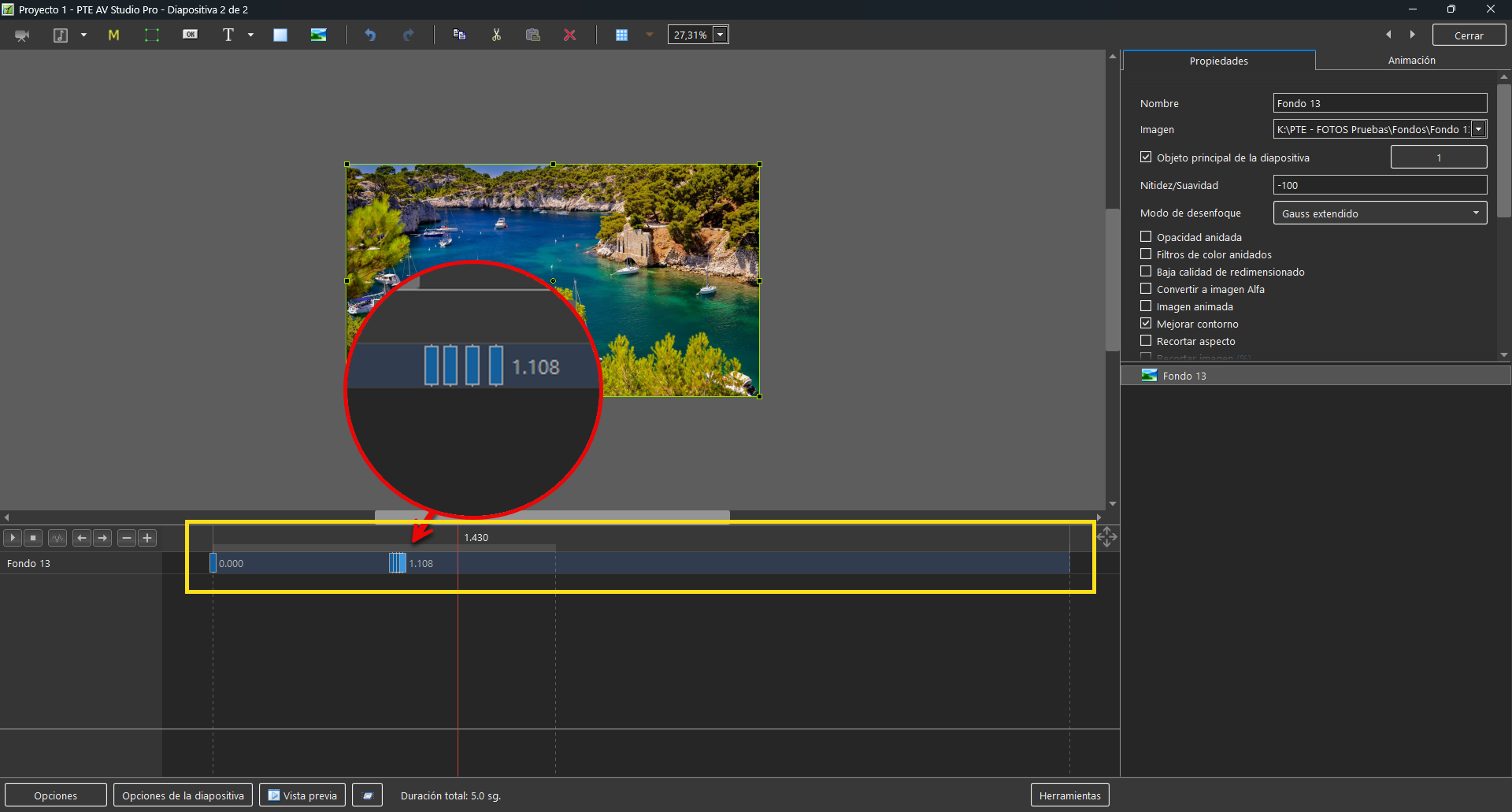
Hi, would it be possible for PTE to zoom in on the O&A timeline? Or maybe I’m mistaken and it’s already possible, but I just can’t figure out how. If this option isn’t available, it would be great to have it so we can have better control over keyframes, especially when we need to adjust them in more detail at a specific position. Right now, it’s very difficult to adjust them exactly as we want; being able to zoom in on the timeline would make the workflow much smoother than it is now. Thank you.
-
Free PTE AV Studio 12, 4K Numeric Transitions
SlideBen replied to SoCu's topic in Styles & Templates
Great style, which I can use with it. Is it perhaps possible to outline the figures of these transitions very lightly for more clarity? -
Hi, I'm sharing these 25 transitions with you; I hope you like them. https://www.mediafire.com/file/axil9uivaf91bf1/Light_Leaks_Transitions_1.rar/file
- Last week
-
Free Music / SFX Resource - Over 2000 Tracks
Eric Matyas replied to Eric Matyas's topic in General Discussion
Since my website is completely ad-free and community-supported, please consider making a small contribution on the site if you possibly can...your contributions really help me a lot. That said, I've recorded a couple of brand new music tracks to share with you...free, as always, to download and use in your projects with attribution. They are: "CYBERPUNK STAKEOUT" You can listen to it here: https://soundimage.org/wp-content/uploads/2026/09/Cyberpunk-Stakeout.ogg And download it here: https://soundimage.org/sci-fi-15/ "HIDDEN RIDDLES" You can listen to it here: https://soundimage.org/wp-content/uploads/2026/09/Hidden-Riddles.ogg And download it here: https://soundimage.org/puzzle-music-8/ Enjoy, stay safe and keep being creative! 🙂 -
Jayx241 joined the community
-
Hi, here are some transitions for you; I hope you can use them if you like them. https://www.mediafire.com/file/gw0ot8t04q2z5o3/4K_numeric_transitions.rar/file
- 1 reply
-
- 7
-

-
Updated version of PTE AV Studio 12.0.4 is available for PC and Mac Download: https://www.wnsoft.com/pte-av-studio/download/ Or use the Auto Update function: Main menu > Help > Check for Free Updates Fixed an issue where a video clip with adjusted speed or a trimmed start could be skipped in the final render during video export. Fixed an issue where restoring a backup project loaded files from their original location instead of the project's backup folder, if the original file was available. About window shows: 12.0.4 Build 1.
- Earlier
-
Thanks, Roan Jon, I've already downloaded it. Before installing it, I'm going to try to fix a couple more versions that have the same issue. If I can do it the way Igor says, I think I downloaded them from here, but I can't find the post to report it.
-
Hi, I understand your frustration. In V11, there was a bug - Hue slider in the Hue/Lightness/Saturation Color filters was changing the color of black and white (grayscale) images. This is not correct behavior. In a grayscale image, there is no color (no saturation), so the Hue slider should have no effect - this is standard behavior in Photoshop and other image editors, too. We fixed this bug in V12.0. Normally we're trying to keep backward compatibility between versions. But this case is different, because it was not a feature, it was a bug. Keeping it working would mean keeping the color filters broken. For this kind of effect, I recommend the "Coloration" color filter in PTE AV Studio. Unlike Hue/Saturation, so you can set it to any color you like. This will give you full control and a predictable result. Alternative option: it may be easier to prepare those color variations in Photoshop first, then bring these images into PTE AV Studio.
-
Hi Socu, New version of this style (confetti) for PTE 12 Multicolor confetti-2.ptestyle
-
Hi, I see the problem with this style (confetti) in V12. We’ll check the code today.
-
Hi SoCu I confirm this style works well with PTE 11 and unfortunately the confetti appears white with PTE 12
-
SoCu, This Style works OK with Version 11. Original Post is here: https://www.pteavstudio.com/forums/topic/20848-confetti/#comment-138292 Possibly Igor can throw some light on this?? DG
-
Hi, here is the link to the project. Regarding the samples of these styles, I believe they were posted here, though I’m not entirely sure, they did display color back when I first tested them. The other example, the one with the confetti showing the gold color, was a video; I’m not sure why, but it displays correctly now. The two examples I’m showing in this project are the ones that aren't displaying in color right now. https://drive.google.com/file/d/1GTQ7BD8k-86kT4dPmlv614pGlKcofkjv/view?usp=sharing
-
Post a single slide Template/BIZ so that someone can take a look for you? DG
-
I have to say that I’ve tried changing all the settings in this section, and even disabling it, but it doesn't show any changes.

-
Hi, I’m not sure if something changed in the latest update, I’m on version 12.0.4, build 1, but I can’t see the actual colors of the styles. For instance, I applied a style featuring colorful confetti, but it’s displaying in white. With another confetti style that is supposed to be gold, the confetti appears black. Unless the settings changed for some reason, I haven't altered anything myself, I’ve tried looking for an option to change this behavior but haven't found anything. Can anyone tell me if I need to adjust a setting, or why this is happening? Thanks.

-
Free Music / SFX Resource - Over 2000 Tracks
Eric Matyas replied to Eric Matyas's topic in General Discussion
Hey everyone, please be sure to check out my Game Music Mega Pack. The pack contains over 1460 music tracks (looping and non-looping) in my most popular game music genres. You can download all of them at once...a huge time-saver. Here's the link: https://soundimage.org/ogg-game-music-mega-pack/ That said, it was another very busy week, but I did manage to create a new music track to share with the community: "DRIFTING BEYOND PLUTO " You can listen to it here: https://soundimage.org/wp-content/uploads/2026/09/Drifting-Beyond-Pluto.ogg And download it here: https://soundimage.org/sci-fi-15/ It's completely free to use with attribution, just like my thousands of other music tracks, sounds and images. Enjoy! 🙂 -
Reworked D drive and now using it. Thanks all for the help!
-
Have you got Full Duration and/or Scale KeyFrames on Time Change Ticked. If so then if you move a Slide to a different position the Time will change. Best to untick Full Duration in Settings/Preferences/Project Jill
-
Good evening. Why do the photos placed on the timeline in PTE12 not retain their assigned duration or specified transitions, but instead change on their own? Thanks for the reply. Guy