

denisb
-
Posts
887 -
Joined
-
Last visited
-
Days Won
14
denisb's Achievements

Advanced Member (6/6)
-
Hi It's notpossible to zoom in. To adjust key frame, you can use the key frame time. (1/1000 s). Denis
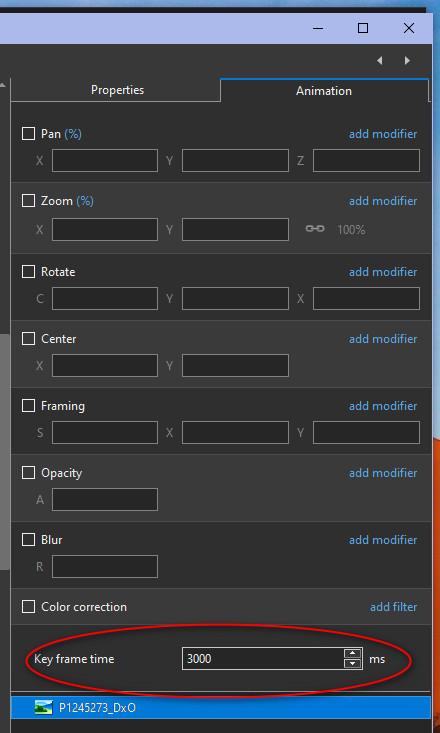
-
Hi Igor, It's Ok for me now. It works like PTE11 Denis
-
in PTE11, when you load a backup project, the files come from the pte project folder. in PTE12, the files comme from th original location. Denis
-
Hi Jürgen Oups, it's a bug of PTE 12. If you try PTE11, PTE10, PTE9, it works like I explained. Denis
-
Hi jt49, I don't agree with you: PTE use the copied images in the folder of the unzipped backup and then if it don't find some files, it use the original path. The keyword is: IsTemplate If IsTemplate=0 PTE look first in the folder of the path if IsTemplate=1 PTE look first in the folder of the .pte When PTE make the ZIP it change first IsTemplate=0 to 1 Denis
-
Hi you write that "I have to recreate the same path so that PTE can find all the files" I dont need to recreate the path. Try the example linked. https://www.swisstransfer.com/d/2fb3d9b9-9c14-446e-a918-894244f5eddb You don't need to recreate my path. Denis
-
Hi, If you organize your files by dividing them into various folders based on their intended use (photos, other images, maps, tables, music, sounds, etc.), why you don't use windows to make a ZIP ? Just make a ZIP of your main folder Denis
-
Hi, when I do the same (writing text comment) it works well. I use the French language and a French keyboard. Denis
-
Hi, I try using new features in Custom transition. The blend modes are used here. transition fusion.pteeff The example Transition_fusion.webm The video is with new AV1 Codec Sorry: I use French Denis
- 1 reply
-
- 1
-

-
Hi Igor, I try a 5 GB project (made specially) and it works well. With a HDD the limit is the HDD speed. With a SSD the speed is very important. I unpack for checking, it works well. Denis
-
Problem with Circle Waves Transition to Blank
denisb replied to jkb's topic in PTE AV Studio 12 Beta
Hi Jill, when I use CT with blank slide I add a blank rectangle to the blank slide and it works. This transition could be used with splitter for background object as the CT I make Denis -
I don't think there is a special option
-
Changing the speed of a video is broken in several ways [SOLVED]
denisb replied to mhwarner's topic in PTE AV Studio 12 Beta
Hi, For me, we can increase the speed and it works well. Original duration is 0 at the first opening If we reopen "Trim and Adjust Speed " some values are not correct. Original duration is 0 at the first opening Denis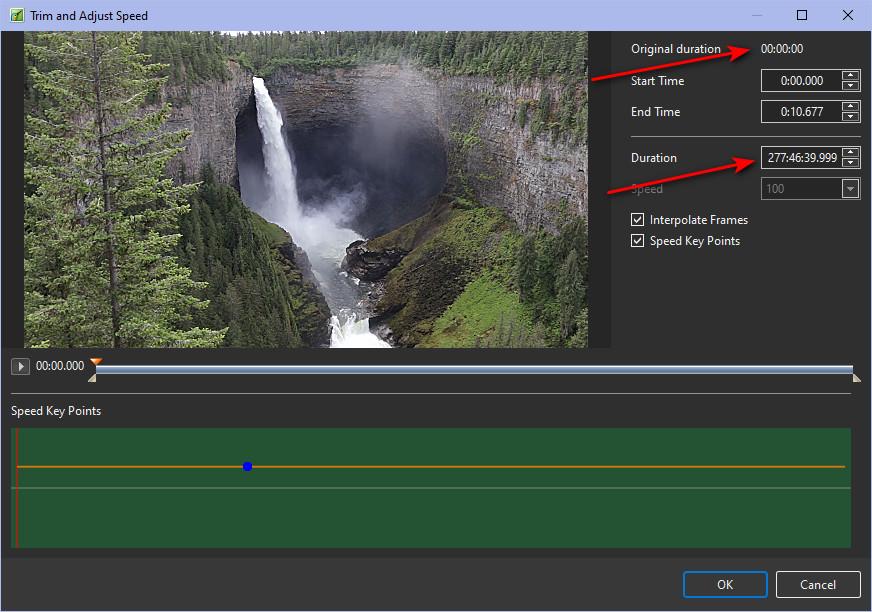
-
Hi In French, a search in Windows give results with and without diacritical symbols and with and without capital letters Denis I
-
Rather low volume of new sound effects [SOLVED]
denisb replied to CorVdK's topic in PTE AV Studio 12 Beta
Hi, I agree the volume of the effects are low. Denis
