Ken Cox
-
Posts
8,069 -
Joined
-
Last visited
-
Days Won
2
Everything posted by Ken Cox
-
lot of new features and the transition went pretty smooth lets hope it slows down the intruders thks ken
-
http://www.picturestoexe.com/forums/index....amp;#entry31968 http://www.picturestoexe.com/forums//index...t=2605&st=0 ken
-
you are going to have to supply all details in order to get help this thread should be combined with your other thread -- you never should have started 2 threads for the same problem you have been a member since 2003 you are not new ken
-
start ver 5 and then direct to open the ver 4.48 pte ken start ver 5 and then direct ver 5 to open the ver 4.48 pte ken
-
it was done as soon as you posted it you got mail:) ken
-
moderators also experience a bit of delay - but it could be because the edit process may be on a different server ken
-
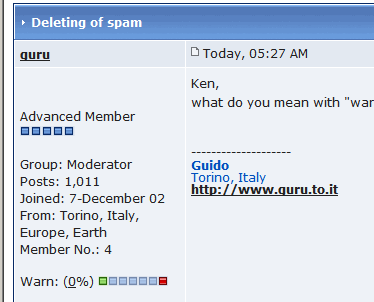
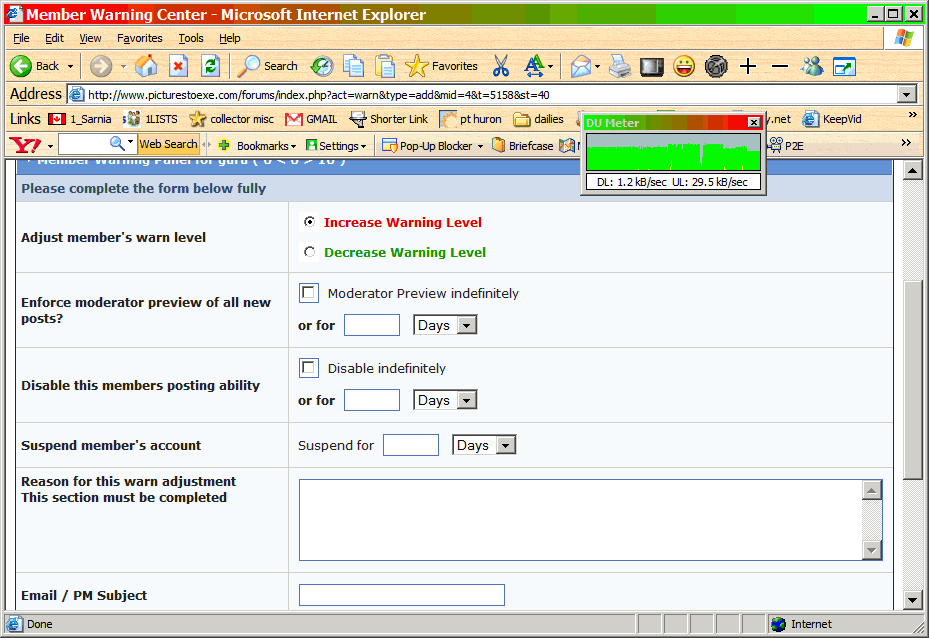
here ya go moderators -- use it to ban spammers:) you click the warn bar near bottom of left column which brings up the next screen - ken
-
Guido you click the warning indicator and fill in the blanks and reason then go back and edit or delete thread ken
-
moderators should also ban permanently the spammers -- and also edit tiles where possible ken
-
Lin great colours is the pin/broach cracked vertically above and below the red "mouth"? ken
-
from the help file PicturesToExe v5.00 beta + New Visual editor where you can add Pan/Zoom/Rotate effect. See "Objects and Animation" button (Ctrl+ on the main window. + Added Undo (Ctrl+Z) and Redo (Ctrl+Y) features. See Main menu | Project | Undo (Ctrl+Z) and Redo (Ctrl+Y). + Improved Navigation bar. > New Navigation bar style. > Added support of skins. You can add any images of buttons and background, Navigation bar can be semi-transparent and has a shadow. See folder "NavBar" in PicturesToExe's folder. Just add new folder to create new style of Navigation bar. + Added tree of folders to main window. See Main Menu | View | Show tree (Ctrl+G) + Added support of PNG images files (including PNG with partial semi-transparency). + You can quickly remove slide(s) from Slide list simply dragging them back to File list. + You can quickly press Enter to show "Customize slide" window for selected slide(s). + Main image of a slide can be transparent GIF or transparent PNG now. + Added new function to Main menu | File. "Create backup in ZIP" which compress all files of your project into one ZIP archive. It can be useful for moving project to another PC. + Vastly improved speed of work of PicturesToExe's main window. Instant response now. Especially when you work with 1000 or more slides in the Slide list. + Added new style of background image of a slide: "Fit to screen". + Added option "Keep slide aspect ratio" (1,3333 by default) to correctly draw slide + Ability to insert comment or description from EXIF info of JPEG images. See Project options | Comments tab | "Set comments for all slides as" | "Display EXIF". on various displays (usual 4:3 and wide screen). See Project options | Screen tab. + Added compatibility of main interface of PicturesToExe with Large font (120 dpi) mode of Windows. + Main interface of PicturesToExe supports "Clear type" font mode of Windows XP. + Various improvements in File list in the main window. + New "About PicturesToExe" window. + Added compatibility of main application of PicturesToExe with Windows Vista. + Added compatibility of main application of PicturesToExe with restricted user accounts in Windows. PicturesToExe v4.48 ken
-
SEE http://www.picturestoexe.com/forums/index....amp;#entry25335 http://www.picturestoexe.com/forums/index....amp;mode=linear http://www.picturestoexe.com/forums//index...;f=2&t=2687 http://www.picturestoexe.com/forums//index...;f=2&t=3537 http://www.picturestoexe.com/forums/index....es+in+V\.5 I find the make a zip function most useful -- never used a template but many members swear by it ken
-
from my archives and Rudi did all that with a very early version -- 5 yrs ago ken Tuesday, December 31, 2002 11:56 To: [email protected] Subject: PTE Presentations on Beechbrook.Com The newest PTE presentation "Ragtime Jukebox" is now available for download at the link below. Happy New Year!! Bill Ragtime Jukebox File Size: 5.24M By: [email protected] Download Count: 17 PTE Presentations at Beechbrook.Com -------------------------------------------------------------------------------- Click here to be removed from the mailing list --- Incoming mail is certified Virus Free. Checked by AVG anti-virus system (http://www.grisoft.com). Version: 6.0.435 / Virus Database: 244 - Release Date: 12/30/02 From: PTE Directory Update [[email protected]] Sent: Thursday, October 31, 2002 07:51 To: [email protected] Subject: Card Trick PTE Presentations on Beechbrook.Com The newest PTE presentation "Card Trick" is now available for download at the link below. This is the first presentation I've received which was created using the newly released PicturesToExe Version 3.80. Regards, Bill Card Trick File Size: 295K By: [email protected] Download Count: 6 PTE Presentation at Beechbrook.Com
-
JPD TEST SHOW works ok and your revised test works ok is that you ticklin' the ivory's ken
-
Gilio great picts what is planted in the fields kind of unique furrows ken
-
Lin another winner for you and Pano ken
-
thks Ronnie am going to try and move to the tutorial section -- cant t do it possibly you could repost to the tutorial section or maybe Igor and company can move it I managed to merge it to the tutorial section but it is not working correctly guess Igor will have to straighjen things up ken
-
see http://www.picturestoexe.com/forums/index....amp;#entry37665 and post 45 http://www.picturestoexe.com/forums/index....=5237&st=40 ken
-
Lin quite a show would suggest you add some links to thread to clay polymer art for new and old members of the forum so they can get some background of the craft and was the spelling correct in the credits for Snta Clara ? 2nd entry is Santa Clara ken
-
zip is up now quite a show bart you and Morasoft should collabaorate ken
-
Morasoft how about putting the roadrunner in the next issue:) http://looneytunes.warnerbros.com/stars_of...wile_story.html ken
-
SEE http://www.bit-tech.net/hardware/2006/11/3...c_gaming/1.html http://forums.microsoft.com/MSDN/ShowPost....32&SiteID=1 http://www.microsoft.com/downloads/details...;displaylang=en KEN
-
re re writeable disks see http://www.google.ca/search?hl=en&q=Er...blems&meta= also my standby sources http://www.mrichter.com/cdr/welcome.htm http://www.cdrfaq.org/ ken
-
Morasoft shows are only up for 30 days tutorials and demos are up quite a while longer because we reference them for new people all the time ken
-
Ron this? dxdiag ken Gerdi http://www.picturestoexe.com/forums/index.php?showtopic=5173 http://www.wisdomquotes.com/cat_patience.html http://en.wikiquote.org/wiki/Patience ken