Ken Cox
-
Posts
8,069 -
Joined
-
Last visited
-
Days Won
2
Everything posted by Ken Cox
-
Dan many dvd players will not play svcd's but will play vcd's and dvd's many moons [win98 era] ago graphic card mfg's -- in their bundle of software would throw in a vcd disk to show you what their card would do see http://www.videohelp.com/vcd and see if your player is compatible http://www.videohelp.com/dvdplayers of my 8 dvd players, only 3 of them will play svcd in the early days of p2e being able to make the avi/vid file it was very frustrating in the learning process to not be able to play the svcd one made mixed disk see http://www.picturestoexe.com/forums/index.php?showtopic=4136 but if you are going to try a dvd you must use a dvd disk ken
-
Ruth if you are not running ver4.48 you should because long time ago Igor updated a version that will look after "folder moving" of course all the picts music icons etc of the show must be the said folder that is to be moved - then the program will accept/find the new path to the components. ken
-
we are not hearing much about the fractals in members testing see http://www.picturestoexe.com/forums/index....st=entry27693 Please look at this example: http://www.wnsoft.com/apr/show/Fractal.zip (1 MB) Here you see 25 images and 25 text labels on one slide. ken
-
#1 system is a xp home sp2 2.8 ghz Intel pent 4 - 1 gb ram - 1 gb fixed swp file ALL-IN-WONDER 9000 [Display adapter] plays pteshow.exe and flowers fine but the fractal gives a very slight jerk at +- 20 secs and then +- every 9 secs later i relocated the files from one physical drive[d] to the main c drive to check for the jerkiness the second time i ran it when i stopped it i got the Allocation Leakage Memory Report - various stats reported here.warning then i tried the flowers and pteshow.exe when stopped i had the warning i had downloaded retried it on the the d drive no errors retried on the c drive no errors #2 system is a xp home sp2 1.3 ghz Celeron pent 3 -1 gb ram -1 gb fixed swp file All-In-Wonder 128 AGP (Microsoft Corporation) [Display adapter] 16 mb ram pteshow.exe pretty well stalled the system, CAD to stop show, flowers and fractals would run but not satisfactory ken
-
IOgor no sound opn flowers -- correct?? ken
-
my system runs it just fine and May Day is a day to celebrate http://www.cstone.net/~bry-back/holidayfun/mayday.html so start preparing for the celebration of PicturesToExe v5.00 release celebration = A joyful occasion for special festivities to mark some happy event ken
-
thks Lin ken
-
this is what myseldf and others are trying to get across to people one has to create the show then if one so desires to burn it one has to select something that is going to make the avi then one has to click make dvd -- in whatever program one wants to use to make the dvd direct it to do the job the problem seems to be that people do not want to read the instructions and/ or buy the proper software to do the job when we had the first oppurtinity to make an avi , i couldnt even get the help file open so i winged it and made vcd's and svcd's until i got a dvd burner - and until Igor advised me of windows protocol violation that i had committed i was not able to open the help file ken
-
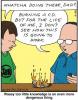
HOW NOT TO DO IT KEN
-
Andre Welcome to the forum neat but when one converts to dvd, vcd,svcd the midi's will no longer work -- midi is computer generated music so suggest you use small wav or mp3 files and i think it could be done as the program stands but will take a lot of diddlin' ken
-
GIVE EM'ELL DEN about as much response as we got the the peace project other than the bitchin' and whinning and this one is for their benefit ken
-
I am supplying sources for codecs that i have came across, i never used a different codec for a show until Jeff Evans brought it up and i did not have the codec that he used on my system and then i went hunting to get it so that possibly we could work togethether to solve the problem making a dvd is very straightforward using the standard default as supplied by Igor -- using the temp avi/vid and importing it into nero suite -- good luck trying to make the dvd if you are trying to do it with anything less than the full suite of any softwware - the suite's have wizards to help you thru until you get an idea how things work A few of us are into experimenting and spending considerable time and material trying different combinations -- we are looking to the future tv's and seeing exactly what we can and cannot do. Along the way we are coming across tips and tricks and utilities to aid us. ken
-
turning Autorun on or off. see http://www.base40.com/cdtTipAutoRun.htm http://www.annoyances.org/exec/show/article03-018 http://helpdesk.wisc.edu/page.php?id=197 http://groups.google.ca/groups?q=turning+A...groups&ct=title ken
-
gillo the ELY show? -- i have no problem with it is the Sequel to my 2004 Alaska sunset sequence -- it says a nine minute sequence - -which threw me off it does not run 9 mins it was a sequence taken over a nine minute period ken
-
Bill i thought by the description on first slide it is supposed to run 9 mins mine just runs <30 secs and quits ken
-
Dave I just downloaded and same from the cottage opens fine but try it direct from DaVe's site http://www.morturn.com/ I cant get a running copy of Sequel to my 2004 Alaska sunset sequence File Size: 9.91M By: [email protected] Download Count: 36 have dropped him a note ken
-
Fonz get this free proggie http://avicodec.duby.info/ it will tell you where every codec is installed on your system if you think you need more K Lite have also just issued updates http://www.codecguide.com/about_kl.htm http://www.codecguide.com/features_kl.htm ken
-
FONZ in order to keep the overall program small,Igor designed it that way.Less problems in the long run. Hawk and I both use the nero suite [$100 +-] and we generally do not have any problems making the dvd if you take the time and go back thru the forum you will find that the Ulead software seems to give people problems. ken
-
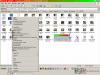
laura anne welcome to the forum r mouse te show tht you created exe file -- make shortcut windows will make the shortcut - then you can cut and paste it anywhere on your system see screenshot ken
-
Ron search damor http://www.picturestoexe.com/forums/index....c=3927&hl=damor http://www.picturestoexe.com/forums/index....st=entry25053 but if we were to "follow the forum protocol" we would discuss the merits of the show in this section the first thread was the idea to get it going but once it was made all commnets should have been made here ken
-
you must NOT click Finish until the burn is complete, if you do you will get a black screen and only sound - see screenshot ken

-
Ron from my faq file "auto start" http://www.guru.to.it/en/tips/autorun.htm http://www.picturestoexe.com/forums/index....st=entry26544 http://www.picturestoexe.com/forums/index....&st=entry5095 http://www.picturestoexe.com/forums/index....st=entry18939 http://www.picturestoexe.com/forums/index....st=entry21438 ken
-
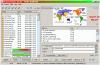
toast below test ken
-
JP A dvd played on your monitor is going to look better when played on a dvd/tv set up i belive -- this has been mentioned before -- wmp is not the ideal place to play a dvd and wmp has separate colour, tint contrast controls etc which likely will affect your viewing on the monitor when i make a dvd i play it immediately in the tv/dvd setup -- the computer has just been the tools to make it ken
-
Robert see Despicable Microsoft WMP 10 bugs http://cdcer.blogspot.com/2005/09/despicab...mp-10-bugs.html http://www.quickonlinetips.com/archives/20...s-media-player/ http://help.lockergnome.com/lofiversion/in...php/t43173.html re: screenshot of wmp screen i have just spent +- 1 hr trying the methods mentioned the resulting pict were 3-4 mb each and the image was there when i mailed it to myself in bmp format then when i tried to save as a jpg i got the usual black screen and when i shut down wmp the images were also gone in the origial email but patience paid off i did screenshots of the mail and saved as gif your turn:( ken