

Ken Cox
-
Posts
8,069 -
Joined
-
Last visited
-
Days Won
2
Everything posted by Ken Cox
-
we already have the forum for avi's it is called How to create video located here http://www.picturestoexe.com/forums/index.php?showforum=4 ken
-
you just had a brain shimmer and the pint's straightened you out k
-
JEB i have found it also helps if you try the techie stuff before the visit to the pub - or the 3 pints before lunch your download is a trial if there is no reg key so xfer the proggie and the key and install the key cheers and have a few for me, none for yourself then you can blame it on me:) ken
-
is it possible to email an P2E file?
Ken Cox replied to natalephotography's topic in General Discussion
you can zip the exe but you and the person you are sending to must have the isp's not limit the size of the file so check with your isp and the person you want to send to what the limits are the next thing you have to do is make sure you both have systems that will allow sending attachments - anti virus - firewall etc must all be compliant ken -
put the program on a floppy and load it on laptop, and the same with your reg key now it is possible to network the 2 computers - - network neighbourhood see hl=en&q=network+neighbourhood+xp+&btnG=Google+Search&meta= i will let somebody else explain it -- i had a tech do my 2 ken
-
there has been no mention of a sound editor -- p2e stays small so the program will fit on a floppy and is easier on the wallet, 'tho Igor says the price is going up ken there has been no mention of a sound editor -- p2e stays small so the program will fit on a floppy and is easier on the wallet, 'tho Igor says the price is going up ken
-
if you registered it with a bought key it will still be registered on your main system you just have to install the latest version on top of the 443 see http://www.guru.to.it/en/tips/regkey_en.htm also do a search of forum for more tips re registering ken ps save all the letters/correspondance re registration to a cd or floppy and put in safe place
-
Lin after Jeff had brought the subject up i had got the Microsoft MPEG-4 Video Codec V2 at http://www.free-codecs.com/ACE_Mega_CoDecS_Pack_download.htm after i had searched of all of ms codecs links from what i have read it is an old codec that has since been updated -- same was not on my system at the time but it does the job -- i had a 4.5 gb avi file that one son in law had made that would not run until the Microsoft MPEG-4 Video Codec V2 was installed thks ken thks
-
well Geoff if you follow this thread http://www.picturestoexe.com/forums/index.php?showtopic=3943 and http://www.picturestoexe.com/forums/index.php?showtopic=3992 Al has a projector and laptop but he still wants to perfect his shows for viewing on hdtv Hawk wants to be ready for hdtv Jeff wants to perfect his shows for his hdtv I am just a willing tester and i can take a dvd disk and test it with the latest hardware at electronic dealers to see whether i am in the ballpark -- and they will tell me if it passes muster we cant stick our head in the sand -- we have to move forward when the avi feature became available there was a lot of interest in the feature and the help file has changed very little since then -- that is all we had to work with -- my bigggest problem i could not get the help file to work and Igor had to give me a lesson in basic windows protocol -- but who reads the help file anyways?? ken
-
Ron is correct -- this topic should be in the video section it is no problem making dvd's with the tools available if people would read the instructions for the applicable software the computer is just a tool to make the raw material work one has to think "outside the box" as one of our older members used to say hdtv is here to stay ken
-
you could try to rip one of your own cd's with audiograbber http://www.audiograbber.com-us.net/ or with windows media player 10 http://www.google.ca/search?hl=en&q=rip+cd+wmp10&meta= but you must remember that unless you are using royalty free music you could get into trouble if you use the show for commercial purposes royalty free music see Barry's site http://www.beckhamdigital.co.uk/royaltyfreemusic.htm ken
-
Scrolling text and fixed image...
Ken Cox replied to [email protected]'s topic in General Discussion
guess you have not visted http://www.picturestoexe.com/forums/index.php?showtopic=2362 or http://www.picturestoexe.com/forums/index.php?showtopic=4164 yet ken -
why not burn it did the avi test ok before the full avi is made when accessed from the p2e program ken
-
are you playing the finished dvd on the computer or on the dvd player/tv ken
-
Katie I think the itunes have to be converted to mp3 format -- p2e likes mp3 and wav files -- burps on wma files see http://en.wikipedia.org/wiki/ITunes ken
-
Problems burning a DVD using Roxio Easy Creator 7
Ken Cox replied to jezzaf99's topic in General Discussion
Jerry will last years show still work in the dvd/tv set up what changes have you made to your system methods etc in the past year there is no comparison between your monitor and a atandard tv, but there are members that are showing on 42" plasma's and projector screens see http://www.picturestoexe.com/forums/index.php?showtopic=3943 http://www.picturestoexe.com/forums/index.php?showtopic=3992 why did you not tell us last year about your unsatisfaction with the show and we maybe could have helped you ken -
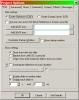
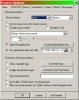
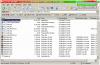
phephoto see picts i and 2 for location of check boxes and the file location in this example is pict #3 this example will retrive 1 show - have not experimented with more - but see if you can get one and you might be able to figger out how to get the rest or somebody else will help you ken
-
Leonard I use 4:3 tv in my house and so do most of the other's -- ws hd plasma and lcd tv's are coming on to the market fast and furious. I ran my tests first on standard tv's 4:3 as did Ralph, then we tested elsewhere - Al tested on his projector then on his daughter's tv Jeff Evans is in the UK and he tested on ws tv if you read our threads thoroughly you will see our procedures http://www.picturestoexe.com/forums/index.php?showtopic=3943 http://www.picturestoexe.com/forums/index.php?showtopic=3992 ken
-
Peter review my notes http://www.picturestoexe.com/forums/index....st=entry25224 ken
-
ADRI some background here http://www.picturestoexe.com/forums/index....st=entry26680 there is a lot more to it as well ken
-
Robert what was the solution to the jpegs not opening ken
-
Phil see http://www.picturestoexe.com/forums/index.php?showtopic=4122 and please start a new thread in the how to video section if you have video questions -- we have been trying to give Leonard the hint:) ken
-
New Member - First Question - Sound Files (Editing)
Ken Cox replied to Nottingham_Blancs's topic in General Discussion
Phil welcome to the forum there are quite a few members that use the free audacity, so you will quite likely get good advice if you run into problems ken -
Phil If you are using Nero you do not check any of the other software boxes that read 'For Adobe Encore DVD" , "For Pinaccle Studio", "For ULEAD DVD" ....in fact does it make a difference? - i belive it makes a vid file that is specific to that software Ken
-
you cannot edit what is on a cd unless you copy and paste the contents of a cd to a folder on your hard drive you will also have to describe the error message to us for the members to be of any help to you also you should have a folder with the original show in it as well as all components of the show in the folder ken


