Lin Evans
-
Posts
8,206 -
Joined
-
Last visited
-
Days Won
12
Everything posted by Lin Evans
-
Hi Derek You can also simply copy and paste the text to alternate slides, then change the content of the text which will not affect the keypoint timing. If you are going to be doing many it probably would be worth making a slide style, but for just a dozen or so you may just want to copy/paste the text then alter the text itself where needed. Best regards, Lin
-
Hi Sandy, If you can tell me where you live (which country) perhaps I can help you. There are two different snow globes which Panos created Photoshop actions for, and I created falling snow animations for. Best regards, Lin
-
Hi Ken, It does have a couple nice speakers, but I'm getting a big set with bass reflex, etc., as soon as I can afford it... I found a nice one at BestBuy for about $99.00 I have a battery backup system coming soon which will let it play about 45 minutes without power so I will have plenty of time to shut down. I still have to update from Win 8.0 to Win 8.1 but haven't been able to find it on the Windows Store page yet. It has a smaller footprint than Win 8/64 and built-in anti-virus. Later... I discovered I had to do all Win 8.0 updates before Win 8.1 would show up in the Windows Store. The update is free so I'm downloading now. It's a bit over 3 gigabytes so will likely take all night.... Lin
-
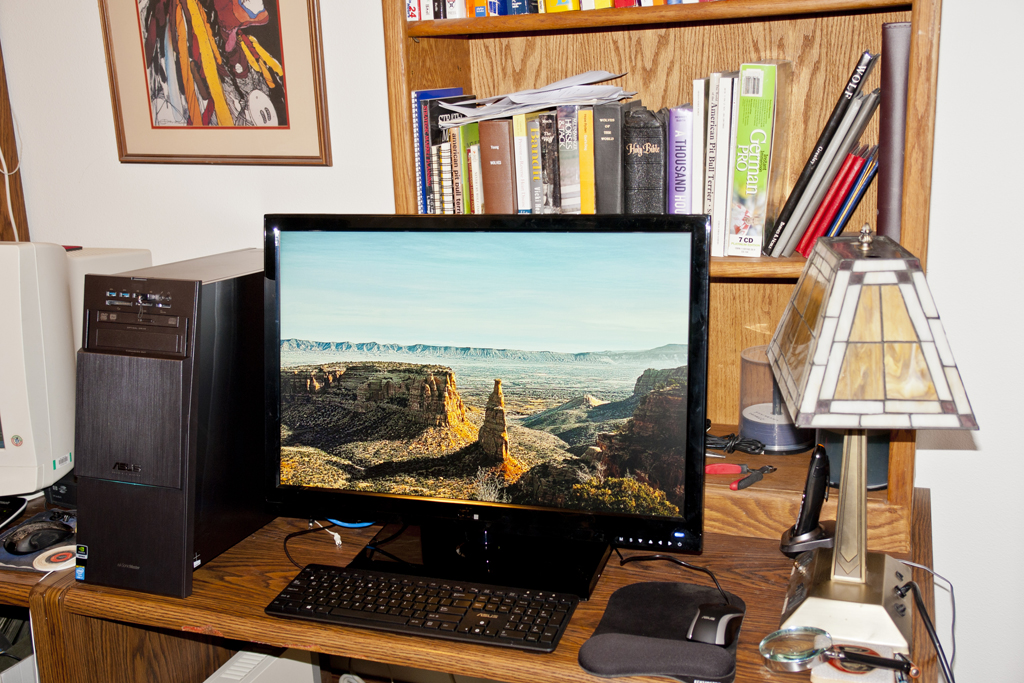
The new ASUS ROG (Republic Of Gamer's) Windows 8 with 32 Gig RAM Intel i7 and nVidia GeForce 760 with 3 Gig RAM is working very well. I just put it up tonight and the great 30" 2560x1600 CTL Display is a dream. Lin
-
Wrong slide duration with unprivileged user
Lin Evans replied to gaaned92's topic in General Discussion
HI Dave, Just answering the question of how to modify the title - I suppose it all depends on the reason one wants to modify the title... Best regards, Lin -
Business Report Here (Link) Lin
-
HI Mick, I was just going by the Wikipedia explanation: The effect is achieved by using the setting of a zoom lens to adjust the angle of view (often referred to as field of view or FOV) while the camera dollies (or moves) towards or away from the subject in such a way as to keep the subject the same size in the frame throughout. There are probably lots of useful variations possible... Best regards, Lin
-
Maybe something like this? MacIntosh Link Windows PC Link Lin
-
O.K., now I understand why. What you really need, I think, is to be able to add audio as an object just as we add images or video. Perhaps that might be something which Igor could consider for a future version. Best regards, Lin
-
Hi Tom, I'm a little unclear of the exact procedure you are using. If you want to add the audio of a video to a slide, wouldn't it make more sense to just add the audio to the slide via the "add video for audio feature" then "link to slide" rather than make the video transparent? Or maybe I'm misunderstanding what you are actually doing? Best regards, Lin
-
Hi Daniel, Bucolic and tranquil !! Thank you!! Best regards, Lin
-
Hi JT, This is the last link I have..... http://www.diapositif.net/forum/viewtopic.php?t=35945 Best regards, Lin
-
Hi Dominique, There are multiple possibilities for moving an object in curved or circle paths. If you could further explain exactly what you want to do then we can make further suggestions. As David has demonstrated, You can attach an object to a position as a child of another invisible object such as a frame then move that object causing multiple types of motion. You can use multiple frames or invisible objects with child objects attached. Also, on the French forum there one of our French users has created a program which will allow following a Bezier Path. I have several free tutorials which demonstrate alternate ways of moving an object in circular or elliptical paths. I will place a few links below for you: Download Tutorials 3, 4, and 33 French Forum Link Another French Forum With Many Tutorials Best regards. Lin
-
Hi Tom, Like a kid in a candy store!! It is fun isn't it? For the spiral effect - if anyone wants to see how it done manually, back when you discovered it on YouTube and asked the question on the forum, one of our Belgium members told us that it was originally done by Marcel and posted on the French forum. Marcel then came on this forum and gave us a link to his PDF which was in French. I copied Marcel's PDF instructions in French into a JPG and posted it on the forum. Subsequently, I made tutorials and posted them in the tutorials section on the forum. The one on creating the spiral effect is found on this link. Tutorial # 36 Link - How to Create Marcel's Spiral Effect Link to tutorials - # 36 for Spiral Effect.... Best regards, Lin
-
Hi Tom, Actually, the Chinese got this from Célou (Marcel) from our French users. Igor then gave us yet another way to do the same.... Best regards, Lin
-
Congratulations Igor and development team, on producing the finest presentation slideshow product available at ANY price! Take a break and enjoy the Christmas holiday! We are all extremely thankful for this incredible product and hope that you and the Wnsoft team have a fantastic and well-deserved break for the season!! Best regards, Lin
-
Hi Cici, Very nice, that was quite a production!! Thanks!! Best regards, Lin
-
Actually, there are "professionals" using PTE - I've used PTE "professionally" for a number of years making my clients which have been some pretty prestigious art galleries and museums quite happy with AV shows. I don't believe I'm the only one doing this either. For my clients, there is absolutely zero advantage in using Wings except considerably more cost. The end product is no better for all the additional cost, and the difficulty in my experience a great deal more. The only time I would consider using Wings Platinum is if there were multiple projections, curved screens and other considerations not possible with PTE. In the vast majority of cases for my purposes Wings is overkill and m.Objects simply not stable enough. I have a friend in Norway who puts on extremely professional AV theatrical shows with huge projections, dozens of displays and high resolution video and he doesn't use Wings, m.Objects or PTE. The problem arises when we define the term "Professional Use." Professional means being paid for what you do. I have been paid very well for both my photography and for my creation of AV products by my clients and I find no problem at all with defining PTE as a Professional tool. As for the length of time it takes to produce the end product - that depends greatly on the skills of the user. What might take an experienced user of PTE a few hours could take a week to do with Wings Platinum depending on the degree and type of desired end product. If serious animation is involved, in my experience it's no contest. PTE wins hands down. PTE works very well for me as it is without the "features" used by lesser products. I would be very happy if someone would send me a "professional" AV made with Wings Platinum to be played on a single projected screen or high resolution display which is superior in any way to what I can accomplish with PTE. What the developers must decide is if they want to dabble with countless "features" to make the product more amenable to those who would probably be quite happy with the "standard" version or if they want to concentrate on the more important things which the experienced AV worker or professional photographer wants. Not having this feature under discussion has not kept PTE from being the # 1 choice among serious AV competitors. There are countless products which resize, resample, rename, etc., and adding that as yet another option to PTE seem to me to be superfluous. Will it really help sell the product? If so to whom? What are people using now which they will give up for PTE and for what purpose are they using their present product? That's my $.02 Best regards, Lin
-
Hi Tony, Actually, it all depends on what type of show you are creating, how much zooming in tight you intend or need to do and the resources available on the computer which is used to play the executable. There are limitations, but in normal shows it's not very often that they are exceeded. What I do is use images no larger in pixel dimensions than the display resolution I expect to be used to play the show except for those images where I either crop or zoom in tight. In such cases I may use originals. In my own case it "could" be anywhere from a 10 megapixel capture to an 80 megapixel capture. Generally, I try to limit my originals to no larger than about 30 megapixel optical resolution even for heavy zooms, but there are times when I use a Phase One P65 or a Leaf Credo 80 which one of my good friends has and lets me borrow occasionally. As long as 32 bit limits are not exceeded, things work quite well. Personally, I have no need or interest in having PTE downsample and save my images under another name. It's just as easy for me to downsample those I want using the batch features of Irfanview and leave the original size for only those necessary. Having PTE do this on the fly would just prolong what is normally a pretty efficient operation and in my own case would not be a feature I would care to use. I can understand why some might want everything done for them in software, but letting the user make those decisions is the very thing which sets PTE apart for quality of images in our slideshows. There are a number of really good sampling algorithms and they are not free. It would increase the cost of our product for Igor to license different resampling libraries just to make everyone happy with the particular algorithm of choice. And then there is the issue of choosing the amount and type of sharpening used. In my opinion it would constitute a can of worms which probably should not be opened. As stated earlier, one doesn't have to downsample their images with PTE. It's only if they want an inordinately large number of images in their show that it might become necessary, or if there is lots of animation which non optimal systems couldn't handle. As for the size of the finished show, that's a variable which is entirely up to the individual. If one needs to keep it small enough to email, then relatively small images would be necessary. On the other hand, I often create shows of 500 megabytes in size and really no one has complained about download time if the content is sufficient to interest them. It's horses for courses and it's really not possible to have our cake and eat it too. It's something the developers would have to think about, but what sets this product apart is image quality and versatility. The competition may have such features and perhaps for some people these are important factors. I don't see these being overly important for the professional or for the serious AV user. After all, the products with such features are nowhere to be found where the rubber hits the road. PTE is by far the most popular tool for AV competition and the professional photographer is much more interested in quality than in "convenience" in my experience. Just my $.02 Best regards, Lin
-
Hi John, What I mean is if you create your slideshow and in Project Options, Screen Tab, do not specify "Fixed Size of Slide," PTE will size the image to fit the size the the display within the parameters of the chosen aspect ratio. For example, if I use an original image of say 1600x1200 and display the exe file on a 1024x768 display, the image will fill the screen to the level I have zoomed within my show without distortion. If I display it on a 1600x1200 resolution display, it will use the original file dimension to fill the screen in the same way without distortion. If I instead used, for example, an original of 24 megapixel resolution such as 4928x3264 pixels, this image would likewise only fill the screen on a 1024x768 pixel display or on a 1600x1200 pixel display. If I displayed this image on a 2650x1600 display it would fill the screen just as with smaller resolution displays. The difference with the 4928x3264 image would be that I could zoom in to the original 1:1 pixel level of this high resolution image and not lose any quality. On the other hand, had I used an original 1024x768 and zoomed in to the identical screen display view, the quality of the image would be severely compromised because it would be resized from 1024x768 to 4928x3264 for the deep zoom. Best regards, Lin
-
Hi Dave, That's always been my attitude. If it's not broken, don't fix it. I fully understand internet security updates, but if the system isn't exposed to the internet, they have no relevance. As long as everything is working to my satisfaction, I see no reason to expose the anticipated new system to potential malware of any kind. It was very nice for the two years I managed to keep my present development system off-line. No worries about even needing anti-virus/ anti-threat software and the numerous issues that these programs sometimes cause. Best regards, Lin
-
Hi Eric, What are the two video cards? Are they the same or could it be that you are using an integrated graphics rather than the more powerful 760 (assuming it's an nVidia GTX 760.) If so, you definitely want to disable the integrated graphics and use the GTX 760 instead. Unless you have two physical GPU cards installed, the probability is that you have a motherboard which included an Intel integrated graphics chip with shared resources and an nVIdia card has been added. I suspect this could account for the issue you are seeing with text. Lin The PCS web site has links to all the components listed in their construction wizard. With regard to the 760 installed in my machine, I have noticed the off line text on a couple of programmes such as OOO & Audacity is not as crisp as with my previous machine, I assume it's something to do with 3d or gaming requirements. There is a separate graphics card on the mother board on my set up, but requires a separate lead from the HDMI socket through a hub to switch between the two cards. I think we would all like to do that, especially after my last brush with malware, but IMO with constant up-dates from all in sundry sources, it would be practically impossible. Regards Eric Yachtsman1 Once the system is working properly, I see no reason to update on line. I can just download update data on another system and port it to the new one with a USB flash drive. In my experience, the majority of updates are Windows security updates and if the system is not on-line these are mostly superfluous. The few other updates such as Flash or such can easily be ported from another system without risking on-line exposure. I managed to keep my present development system off-line for over two years. Had my backup system not failed, I actually would never have put it on-line Best Regards, Lin
-
Hi Jack, There is potentially a serious problem with doing things this way. When creating a show, there may be a need to do a deep zoom-in on a particular image. To maintain image quality when zooming beyond 1:1 it's necessary to have a higher resolution original than for images where no zoom in is required. If all images were automatically optimized for a specific display size, this extremely valuable feature would be defeated. So the convenience of not having to resize or resample to optimize file size and increase convenience would cause issues for a number of shows where having high resolution images are very important. Actually, at the present time, there is no need to resample at all unless the show might either exceed system resources by going beyond a system limitation such as the two gigabyte limit of 32 bit systems or exceed the capabilities of less than optimal older systems. As I'm sure you know, PTE automatically resizes all images to fit the display resolution of the display device within the selected aspect ratio. Best regards, Lin
-
Hi Stu, In the configuration offered by both BestBuy and B&H Photo, at least, it seems like a pretty nice combination of both CPU and GPU power with some nice features. I bought a 30 inch 2560 x 1600 CTL 3001 Ultra 30 display and it took a while and a call to ASUS to be certain that the GPU was a separate card rather than integrated into the motherboard. I was uncertain from the description whether or not the GPU had the necessary dual link DVI port, but after finally finding a closeup image of the back apron of the system on the ASUS website I discovered that it is indeed a separate nVidia card and that it has a dual link DVI port so it should be satisfactory. The display has multi-resolution capabilities so should work fine with this card. It is far from the "best" 30" displays available - not terribly accurate on color, per PC Magazine, but for $499.00 for a high res 30" display with a three year warranty the price was just too good to resist. I have enough other displays which are spot-on accurate that I figured with high resolution I needed the size to be able to read fine print - HA! At first I was going to order the ASUS from BestBuy, but may do so from B&H instead because the price is slightly lower and I don't have to pay the high city tax on it so will save about $100. It comes with a one year parts and labor warranty so hopefully will make a nice system. It was good to hear that Judy Kay has had good luck with hers. I have so many older systems that about a half dozen are in storage. It's almost impossible to even "give" them away because even school children want the latest and greatest these days - LOL. I think I will try to keep this one disconnected from the web to minimize the probability of any malware getting on it and just dedicate it to PTE and processing photos. I was somewhat surprised when I called ASUS tech-support for pre-purchase questions that the tech had a difficult time actually finding this model so we were on the same page. I actually had to point him to several URL's before he was able to find it on their own website. I guess they have so many combinations and new offerings that it takes a while for things to filter down from sales to support. Thanks for that link - that's one I hadn't seen! For anyone else interested in a pretty great deal on a high resolution 30 " display with lots of bells and whistles, here's a link: Link to Pretty Good Deal on Display I Think Best regards, Lin
-
Hi Folks, Just a re-post of the PTE Demo Show I put up in very early 2009 - This one was made with a very early beta of version 5.7 - before we had video capabilities. It demonstrates various effects possible even then with PTE including Snow, Water Effects, Rotation of Earth, Simulated rotation of Sun, masking techniques, reflection, 3D transforms, etc. The rotation of the Earth was accomplished with well over six hundred separate photos made into small PNG transparencies and keyframed in and out on over 600 layers. The simulated rotation of the sun was done with a technique developed by Domenique (theDom) involving masking and a long - flat moving sun surface with shadowing, etc. The snowfall was done with my own processes as was the moving water. It's always amazing to see how powerful PTE was even six plus years ago! Now we have superb video and audio controls, highly sophisticated nested masking, chroma key, keyframe color control, blur/sharpen with keyframe control, chroma key extraction, RGBA Alpha Channel, incredibly precise keypoint control of audio waveform, and numerous other features and improvements. The future is very bright for this product indeed!! Link To PTE Demo Show - About 97 meg Zipped Windows EXE Best regards, Lin