cead
-
Posts
200 -
Joined
Everything posted by cead
-
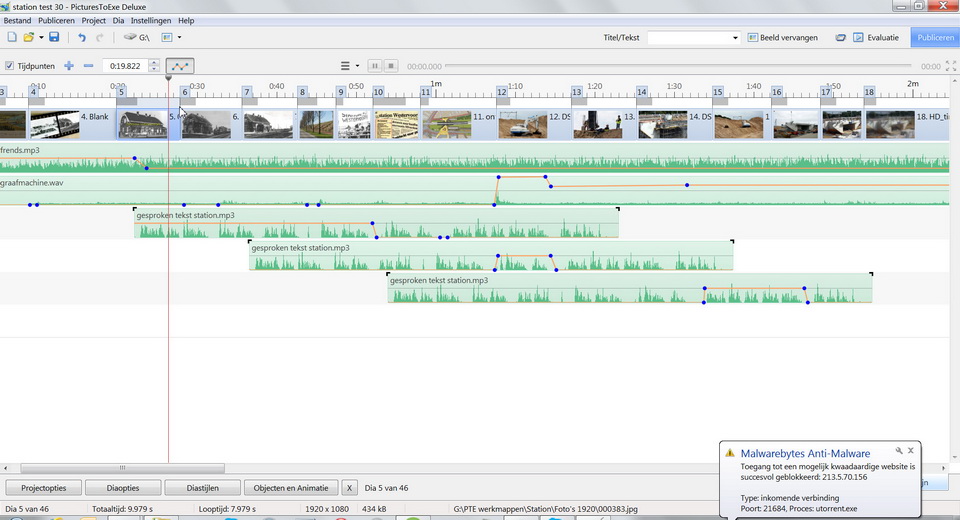
No Peter, not when you have put the timeline, by dragging the mouse, too much up; then you get the double arrow not back by clicking on the arrow next timeline / slideline. And you are really forced to remove PTE and reinstall. Frans
-
Solved: I did remove the full PTE program from my pc. Then downloaded PTE 8.01and installed again. Igor, perhaps installing a security, so you can not move accidentaly the timelines too far up (outside the range of the double arrow) ? Dave thanks for your quick response and the 'thinking'. Frans
-
Dave, That was also my first thought; unfortunately there appears no (double)arrow. (Completely jammed image-screen.) Frans
-
I do not get the time lines down (normal picture). Picture don't grabs the mouse pointer. Who knows how I can correct this?
-
Here not any problem when updating with the old long license key (up to v6.5) ! Frans
-
David, Thank you for this interesting template. Frans
-
Hello Morasoft, Thank you very much for sharing this nice template with us. Regards, Frans
-
Hallo Giel, Ontzettend mooie, zomerse, serie met prachtige foto's en uitstekende overvloeiers ! Very beautiful, summer, series with great photos and excellent dissolves ! Frans
-
Yes Roger, I am interested in your PDF workflow for Lightroom. Regards, Frans
-
DG and Xaver, Thanks for your quick reply. I do hope this problem can be improved in the future! (It is not easy to rebuild the image and maintain the same [masker] effects.) Regards, Frans
-
Yes, it is (Maskercontainer) Dave
-
Who can help me? When I see one of my productions as preview on the PTE program it runs completely smoothly. After making an exe-file, a section of this jerks and stutters. Is the pte-file not always transferred '1 on 1' to the exe-file? Regards, Frans
-
Brian, Thanks for the tip! Frans
-
Hi Dave, Thank you so much for thinking and searching for a solution to the noise problem conversion. I can't find out what the problem is; but in my case, converterting by Freemake however gives a much better result,(moreover the file size is much smaller). Frans
-
Dave, Video is ok; sound not ! Frans
-
Dave, I tried once again, now with an other project, the result is slightly better. (The settings of the AVI file conained: Audio: No compressin [PCM] 44100 kHz 16 bit Stereo; Video: Xvid MPEG-4 Codec) Frans
-
Dave, When I convert an avi-file by your way through PTE to MP4 the sound is very bad, not listenable (very distorted). What am I doing wrong? Frans
-
Hi Freddy, I use for it the Freemake Video Converter (gratis). Frans
-
Hi Giel, Nice demo series, excellent effects and runs very smoothly on my PC. What a brilliant photos ! Shame about the small display format. Frans
-
Barry, Here i have downloaded without problems, thank you for sharing ! Frans
-
Igor, Tanks for this service ! Frans
-
Hello, I am convinced that will be a very useful function to us. (This 'image not found' - error unfortunately occurred to me too much!) Kind Regards, Frans
-
Hello Eric, Nice show of a beautiful church. Best regards, Frans
-
Hi Lin, Thanks for your convenient website: 'Learn Slideshows'! Best regards, Frans
-
Lin, What a brilliant idea, and execution! Best regards, Frans