nobeefstu
-
Posts
1,971 -
Joined
-
Last visited
Everything posted by nobeefstu
-
alantha, What version of PTE are you using ? ( its good to know because so many users use different versions) Did you build your Menu in Video Builder ? Did you check your Video Builder| Project Options and enable Return to Menu after each Title ?
-
Who can give instructions to make an avi-file?
nobeefstu replied to arendsoog's topic in General Discussion
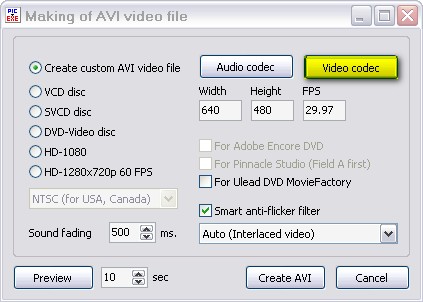
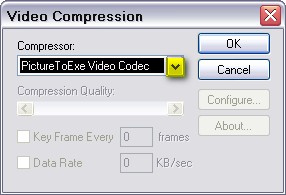
arendsoog, You must select a Video Codec in the selection menu to create a Custom Avi ... You cannot use the Pte Video Codec as its only used for creating video to disc. Creating standalone Avi files requires a Mpeg4 format type codecs or compatable codec. Pte program does not supply or install 3rd party codecs, therefore your system must already have it installed or you must locate and download from the internet. * If your Compressor selection says 'PicturestoExe Video Codec' ? If it does you need to make Mpeg4 codec selection if available on your system. See Attached Items
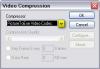
-
Who can give instructions to make an avi-file?
nobeefstu replied to arendsoog's topic in General Discussion
arendsoog, It appears your trying to make pte avi to video for disc. You need to make a standalone avi file. Incase you may not see the Create AVI button ( personal customization can hide it) Go To top bar menu File ... click Create Avi File This will open the window Making of Create Avi File. Click the top radio button ... Create Custom AVI Video File. If your new to making avi/videos and what codecs to use... you may way to read up in Pte User Guide (top of Tutorials and Articles section of this forum) -
Steve, Having the ability to add some favorite(s) directory would be a nice touch. Right now your quickest access to My Pictures folder is to click the yellow open folder icon label atop the gui panel. This is your Documents folder ... and below in the folder pane you should see your My Pictures folder.
-
Dave, Expanding on Peter's & Ralph's post above ... Another possible way to achieve your navigation bar needs is to build your own with button objects ( as many as you need) in the O&A Window. Make your button destination settings. Once made just copy the button group to your slide pages needed. You will have to reset page destinations in the appropriate buttons if you are slide jumping. Initially this will take a few minutes ... but its creative ... have them fade in or whatever within your slide timeline. The problem waiting for v5.56 beta ... is that the feature Peter mentions may not be ready. Even if it is ... its not wise to make permanent slide shows with any beta versions even though Igor has done wonderful work on it.
-
David, think(box) (Bill) ... use to have a old tool for just for your lost key case. This only retrieves PTE key and not Video Builder Key I have not seen him in forum in quite awhile ( been quite ill ) ... you may try contacting him thru PM I may still have a copy if you are unable to reach him. See Post: Help recovering registration key
-
New Monitor (1680 x 1050) PTE setup / display issues
nobeefstu replied to ezdzit's topic in General Discussion
Mike, Have you checked your screens display DPI settings ? See the DPI currently set within Display Properties Settings- Advanced -
Peter, Yes there will be some difference from v1 Reporter (even v2 beta1). Those versions ignored non data entries such as ImageName= with no reporting of missing blank entries in pte file. I figured since pte file didnt need to list it ... neither did I. I suspect this is just a copy and paste issue ... either with user process or v5.52 v2 beta2 has this reporting now since Gary experienced this new issue. New Edidted Notes I must be having a real bad day in my wrong replies to above posts. I just compiled Gary's file without receiving file missing errors ... So its not true that the empty file data space needs to be filled. The ImageName= is OK to be empty. Pte ignores or does not need it filled. Gary, Iam sorry for leading you to more issues than that of your original problem.
-
Gary, My previous post has some miss information relating to your pte file Image Object data amounts missing. Heres a report on your file. Cris_Portraits_test_Report.txt
-
Gary, I just looked over your pte file ... and your pte file has missing filename data in some slide image objects. Actually the last image object in Slide 1 and a few in Slide 2. Only fix to this file corruption is to replace image objects with new file name selections or hand paste the path/ filename after the ... ImageName= ... within the pte file itself Normally it should read : ImageName=G:\Downloads\8-18-08\Pte Shows\Cris_Portraits_test_Oct1_2008_8_45_59\WWR-1998-003.jpg Your missing image object data reads : ImageName= Note: I see you mentioned Project Reporter also failed. I will add this error warning in its detection.
-
PTE freezes sometimes when I try to Preview...
nobeefstu replied to goddi's topic in General Discussion
Gary, You may want to check your Project Options settings and see what you have enabled and preset. Avanced tab has your mouse and keyboard controls for your show ... this includes Preview. -
Yachtsman1, Your screen shots indcate to me you are not at the correct registry location. You must search for PTE and not PicturesToExe from beginning of registry for Pte's key. Make sure in the Find window you type PTE and select checkbox ... Match Whole String Only.
-
Wideangle. I cant tell you what error 2909 as it relates to in Pte ... but you may want to try this to get a better idea where the fault may occur. How to get a DeBug Report -Open Video Builder and select your files. (Do not click Next button quite yet) -Use keyboard shift+ctl+alt+q -This brings up the Debug Window. Check the Main Options and Additional Options tabs for what action you want to perform. -Now proceed as normal.
-
Severn Bore, When you say v5.52 crashes ... is it when using Pte program correct ? ... try the compiled slideshow exe ? If you still have an earlier version of Pte v5.11 still installed on your pc ... open the v5.52 pte file in that Pte v5.11 program. (Newer v5.52 files are somewhat backward compatable in my testing.) Compile it and test results.
-
Frank, First try this: Disable Hardware Acceleration D3D checkbox in Project Options | Screen tab ... all v5 and newer has this setting option, whereas older v4 does not. If the slide behavior returns as you expect ... I suspect your video card is not powerful enough to use v5 and newer Hardware Acceleration D3D.
-
Eric, Ive noticed this also in v5.52. Right click zoom options or zoom button is necessary. Right now one has to keep going to View tab and select Timelne Options then slect Zoom multiple times to get a respectale zoom in view. Please note : V5.52 has a waveform symbol at the bottom right to insert waveform. Older versions has waveform text button
-
Shep, Is it possible that you may be noticing a visual perception of the speed from smaller player screen vs full preview screen Larger screens will have larger distances to move objects across the screen and appear faster than that of small screen view. Try it set to music and you will get a better idea. The music will play normally in both view screens ... therefore the speed is the same in both views.
-
Peter, Were these latest file path locations relative to the pte file itself ? I can only guess that if pte is not using the documented full file paths or the relative file paths and still is finding them ... this may be a template file and /or is using a WnSoftFolderInfo.ini instruction sheet that is finding its files by other instructions or means known to pte. (Igor would have to explain pte's other ways to locate files.) Reporter does not identify, search, or use WnSoftFolderInfo.ini instruction sheets (normally a hidden file). I do know that template files check and use the relative path first ... then the documented file path to locate files. Whereas normal files and backup files check and use the documented file path first ... then the relative file path. Yes ... because now the actuall file paths are documented when saved ... no changes to pte file are necessary.
-
How to prepare and burn DVD-Video or SVCD disc
nobeefstu replied to Igor's topic in General Discussion
Jess575, You can not use DVD-R 4.7GB discs in a CD Burner ... only good for DVD Burner. You will have to stick with CD Discs. I dont lnow anything about Ulead DVD MovieFactory 6 and its procedures for importing files. Have your tried to make your show using Create AVI File using SVCD setting in Pte and enabled the checkbox for Ulead DVD MovieFactory ? Note: I have read comments that some versions of Ulead DVD MovieFactory dont require the checkbox for Ulead DVD MovieFactory enabled from Pte. So my best guess is try both ways to see how it sorts out . *You may want to verify that your DVD player model accepts SVCD disc. -
Peter Ive play with this Image-Audio-Files in many diff text responses. It use to display Project Files : Missing or etc. I believed the use of word Project would confuse users with their own pte project file. So the end result was to use Image-Audio-Files to address images files, audio files, or any other files (such as icons) to generally include any file pte uses externally. Reporter does 2 things to get ptes files used. -First : it reads what is exactly documented in the pte file. This is ptes doucumented full file path that was saved. If that file is found it uses it. It reports its file string used. -Second : if above files doucumented full file path is missing .... it then proceeds to find it in ptes undocumented relative path. ( this relative path is not written in pte file ... its just files that are relative to the pte file) If it finds it ... it uses it and reports the relative file string used with *RFP at the end. So in the end if both above fail to find the file ... it reports only the documented full file string as written in pte ... not the undocumented relative file path because its a assumed file location. Open your pte file in a text editor ... read its documented full file path. Now open pte file with Pte ... see if that says the same path. If it does not say the same thing ... pte is using a undocument relative file path. That relative file use will only be documented when pte file is resaved. Let me know your findings on this ... Pte does think on its own on these matters on the fly without documenting it until its actually resaved. Stu
-
Peter, I think I see now. It may falsely reported ... especially if it relates to slide baclground images. Igor has a old bug in background reporting within the pte file he mentioned to fix. Read reporter help txt at bottom for comments of ths possible issue. But it shows up rarely Click the yellow color button in Projects Reports panel beside the Image-Audio-Files: Missing text label. This brings up the [Project - Missing Files List] report sub section. or Just double-click any of the items in the Project Report slide list (top list) to expand the panel .... then click the bottom right Missing List button. There is where you will the file positions Reporter found as missing. Note: I have also had very rare cases of miss reports also. The issue I found was reporter was not correctly parsing the pte line data during scan. The data reporter will show in its list will be somewhat of lines merged and wont represent a file or file path at all. My files that gave these false reports were not totally generated by PTE ... but with PZR Transistions tools or man handled by me using copy and paste practices. These cases will most likely show some false reporting ... and may also be yours. Here is example what my missing files falsely reported: [slide28] Main Image=1 Picture=G:\Tools\dvd burn mark\Copy of IMG_1884.jpg ( X ) This counted as 2 missing It should read : [slide28] Main Image=G:\Tools\dvd burn mark\Copy of IMG_1884.jpg ( X ) Count as 1 missing *Im not sure what exactly whats causing this. Pte data is correct ... it may be a whitespace issue in my parse ... trying to sort it out.
-
Ray. No provision was made to import the project report back into the program. I didnt see the need read the saved report internally ... when it can be as easily read externally. I suspect you would like to see the saved report displayed the same as when pte was loaded. Glad to hear it worked ok on your Vista ... I really dont know many people who use Vista. Thanks Peter, I will just address some of your questions now ... I knew I could count on you giving it a torture test with your mega shows. Yes, The scanning scheme(s) is progreesively slower as the data lines mount up. I have early beta tested alot faster schemes (360 slide, 951 images @ 54520 Data Lines in 15+sec) ... but they were inconsistent and buggy in loading the slide/ slide option list to memory, the other lists were just fine cause they arent loaded into memory. I decided to stick with the slower bullet proof scheme(s) till its sorted out. Im surprised it made it that far ... your swap/ page file was probably having a fit trying to the load the slide list into memory. If I allow users to minimze on long scans so they are able to invoke other pc processes ... scan errors could occur and the scan time greatly extended. They better start ... Popups irratate me to no end ... and a poor excuse not to read. No wonder 90% of Photoshop owners dont know how do use 90% of Photoshop featues. Actually, after a few goes with reporter ... its easier than making coffee. Robert & Peter There are 1 of 3 results displayed on file(s) missing Image-Audio-Files: Missing .. the text, File Position status, and the Missing List button turns yellow ... indicating caution there are Files that are missing. Image-Audio-Files: All Found .. the text, File Position status, and the Missing List button turns green ... indicating all your files were found. Image-Audio-Files: All Missing.. the text turns yellow, File Position status, and the Missing List button turns red ... alerting you all your files are missing. The Missing warning does not sort or identify any specific file type category. I dont see where the' Files Not Used' applies in this case. Maybe just seeing the Missing throws you off. I guess It could of said ... Some Missing ? Ok for now ... Ill get the other questions a little later ... thanks All !!!
-
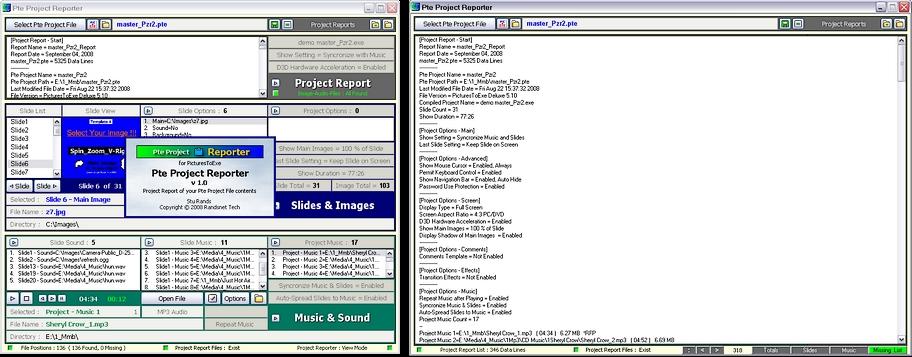
Pte Project Reporter - A new tool for PicturesToExe Easily scan, display, and view major details of your PicturesToExe v5+ slideshow .pte project files in one simple step. Save the project details to a Project Report txt and html file(s). For all those users who want to view and document the major details of their pte slideshow for record retention ... or whatever. Especially useful to new users who want to grasp the inner workings and settings their pte file makes of their slideshow. Troubleshooting ? Save a Project Report and upload the report txt file to the forum ... so the experts here can better help you identify some of your slideshow image issues and settings. Pte Project Reporter is simple to use and has many nice features. And of course ... its Free !!! * But most ... My warmest graditude to my friends for testing and suggestions ... Ralph (Hawk), Ken (Ken Cox), and Robert (LumenLux) ... and Bill (cottage) of beechbrook.com for hosting, all of whom helped to make this program possible! Find it hosted at Beechbrook.Com - PTE Presentations : Pte Project Reporter http://www.beechbrook.com/pte/ Enjoy. See Sample Report txt below PteShow_Report.txt

-
Andrew, If you remove the setting Slide Transition Random .. do your transistions reappear as you expect ? Hint : Your expected O&A transition timing may be overlapped by the normal Slide Transitions need to achieve its timing function. You may need to move your expected O&A transition further into the timeline ( not within the area at the beginning of the slide where the normal slide transistion will hide it)
-
TRANSFERING FILES TO A DIFFERENT DRIVE
nobeefstu replied to Arthur Morris's topic in General Discussion
Peter's post above is correct procedure in your case. Pte backup .pte file should read the new relative file path locations. Pte will look first for the old fixed file path ... if they dont exist it will look in the new relative file path. For the backup .pte to retain the new file paths internally ... you must open that backup .pte file and save it. Make sure theres no lingering files from old file path available ... because pte will look for them there first.