Dewcal
-
Posts
49 -
Joined
-
Last visited
Recent Profile Visitors
1,484 profile views





Dewcal's Achievements

Junior Member (2/6)
-
Thanks Dave. Have downloaded and will import to try out - your help is appreciated.
-
Thanks, Dave, will try this.
-
Thanks, Dave, I will look at frames as these are not something I have ever used before!
-
Thanks, Jill. It appears that I have to manually get it right the first time, and that PTE will not align the text boxes to each other!
-
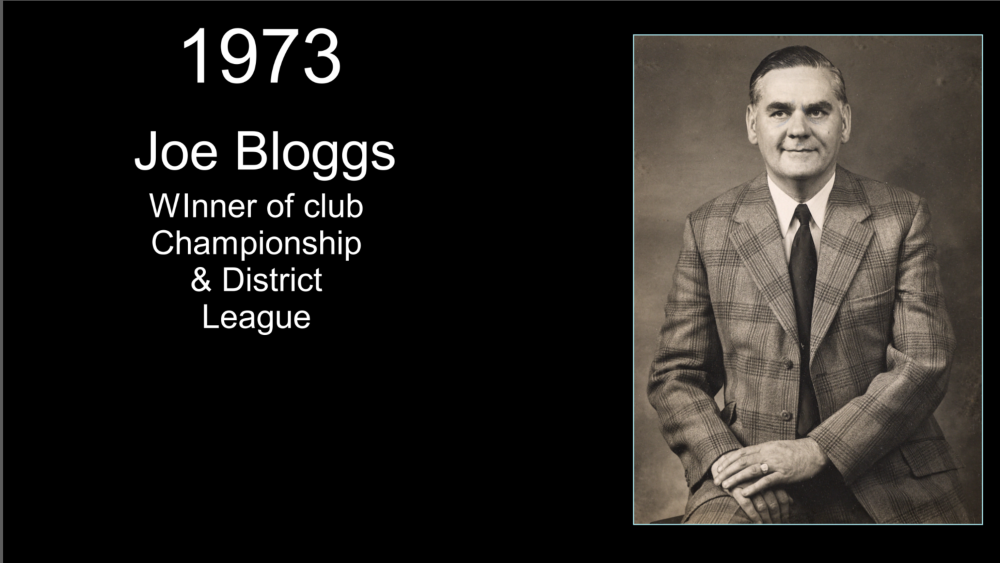
Dave, thanks for the reply and information. Perhaps I am mistaken, but my understanding is that this will only align the text within each individual box/object. I may not have explained my issue properly, but I am looking to have each text box aligned vertically above each other on the slide. I have tried selecting three text boxes, and while I can get each box to have the text aligned within its own box, the boxes are not aligned on the page. Hope this makes some sense! Have added a screenshot to try and explain what I wish to achieve.
-
I am looking to produce a show (1920x1080 px) with a slide for each of the 160 presidents of a local club! This has involved photographing some very old prints (some from the 1870s). Each image will have its own slide along with individual text boxes stating the year and name of the individual. Other text boxes may be included depending on available information about the individual. Is there a way to align the centre of these text boxes so they appear neatly on screen? The size of the "name" text box will obviously vary per individual. Can this alignment be incorporated into a style once achieved? I am looking to make a "style" to incorporate the name of the club and the foundation date on every slide. Thanks for any help.
-
Mark, Many thanks for information - I will check out how the TVs are set up. One query I have is why do I not get the "error" message when I make a video with 20 or so images and using the same audio track, style etc., yet I do when the image count is over 1000? If the TV codec / format was incorrect, would it not be incorrect in both these cases? Thanks again.
-
Hi Jill, Yes, VLC playlist is good and at least one of the TV sets will auto play all mp4s on the USB. While doing it this way is an option, I do lose the ability to randomise all the years together. Thanks again.
-
Hi Jill, Once again thanks for commenting. I can advise that the current file size is just over 5.2Gb - quite hefty but fits on an exFAT formatted USB stick. All TVs that I have tried (including an 8 year old one) have no trouble playing the images but all give the warning message re the audio. I have only added an audio track, linked to slide one and set at volume of 1, to try and avoid message that "audio not supported"! Thanks for information re the exe files being able to randomise "on the fly" - I was unaware of this. I am aware that the mp4 file, once published, will not change. As new images are added to the show each month, all bar the first two images are then randomised (Alt-R) before saving and publishing. This avoids images appearing in the sequence they the photographs were taken. People seem to appreciate the randomness this creates when viewing the show. The show lasts for about an hour before replaying until the end of the evening. The repeat is unattended as access to the TV being used during the event would not be possible. Is there an option to sequentially play a series of smaller shows without access to any control of the TV? I do not seem to be able to see one but that was with a "man" search! As i have said, the warning message which appears when the show starts each time, is an irritant, but does not stop the show repeating. Thanks again.
-
I have spent some more time on this issue and can advise that I cannot get the video file to play without a warning no matter what combination of project audio and publish options I use. However, I can get the mp4 file to play without any warnings of "audio not supported" when I make an mp4 that has 20 images in the show. Based on this it would appear that my project audio options and publish options are working correctly. I have not tried increasing the number of images to find what the "limit" is. Once I exceed the image "limit", the "unsupported audio" warnings appear on TV playback - have now tried both Samsung and LG TVs. Is there anyway to overcome this "limit"? This show is a compilation of images taken over a period of 14 years that is designed to play (with the images randomised) in the background (without sound) of a local music gig. While the warning message that appears does not stop the show playing, it is an unwelcome distraction. Any help would be appreciated.
-
Thanks Jill, Synchronise was not ticked. I always add the music track when I have randomised all the images and attach the audio file to the first image. I have just set "loop the audio" and will see how that works. Thanks again for comments.
-
Update insofar as I have added an .m4a file linked to the first slide and set the volume to one. So technically there is an audio file in the show even if it only lasts for 4 minutes and the show runs for 66 minutes...... Published show as mp4 file and played on a LG TV set and got a similar message that "this video does not contain audio". What am I doing wrong? I am assuming that as there is an audio track shown under project options and it is linked to the first slide this is all I need to do to get the audio incorporated? The first two slides are in a fixed order but the remaining 1000 images are "randomised" via Alt-R if that makes any difference.
-
Thanks Dave, Will try adding a muted sound track and see what happens.
-
I have a 1000+ image show (mp4) that has each image on screen for a couple of seconds before they fade into the next one which works well. There is no sound / music included as it is designed to play silently as background at a music gig. Last time I played it on a Samsung TV, when the show opened, there was a message displayed by the TV that "the sound track was not supported" or similar wording. What do I need to do to avoid this message? Thanks for any help.
-
Dave, Many thanks for both a very prompt and beautifully simple reply - works without issue. If only everything in life was that simple!! Thanks again.