Ken Cox
-
Posts
8,069 -
Joined
-
Last visited
-
Days Won
2
Everything posted by Ken Cox
-
Len copy and paste your reply in the other section to your entry in this thread this is the video section and your questions should be posted here ken
-
JP link #1 file is labelled as hubble.exe.zip link #2 file is labelled hubble.zip this morning both open fine, and tho' i do not have times, they were a lot faster downloading today 08:55 est time -- 02:55 Strausborg time but files did not work for me or Bill Hines yesterday - but Bill said it did work for him when it was initially posted magic i guess ken
-
Ron am sending this to you by email as well are you getting the notices yet from Bill and I? I would suspect JP has taken it down overnight ken quote Ron fyi ken -----Original Message----- From: Beechbrook Cottage [mailto:[email protected]] Sent: Saturday, March 11, 2006 7:55 PM To: [email protected] Subject: Re: [email protected] PTE Presentations on Beechbrook.Com I see that it is now no longer valid. It was when I watched it before posting it. I'll contact the author. ----- Original Message ----- From: Ken Cox To: 'PTE Presentation Notification' Sent: Saturday, March 11, 2006 12:50 PM Subject: RE: [email protected] PTE Presentations on Beechbrook.Com Bill i have downloaded thus 4 times now and same says the zip is an invalid file anybody e;se having probs the file size is what is on page so idont know what is wrong unless it is losing bits coming across the pond:)) ken -----Original
-
John the wma files just give problems for some reason convert them to mp3 if you can and try or for experimentation if you have a mp3 file try it ken
-
well now i am having a problem getting "Hubble" from the cottage have tried all day and keep getting bad zips tho' they are full size magical mystical world sucks at times Howard i could maybe email the pheasant show - it is a 7.5 meg file email me off forum if you want to try [email protected] ken
-
Howard as i said at start of the thread it took me twice it tells you how big the file is +- 7.3 mb's - if it is all done in 5-10 secs it is junk - immediately try it again and you will get it - it almost as tho' you have to wake up the server:) k
-
Howard dump your temp internet files [not the cookies] and try again as i said at start of the thread it took me twice 'it tells you how bifg the file is - if it is all done in 5-10 secs it is junk - try it again and you will get it - -it almost as tho' you have to wake up the server:) k
-
If I edit them with a photo editor I can change their size but why not just take the photographs of the correct size to begin with? because it is easier to work with big files and make them smaller than the opposite I simply asked what file size will render a good DVD? Or what photo size I should set my camera in order to get good DVD results. 100 - 200 kb but Al's point was he was going to decrease the quality by lowering the compression ratio this is not a simple question/answer i use files as big as 2.5 mb each because i can but i also use smaller files 100 - 200 kb in size it depends on what i am trying to achieve -- on these 2 threads i used +- 50 disks, many hrs and many miles driving back and forth to places to test I dont know how many of the above Al, Hawk and Jeff used but it was considerable -- Al even delivered disks to hawk and myself to see his work on his way south - Lives in Ottawa - is in Tuscon AZ at present:) http://www.picturestoexe.com/forums/index.php?showtopic=3943 http://www.picturestoexe.com/forums/index.php?showtopic=3992 i do not have the shimmer/quiver problem because i have researched the subject of shimmer and quiver -as well as many others - it is a very deep subject and one has to experiment in order to achieve optimum results what may work for me may not work for other people -- there are more variables than hair on a dog there are numerous threads on the optimum size and shimmer subject in the forum -- you are going to have to search them out -- you will soom see it is not a simple subject - but it is attainable to make an excellent show as many of the other members will attest to - but it wasn't always that way - when i first started with vcd's and svcd's i had shimmer on the r side on vertical edges -- the solution - get rid of the frames and borders and make picts fill the tv screen ken
-
Dan depending on your graphics program when you take the picture from the camera into this program and do a save as it should ask the quality you want to save as generally it is 80% quality for a jpeg there is quite a difference in resulting disc size between 50%, 80% and 100% jpgs I would suggest you start a new thread because this one is way off topic - then your questions /answers will be more easily found also use the search function of the forum for picture size example see http://www.picturestoexe.com/forums//index...18&hl=irfanview and i have +-15 more links like that ken
-
I will fwd a notice to Ron to see if it goes thru' ken
-
I just finally got the svhs of my ati 9000 card hooked up to my tv system so i was interested in this thread, so did a search Roger there may be some tips here that might help in the decision making see http://hardware.mcse.ms/archive14-2006-1-273785.html http://www.google.ca/search?hl=en&q=laptop...le+Search&meta= now the quality of my setup is nowwhere near dvd quality but for showing grandkids comedy clips it is good enough [ there might be some things i want to see a little larger as well:)] and i can finally see p2e shows 16 ft away -- showing them under worst case conditions like this one can more readily see faults ken
-
see http://www.phdcc.com/shellrun/autorun.htm http://www.ezau.com/latest/articles/autorun.shtml http://www.timeless.co.zw/soft_cdarfaq.cfm http://www.picturestoexe.com/forums/index....t=0entry21434 http://www.msfn.org/comments.php?catid=2&id=10497 dont want autorun see http://www.worldstart.com/tips/tips.php/1347 there are too many people that want the computer to do all their thinking, i do not, therefore one of the first things i do is disable auto run - I prefer thinking for myself and i do not want something taking over my system -- i get in enough trouble doing things my way A temp work around is hold down the SHIFT key till the cd mounts. This will stop it from auto starting. ken
-
autorun what if the program on the cd has big old virus and you are set up to autorun? ken
-
GP see http://www.picturestoexe.com/forums//index...t=ST&f=2&t=2785 also http://www.picturestoexe.com/forums/index.php?showtopic=4052 they should get you going ken
-
Maybe if you knew all the details, you would not hve been so harsh on Harry ken
-
Mike maybe this one 24. Disable Notification Area Balloon Tips http://www.musicxp.net/tuning_tips.htm or http://www.microsoft.com/resources/documen...n-us/gp/176.asp http://www.google.ca/search?hl=en&c2coff=1...nG=Search&meta= also see tooltips http://www.google.ca/search?hl=en&q=disabl...le+Search&meta= plse advise which one works for benefit of all ken
-
Len see http://www.picturestoexe.com/forums/index.php?showtopic=3943 http://www.picturestoexe.com/forums/index....334entry25334 now Al, Hawk and myself are from Canada, but Jeff is from the UK we did some real testing in these threads and i thought we summed up our findings pretty well i do not have widescreen/hd tv but i did get access to widescreen and a 100" screen/projector as documented in the first thread As far as i know we are all happy with our test results -- Hawk and i tested on 4:3 tv's then took our work elsewhwere -- Al has a Projector set up, Jell got a pile of treats as well -- I would not have taken my stuff to the outside world if i wasn't pretty sure it was going to be ok study the info that has been written - the answer may be there ken
-
TONY just remember the old adage "JESUS SAVES" IT ONLY TAKES A MINUTE ken ps kind of like closing the gate after the horses all ran away
-
myself i always do a save as and create as then i run from the fresh exe on occasion i will run from the piece of "toast" but i would have done the above first i wont say that i have never run preview but very seldom different strokes i guess:) ken
-
did you do a save as and a create as ken
-
Zoo please supply all details system exe version of pict to exe etc details are needed in irder for proper diagnosis ken
-
i rename extentions with xp with no problem - just ignore the xp warnings ken
-
misterwollie welcome to the forum most isp's limit how big a file you can send / receive + there is the isp mailbox size - mine is limited to 10 mb I always zip an exe if i am going to send it by email -- but they are sometimes stopped by the person you are sending to mail system I will leave the streaming issue to somebody else - but think you have to have flash or riva flv player see http://www.google.ca/search?hl=en&c2coff=1...nG=Search&meta= http://video.google.com/videosearch?q=owne...age=1&lv=0&so=0 these are flv files ken
-
Tom see http://www.picturestoexe.com/forums/index....lite=video+card http://www.microsoft.com/windows/windowsme...ntShowcase.aspx my ati 9000 handled them ok also was able to burn most of the clips to dvd ken
-
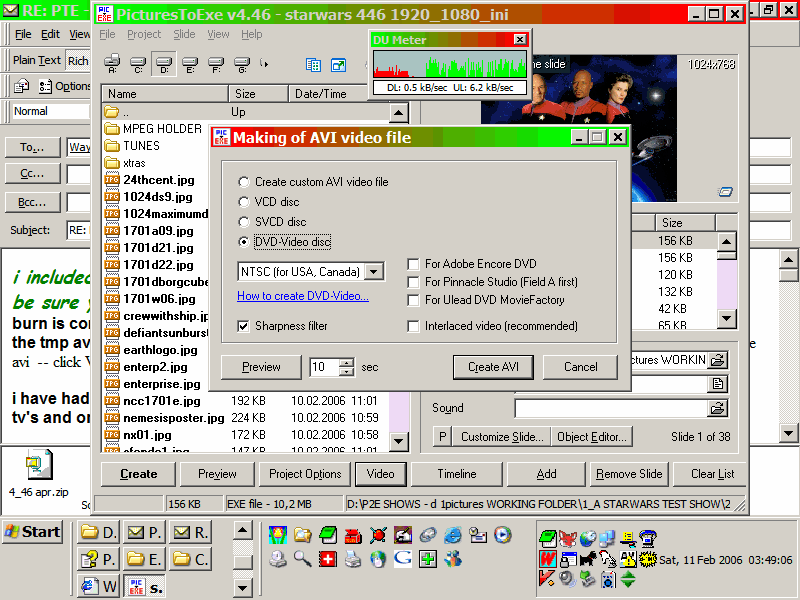
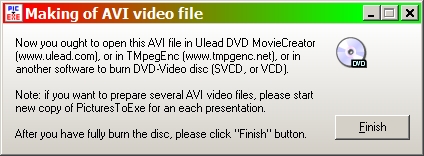
you create the avi and import it into your authoring software dont click finish till you have made the burn ken