

Ken Cox
-
Posts
8,069 -
Joined
-
Last visited
-
Days Won
2
Everything posted by Ken Cox
-
Igor error message that your 2nd one is not a valid windows application but this one 2) Please download this utility I've prepared, it will show duration of selected MP3 file. http://www.wnsoft.com/test/ShowLength.exe (400 KB) If it shows "Length: 0 ms.", it will help me to more exactly determine the problem. shows 66690ms and plays on my system ken
-
try again Ron it took me 2 trys ken
-
Ciro welcome to the forum using the search feature of the forum "undo" there were a number of hits this thread may help you http://www.picturestoexe.com/forums/index....ic=3289&hl=undo ken
-
Geoff r mouse and open it with wordpad ken
-
well TR you are really upset but it you repost to the proper section "VIDEO" you may have better luck and for the spot where we all started see http://www.picturestoexe.com/forums/index.php?showtopic=1408 when the program asks you where to save the avi direct it to the folder where you have all the files for the show you have to import the tmp avi into nero i personally have made many shows/dvd's with nero vision express with no problem,but have never tried nero burning rom route now if you want to make a permanent avi see http://www.picturestoexe.com/forums/index.php?showtopic=3992 you can also use tmpenc and make a permanent mpeg 2 that will have no menu etc but will play in most dvd/tv set ups see http://www.picturestoexe.com/forums/index....st=entry25577 ken
-
KATIE welcome to the forum SEE MY SCREENSHOT check the box that is not checked - SET COMMENTS ~ i have found a yellow font stands out and make it large for their show dont forget to save as/create as with a different name for them set line spacing at +- 50 to keep comments up from bottom of screen ken

-
Mike i seem to remember he posted at CONTAXMAN'S SITE http://www.picturestoexe.com/forums/index....wtopic=3870&hl= http://www.bishopthorpe-camera-club.com/Re...s/resources.htm PTE Timeline Guide - for PTE 4.44 or later (right-click the link choose "Save Target As") NB this file is 3.6 Mb so you will need to be patient! KEN
-
Jeff I am noticing that even tho i have read all posts the main icon of a section still shows that there are posts still unread. possibly Igor should be checking in with Invision Power Board - the last time queer things happened the site had been hacked and yes allow cookies is enabled and I will further qualfy that it does not happen all the time ken
-
Jan not having control of a show is my bug bear as well -- i feel it is improper to take control someone's system without knowing in advance. I always try the space bar and if the show jumps ahead i have control and the key pause/break will also pause the show so you study the particular scene and of course esc will get you out of it ken
-
Well we just had a new member join and when i signed on 15 people had viewed his thread - Multiple Page Jumps In Slide Show? Today, 08:28 AM and nobody had answered him was there nobody out there that could help him??? ken
-
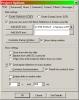
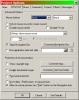
Bob welcome to the forum select control show and you can also select show taskbar ken
-
Shik the registation key is buried in your registry and will stay so just reinstall your program but you should save your communication to register and your reg key to floppy or cd also try the show un synchronized am not up to custom sync so can not help you there but try unsync before you reinstall ken
-
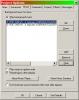
Shik refer back to the pict i put up does your mp3 file show at the top of the window like mine ? - mine shows 2 entries
-
it may be the wma file try a mp3 or you might not have the box checked to play music ken
-
Jill get yourself a copy of tmpegenc http://www.free-codecs.com/download/TMPGEnc.htm see http://www.picturestoexe.com/forums/index.php?showtopic=3962 in the video section -- way back quietstorm posted how to covert/use tmpegenc -- and there were a lot of answers/questions winavi will convert avi's to mpeg-2's http://www.winavi.com/ anything video takes considerable time if you have windows media player it will play vcd ken
-
Jill i would suggest you move this thread to http://www.picturestoexe.com/forums/index.php?showforum=4 you are going to get better results there you can then delete this thread before it goes any further ken
-
John think you have me mixed up the site is Geoff"stonemason" Stone ken
-
CGalvan been fixed long ago - I believe Igor made some changes that loaded the shows real fast so it was no longer needed get the latest version 4.45 but running off the cd has always been iffy -- a whole lot of things are involved and if you do not have the power you will have a slow loading show -- better to copy and paste to your hard drive ken
-
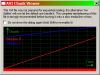
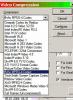
Jeff I am running xp home sp2 c/w all updates For this test I have a fairly large show - picts from the web - that i have set up and run with ver 4.5 to make sure everything works -- i cannot do custom sync so it is set auto sync with full control -- ordinary fades -- the exe is 62 mb -runs +- 20 mins - been saving it for ver 5. I read your entry about the codecs http://www.picturestoexe.com/forums/index.php?showtopic=3992 and i had never looked at the list before so i went looking I could not find your Microsoft MPEG-4 Video Codec V2 in the list I found WINDOWS MEDIA PLAYER 9 ran it -- it created an avi 2.4 gb in 45 mins -- nothing would run it then tried MS VIDEO 1 4.194 gb in 54 mins -- nothing would run it errors - needed different codecs went to MS http://www.microsoft.com/windows/windowsme...ecdownload.aspx got pkg for xp and installed still no go also got Codec Installation Package for Windows Media Player 6.4 but did not install -- as 6.4 is on my system so then i picked from avail codecs in the p2e drop down list - attached screenshot FFVFW MPEG-4 ran it and it created an avi in 30.4 mins that would run non interlaced 348 mb but as in some instances in the past i get a screen chunk viewer - attached screenshot - when i run it with wmp 10 or windvd viewer so i made another interlaced but got same error tried to do a DIVX 6 CODEC -- was 1/2 way thru and it crashed - stackoverflow then i ran xvid mpeg 4 codec -- default settings -- interlaced it made an avi in 30.44 mins 354 mb file that plays but chunk screen error again I burned the 2 ffvfw mpeg 4 avi's as well as one avi that i had ran thru WinAvi to convert to a mpeg -2 -- this gets rid of the chunk error when played on wmp 10 i used nero 6.6 to burn with default settings with menu - show set to return to menu at competion of show -- as per Hawk's discovery of this trick ran the shows on the dvd / tv with perfect transitions and music runs as it does on the exe Since this was composed Jeff has contacted me off list with his spreadsheet and he is of the opinion that the codecs available in the p2e dropdown list are computor specific and after seeing his spreadsheet list of codecs, am of the same opinion Igor, any comments here? oh and BTW the av's that would not run have been disposed of - space on my video drive is getting tight ken
-
do you have a fresh url for us?? ken
-
Dennis just checked a show that i adjusted the comments placement 49 pixels this gave me a placement of 1" up from bottom of my 19" monitor as well as my 29" tv ken
-
Dre welcome to the forum see http://www.picturestoexe.com/forums//index...t=ST&f=3&t=3547 http://www.abdn.ac.uk/diss/webpack/factsheet24.shtml http://www.picturestoexe.com/forums//index...t=ST&f=3&t=2855 http://www.picturestoexe.com/forums//index...t=ST&f=2&t=3455 use search of forum for more hits ken
-
Patrick,you did it again - a keeper ken
-
John you might pick up some tips here http://www.picturestoexe.com/forums/index.php?showtopic=3943 ken
-
Dennis think the last time i used it i started at 100 and worked from there "go boldly forth" ken


