goddi
-
Posts
3,593 -
Joined
-
Last visited
-
Days Won
26
Everything posted by goddi
-
Greetings, This has become a very annoying feature and I'd like to bring it up again. I notice that when you change from Timeline to Slides, the filename indicates that the same slide is highlighted. However, the positioning of the images in the Slides view, when you change from Timeline to Slides, changes to various different positions and inconsistently. A great improvement would be to hold the position of the highlighted slide in the same position on the screen when you switch back and forth between Slides and Timeline. Otherwise, you have to hunt to find the image's location that you were on with in the Timeline. Gary
-
Greetings Igor, This error occurred several times while working on the same project. Since I just finished the editing process for this project, I am not able to try to reproduce the error in this project. However, I was going through an older project, changing the settings for many of the images. I was concentrating, in 'O&A', to change the 'Border' width, and unchecking the previously used 'Image Crop' and then using 'Framing' instead to set the image. Also, some adjusting of the 'Pan' setting. Most of the images were old slides that had been scanned so there was a black border around the images. 'Framing' makes this adjustment much easier to hide this black border. So going image by image, making these changes, this error popped up several times over many hours of work. If I can reproduce it in any other project, I'll let you know. Gary
-
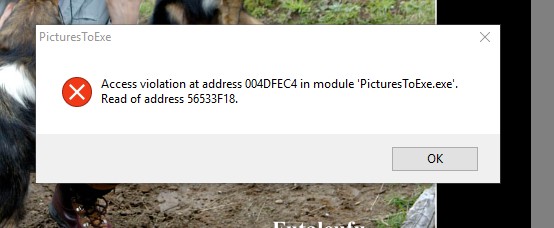
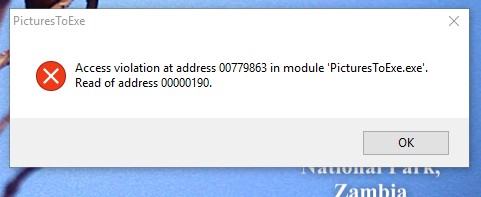
Greetings, While working on a project, a couple of error messages popped up. I closed the first error message window and continued and later, in the same session, another access violation error popped up. Both occurred while in the O&A. Gary
-
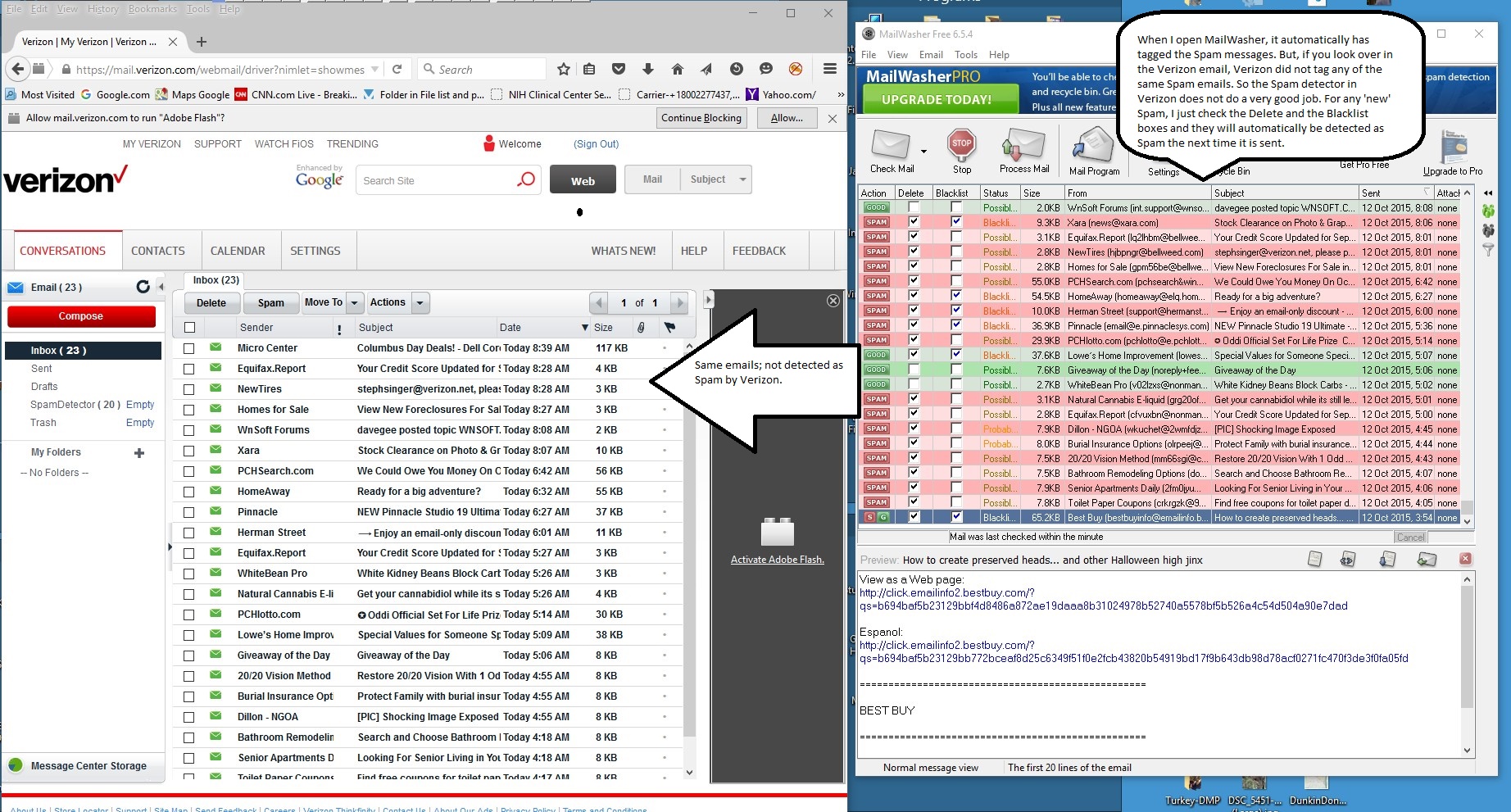
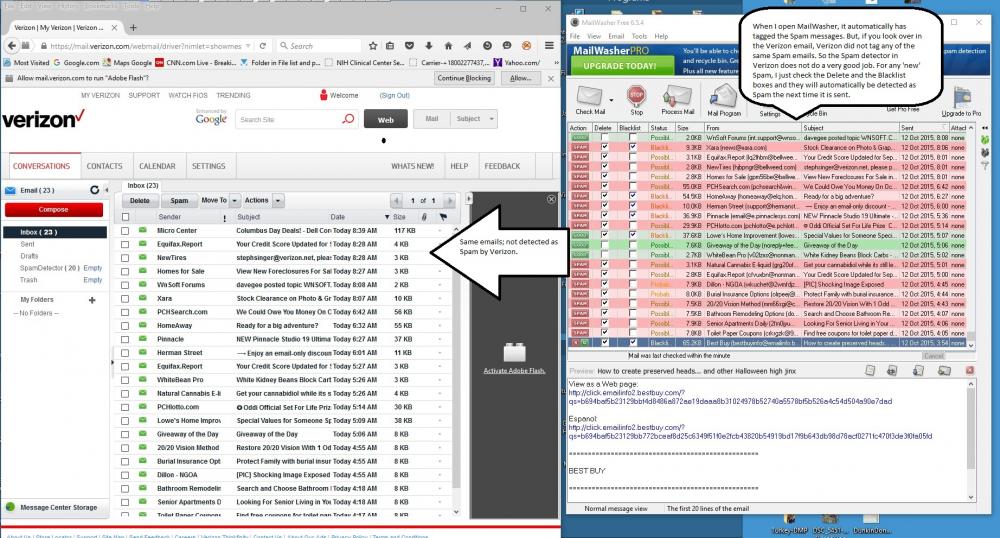
Greetings Ronnie, In response to your question, I use Verizon (our Internet provider, or server). They recently gave their email system to AOL, but we are able to keep our email address and nothing really changed. My server does catch a lot of spam automatically. But many still get through. I have been using a program called Mailwasher that allows me to view all the email left on the Verizon (AOL) server before I download them to my PC. Mailwasher catches most of the rest of the spam that Verizon (AOL) doesn't catch. The nice thing about Mailwasher is that I can tag the spam that Verizon (AOL) doesn't catch so they get tagged each time automatically. So when I Process this list in Mailwasher, all the tagged spam gets deleted off the server, and the rest get downloaded to my PC. I have been using the free version for many years, my wife has the Pro version. Best thing since sliced bread. I have attached a screenprint of a Verizon list emails that were not tagged as spam and the Mailwasher catching most of them as spam. So I need both to help get rid of the tons of spam I get. Verizon (AOL) gets some, and Mailwasher get almost all of the rest. It give me one more layer of protection. You can also view the 'raw source' of each email in Mailwasher. I am pretty sure you can use it with GoDaddy. http://www.mailwasher.net/
-
Greetings, You are not the only one. Take a look here: Gary
-
Greetings, Ok, good to know. I will just dump these from my server as they come up. I didn't know if anyone else gets the same emails. Thanks for your help. So far, they are easy to detect. Sincerely, Gary
-
Jeff, Thanks... I did not see your edit. We are on the same page now. Gary
-
Jeff, Are you talking about the 'Add video' button? Once I click on the 'Add video' button, a window of files opens up and I can select a video and it will be added to the O&A window, but it does not ask for the 'Convert', as you have pointed out. But I don't see the ability to actually 'dragging a video clip into the O&A Window'. Am I misinterpreting part of your posting about the ability to 'drag' a video clip into the O&A window? Gary
-
Igor, I received some more Spammer emails. Don't know if it will make any difference or help others to not receive such emails, but here are some new ones that should be banned. Thanks.... Gary

-
Greetings Jeff, Are you saying you can drag a video clip into the O&A window? I have tried it in V8 and V9, but, in either case, it does not allow it to be done. Can you clarify this for me? Thanks... Gary
-
Greetings All, I did a little test to answer my question: I created a short show with only one video clip. The size of the show was 81,692 KB. I then I Trimmed/Converted the one video clip to a 5 second clip. The size of the show dropped down to 15,070 KB, as expected. I then add the audio of the full video clip to the Track. The size increased to 86,389 KB. Then, to this last version with the increase size of 86,389 KB, I 'Convert(ed) tracks to MP3 for exe'. The size dropped down to 11,460 KB. So I conclude that 'Converting tracks to MP3 for exe' is a good way to reduce the size of shows with many video clips. I did a similar test on a large show with many video clips. The show's size was 444,579 KB. When I 'Convert(ed) tracks to MP3 for exe', the size dropped to 404,563 KB. My last question is, why would anyone not 'Convert tracks to MP3 for exe'? Is there an advantage for not doing it? Gary

-
Yes, thanks. I see that ' Dragging a Video Clip into an Audio Track in the Timeline will also add its Audio to the Audio Track'. So much easier.... Gary
-
Greetings Jill and Tonton and all, Ok... I copied to my Desktop the show where I had applied the "do not include file to exe" to each of my video clips. I was surprised that the video clips still played. I was to aware that an exe could still find and play video clips that are outside the exe file. I then played the show on another computer and I got the error messages, due to the missing video clips. Interesting. So, for my purposes, using the " do not include file to exe" feature does not help me at all when I want to create as small an exe as possible, with all the files still within the exe (such as posting on the Slideshowclub). But I will try out the 'convert tracks to MP3' to see that that will me a difference, but I don't expect too much from that. Thanks for the clarification. But some of my questions in my original posting have not bee addresses, such as just dragging down a video clip to the Slides/Timeline instead of going through the Project Options/Add Audio File/select the video and add it to an audio track. Works just the same? If I use an external program to extract the full audio length of 34 seconds from a video clip, the size of the MP3 is 1.3 Mbs (added to the Tracks), will I actually be saving the difference between the original 41 Mbs of the MOV and the 1.3 Mbs of the MP3, or will I still have the 41 Mbs included in the final show's size? The original size of the video clip is 41 Mbs. If I drag down the video clip into the Timeline, is it adding the full 41 Mbs, or only the size related to the audio portion? If I am using only the PTE trimmed/converted section of the video file of 16 seconds, can I delete from video clip from my PC and will the audio portion of that video clip still play if I 'convert tracks to MP3'? Gary
-
Greetings Tonton, What is the advantage of 'Convert tracks to MP3 for exe'? If this makes the show smaller, why not have it as the default? If there is no other difference in the final exe file, what is the advantage of not doing it??? Seems that if you used the audio from a video clip, there should be no increase in the size of the exe. So what effect does the 'Convert tracks (MP3 and MP4 or AVIs tracks) to MP3 do??? Gary
-
Greetings Tonton, In your example, I don't see any advantage of just separating out the video files.You still have a large zip file of the video files. That does not help when, for example, you want to post the show in the Slideshowclub site. But, more importantly, when I Published (without using the Safe Executable process) my exe with 'do not include file to exe', 'excluding all of the 26 video clips, the reduced sized exe STILL played with all the video clips. What's going on with that???? How can they be 'excluded' but still play in the exe???? Gary
-
Greetings Tonton, I just did a test with your suggestions to 'convert tracks to Mp3' and 'not include the video clips in your exe' for the 26 video clips I have in this show. Interesting results. The size of the exe dropped from 360 Mbs to 172 Mbs. Quite dramatic. But I don't understand what is going on. If the video are 'not included', what is happening? If the show plays just fine with the video clips being 'excluded', why is this not the default, to reduce file size? Why/when would you want the video clips to be 'included'? When I 'convert tracks to MP3', some of the audio files are MP4 (audio from videos) and MP3s. I don't see any changes made anywhere. So what is going on? If this reduces the final size of the project, why is this not the default? Great discovery but I don't understand why the file size decreased. Thanks.... Gary
-
Greetings, I have trimmed and converted an MOV video clip using PTE Convert. This video clip was trimmed and converted from a 34 second length to about a 16 second length. But I want to use the entire audio portion of the original length of the MOV clip. Normally, I would go through the process of Project Options/Add Audio File/select the video and add it to an audio track. But I notice that I can accomplish this my just dragging down the MOV file into an audio track. So, is this easy way (just dragging down the video clip) of adding the audio of a video clip a valid method? Another Question: The original size of the MOV clip is about 41 Mbs. If I drag down the MOV clip into the Timeline, is it adding the full 41 Mbs, or only the size related to the audio portion? If I am using only the PTE trimmed/converted video file of 16 seconds, can I delete from MOV clip from my PC and still use the audio portion of that MOV clip? (Yes, I can also Convert the full 34 second MOV to AVI, and that clip then becomes 51 Mbs. I can drag that one down to the Timeline, too, so the clip used is not H.264. Same questions). If I use an external program to extract the full audio length of 34 seconds from the MOV video clip, the size of the MP3 is 1.3 Mbs, will I actually be saving the difference between the original 41 Mbs of the MOV and the 1.3 Mbs of the MP3? Gary
-
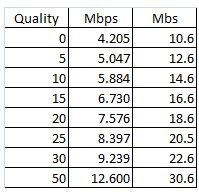
Oppsss. I had copied/pasted the chart from Excel, but it disappeared. So I added it as a jpg, above. Gary
-
Greetings Denis and all, I don't know why I never related the 'Quality' with changing the 'bit rate' in the Converter. Thanks so much for turning on the light bulb. I did a little test. I Converted an original MOV (11.1 Mbps and 30.2 Mbs.) to the various 'qualities', 0, 5, 10, 15, 20, 25, 30 and 50. Here are my results below as an attachment. I put together a slideshow that shows the difference of each quality setting. It is interesting to compare each quality to the '50'. With my eyes, I would not use qualities 0, 5 and 10. I can see the 'noise' in the shadows and the text of the sign is not to good. However, 15 and 20 start to compare favorably to '50', with reduced file sizes. The shadows are better and the text in the sign shows less pixelation. At the end of the individual samples of qualities in the attached video, I put them all in one frame so you can also compare each quality. Thanks again for shedding some light on something I really needed to understand. Let me know how you see the differences, if you can. Gary PS. Forgot to put in the full navigation bar but you can still jump from quality to quality using the keypad. Video_Quality.zip
-
Greetings Tonton, Yes, that is exactly my problem. I prepare my shows with the intention of uploading them to the Slideshowclub site. The limiting factor is that the max size of a show used to be 280 Mbs. Now it is down to about 124 Mbs. I have asked Igor to fix that limitation some time ago but nothing yet. Even the 280 Mbs limitation is too small when you have many video clips reduced to bit rates of even 5 Mbps. The Converter can put the bit rate at 3 times that. When I prepare my videos with an outside video program at the lower bit rate, there is still good quality and fluidity. If Igor would allow us to choose a bit rate for videos when using the Converter, that would help reduce the size of the shows. Many of the shows I am currently are working on are over the 124 Mbs limitation and one is about 468 Mbs. Yes, your workflow makes sense but I still need to work hard to reduce the size of my shows since I have many video clips inserted. The way the Converter currently works does not help, so I have to use an external program to process my video clips that allows the choice of bit rates. Gary
-
Greetings Denis, If I understand your post, you say you use h.264 with no problems. However, recently I was having problems with a video that was formatted as h.264 and Igor indicated that the h.264 format was causing the problem. Take a look at the following discussion. Not sure if it pertains to you, but it does talk about h.264. It appears that AC-3 and MPEG audio formats work OK with PTE. Gary
-
Greetings Tonton and Lin, I don't like to use the PTE Converter because I have no control over the bit rate and it, therefore, creates a larger video file. I don't have this problem when I do use the Convert process, but when you have a lot of video clips in a project, it really makes a difference in its ultimate size. Ok. You confirm that ACC is not supported by PTE. It is interesting that the clip will play if the ACC audio format is embedded in the video clip but not if it is separated out from the clip, as being 'added' to the Slides/Timeline. I'll stick with the conversion process that gives me the AVI format with the audio MPEG format. Seems to work OK. Thanks for the responses... Gary
-
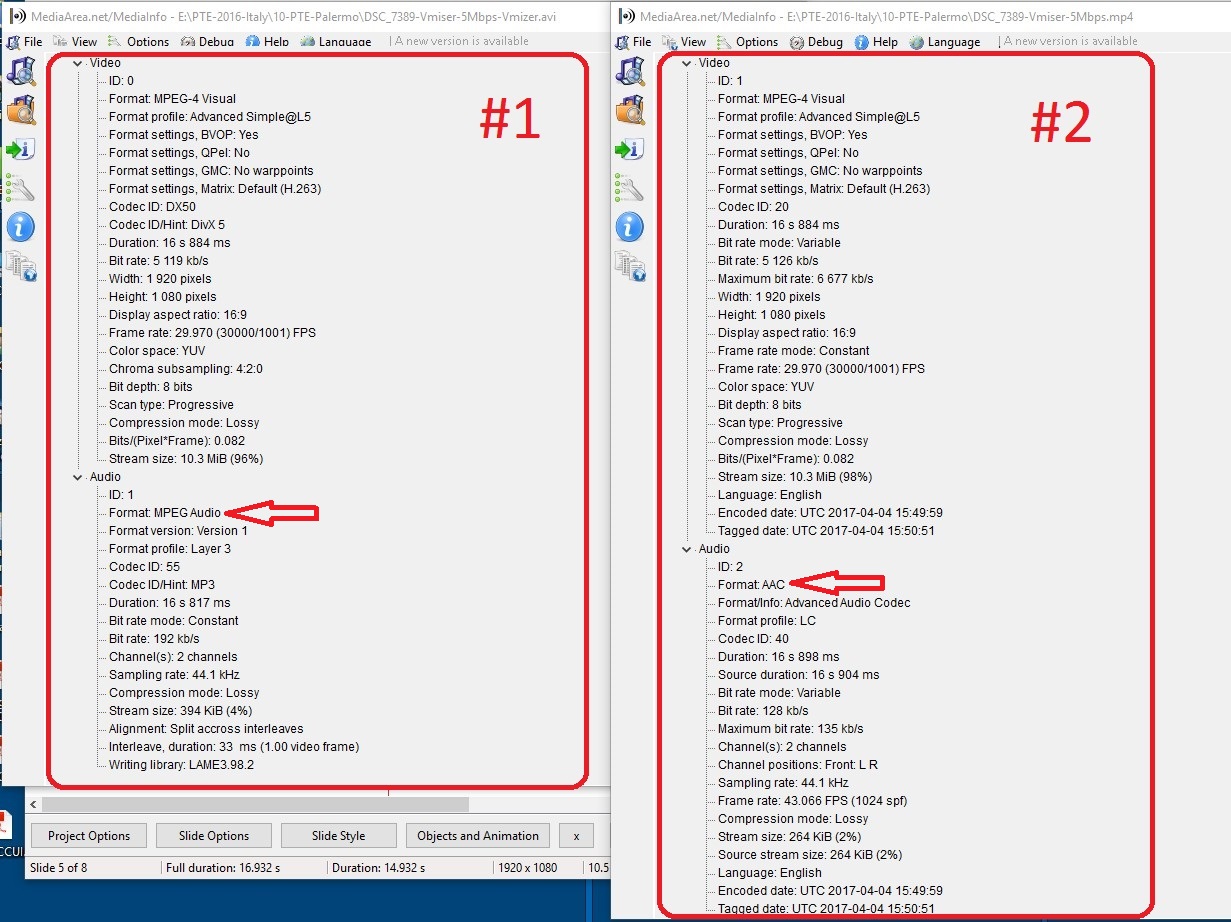
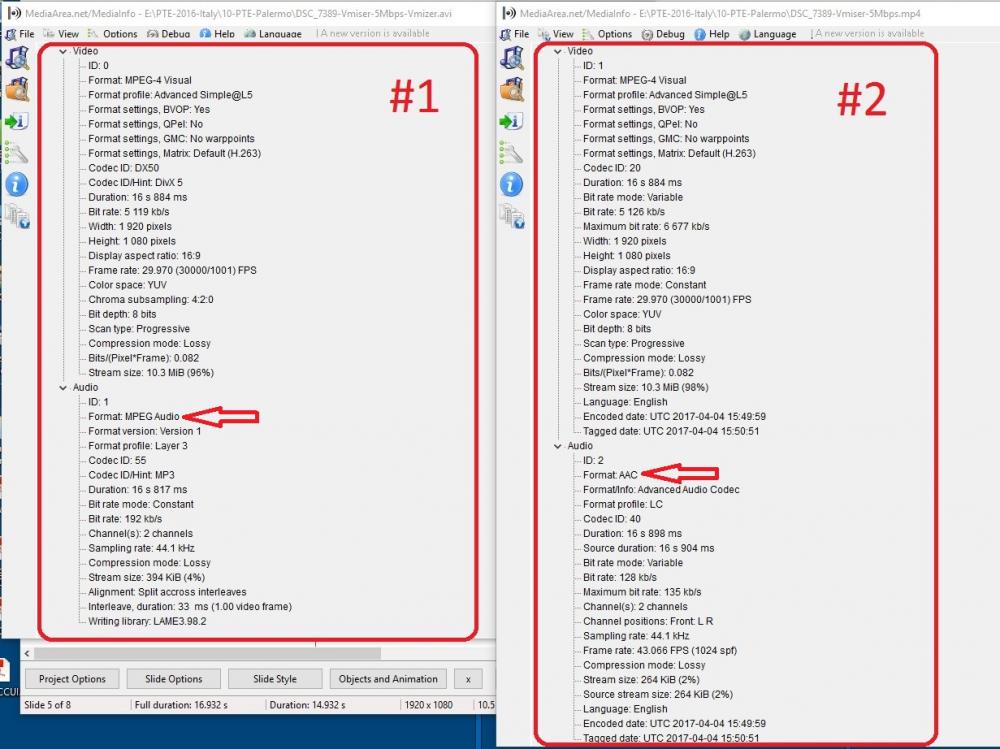
Greetings, When I add a particular video clip to the Slides/Timeline, it plays just fine. However, when I try to add the audio of this video clip to the Slides/Timeline, PTE freezes. I have this video clip in two different formats. Both play without problems. But the freezing problem only occurs with video #2, not video #1 (see attached) when I try to add its audio. From reading some past posts, it seems that AAC audio is not playable in PTE. Not sure but can this be the problem? The audio for video #1 is MPEG, the audio for video #2 is AAC. When I trim/convert this video clip in an outside program, I don't have control over what the audio format turns out to be. One comes as MPEG, the other as AAC. Just strange that the video #2, with the AAC audio, plays with no problem, but the freezing problem only occurs after I have tried to add this video's audio to the Slides/Timeline. Can the AAC format be the problem with video #2? Gary
-
Greetings Igor, Thanks for taking a look at this. I thought he might be a Spammer and, perhaps, other might be getting similar emails. Thanks for taking the time during your vacation. Hope you are having fun! Sincerely, Gary
-
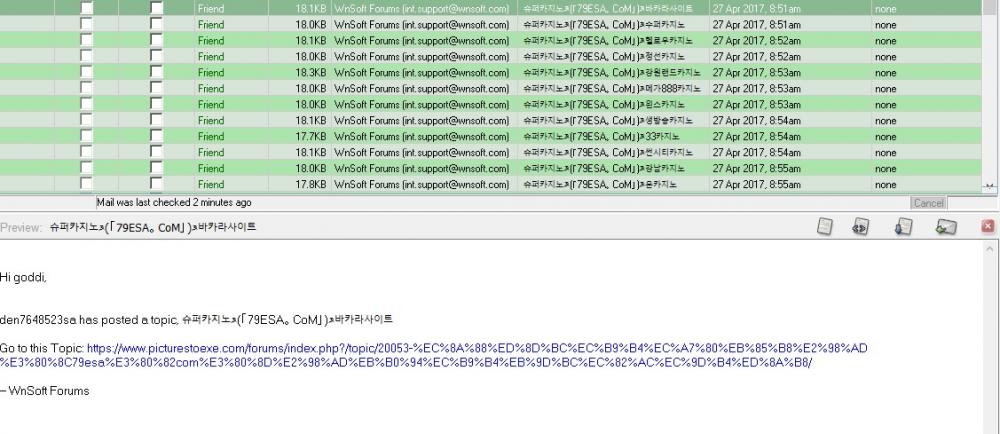
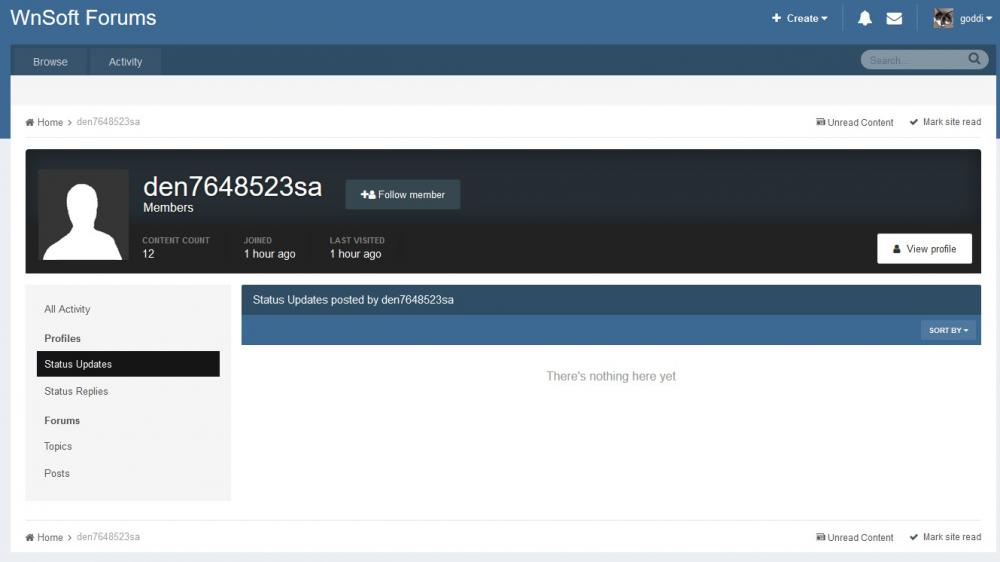
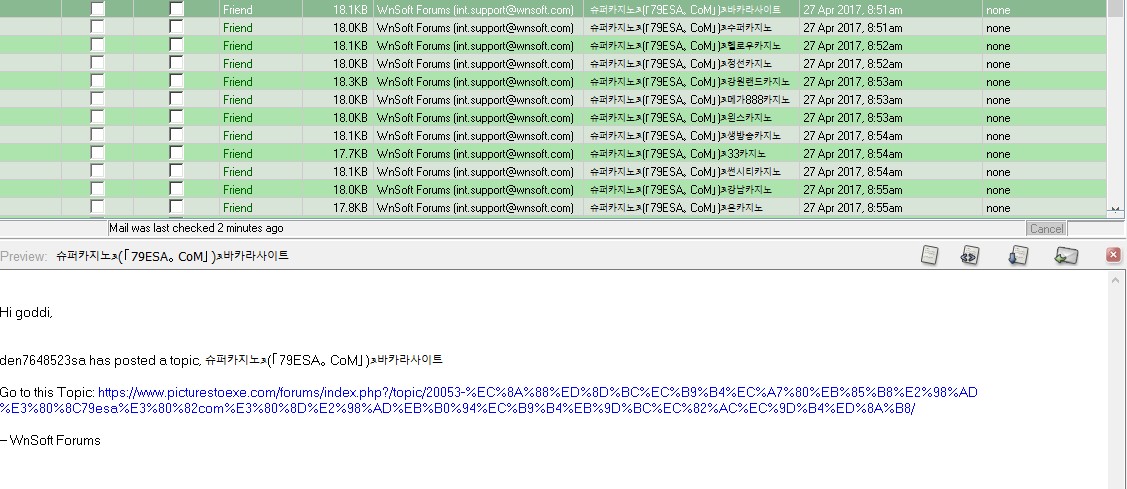
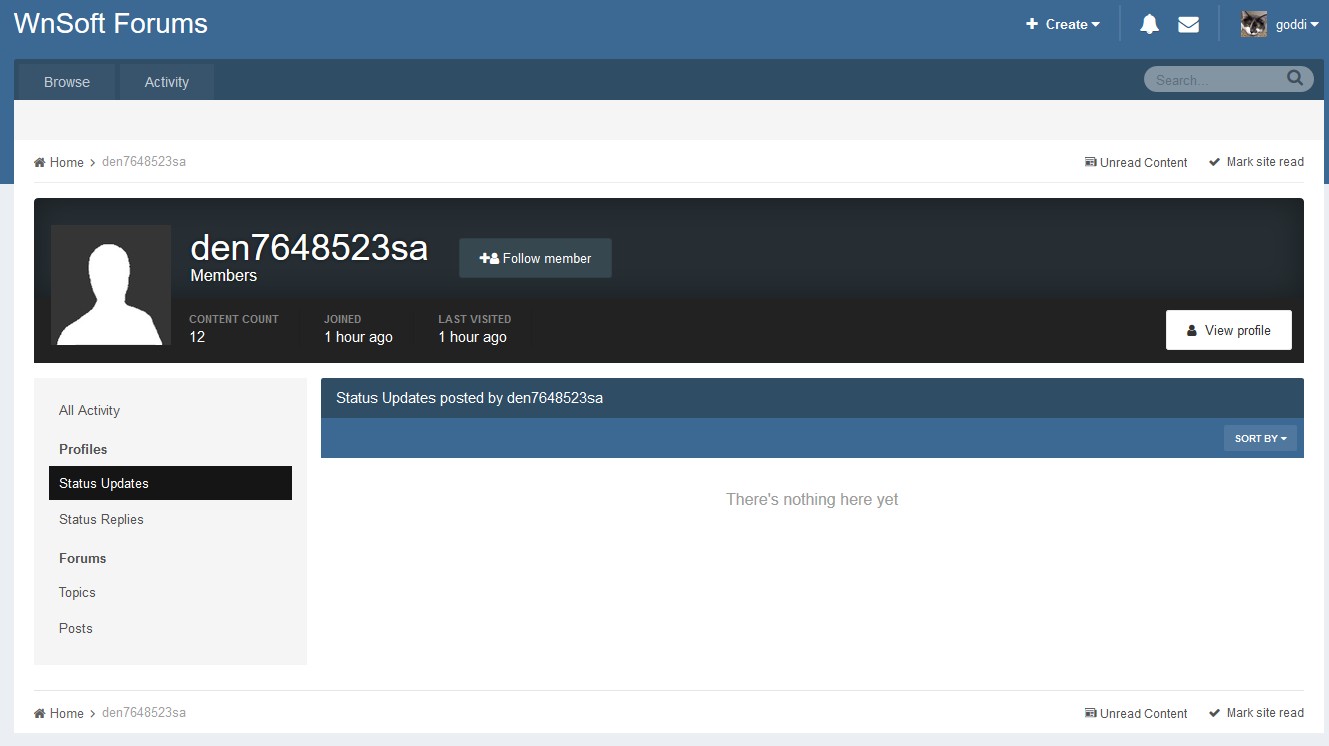
Greetings, Just got about a dozen emails from the same person, 'den7648523sa'. Looks suspicious. I only viewed the email while on my server so I did not actually download them. The Forum shows that this person joined the Forum only about an hour ago, with no other activity. Does anyone recognized this activity from this person? It does show 'int.support.@wnsoft.com', so I am not sure if it is really from Winsoft. Gary