goddi
-
Posts
3,596 -
Joined
-
Last visited
-
Days Won
27
Everything posted by goddi
-
Greetings, I am thinking of getting a new monitor. I currently have a Samsung 23" monitor with a TV tuner. So, maybe I have a TV that I use as a computer monitor. It work out well but I'd like a 27" or so larger monitor that has a TV tuner. The problem is that you can't get as detailed specs for TVs as you can for computer monitors. I like the dual function of a TV being used also as a computer monitor. But it is difficult to find a TVs for a desk that are smaller in size to be used for photo/video editing for a computer. Is having a TV as your computer monitor for editing photos and videos not a good thing? A monitor that is strictly a computer monitor is more expensive and not sure why. Using a flat screen TV seems to work for me. Maybe I am missing something. Any advise/recommendations would be welcomed. What specs are important and which are not if you are going to get a TV as your computer monitor? Gary
-
How to play several shows in a row automatically?
goddi replied to willemx's topic in General Discussion
Here is a 'Menu' style that might be what you are looking for. Someone had posted it some time ago but I have not had the opportunity to use it yet. Should play one at a time but not sure about the 'consecutively' part. Menu Style 1.ptestyle Gary -
Greetings, Just so we can put a 'Solved' with this issue that I started, I have had a 'solution'. Since I was having several strange things going on with my laptop, primarily that video clips in PTE exe shows would not play smoothly, I tried to do a System Restore. Well, that proved fatal. The System Restore was running over 8.5 hours. I figured I had to just power down the laptop. With that done, I could not boot up the laptop. Dead. So I have started from scratch with my Recovery Disk to put the laptop back to where it was when I bought it and have started to reload Windows and all my programs and data. But the good news is that this has fixed all the problems that I was having. There must have been some corruption in the operating system. The issue with video clips in exes was solved, and other problems too. It is a real pain to have to reload programs and data but at least the problem was resolved. Gary
-
labtop intel, Nvidia graphic card and custom transition [SOLVED]
goddi replied to denisb's topic in Troubleshooting
Oh..so you meant the process of creating the exe (Publish) will be faster...not the playing of the exe? I'm confused: You just posted: Posted in General Discussion Hi, If you have a laptop with dual graphics card (Intel + NVIDIA) please try a new test version of PicturesToExe 9.0.15 BETA: https://files.wnsoft.com/test/picturestoexe-setup.exe It should greatly improve smoothness of animations. Because this update automatically forces PTE 9 to use dedicated NVIDIA video card instead of slow Intel video card. This improvement affects: - Preview in the main window of PTE 9; - Objects and animation editor. - Playback of EXE shows. Now you are saying 'Playback of EXE shows' will be improved. Confused. Or do you mean that only the playback of video clips in exes will not be improved? Thanks... Gary -
labtop intel, Nvidia graphic card and custom transition [SOLVED]
goddi replied to denisb's topic in Troubleshooting
Igor, I was hoping that the PTE 9.0.15 update would solve my problem of the jerky playing of video clips in my exe PTE shows. But it does not. As I stated in my previous postings, my laptop has the Intel HD 4600 card and the added Nvidia GT740M. When I play the exe show with the video clips with the new 9.0.15, both cards show up in the Task Manager's Performance. The 4600 shows about 1% - 10% and the GT740M shows about 50% - 60% as the show plays. From what I expected was that the 4600 would not show up at all and only the GT740M would be doing the video processing. Should this be happening or not? Gary -
Greetings JudyKay, I agree. I have made PTE shows for friends, weddings, memorials, family gatherings, without charge. Just because I enjoy it. But recently I found a site from TAPS (Tragedy Assistance Program for Survivors) which provides expeditions for families who have of lost military veterans. I happened to come across their site that has images of one of their expeditions to Machu Picchu. I thought wouldn't it be better to have these images in a PTE show? I downloaded all the images, put in music and text, etc. Turned out quite nice, I thought. I contacted the TAPS organization with this example and said I'd be happy to do it to other expeditions. No charge, no strings. Just give it to each of the participants as a memento. Never heard back from them. I then found the guide company that went along with the expedition and told them I'd rather it not go to waste so if you can send it to the participants, please do. Got an email back that said they'd look into it. Never has been downloaded. So sometimes you can't even give it away free. Gary
-
George, Yes, this is a strange problem. The bottom line is that the converted video clip that I use in a PTE show plays just fine, by itself, outside of the PTE exe show. However, when it is use within a PTE exe show, that video clip plays very jerky. And this happens only on my laptop, not my desktop. On the deskop, the video clip in the exe play smoothly. I still have no clue why. Gary
-
Greetings Dawn, When I started the book project for my friend, she gave me all the prints in a shoe box. I had to have her put them in the correct sequence that she wanted. After that, I had to digitize them. Time consuming, one by one. I also then ran each on through Photoshop to fix the ones that really needed fixing. But leaving some with cuts, spots and rips, etc. in some are good to show the age and character of the photos. Once you have all that, it is just putting them into the Blurb photo program. Blurb has the program that you can use online. But I highly recommend downloading it to your PC and work with that one. I went back and forth with the friend several times to make sure it was what they wanted. She added some pictures and wanted some deleted. We finally came up with the finished product. I uploaded it to Blurb. You have to choose (or should choose) the format before you actually start adding images to a book. They have different sizes and styles so that will make you assemble the images in the book to suit the final book's size. I don't know if you can easily just change the book's size after inputting all the images into a certain sized book. Going from large to small would cause problems, I'd guess. She had me order the 20-30 books for her through Blurb. But once it is on Blurb, you can set it for anyone to purchase through Blurb. To make it simple, I'd just charge for the time for digitizing and creating the book and for a PTE show and let them just do the purchasing at Blurb's prices. Not sure if this will work, but my book is still on Blurb. I'm not sure how to show you my book. But try this link and they should be a way to Preview the book. http://www.blurb.com/bookstore/invited/6832049/67b12d5095349aa948570ee0cc8de0cbcba13bd0 Hope this works. But creating a book of your mother from the images you would use in a PTE show would be a great thing. Gary (Just edited with the link above that should show you the book I made with Blurb with the Preview button)
-
Greetings Dawn, Blurb is a photobook site. I like it because you can download the program to your PC and work on the project disconnected from the Blurb site. Then just upload our final project to Blurb for your customer to order how many they want whenever they want. So a combination of a PTE show and a book is good product to offer. No additional stuff to buy...just time. By the way, I used a simple, cheap Canon printer to scan the old prints, and it worked very well. Here is Blurb: http://www.blurb.com/photo-books There is also Snapfish: https://www.snapfish.com/photo-gift/photo-book But I prefer Blurb. Just adds to what you can offer. Really a lot of fun. Gary
-
Greetings Dawn, A friend of mine lost her husband a few years ago. All the images of their life together were in old prints. I offered to digitized some prints and put them into a digital show (PTE). Well, it turned out that she had about 300 prints in a shoe box and also wanted a printed book of the pictures to distribute to her family. So it turned out to be a much larger project. So, anyway, I scanned the 300 prints and put them into a 106 page Blurb book. For the memorial gathering, she also wanted a digital slideshow and, from these images, I made a 4 min 30 seconds show with 56 images. She had many Blurb books printed for her family and the slideshow worked very well for the memorial gathering. I did it as a friend and did not expect any payment. But she insisted and gave me several hundred dollars for my efforts. So it really depends on the depth of the project. But combining a PTE slideshow with a printed book from such places as Blurb, I think it would be a welcomed offering. How much? That is a good question. But many people have only prints that need digitizing and you might expect more work and time is needed. Perhaps, since you are considering approaching funeral homes, I am sure they would have suggestions and will require a portion of the price. And they might already be doing this service and you can provide an even better product using PTE. The price would vary depending whether images are already digital or you'd have to scan old prints and do a lot of post-processing and if they wanted a printed book. Lots of possibilities. Let us know how it goes. Gary
-
Greetings Tom, I opened the Task Manager on both my Desktop and my Laptop and selected the Performance tab. The Desktop showed the GPU being used is the NVIDIA GeForce GTX 1070, as expected. I also did the same with the Laptop. Its GPU showed it was using the NVIDIA GeForce GT 740M, as expected. As I played the video clip on both, the Desktop and the Laptop, the GPU did not change. The GPU usage percentage (about 40%) did not differ much between the two computers as the video clip played. As far as the point about the battery, the Laptop is fully charged and plugged in. Not sure what else to make of this but the Laptop seems to be using the high performance video card. Oh...I just noticed that the Laptop Performance tab is showing both the Nvidia and the Intel HD Graphic 4600. So I disabled the 4600. The PTE transitions now are rough and the video clips are even more jerky. And I notice, in the Performance tab, there is no activity in the Nvidia GPU graph when the 4600 is disabled. Hmmmm. So it appears that I have to have both graphic adapters enabled. When I play the PTE show with both graphic adapters enabled, both GPUs show usage. The 4600 is minimal, at about 1-13%. The Nvidia is at about 30-50%. So now I am really at a loss to understand what is going on. Gary
-
Greetings John (Alias Kev), I gave that a try. Yes, the setting for Games was ON. I turned it OFF but no change. I even made sure the settings in Game DVR, Game Mode and TruePlay were OFF. I also deleted anything to do with Xbox networking. Nothing helped. Video clips still are jerky. I wish I knew what the technical reason is.Is it in the PTE exe file or is it Windows10? Duno... Thanks for the additional suggestions. Gary
-
Adjusting the beginning of video clips
goddi replied to goddi's topic in Suggestions for Next Versions
Dave... Yes I see your point. My problem was that all I saw under the Adjust Time Range was 'Offset'. That just delays the start of the clip and leaves a dead space. I have used this option before but I had forgotten that you can click on the 'Adjust Time Range' button to get the 'Start Time' and 'End Time' to make the adjustments such as trimming off the beginning and end of a video. Thanks for reminding me. This should be a reminder to Igor to make the menus more intuitive. The Adjust Time Range box just looks like a title, not an active button to push. It only changes to blue when you happen to mouseover it. A more helpful reminder that such buttons are active would be to put a blue border around them so you know that there is a menu behind them. Or be consistent and put a downward triangle in the boxes as it is done in the 'Auto' and some other buttons. If you don't use certain functions on a regular basis, you tend to forget, at least I do. Thanks for the reminder. Gary -
Greetings, After you have trimmed a video in Convert process and put it in the Timeline, you might want to tweak the beginning or ending of the video clip. To adjust the ending of the video clip is easy by just dragging the end point to the left. However, to adjust the beginning of the video clip, you have to go into the O&A's Start Time and input an amount. It would be nice if you could adjust the beginning of a video clip in the same manner as you can with the ending of the video clip by just moving the beginning point to the right. Gary
-
Igor.... Thanks... Gary
-
Igor... Yes, 9.0.14. Gary
-
Greetings, I am trying to make an PTE show that has only one converted video clip, but it is about 2.5Gbs. I can Publish it as an MP4. But when I try to Publish an exe, it stops after a few seconds into the process and I get only a small 4Mb file. I guess there is a limit on the video clip size. Can someone confirm this and what is the limit? Yes, I can break it up into two shows but I'd like to know what the max size of a video clip is to be able to be Published it as an exe. Thanks... Gary
-
Igor, I have addressed each of the items you listed above with no improvement. I also tried the 'Win+G' and I don't even get the game mode window to appear on my laptop. So that would rule out the 'game DVR' problem. Do you know of any other technical thing that might cause converted video clips in the PTE exe shows to not play smoothly? The PTE is designated to use the high-performance Nvdia card. Seems if the PTE show plays perfectly well as MP4, they would play just as well as exe, but I don't understand the technicalities. Any other ideas where the problem might be? But I just thought that designating the PTE program to use the high-performance video card should not have any affect on the actual playing of the PTE exe show. So I designated the actual PTE exe show to use the high-performance Nvidia card. Again...made no difference. Not sure where to look now. Gary
-
Kev, Yea, I see the 'Windows G' to open the Gaming icon. I can do this on my desktop PC; but on the laptop, nothing comes up. So I don't even have that function. Gary
-
Why not??? Seems it is only for gaming. Gary
-
Greetings Kev, You gave me an idea. But I don't find any 'game DVR' feature. I don't do games so I searched around my laptop and found two thinks that might be for 'games' and figured out I might not need them and maybe they were causing the problem. So I deleted the Nvidia 'GeForce Experience' and the 'PhysX'. But, it didn't help at all. Maybe just changing the video card would help...duno. Just throwing darts... The mp4's play just fine; just not the exe's. Gary
-
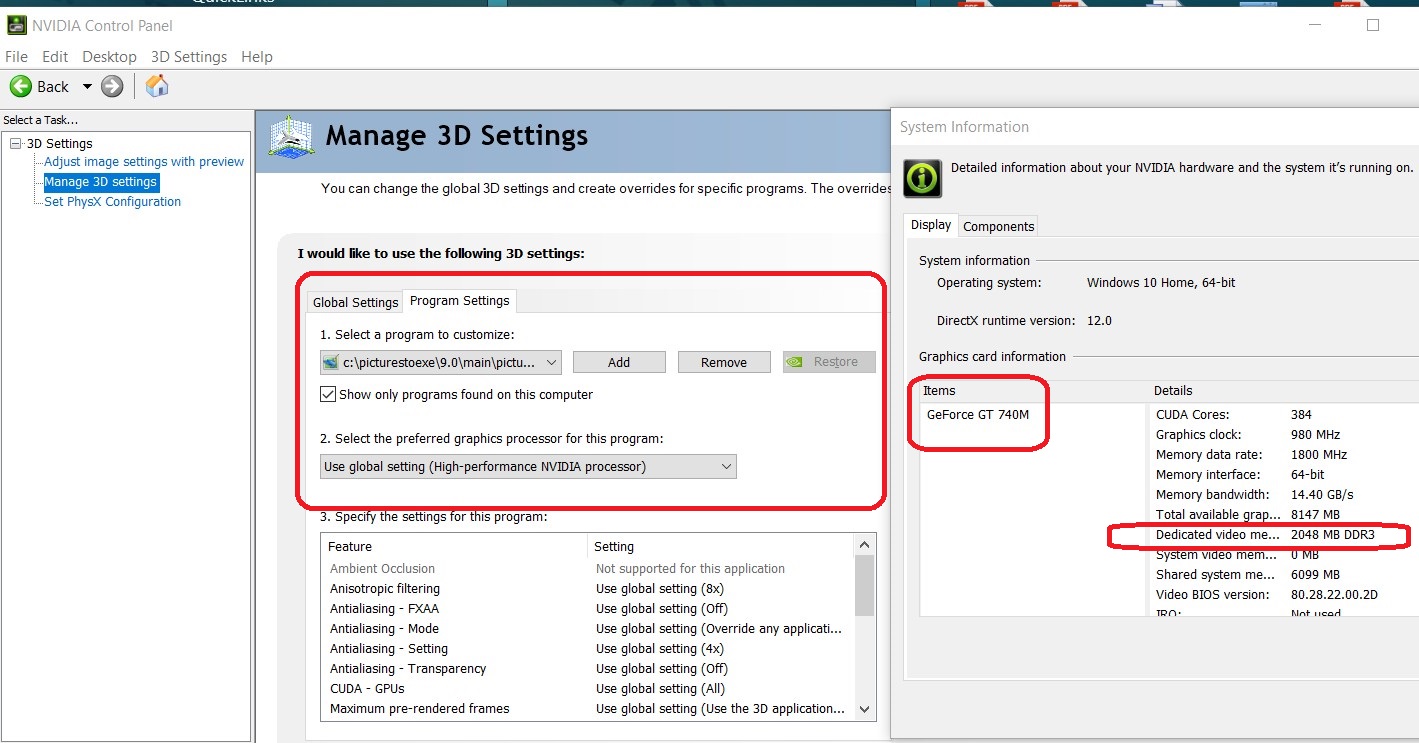
Dave, Yes, I understood you 'inserted the video into a PTE project'. As you can see in my Nvida control panel screenshot, I have specifically made PTE use the 'high performance Nvidia processor'. And, yes, I tried, when I open PTE program using Mycomputer, I also specified it to use the high performance Nvidia processor, even though it already shows that it is the default, as you also showed in your screenshot. None of this helped. Since it happens apparently only on my laptop, I assume it has nothing to do with the PTE program. Must be something in the laptop. The problem of jerky video clips happens in all of my PTE shows' video clips, when played on my laptop, not just the one you looked at. I'll keep poking around. Thanks for trying... Gary
-
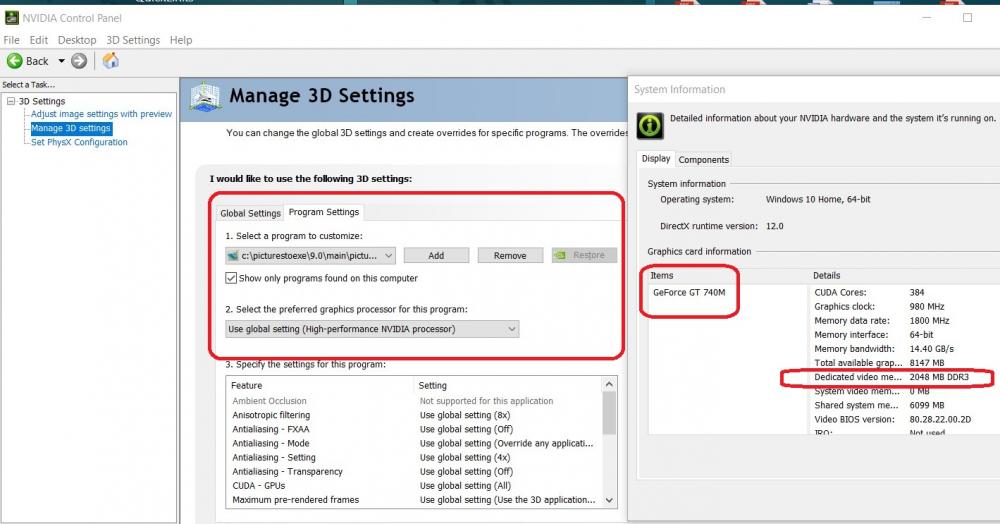
Dave, I seem to have a similar setup with my Nvidia control panel. But I notice my dedicated video memory is only 2 Gbs. Can that cause the problem? Yes, video clips play just fine anywhere except when they are in the PTE exe files, on my laptop. If you disable your integrated graphics adapter, do your videos worse (as it happens to me)? I have to have both enabled, but videos are still jerky. Gary--
-
Dave, Here is a short video clip. https://dl.orangedox.com/x35SQstrwK2xA1T4xw Gary
-
Dave, The project's Aspect Ratio is 16:9, video clips are 1920x1080, bitrate 15.8. When I have the video clip at 1280x720, bitrate 7.041, it seems to play smoothly, but of course not as sharp. The converted 1920x1080 video clips plays just fine in Windows Media Player, but not when inserted into PTE and played as the exe, in my laptop. Gary