goddi
-
Posts
3,596 -
Joined
-
Last visited
-
Days Won
27
Everything posted by goddi
-
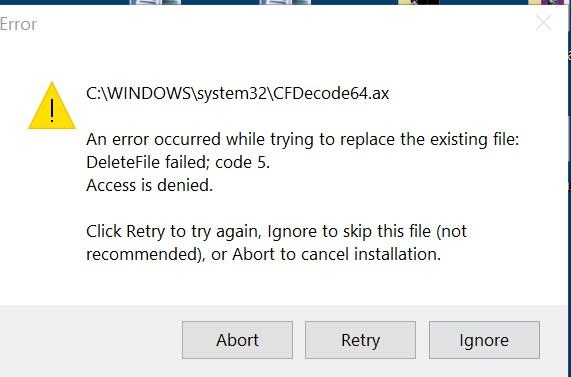
Judy, I found that version and I tried to install it. Got the same error message. I said Ignore and finished the install. I was able to import one video but could not do anything with it. Other videos just won't import and freezes. I have Win10. Not sure what that error message means but there is something going on.... Gary
-
Lin, Yea, kinda weird. I found two different Filmora download files. One was 'filmora_setup_full846.exe' and another one was 'filmora-idco_setup_full1901.exe'. Both give me an error message during the install and the install stops at 97%. Too bad, I was looking forward to giving it a try. Gary
-
Lin, I've given up on Filmora. I can't import any video clips. I uninstalled it and reinstalled it. No go. Very strange. But the first time I imported a video clip, the preview was a mess. After that, could not import anything. I just wish Igor would improve the PTE video processing. Don't like to go outside to other programs for video processing. Always a pain,. Gary
-
Greetings MUR, I gave Avidemux a quick try. Its output is MKV. Do you then run it through the PTE's Convert process? I ask this because the trimmed clip I made using Avidemux (MKV) did not seem to degrade in quality from the original clip. However, when I ran the MKV trimmed clip through the PTE Convert, the quality seemed to be degraded, even though the MediaInfo for both (the MKV trimmed/converted and the original trimmed/converted files) were pretty much identical. Do do you Convert the MKV clip or not? I get good results just using the PTE Trim/Convert process but setting the trim's beginning and ending is really crude and not precise. Gary
-
Greetings Judy, Since you mentioned Filmora, I downloaded/installed their latest version. Looked promising. But...I see it is a trial version. I gave it a short try but really did not like it for a few reasons. The video preview image was really degraded...lots for splattered colors (hard to explain). I tried to just drag one clip over the other to have a simple transition fade. It would not let me. In PTE, simple. Anyway, if Igor will just concentrate on improving the 'Convert' process, he will have a real winner and more useful process to deal with videos. I recently took a 90 minute video tape and created about 40 or so clips for a show using the PTE Convert/Trim process. One problem is the Trim function. After you set the Trim indicators, the little up/down arrows next to the green arrows should help to move the Trim indicators to a more accurate position. I don't think they are working well. Even though the Start Time changes, when you click the green arrow to reset the position, it does not do that. And once you have the Trim indicators (left and right) set, it would be nice to be able to preview only that portion to doublecheck the trimmed clip. You can't. Once you Convert/Trim a video, you have to start all over again. You can't trim out one section of the video and Convert it and then Trim another section of the same clip without having to close the Convert Window and start over again with that same original clip and trim out another portion of that clip. Wouldn't it be nice to have video stabilization??? Simple things like that make it frustrating and should be improved. I have tried many outside programs but they all have negative aspects. I like to stay within PTE to do the video editing process, even if it now is pretty crude. Video is becoming more important to the slideshows. Like I said, I've tried many other video programs and have just about given up. Let me know if you come with a winner. Gary
-
Greetings, When you add an audio file, you currently can pick the placement of the file either before or after another audio file on a particular Track. But then you still have to drag the audio clip along that Track to where you might want the exact placement to be. If you have many other audio clips, especially if you are adding in audio from specific video clips, this can a bit difficult trying to drag it to the slide you want it to be aligned with. My suggestion is that, when an audio clip is added, it can be added to where you have highlighted a particular slide (on the selected Track). Gary
-
Jill... Yes, I understand. But if we can move Tracks up or down, it seem that we should be able to move audio clips up or down with the same ease. And if they are linked, doing a simple move to the next Track down would prevent the cutting off the ending sound of the first clip, if there is a crossfade (as you pointed out in the your other reply). Gary
-
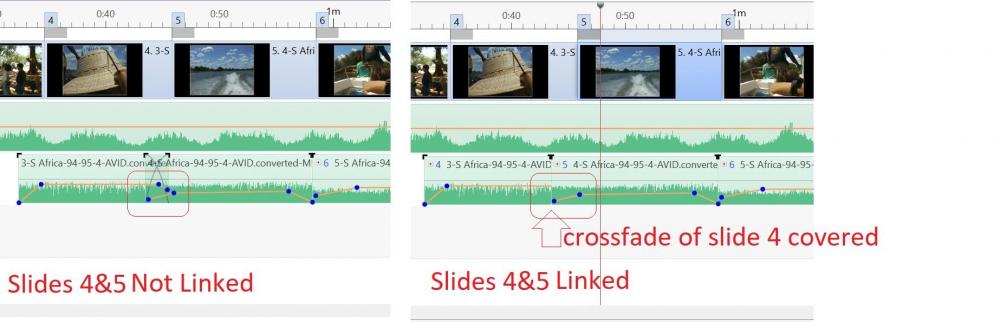
Greetings, I'd like to have a menu item that gives the ability to move an audio clip up or down in the Audio Tracks. You can move Tracks up and down but not specific audio clips between Tracks. This would be helpful when you have linked, for example, two audio clips and the crossfade of one is covered up. Moving them by hand is hard to keep the precise placement. If there is already a way, please let me know. I have tried every keystroke but haven't found it yet. Gary
-
Greetings Jill, Thanks. I haven't run into this before so I wasn't sure if it was 'normal'. But I don't see any advantage to this 'design'. Why would it be good to cover up the crossfade of one of the linked audio clips? I see your solution is workable but just adds to more complicated tracks. But thanks for the info. Gary
-
Greetings, I have linked 2 slides (video clips), #4 and #5. The crossfade of the first slide (#4) gets covered by the following slide (5#). So once they are linked, I can not see the crossfade of slide #4. Is this a bug or not? Gary
-
Wideangle, I also added in the Suggestion Forum to keep the already set Transition Time when you use a Slide Style. I have no idea why it needs to change the Transition Time. Gary
-
Slide Style for Videos-Full Duration Problem
goddi replied to goddi's topic in Suggestions for Next Versions
Also, Please, when you apply a Slide Style, don't let it change the Transition Time. Let it keep the already set Transition Time. Gary -
Greetings Wideangle, Yes, I feel your pain. I have just edited a 90 minute video down to about 44 individual video clips. I have to apply my Slide Style clip-by-clip to be able to reset the actual Full Duration of each clip. There has to be an easier way... Gary
-
Greetings, I just took a look the Slide Style I had created. I am wondering if the style.xml can be edited. And would the 'settime=' be where I could remove the setting of the Duration Time? Change it to "False"??? Just wondering.... Gary

-
Greetings, Reminder. Please add 'Rotate' for the Framing function. Previously, you said it is complicated code , but would considerate it. Hopefully, it will be in the 10.x version. Thanks...Gary
-
When a Slide Style is created from a video clip, the Full Duration of the initial video clip gets embedded in the Slide Style. So when the Slide Style is applied to subsequent video clips, the Full Duration of each video clip has to be reset to its actual Full Duration. I suggest that there should be a way to make a Slide Style to not retain the Full Duration of the initial video clip when it was created. I'd like the Slide Style to have the option to accept the existing Full Duration of each video clip when the Slide Style is applied. Gary
-
Greetings, I thought I had posted a similar question before but could not find it until this morning. See below. Perhaps I had not explained it as well as I should have. We went back and forth on this. Igor said he would check into this. But I never got a response from him. So now this question has popped up again when I try to use a Slide Style on video clips. If there isn't any 'fix' for this problem, I'll put it in the Suggestion forum. Yes, having a 'Use the existing Slide Full Duration' as an option sounds like what is needed. Gary
-
Greetings, I am creating a show from a 90 minute video. I am using the PTE's Trim function in the Convert process to produce many clips from it. So now I have a bunch of video clips. I created a Slide Style to put do a 90% zoom, a border and aspect ratio and image crop. (Needed because it was digitize from a HI8 tape). So I made a Slide Style with all these attributes and want to apply it to each video clip, preferable highlighting all of them and doing it in one action. The problem is the Full Duration of the initial clip gets embedded in the Slide Style when it is created. So when I apply the Slide Style to each clip one by one, I have to adjust the Full Duration of each clip to its actual Full Duration. Is there a way to make a Slide Style to not retain the Full Duration of the initial clip when it was created? I'd like it to just accept the existing Full Duration of each video clip when I apply the Slide Style. Is this possible? Gary
-
Greetings, The current max size of uploads to the Slideshowclub is 125 mbs. It used to be 273 mbs. Though Igor has said he would fix this, the max size is still 125 mbs. Gary
-
Igor, I normally use a short Dissolve at 1.5 seconds. I'd guess that is why I don't see much difference between the current dissolve and the 'Smooth'. But, yes, add it v10. Thanks... Gary
-
Igor, In comparing your two demos, I prefer the 'Smooth' dissolve. I dislike long dissolves because they are uncomfortable on my eyes. The 'Linear' demo just seems to take a tad too long. Is the current default dissolve in PTE 'smooth' or 'linear'? Hard to tell without it also included in your demos. But Smooth is better for me. Thanks... Gary
-
Lin... Get better!! Sorry to hear you are going through all of this. Best Wishes... Gary
-
Igor, This would be an improvement that would be very useful and helpful every day, with every show we work on. Thanks...Gary
-
Igor, Not to hijack this posting, but since the topic of 'remember settings' has come up, I'd like to re-enter my request to be able to set a default option for location of all files used in a PTE show. The suggestion does not get any traction but I believe it is useful. Gary
-
Works fine for me too. Win10, desktop with 1803 update. Gary