goddi
-
Posts
3,593 -
Joined
-
Last visited
-
Days Won
26
Everything posted by goddi
-
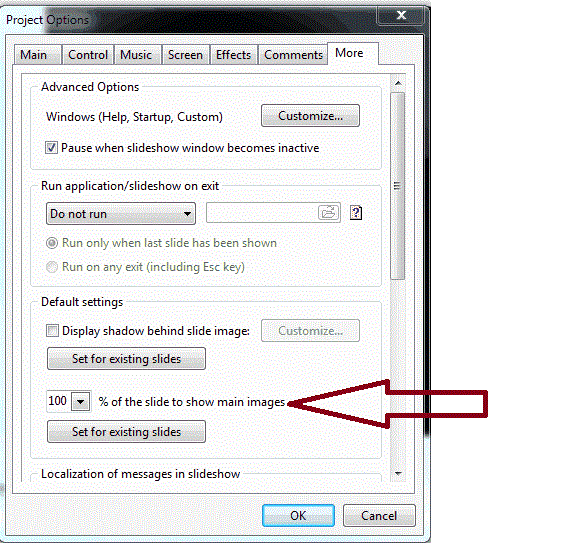
Greetings, My suggestion is to modify the how the scale works for the '% of the Slide to Show Main Images' works. It is found in the Projects Options/More menu. Currently, when you click on the down arrow to reveal the scale, you can only move the arrow from 100% to some lesser value. However, when I create my slide shows I usually want to increase all of my images at once by 118% to bring the left and right edges to fill the 16:9 aspect ratio. I know that I can manually enter the 118 value directly into the block but it took me several years before someone told me that this was possible (as opposed to doing it to each image, one by one). So by changing the scale to allow movement to above 100%, I think it would be an improvement to make this capability to be more obvious. Gary
-
================= Mary, You got me to see what I can do about the distortion and perspective problems you pointed out. I found this great video on how to fix it in Photoshop. I knew it was a problem but was not sure how to deal with it. Thanks for the comments. I'll start fooling around with it. http://tv.adobe.com/...deangle-photos/ Thanks... Gary P.S. For CS5: http://tv.adobe.com/watch/photoshop-cs5-feature-tour/automated-lens-correction/
-
===================== Mary, Yes, it is really too long but I had already cut out lots of images and temples. Give me another 6 months and I am sure I will be able to cut it down some more. When it is so fresh, it is hard to do. I always put in the Nav Bar to make it easier on viewer to pause or leave the show. It was so amazing to me to see the detail in the stone work and the tremendous amounts of stones. I've built a lot of dry-laid stone work around my house so I am really in awe of what I saw there. I never felt unsafe around the temples, though OSHA would have a blast there! No guard rails, steep steps, stone arches that on the verge of dropping... Also, I give thanks to the organizations that removed the landmines. If you look closely, the 'pig' is actually 2 pigs. Yes, I also noticed a lot of verticals were not vertical. I have a habit of not holding the camera exactly vertical or horizontal so I had to tweek a lot of the images to be level. But the problem was that most of the temples were not level so it is a bit confusing at times what to do with the image. But I did have to do a lot of slight 'rotation' of many images to fix my errors. I also had to use the wide-angle end of my 18-200 lens most of time because everything was so 'big', so that did cause some distortion. But it is hard to tell whether the 'leaning' of the temples is from the lens or from their old age.... But you have a good point about trying to correct for that. It will give me something to do now....thanks!!! Oh...yea. By the way, I remember you commented that you thought that our trek in the jungle had a lot of bugs. I said we actually did not have any problem with them. My wife reminded me that when we got back from our trek in Khoa Sok, we did have a bunch of leeches under our socks with streams of blood. Part of the adventure! Gary
-
Greetings, I would like to suggest a change in the way the Publish/HD Video for PC and Mac saves a replacement mp4 file. If you already have processed one mp4 file, the replacement is automatically named File2.mp4, without allowing for naming or renaming the file. It would be helpful, when replacing an mp4 file, you are given the opportunity to overwrite the previous file or to rename it before you begin the process (as you would expect in a normal Windows process). Gary
-
Audio: add a Move tool and Color the waveform
goddi replied to goddi's topic in Suggestions for Next Versions
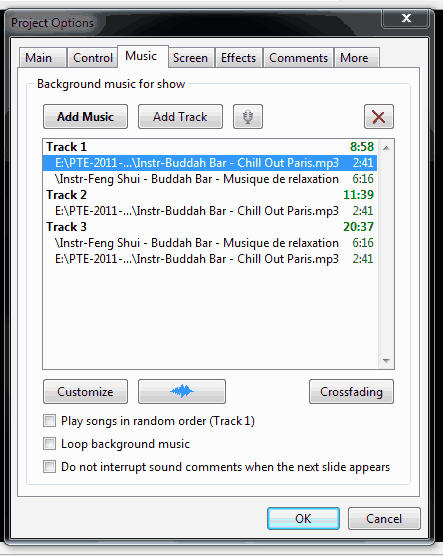
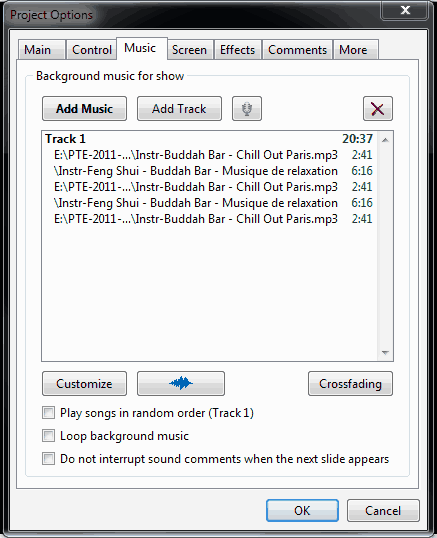
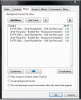
========================== Peter, Yes, I realize that I can put each MP3 in its own Track and use Offset to achieve the overlap of the music. I had pointed this out in one of my original posts And I did this with my recent slideshow. But I think using multiple Tracks to achieve this is not the better way. Take a look at my two attachments. The attachment that uses Tracks is too complicated visually if you just want to overlap MP3s. The attachment that shows the MP3s without having to use Tracks makes it more straightforward. I am sure some indicators can be added to inform the user which have been 'Moved'. And I hope some visual indicators can be added to the MP3s in the Timeline to help distinguish each one. Gary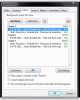
-
Greetings, We had a good discussion about Crossfading back in January: http://www.picturest...o-overlap-mp3s/ It continued in: http://www.picturest...h__1#entry92526 I think most of us agreed that there was something wrong with the current Crossfading when it not only faded-in the end of Song1 with the beginning of Song2, but it also faded in the beginning of Song1. Hopefully, that will be corrected in future versions. However, at the end of this discussion I had suggested that we should also have a choice to Overlap two songs without the fade-in or fade-out. I have come up with a better option, I think. Add a Move Function: In a recent slideshow, I have been using 5 MP3s. I wanted to have the MP3s' endings and beginnings to overlap without fade-ins or fade-outs (that Crossfading provides). So, what I wanted to do was to actually move the MP3s to the left or the right in the waveform so the endings of one would overlap the beginning of the next MP3. What I would like to suggest is to have a Move tool where you can simply highlight a single or multiple MP3s (must be in sequence) and provide a negative value to move the highlighted MP3 (or a sequence of MP3s) to the left or a positive value to move them to the right. If moved to the left, the highlighted MP3 would just overlap the MP3 on the left by the given value. If more than one MP3 were highlighted, the entire highlighted group would move to the left. Same if the highlighted MP3(s) were moved to the right. Color the Different MP3s in the Waveform in the Timeline: Another suggestion is to have some visual indicator to distinguish between the individual MP3s in the Timeline. Right now, it is very difficult to determine where one MP3 ends and the next one starts. How about showing each MP3 in a different color? And when the MP3s are Crossfaded or Moved, the colors would be combined to indicate visually the extent of the overlap. Gary
-
Greetings, Here is a slideshow, Gardens of Stone, of our recent visit to the Angkor Archaeological Park in Siem Reap, Cambodia. This slideshow contains only a few of the archaeological sites you can see. The Angkor Archaeological Park contains the magnificent remains of the different capitals of the Khmer Empire, from the 9th to the 15th century. It was declared a UNESCO World Heritage site in 1992. The slideshow, showing a few of the sites we visited, is long, a bit over 20 minutes, 84Mb,1920x1080, but the Nav Bar is there for your convenience. Images were taken with a Nikon D7000. I hope you are entertained by it. Comments and critiques are welcomed. Download at http://www.beechbrook.com/pte/ Gary
-
============================== Phillip, I don't have an answer to your question. But, just to let you know, recently I had a similar perplexing question about an MP3 that, also, showed up in PTE as a flat line wave form. Even though it was flat-lined in PTE, it did play the music. If I remember right, it did show the wave form in Audacity and played just fine. I could not find what was the cause. I tried hard to figure it out but no luck. I guess it just happens... You can see one of my attachments shows the flat-line mp3 here: Gary
-
============================= Greetings Mary, Thanks for the tip. I'll experiment. Gary
-
Greetings, Great! Glad you liked it. As far as mixing horizontals with verticals, in the 'old days', I was taught to include verticals so that the slide show would not get boring. (I think some in the Forum have said not to use verticals at all!) Putting a background with the vertical....hmmmmmm....I think it detracts from the vertical image. I see it as the eye not knowing exactly where to look. But that is my 'school of thought'. Maybe in some cases as I did with the bananas as a background in a few of the images in my "Close Encounter..." show, but not as a consistent thing to do. I also think it would be pretty hard pick out that many appropriate backgrounds that would fit that purpose. But, who knows,maybe I will be doing something along those lines in the future. Never say never. Interesting you mentioned a concern about bugs. I brought 2 full bottles of bug repellant expecting the worse and did not ever think of opening either one and never did. We were in Cambodia and Thailand for about 21 days and bugs were never a thought or a problem!!! In the treehouse, we were warned to keep windows shuttered when we were not there because the monkeys would come in and take anything not nailed down...but no problem there either. Thanks for the comments, Gary =============================================
-
======================== Greetings, The driving force to make the show the way I did was the music. The electric violin and the beat just grabbed my attention to contrast the techno sound with nature. And, because of the beat of the music, the fast pace of the transitions had to be where they are...I think. My wife gave it a thumbs down, too. Mostly for the music...and the subsequent fast pace. But, I had to do what I did. The videos have really been reduced in size. From the camera, they are in MOV format. I edited and reduced then down when I saved them as an AVI. I don't know if they can really be reduced in size any further without losing quality to the point of not being useful. I don't see any other attempts at using video in PTE yet, so maybe as time goes on, we will learn some tricks to help get the shows down in size as others try it. But, once I have started including video, it is sort of hard not to now. I like to include video because it brings some motion or life to the show. I am not a videographer but I like the results so far. Lot to learn, though. For example in the Ziplining show, I think the video added 'life' to the show...I hope. Wow, I can't imagine it taking 1 hr and 45 minutes to download the Khoa Sok show with a broadband connection, so I understand your reluctance. It took me only 56 seconds to download it with my broadband. I do try to get the file size down, but with video, it is a challenge. In case you do get to download the Khoa Sok show, it is a much calmer and quieter show. I hope you can. Thanks for your comments. I hope others will comment on how they feel about the addition of video in shows. Gary
-
===================== Lin, We sure did. We went to Seam Reap, Cambodia first and went through Angkor Wat and many other temples. And saw temples in Chiang Mai and Bangkok, too. It was an incredible trip. I have a few more slideshows to put together...takes time. Gary
-
The location of this show is at the Khoa Sok National Park, Thailand. It lasts about 6:20 minutes and is blend of still images and video, at 1920x1080. The Khoa Sok National Park is an amazing place. It is covered by the oldest evergreen rainforest in the world, huge limestone mountains shooting straight up in the air, deep valleys, breathtaking lakes, exciting caves, wild animals and much more. Still images were taken with a Nikon D7000; videos were taken with a Kodak PlaySport camera. I hope you are entertained by it. Comments and critiques are welcomed. http://www.beechbrook.com/pte/ Gary
-
Greetings, I have uploaded a new slide/video show to http://www.beechbrook.com/pte/ called Cheow Lan Lake. The location is at the Cheow Lan Lake in Thailand. This show last about 5 minutes and is a fast moving blend of still images and video, at 1920x1080. The music captured my imagination and I had to put some images and video with it. The Cheow Lan Lake is an incredibly beautiful place that I wanted to capture with this techno-electric-violin beat. Still images were taken with a Nikon D7000; videos were taken also with the D7000 and with a Kodak Play Sport camera. I hope you are entertained by it. Comments and critiques are welcomed. Gary
-
Peter, I was nodding my head 'yes' as I was reading your post until I got to "Its use should then result in the same time duration being applied to the start and end of ALL tracks (including a fade-in at the start of the first item and a fade-out at the end of the last item) ." It is my understanding that the definition of Crossfading is that it is to be applied ONLY to the end of the first audio clips and the beginning of the second audio clip, not the start and end of the pair. Will you clarify your position on this? Now, can I be so bold as to offer another suggestion? Lets assume that Crossfading overlaps two audio clips with fading-ins and fading-outs. I would like to have an option called Overlap. I'd like an easy way to be able to do Crossfading without the fades. So I think Overlap would be a good addition. With Overlap, you would highlight two adjacent audio clips and enter a negative value, in seconds, that would move the second audio clip to the left placing the beginning of the second clip over the ending of the first clip, without fades. This can be done with Offset but it not as easy to do, especially if you have more than 2 clips. This seems to be more intuitive than using Offset. Thoughts? Just my thoughts. Gary
-
============ Lin, I think we can agree to disagree with this one. Then to be consistent, a '5 sec' should be put in the Crossfading in the Audio Clip Properties, too? At least be consistent? But then, Unsharp Mask has a '0'. Not to mention Line Space and Sharper/Smoother. So it can be done. And I would think that if you don't have any Crossfading being used, zero makes sense to me. And aren't we most always being 'forced' to put in some value in most menus? As long as they fix the fade-in problem with Crossfading, it is no big deal now. Gary
-
============= Peter, Ok.....let's call it bugelogic? Sorry, I could not resist... Gary
-
========================= DG, It makes sense to me that if I have not added any Crossfading, I would not expect to see '5 secs'? What if someone clicked on the 'OK' in the little Crossfading Duration window that has the '5 secs'? It would input the 5 secs of Crossfacing by accident. If you put in 1 sec, it will input 1 sec., or if you chose 2 secs, it would input 2 secs. So why not start out with what it actually is and should be, which is Zero. It won't allow a negative value, so I don't see the resistant to Zero. Can you explain more why "0:00.000" should not be used? I don't see why '5 secs' helps. If that is Igor's 'suggested amount', then it should be put in text, as a suggestion. Gary ADDED LATER: If you change the '5 secs' to '0', and click on OK, nothing happens. Everything stays as it was, with no Crossfading. So why not start out with '0' instead of '5'?
-
Greetings, And, remove the 5 secs 'suggested value' that appears when you open Crossfading. If you have not added any seconds to the Crossfading, then it should show what it actually is, and that is '0'. Gary
-
========================= DG, Actually, the only time Crossfading works properly is when you are using the Audio Clip Properties/Crossfading radio button and you have selected the second of two audio clips (or any other audio clip except the first one, in that Track). If you selected the first audio clip, you only get it to fade-in. And if you select both audio clips, you can't make any adjustments to the seconds. I think it is a bug AND a logic problem. Gary
-
===================== Hi Gogs, I liked Jing too, but the big reason that I now prefer BBFE is that I can output the file as an AVI, and the highlighted cursor. And with AVI, you have more choices to play it back. Yes, the editing features are not available with BBFE version. But I just open the AVI with Freemake Video Converter and that allows me trim the beginning and end and cut out sections I don't want. And, I can then re-save the AVI as a smaller sized file by choosing lower bit rates, or no audio, etc., or in other formats. Really is a nice combination. Gary
-
Greetings Peter, et al., After looking at your two screen shots this morning, I now see why you were not seeing the fade-in of the first audio clip when you applied Crossfade. There are two ways to get into Crossfading. When you applied your Crossfading, you clicked on Customize which revealed the Audio Clip Properties. When this happens, you can actually select either of the two audio clips that you want to apply the Crossface. However, when I applied the Crossfading to my two audio clips, I just clicked on Crossfading button in the Music tab. (I did not get into the Customize window). When this is done, both audio clips are automatically highlighted. And we can get different results. I think the problem with all of this is the definition of Crossfading is not being followed. The definition that seems to be accepted, and is in Jeb's excellent Tutorial (page 10), is as follows: Crossfading is when the end of one clip and the beginning of the following clip are faded out and in respectively and the faded segments are overlapped and merged together. Note that this does not include the fading-in of the beginning of the first audio clip. When one uses the Customize/Audio Clip Properties/Crossfading approach, you can choose which audio clip you want to apply the 'Crossfading' to. If you select only the first audio clip, and apply 5s of Crossfading, what you actually get is only the fading-in of the first audio clip. This is really not Crossfading. The total length of the combined audio clips do not change. If, however, you select only the second audio clip, and apply 5 s of Crossfading, you do get the crossfading that you should expect. The ending of the first audio clip and the beginning of the second audio clip are crossfaded and the beginning of the first audio clip is not affected and the total length of the two audio clips is reduced by the 5s, as expected. Now, if you happen to select Crossfading in the Music tab, both audio clips are automatically highlighted and you get the Duration window that initially defaults to 5s. First of all, I think this should show Zero, not the suggest value of 5s. If you accept the 5s, or input your own number of seconds, the two audio clips do get crossfaded, but the first audio clip also get faded-in. This is not following the definition of Crossfading that is only supposed to affect the end of the first audio clip and the beginning of the second audio clip. I think the entire Crossfading menus need to be reworked so that Crossfading only allows the overlay of two consecutive audio clips at a time. Under the current system, if you have more than 2 audio clips, all of them are automatically selected when you choose the Crossfading in the Music tab. The Crossfading function should be changed so that you can only select two consecutive audio clips and apply the crossfading only to them (without affecting the beginning of the first audio clip). If you highlight the two audio clips in the Music tab and try to set the Crossfading seconds in the Customize/Audio Clips Properties window, it will not accept any seconds. Here is where I would expect to be able to do the crossfading of two selected audio clips, but you can't. Perhaps the Crossfading buttom in the Music tab should be removed and only allow for Crossfading in the Customize/Audio Clip Properties window, and only two consecutive audio clips can be highlighted and only those two audio clips are affected with Crossfading. Just my thoughts....Gary (rat terrier) ======================
-
Peter, This is very interesting. If I understood it correctly, I think that DG agreed that Crossfade produced a fade-in on the first mp3. So we need more 'rat terriers' to track down the rabbit!!! Every time I try it with different mp3s and different versions of PTE, it showed the same results. Even if I put in a single mp3, the beginning gets faded-in. Did you see my AVI? Did I do something wrong? I have Win7 Prof., 32-bit. Gary ADDED LATER: In his last post, I see DB gets the same results as I do. ADDED LATER: Peter, I assume you clicked OK to get the waveform to refresh after changing the Crossfade to 9s. ===========================
-
============================== DG, Thanks for addressing one of my original questions. I think it is illogical because you can apply your own fade to the beginning MP3 if you want to, whenever you want to. Using Crossfade as it is now, affects the beginning audio of the 1st MP3, and it should not. While you were making this posting, I created an AVI to demo my point, for others who might not see what I am trying to show. See the attached for the demo. Thanks, Gary CrossfadeTest -1.zip
-
=================== Peter, Yes. I have tried different versions of PTE (7.04 and 7.03), and different mp3s and even Lin's mp3s and each time the beginning mp3 is affected. I see it does affect where we expect, overlapping the two mp3s.I will try to make up an AVI that will demonstrate my point. Give me some time... Gary