goddi
-
Posts
3,596 -
Joined
-
Last visited
-
Days Won
27
Everything posted by goddi
-
============================== Peter, I gave it a try but saw no difference. All slides lost their set times. If Igor can make it work in Timeline as it does in Slides, I think it would be a good thing. Maybe others have a use for the current method. I'd like to know if anyone sees the current way it works in Timeline as opposed to in Slides to be useful. Currently, if you are working in the Timeline and want to move and retain all the slide times, you have to switch into Slides, make the move, then switch back to Timeline. Gary
-
========================== Peter, You might be correct in your two ways you describe, but I have not been able to figure out exactly how to follow your steps. I'll work on that. However, I have been having the same frustration with moving slides around in the Timeline. For example, say I have Slide 6 (10 seconds), Slide 7 (6 seconds) and Slide 8 (3 seconds). If, in the Timeline view, I move Slide 8 to a position in between Slide 6 and 7, I want all the already set times to stick with each slide. However, all 3 slides lose their already set times. I don't want to Change the Image. Wouldn't it be more intuitive for each slide to just retain their times? Is there a way to retain their times before they are moved in the Timeline? It seems to work just fine in the 'Slides' view, but not the 'Timeline' view. Gary
-
================================ Yes, I finally understood the closing credits slide. It just confused me a bit since it was similar to the previous slides. Perhaps, if you made the credits slide a bit differently or keep it on the screen a bit longer, maybe I would have figured this out. I also liked it better when the manual controls were used. Very nice slideshow. Thanks... Gary
-
=================== Ken, Ok...I get it now. The last postcard looked so similar to the rest, I was expecting to see an image following it of the Tenerife. I did not understand that it was 'the end' slide. No controls work for me, no arrows, no pause. Strange. But this is a good reason for keeping the user controls when there is a lot of text to read. His last slide goes by too fast. But good production. Gary
-
======================= I like the production and the postcards introducing each image. All went well except I still have a couple of questions about it. You reduced the screen size. I like the original size better. You removed the user controls. I prefer how you had it in your first version. And, still, the ending is not clear to me. The second from the last slide is the map, and I expect the show to end there. But then the next one is a postcard of the Tenerife, and then it ends. I am expecting a picture of the Tenerife but it just ends there. Everything else plays smoothly with no problems. Gary
-
================================= I downloaded your slideshow twice and there seems to be a problem with the ending. The world map shows up, then the postcard of Spain, then it stops. Can you check this out? Thanks, Gary PS The size of the exe is 13.4mbs.
-
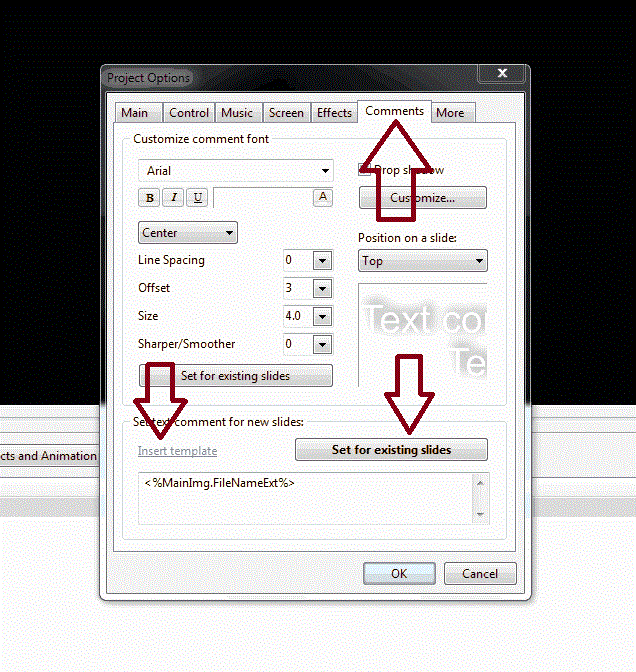
======================= I think if you stare a bit more at the menu, you will probably agree that just above "Insert template" is "Set text comment for new slides:", which is basically what you want. At first glance, it might be easy to misunderstand what it is all about. But after doing it once or twice, it becomes obvious. There are other areas in PTE that do lack an immediate understanding as to what the function will do. It just takes a bit of poking around at times to explore what is going on. I'd like to change some of the titles of functions but it is great that we have this Forum to help us through some of the steps we are trying to take. Glad it worked out. Gary
-
===================== Greetings, Go to Project Options/Comments See the attached gif file. Hope this helps. Gary
-
===================== Greetings, I am creating a new PTE 7.0 slideshow. I am adding a video segment from my Nikon D7000, which produces .MOV video files. One of the original .MOV video segments is 55 Mbs. I converted it to an .MP4 file using Freemake Video Converter. The file size went down to 10 Mbs. Then I inserted this 10 Mb file into PTE and the Converter came up. So I said 'yes' to it and it created a .AVI file but it ballooned up to 30 Mbs. So my question is, is there any advantage to using the Converter when it actually increases the size my video file? Is there any advantage using the Converter's AVI file than using the MP4 video file? Thanks... Gary
-
===================== If I understand your question, the 'light table views' are now in the View menu, where the File, Publish, etc icons are located ( see 'Fullscreen View of...'). The waveform comes up with the Timeline view, automatically...at least with me. Gary
-
================ Jon, Take Peter's advice. Make several MP4 files with PTE. Make them as complex as you can to tax the TV. Bring them on a memory stick to the store and test them out (do it on a laptop too, if you are looking for one of them too). For TV's, I know several models of Samsung will play the PTE's MP4 format slideshows. Some models will not. Make the slideshows in 1920x1080 for a full screen view. It should knock your socks off. Gary
-
========================= Lin, SOLVED!!! I thought my cache had been cleared when I ran a diagnostic program earlier today to see if that would solve the problem. But I guess it did not clear the cache. I went into Firefox and cleared it with its menu and then I got Version 7 to download. This is so strange because all previous beta versions were downloaded with no problems. Thanks for the reminder about clearing out the cache. It worked. Gary
-
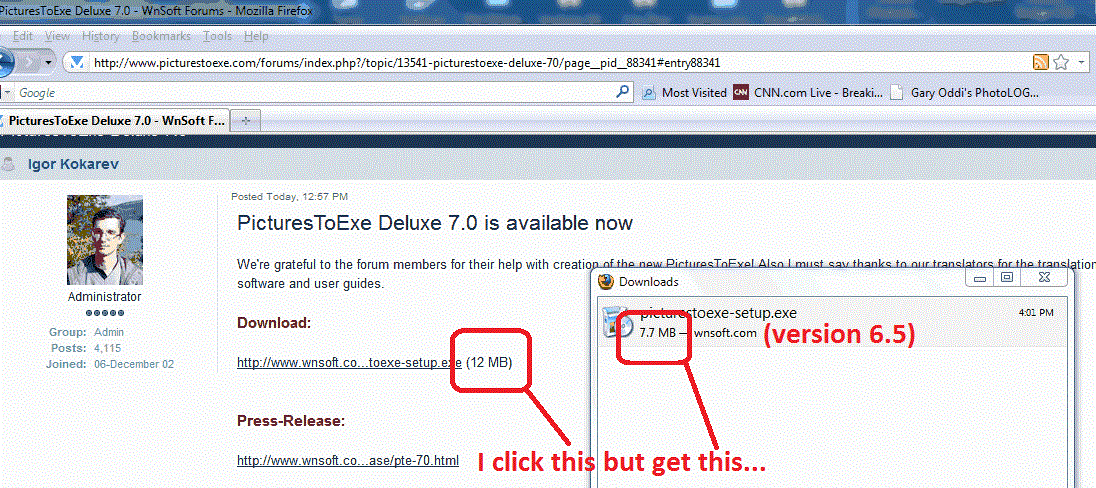
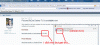
======================= Colin, Thank God it is not only me. I have been going a bit nuts trying to figure out what might be causing the problem. For anyone else, I'd appreciated it someone can shed some light on this. I have attached a gif to show exactly what I get. I have tried more than a dozen times to use Firefox to download version 7, as I have always done, but just can't get 7.0 to download...only 6.58 gets downloaded. Thanks... Gary :blink:
-
================ Ken, I downloaded it at least 5 times using Firefox and it keeps giving me 6.5. This happened whether I used the link in Igor's email notice,or the Forum's link, or at the Wnsoft site. I then tried it using IE and I finally got 7.0. Strange. I've never had this type of problem with Firefox. Gary
-
======================== Igor, When I downloaded it from your link, I got version 6.58. Is it me or did you provide the wrong link? Gary
-
Gary, We removed this view from version 7.0. You could observe same view in previous versions (Horizontal view).
-
I have been using PTE for a number of years and could not be happier with it. It lets me combine my love of travel and photography with my computer to produce slide shows with incredible results. The icing on the cake is the PTE Forum that has a large group of users to help out with any questions. And now, with the availability of adding in video to the slide show, the possibilities are enormous. PTE's quality and capabilities are outstanding. Gary USA
-
Greetings, Back in June 22, 2009, I posted some suggestions that I thought would make an improvement with the music selections we put in PTE. Since then, none of my ideas were picked up. Maybe there is a technical problem that they can not be integrated into PTE. However, one of my suggestions was to increase the visibility of the thin blue line in the waveform that showed the beginning of music selections. Now, I don't see any blue line. Having this blue line which indicates where a music selection starts is a very useful thing to have. Now, if you have several individual music selections, you can not tell where each one starts in the waveform without a lot of tedious work. I would like this blue line to be reinstated. And for what its worth, I am adding all my other suggestions I made back in 2009. Here are some of the suggestions that I had posted, slightly edited: Posted 22 June 2009 - 10:54 AM Greetings, I would like to see the music files shown in better ways. The following suggestions would help when one uses many music files (especially when they are very similar and hard to distinguish) in a slide show.. 1-When music files are added in Project Options/Music tab, I would like to have the music files numbered, as it is now done in the Slide List for images. 2-Then, also, I would like the music file's number appear in the Time Line's waveform, next to the current thin blue line, which indicates where a music file starts. 3-Also, increase the width of the thin blue line so it is more easily found when scrolling through the waveform. Thanks... Gary
-
============================= Greetings, Just a couple more questions for clarification, since I am pretty much in the dark about using video. Will the different effect (though tiny) of using a different frame rate show up the same in the final product whether it is an exe or mp4 or DVD slideshow? After taking a video, can it be changed from a 24p to a 30p, or visa versa (before insertion into PTE)? Thanks, Gary
-
Greetings, I am wondering what the difference would be in a couple of the fps movie setting for a Nikon D7000 when it is dropped into PTE. The two top settings are: 1- 1920x1080; 24 fps 2- 1280x720 30 fps The only thing I have read is that 24 fps is more of a 'movie' look and 30 fps is more of a 'TV' look. Not sure what that means but I am more concerned about the usability and final look when in PTE. Can someone shed some light on making these choices between frame rates for video used in PTE? Thanks.
-
Greetings, This is not a bug in the PTE program itself, but the uninstall of the previous versions have been doing something strange. At least, I think so. Here is what is happening: Say I have Beta 16 installed. Then Beta 17 comes out. I download and install Beta 17 and check the box for a shortcut to be created on the Desktop. The Beta 17 shortcut appears and it works just fine. Then, I go into MyComputer (Win7) and do the uninstall of Beta 16. When this is done, the shortcut that was just made for Beta 17 gets deleted. This has happened for the past several Betas; and I don't think it was doing it for earlier updates. Is this something in the PTE install process that has been changed but can be fixed? Or is this Win7's uninstall just doing something dumb? It is just a pain to have to recreate the shortcut to the new version of PTE each time. I don't think I had to do this in the past. Gary
-
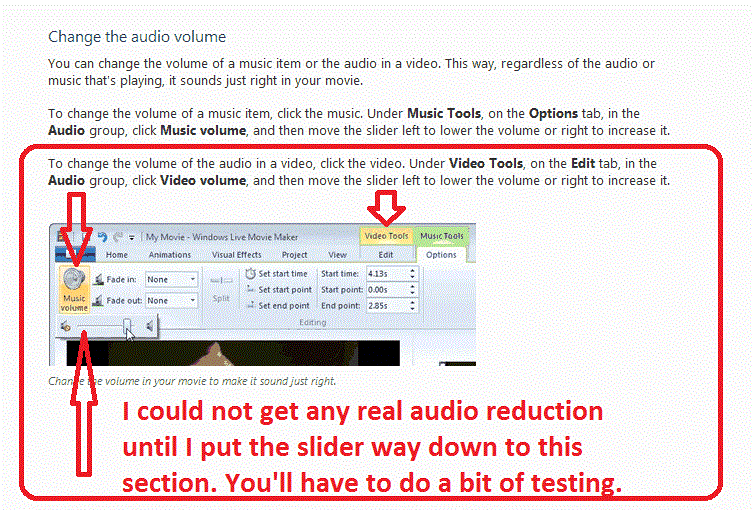
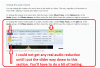
======================= John... Here is another way of dealing with the embedded audio in your video. This can be done outside PTE by using the Windows Live Movie Maker program that is free in Windows. I am attaching a gif that illustrates the steps. At first I did not think it would actually reduce the volume of the embedded audio in my video file. However, through many trials, I found that you have to (at least I had to do it with my video) move the audio slider way to the left and keep testing the saved file until I got it just right. You might have to do a lot of testing find the right reduced volume level. I used this method once to lower the embedded audio so you could just hear it but not interfere with the music selection I had added in PTE. Hope this helps. Gary PS And then use Freemaker Video Converter to convert the mov file to mp4. You'll get a smaller video file.
-
Greetings, Here is another tongue-in-cheek presentation of our trip to Providencia, an island off of Colombia. This one is about my good friend, Roberto. Comments, critiques welcomed: http://www.beechbroo...ile.asp?id=1975 Gary
-
====================== Greetings RayC, The way I did it was to go to this site: http://www.wnsoft.co...turestoexe/buy/ Click on the Upgrade link toward the bottom to get the Videobuilder upgrade for $34. When I did it, they first sent a link for the 6.5 version to download and later I got an email with the Key for the 2 year upgrade period. I think you only really need the Key. When the old version expires, it will ask for the location of the Key you downloaded and just point to it. I think I copied and pasted it in and that works too. I hope this works for you. Gary
-
================= Ken... Oh boy. I must be having a few senior moments. I actually read that post, but since the attachment menu was in French, I must have just glazed over the actual error message in it. It did not compute at the time. Well, it proves I am not the only one having the Nav Bar question... Thanks for pointing it out. I'm sending my eyeballs in for a check!!!! Gary