goddi
-
Posts
3,596 -
Joined
-
Last visited
-
Days Won
27
Everything posted by goddi
-
=================== Peter, Yes. I have tried different versions of PTE (7.04 and 7.03), and different mp3s and even Lin's mp3s and each time the beginning mp3 is affected. I see it does affect where we expect, overlapping the two mp3s.I will try to make up an AVI that will demonstrate my point. Give me some time... Gary
-
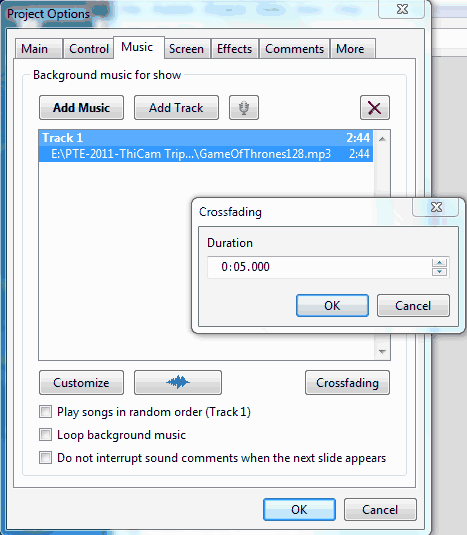
Peter, Attached is what I see when I create a new slideshow and just open Crossfade for the first time. It shows 5s. Seems to me it should be Zero. I understand how Crossfade is supposed to work, overlapping the end of the 1st mp3 with the beginning of the 2nd mp3, and that you should apply it only to the 2nd mp3 (on the same Track). But, take a look at the beginning few seconds of your 1st mp3 and see that it too has been affected. Gary ===========================
-
Lin, I certainly didn't want to turn this into a dissertation. I am just trying to get answers to what I am seeing that does not make sense. You gave me an explanation but it seems that you are only talking about the effects between the 1st and 2nd mp3s. I understand where the Crossfade should happen. However, my question has to do with why is it affecting the beginning of the 1st mp3? I don't think you have responded to that. I tried using Crossfade on another show with 2 mp3s and, again, it affected to beginning of the 1st mp3. I don't think that is what it is supposed to happen. Greetings Lin, No, they are not 'eliminated'. But the beginning drum beats of the 1st mp3 are definitely reduced in sound level with your Crossfade of 10s. In the .gif I had attached, you can see that the waveform barely shows about 4 of the beats when your 10s of Crossfade is applied. If you bring Crossfade to 0s, there is an increase in the number of drum beats you can see in the waveform and you can actually hear the difference when played. I see all of this 'inside' PTE using its waveform in the Timeline. I still don't see why it should be affecting the 1st mp3. I gave you my explanation - I can do no more..... OK I have just noticed another problem with Crossfade. The default setting seems to be 5s. If you bring it down to 0s and then go back into Crossfade, the setting goes back to 5s. Should it not stay at the 0s you set it at? No, it should go to the default. Why would you expect to have Zero in a crossfade? Zero is "no crossfade" so you wouldn't check crossfade if you didn't want it. I would expect it to stay at what I set it at. If '0s' is 'no Crossfade', what is '5s'? If I can make a change from 5s to 0s, it should stay there. Does 5s = 0s? If it does, then it should not let me put in a Zero. Another problem with Crossfade: I am working on a new slideshow that has 2 mp3s. Both are in their own track so I can apply Offset to the 2nd mp3 to have the beginning of the 2nd mp3 overlay the end of the 1st mp3 for a few seconds. If I happen to change the Crossfade of the 2nd mp3 to any other setting than its default of 5, the 2nd mp3 disappears from the wave form and so does the Offset setting. I don't know why I would fiddle with the Crossfade in this instance but I did and it did something weird. Any you can't get it back to where it was unless you close PTE and reopen it without having save it. I don't know why you would fiddle with it either. Gary, you're like a rat terrier worrying a carcass. If you pull the sparkplug wire from a high performance engine while running it will foul the sparkplug. You're not "expected" to pull the sparkplug wire. Crossfade is designed to work with two song selections on the same track. You shouldn't use crossfade if you don't have both selections on the same track. Developers can't possibly account for all the exigencies which users "might" do. If you really think this is a "bug" then report it to Igor as such. Sometimes you just try out menu items to see what would happen. Things happen that aren't expected. I think that is why we have Beta versions. You need the 'rat terriers' to see what happens when developers don't account for what a user might do. The fact that I cannot undo the results of clicking on a menu item that I 'shouldn't' have makes me think the developers weren't good enough 'rat terriers'. I should have been able to put back the default and return it back to where it was. A fix would be, if there is not a second mp3 in that Track, then it should not allow an entry into Crossfade. Gary ('rat terrier'?-- I take that as a complement). This started as a question about how to do crossfade and is developing into a dissertation.... LOL Best regards, Lin Gary
-
Greetings Lin, No, they are not 'eliminated'. But the beginning drum beats of the 1st mp3 are definitely reduced in sound level with your Crossfade of 10s. In the .gif I had attached, you can see that the waveform barely shows about 4 of the beats when your 10s of Crossfade is applied. If you bring Crossfade to 0s, there is an increase in the number of drum beats you can see in the waveform and you can actually hear the difference when played. I see all of this 'inside' PTE using its waveform in the Timeline. I still don't see why it should be affecting the 1st mp3. I have just noticed another problem with Crossfade. The default setting seems to be 5s. If you bring it down to 0s and then go back into Crossfade, the setting goes back to 5s. Should it not stay at the 0s you set it at? Another problem with Crossfade: I am working on a new slideshow that has 2 mp3s. Both are in their own track so I can apply Offset to the 2nd mp3 to have the beginning of the 2nd mp3 overlay the end of the 1st mp3 for a few seconds. If I happen to change the Crossfade of the 2nd mp3 to any other setting than its default of 5, the 2nd mp3 disappears from the wave form and so does the Offset setting. I don't know why I would fiddle with the Crossfade in this instance but I did and it did something weird. Any you can't get it back to where it was unless you close PTE and reopen it without having save it. Gary =====================================================
-
DG, Exactly. Can I vote twice??? Gary ============================
-
Greetings Peter,
-
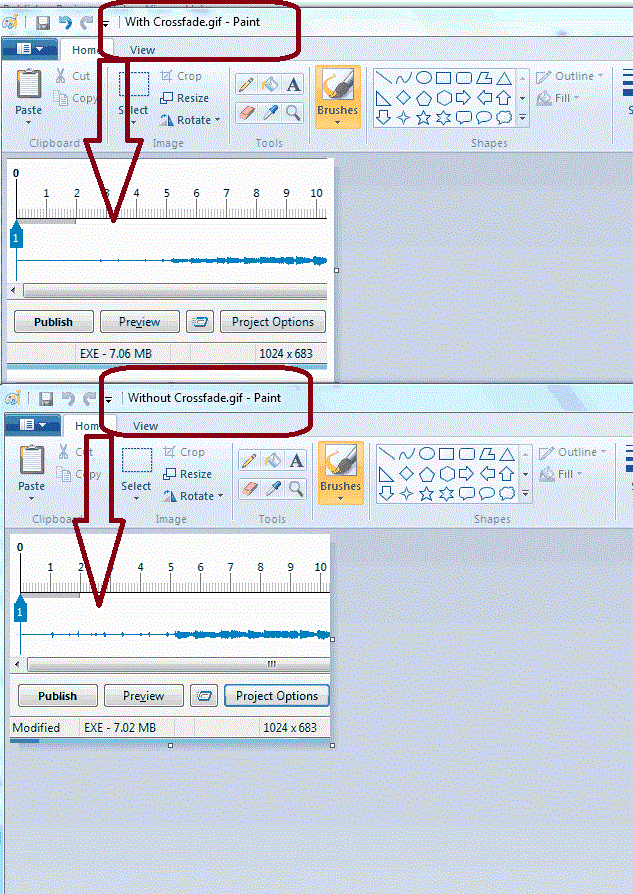
================= Lin, Take a look at the attached gif. If you look closely at the Timelines, you will see what I see. The Timeline without the Crossfade has more 'blips' at the beginning than the Timeline with Crossfade. Something is being removed. And I can hear the difference when I play each. This is in the new version 7.4. I think I understand what you are doing but I don't think you are actually laying the beginning portion of the 2nd mp3 over the ending portion of the 1st mp3. Maybe I am wrong but the fading of either end is taking out some of the music. I don't want to do that. I just want to blend the ending of the 1st mp3 with the beginning of the 2nd mp3. Gary
-
============================= Lin, I checked out your sample. Thanks for the quick reply. What I don't like about using Crossfade is that it affects the beginning of the 1st mp3. If you notice the beginning of the first mp3, it is not exactly like it sounds if you remove the Crossface. The Crossfade is affecting both the transition between the 1st and the 2nd mp3 AND the beginning of the 1st mp3. The Gerry and the Pacemaker's (G&P) mp3 is losing the very beginning drum section with the Crossfade. And, your sample is fading out in the middle of the G&P mp3. I don't want to fade out of my first mp3 because it is already fading out. That means I would be fading-out a fade-out. I just want to put the beginning music of my 2nd mp3 on top of the already fading-out end of my 1st mp3. So if you take out the Crossfade from your sample, it is just a fade-out and a fade-in, no overlapping, but at least you don't lose the beginning drum beats from G&P. So I think my method works a bit better to actually get the overlap between the two mp3s, without the deficiency that the Crossfade introduces. Do you notice what I mean about the Crossfade affecting the first mp3s music???? Is that a bug??? Gary
-
Greetings, I am trying to adjust two mp3 files so that they blend together as one ends and the other starts. I want the second mp3 to start playing while the first mp3 plays its last few seconds, or in other words, to overlap. I tried Crossfade, since that at least sounded like what I wanted to do. But it deals with getting the music to start playing gradually. Then I tried Offset (both mp3s in Track 1). But that made the second mp3 start only after the end of the first mp3 by the amount of time added to the Offset. Then I put the second mp3 in Track 2 and used its Offset setting so that it would start playing a few seconds before the first mp3 ended. If the first mp3 was 2:50, I put the Offset for the second mp3 to be 2:45 go get an overlap of 5 seconds. This got the beginning of the second mp3 to start and to play with the ending of the first mp3 for 5 seconds. Once I got the hang of it, it seems to be a workable solution. My question is, is this the only way to do this in PTE? I don't want to use Audacity to do this. I want to be able to make these adjustments with the audio as I do the editing of the show, within PTE. Wouldn't it be easier if we could just put both mp3s in Track 1 and be able to put in a negative value in for the Offset for the second mp3 to accomplish the overlapping of the mp3s? Gary
-
========================= DavyC, Very nice show; I liked the music. But...you took me on a trip and I did not where I was! How about some introductory text? After a while I recognized the rocks but I can not remember exactly where they are. More info in the slideshow, please. (Also, I'd prefer manual controls to be included) Thanks... Gary
-
Nobeefstul, Yes, Peter's advice is good. But most of the time you just can't point to something you might have done in the past that is causing a problem. I do create backups, but, as you point out, that does not tell you what caused the problem. I always prefer to find the cause, so maybe it won't happen again and you might actually learn something. I have been doing the tests you indicated and that is what has been getting me 'worn out'. Peter thinks that that is the problem but doing these tests over and over to try to nail down what exactly is causing the sporadic problem is needed to be done and it does wear on you. And I think I have found what can cause the problem on a routine basis. But I don't know why the problem is occurring. The uninstall/cold boot/reinstall has been done but that did not stop the problem from occurring. Here is what I have found: I have found that if I open the PTE program by clicking on a .pte file in MyComputer, and then try to replace the exe file using Publish, the error message consistently occurs. If I open the PTE program directly first, then open the same .pte file, and try to replace the exe using Publish, the error does not occur. I tried this with several different slideshows and it seems to be a consistent theme. For some reason unknown, opening PTE by clicking on a .pte file seems to cause a change in the Security tab or Permissions settings in the exe file. I don't know why but opening the PTE program clicking on a .pte file seems to be the trigger of the "Unhandled Exception..." error message. But at least now I can reproduce the problem consistently. Gary
-
Peter, I understand what you are saying. And, I have gone through all of the processes you have mentioned. The difficulty with my situation is that there are two problems occurring at the same time. And both were sporadic and I was not sure if they were related or not. One is with PTE and the other is with downloading a file off the Internet. But both seemed to be tied to Permissions. But many times the error message has nothing to do with the actual source of the problem. So I have had to do many different tests many different ways to try to get to a point where I could consistently cause the problem to occur. Maybe you misunderstood my comment that "I have been trying so many things so many different ways, I am getting worn out..." When the problem is not consistent and redo-able, it is like trying to hit a moving target. I get your points. Been there, done that. But I use my PC far more than the average person, I am sure, so the cause could be from many, many different things that might have started these problems. These problems have been going on for quite a while so that is why I mentioned I am getting 'worn out'. But I do not give up. I find them to be a challenge. I think I am getting closer to being able to reproduce and undo the PTE problem. A little more testing of my theory and I'll post it in a reply to Nobeefstu. Gary ====================================
-
========================= Greetings Nobeefstu, Sorry, I did not respond about uninstall/reinstalling PTE. Yes, I did try that, but I may not have done it in the sequence you outlined above. I will do it again using your sequence. I have been trying so many things so many different ways, I am getting worn out. I have also been emailing back and forth with my local computer group for insight into this problem. But I am willing to try/test any suggestions. This is really an interesting problem than I hope I can get to some good results. Thanks... Gary
-
=============== Yachtsman1, Yes. The only versions on my PC are the 6.5.8 & 7.03. But I am not sure what that would have to do with this problem. This is such a strange problem. Gary
-
Greetings, My last posting said the problem came back. So I did some more testing. The problem seemed to return after I opened my PTE program by just clicking on a .pte file in MyComputer instead of the using the shortcut to the main PTE program. I have both 6.5.8 and 7.03 on my PC. So, with PTE now back to causing the problems, I decided to open 6.5.8. I made a test.pte. I then created a test.exe. No problems. Tried creating/replacing the test.exe several times, no problems. I then opened this test.exe in 7.03. I Published the test.exe. I Published/replaced it several times and the problem did not reappear. Now, with the problem not occurring, I opened the PTE program again by clicking on a .pte file in MyComputer (as opposed to clicking on the shortcut to the main PTE program). The problem came back. I went back to opening 6.5.8 again; created the test.pte and the test.exe. No problems. I opened 7.03 and opened the test.pte and tried Publishing/replacing the test.exe. The problem disappeared....again. Does this shed any light on this problem???????????? I notice, too, that the listings in Security tab for 6.5.8 is quite different than for 7.03. The 7.03 Security tab has 4 Account Unknown..., Batch,, Interactive and Service listed that are not in the 6.5.8 Security tab. I can do a screen capture of this if needed. Gary
-
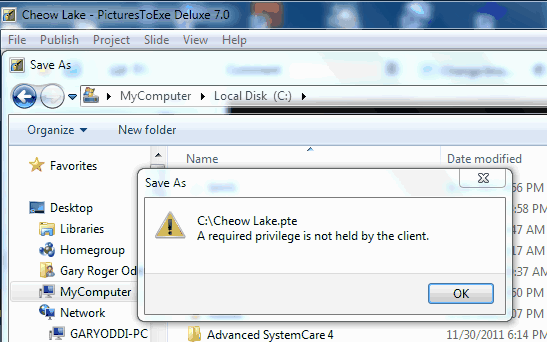
I chose Run As Administrator to open PTE, and tried to replace the Cheow Lake.exe file, and I got the same error problem. Also, I again tried to save the Cheow Lake.pte to the C: drive and got an error message, "A required privilege is not held by the client." I got the same error message when I tried to Publish the exe to the C: drive. Now, something strange just happened. After doing the above (trying the Run As Administrator), as I closed down PTE, it gave me a window saying something about Compatibility problems, and I close the window choosing something like Run as Administrator (I forget the other choices-I'll make a screen shot if it happens again). Then I opened PTE again, and tried about 6 times to Publish the exe to the E: drive as normal and I had NO problems!!! I closed down PTE and reopened it. Tried doing it again....no problems Publishing the exe. Then, I tried to Publish the exe to the C: drive, where it caused the error message "A required privilege is not held by the client" before, and had NO problems. I tried several times replacing the exe on the C: drive and No problems. Now, what can I make of that???????????????? I will let things alone for awhile, reboot, and see what happens. Gary :blink: ADDED LATER: Well, it didn't take long for things to go downhill again. I noticed that now when I start PTE, the UAC window comes up. I am sure it did not it come up before when I opened PTE. It does not with Excel, Word, Photoshop, etc. Anyway, the problem seemed to have disappeared...until. The problem did not show up when I would start PTE using my PTE shortcut. I would click on the PTE shortcut, say Yes to the UAC window, and it would open and I could Publish the exe with not error. Then...I opened PTE by clicking on the .pte file in MyComputer. Then the problem started all over again. Duno... I just don't get it. Gary
-
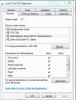
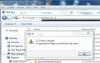
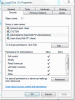
-
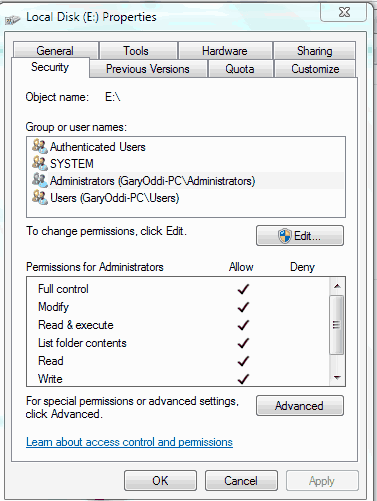
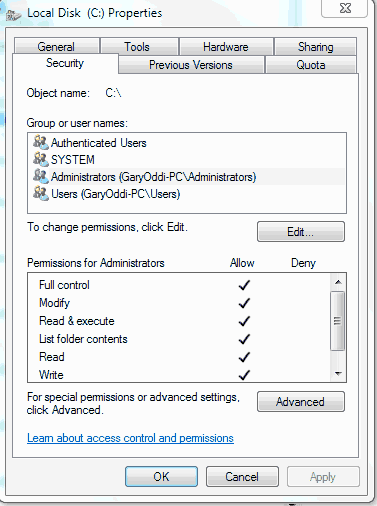
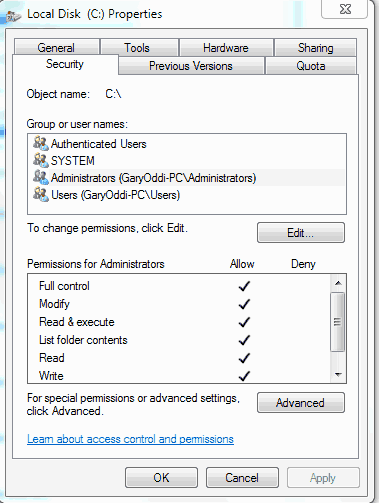
======================= Greetings Nobeefstu... I think I must be the Administrator of my PC. I don't know how to login any other way than the way I am doing it now because there are no other named user accounts. I have attached a screen shot of this. I had not changed anything that has to do with permissions and these problems just popped up out of nowhere. I just went into my C:\ drive and made all of the 'Group or user names' to have all the same 'Permissions for Administrators' as shown in the attachment, see attached gif, to see if that would help. So all users have Full Control. It did not help. (see attached). Gary

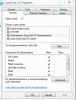
-
==================== Gogs, Yes, the 5 minutes in Jing goes by too fast. If you try BB FlashBack Express, let me know if you can find any way to edit the screen capture in it Player. I can't see any way. But I get around this by exporting the screen capture in AVI and editing it in Freemake Video Converter (free program). I updated the BBFB to a newer version and I got an error message (LogSysServer.exe) but it seemed to go ahead and install the latest version, 3.2.2.2096. I like their highlighted cursor, which Jing does not have. But Jing has a nice single image capture with the ability to add text, blocks and arrows. Gary
-
========================= gogs, Thanks for the info. I just gave it a try and it works just fine. In fact, I just posted my current problem with PTE using Jing to show actually what is happening. http://www.picturest...ge/page__st__20 (see Post 32). Cool piece of software. It is too bad the free version only outputs in swf format. I couldn't find any free software to convert swf to avi or mp4. Is there a way to do this??? You got me interested in finding more capture programs and I ran across BB Flashback Express. http://www.bbsoftwar...press/Home.aspx The nice thing about this program is you can export as AVI and no recording time limit and free. The only problem I have found is that every once in a while, when exporting to AVI, my monitor goes black and I have to use the PC's On/Off button to turn it off and then reboot. Might be just my problem. Haven't sorted it out yet but I did send this question to their tech support. No answer yet. But thanks for the Jing idea. Very useful. Gary
-
Greetings, Unfortunately, my problem with trying to replace an exisiting exe file using Publish still persists. When I try to replace the exe, it give an error message. I gave an explanation (above) of what is happening when I first posted this problem. I found a program called Jing (thanks to someone in this Forum who just mentioned it...thanks) that allows us to do a screen capture. It works well but the free version limits you to 5 minutes. So I made a screen capture of my problem so the you can see exactly what is going on. I just got it in within the 5 minute limit. I hope someone can download it and make more sense of what is going on. I'd appreciate any further ideas of what is going one here. I've tried everything I can think of and everything I can get through Google. No luck. I can only save the screen capture as an swf file. Hope it is not a problem. Thanks... http://www.mediafire...o8l7f1wsopx8757 Gary ADDED LATTER: When you open the file, the audio seems to start right away; be sure to click on the 'play' icon in the middle of the screen to get the video to start too.
-
upgrade 5.6.4 to new Picts EXE version
goddi replied to amandagrantham's topic in General Discussion
==================================================== Greetings, Some time ago, Nobeefstu did this graphic on the differences. I hope this link works. Look for posting #10. This is just his mock-up that I think he proposed to clarify the distinctions but if you look closely, you can see the differences between the Deluxe and the Standard versions. Look for the "Requires Videobuilder Upgrade" in light text in the menu on the left. http://www.picturest...h__1#entry81269 Gary -
================= Just to add my 2 cents in this topic about the Nav Bar... I, too, find it very useful and always include it. I like the ability to make it disappear after a second or two. I normally have used the old Sky Style but now I am gravitating to the Video Player Style. I like this style because it shows total length of the show. But, what bugs me about it is that it does not have the ability to include an Exit icon. It has Previous and Next, but no Exit, as there is in the Sky Style. Why????? If the show is sent to someone not familiar with PTE, they might not know to use the ESC. I have put this as a request to Igor but it has not been addressed. Whether the Nav Bar is default or not, I will always use it. I understand that some don't want the user to have any control over the final product. I see it differently, almost as a courtesy, for user. I wish it were used more. Gary
-
Problem: (SOLVED) MP3's inconsistency in lengths.
goddi replied to goddi's topic in General Discussion
================================ Peter, I did a quick test using different setting for the same MP3 file. I did not do a listening test, but I just wanted to see the file size differences. For the same file: 1- CRB + 192 Kbps + 44.1 Khz = 12,482K 2- CRB + 64 Kbps + 11.025 Khz = 4,162K 3- CRB + 24 Kbps + 11.025 Khz = 1,561K Big differences in the final file size. I'll have to try this on a good MP3 to see if I can tell the difference in sound quality. Gary -
Problem: (SOLVED) MP3's inconsistency in lengths.
goddi replied to goddi's topic in General Discussion
============================ Yachsman1, I did not notice that. I'll keep my eye on that setting too. Thanks... Gary