
goddi
-
Posts
3,601 -
Joined
-
Last visited
-
Days Won
27
Everything posted by goddi
-
Greetings, This is not a bug in the PTE program itself, but the uninstall of the previous versions have been doing something strange. At least, I think so. Here is what is happening: Say I have Beta 16 installed. Then Beta 17 comes out. I download and install Beta 17 and check the box for a shortcut to be created on the Desktop. The Beta 17 shortcut appears and it works just fine. Then, I go into MyComputer (Win7) and do the uninstall of Beta 16. When this is done, the shortcut that was just made for Beta 17 gets deleted. This has happened for the past several Betas; and I don't think it was doing it for earlier updates. Is this something in the PTE install process that has been changed but can be fixed? Or is this Win7's uninstall just doing something dumb? It is just a pain to have to recreate the shortcut to the new version of PTE each time. I don't think I had to do this in the past. Gary
-
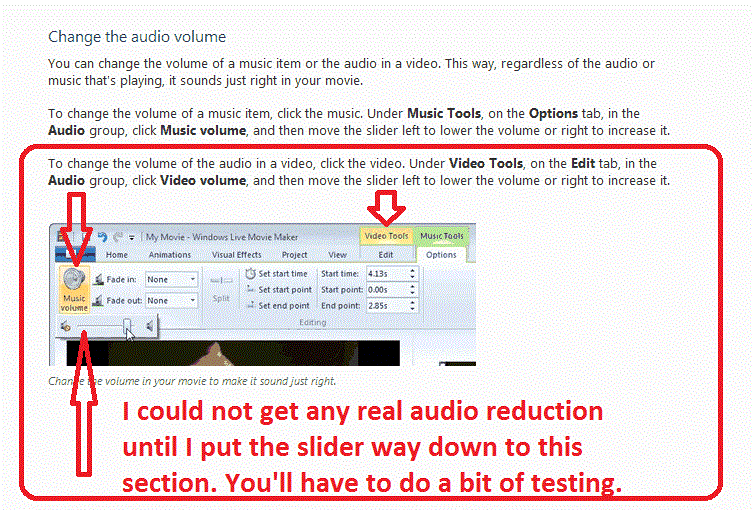
======================= John... Here is another way of dealing with the embedded audio in your video. This can be done outside PTE by using the Windows Live Movie Maker program that is free in Windows. I am attaching a gif that illustrates the steps. At first I did not think it would actually reduce the volume of the embedded audio in my video file. However, through many trials, I found that you have to (at least I had to do it with my video) move the audio slider way to the left and keep testing the saved file until I got it just right. You might have to do a lot of testing find the right reduced volume level. I used this method once to lower the embedded audio so you could just hear it but not interfere with the music selection I had added in PTE. Hope this helps. Gary PS And then use Freemaker Video Converter to convert the mov file to mp4. You'll get a smaller video file.
-
Greetings, Here is another tongue-in-cheek presentation of our trip to Providencia, an island off of Colombia. This one is about my good friend, Roberto. Comments, critiques welcomed: http://www.beechbroo...ile.asp?id=1975 Gary
-
====================== Greetings RayC, The way I did it was to go to this site: http://www.wnsoft.co...turestoexe/buy/ Click on the Upgrade link toward the bottom to get the Videobuilder upgrade for $34. When I did it, they first sent a link for the 6.5 version to download and later I got an email with the Key for the 2 year upgrade period. I think you only really need the Key. When the old version expires, it will ask for the location of the Key you downloaded and just point to it. I think I copied and pasted it in and that works too. I hope this works for you. Gary
-
================= Ken... Oh boy. I must be having a few senior moments. I actually read that post, but since the attachment menu was in French, I must have just glazed over the actual error message in it. It did not compute at the time. Well, it proves I am not the only one having the Nav Bar question... Thanks for pointing it out. I'm sending my eyeballs in for a check!!!! Gary
-
=========================== Peter, I paid $34 which seems to be the upgrade for the Videobuilder. "Upgrade Standard edition – $34 All upgrades and new versions of PicturesToExe at no cost. Free upgrades for VideoBuilder (included to Deluxe edition) during two years' period since the date of your purchasing. After the end of this period you can continue to use any previously released version of VideoBuilder for unlimited time or pay $34 for the upgrade of the newer version." There is no other choice for upgrading or renewing the VideoBuilder that I can see. Gary
-
================ Peter, You caught your boo-boo before I could catch mine. What is strange about the 2 Keys is that they are so different in structure. The first Key is a single line; the second Key has 2 lines. Gary
-
================== Greetings, Certainly not. I thought I had pressed the Add Reply only once. If it appeared twice and you deleted one of them, thanks. Sometimes the posting does not seem to be going through and fiddling with it might have sent it a second time. I don't think anyone purposely posts things twice. Any ideas about the 2 sets of Keys? Thanks... Gary P.S. It is funny that I got 2 emails, exactly the same, pointing to your one reply to my post....
-
============================== Ken, I do try to read all new posts daily. I re-read all the posts in this thread today, but still don't see anything that relates to the Nav Bar error message. Can you point me to where you see it? Curious, Thanks, Gary
-
Greetings, A few days ago, I wanted to make an MP4 file of one of my slideshows. I got the notice that my 2-yr license to Videobuilder had just expired. Ok. I followed the link and purchased the renewal for $34. I quickly got the response with a link to download a file. Since I already had the 6.5 version installed and the 7.14 beta installed, I just followed the instructions. The downloaded file seemed to be the 6.5 version, but I followed the instructions and re-installed the 6.5 version, thinking, perhaps the new system embedded the new Key in download. But, no, I stil got the notice that my Videobuilder license had expired. I sent a notice to the Support team and quickly got a Key sent to me that looked something like this: ------ KEY BEGIN ------------------------------------------------- [VB] 0uDrqh...............................................= ------ KEY END --------------------------------------------------- I ran PTE and pasted in this Key and the error message stopped so it looks like all is well. However, today, I got another email with this file attached, that looked something like this: REGEDIT4 [HKEY_CURRENT_USER\Software\WnSoft\VideoBuilder] "Key"="0fvDK6..........................................=" [HKEY_CURRENT_USER\Software\PTE] "Key"="0aRyBa.........................................=" So I am wondering why I got two Keys. One of the confusing things in this process of renewing Videobuilder is that they sent me the 6.5 version that I already have and there isn't a notice that a Key will follow. So I downloaded the 6.5 program, but apparently really didn't need to. I only needed a new Key. I don't know if I received the first Key because I sent a note to the PTE Support or it arrived automatically. But then what is the second email with another Key for????? Gary
-
====================== Greetings, Speaking of the Nav Bar, several days ago I posted a comment in the Bug Forum that I get an error message when I click on the Customize icon for the Nav Bar. I was trying to change the Nav Bar from the Sky to the Video style, in the version 7.14: http://www.picturest...a/page__st__340 My posting has not received any responses yet so I am wondering if it is just my PTE or if anyone else is experiencing this error message. I can get PTE to change the Nav Bar style but the error message always shows up. Gary
-
I am having a problem with the Nav Bar selection in 7.0 Beta 14. I opened a slideshow that was originally made in a previous version. I tried to change the existing Nav Bar from the Sky Style to the Video Style. When I try this, I get an error message. See attached gif. I also notice that it does not give all the menu choices, such as the Exit icon. Gary

-
============================ Thanks, Paul and Gayland, Isn't it great when things go wrong? It give us food for a good story. My brother-in-law didn't think it was so funny when it was happening, but we all get a good laugh now. Gary
-
Greetings, This show is more of an inside joke about our trip with friends to Providencia Island, off the coast of Colombia. My brother-in-law could not sit up in the kayak. He complained that it was his pants—too slippery or too tight. Something like that. Just hope it brings a smile on your face. It's at: http://www.beechbroo...ile.asp?id=1972 Gary P.S. Comments and critiques welcomed.
-
====================================== DavyC, In a recent trip to the San Antonio Museum of Art, I took this picture. So now I guess we can call our mistakes 'Art'!!! Gary P.S. But I don't know what you are trying to say with "Rianfroest IIII the fainl eipsode."

-
======================= Barry, I just see that the use of proper punctuation, grammar and spelling has gone downhill, in general. Most emails I see are froth with mistakes and it makes it a lot of work to 'interpret' what the writer means to say. Thanks for the understanding. Your text just did not do the rest of your show justice. Music is probably the hardest part of creating a show but the most fun when you find something you like and it fits. It has to present the proper mood and a reasonable length to fit the show. Sometimes next to impossible. What I mean by 'rainforest' music is something like what I found in the YouTube videos (I hope these links work): Rain Forest - Ambient New Age Reiki Music Video Amazon Rainforest Relaxation Video There was nothing wrong with your choice but I wanted to have a more mysterious mood to match the mysterious 'prehistoric' images. Just my thoughts. Gary
-
===== True. I hate getting emails with poor spelling and lack of proper punctuation. I don't like to have to guess at what someone is trying to say. Oh...I don't get text messages, thank goodness! I don't want to start a ruckus here, but I do think there is great room for improvement. We have spell checkers and grammar checkers. All we need to do is use them. Sure we understood what Barry was trying to say. I just think his text portion should have matched his impressive images. Gary
-
=============================== Barry, The images are magical and I enjoyed the show. However, the most distracting thing about the composition is the beginning text. I did not like the fact that proper punctuation was not used. Why didn't you put periods at the end of the sentences? Why did you capitalize nouns that did not need to be capitalized? I had to keep going back to make sure I was at the end of the sentence or the beginning of a sentence. The lack of periods at the end of the sentences and capitalization of nouns where there should not be, distracted me all the way though the show. Perhaps this is a style you intended to have? For me, it did not work well. It reminds me of many of the postings on this site that lack proper punctuation to the point that I really am not sure what they are trying to say. My other critique is that I expected a different type of music. I think the mood of the show would have been better with a 'rainforest' type of music to make it more mysterious, which would match the images. Gary
-
========================================== "Where did you hear about this software" ? Spanish: Como se entero acerca de este software? French: Où avez-vous entendu parler de ce logiciel ? My wife speaks both. These are her translations. Gary
-
Ronnie, It is also under "View/Fullscreen View of Slidelist... F4" and "View/Fullscreen View of Filelist...F3". Gary ==========================
-
Lennart, I just tried to reply but it did not seem to get posted. Let me try again: Yes, I just use the "HD(1920x1080)-Low Quality". I also DISable the "Pan & Scan" choice. I think I do this out of habit. I don't think it makes a difference at this aspect ratio--maybe it does at another aspect ratio (I forget). The MP4 file plays just great on my Samsung model!!!. Gary =======================
-
Greetings, It would be very helpful if an Exit button is added to the Video Nav Bar. Gary
-
============================= JRR, This site gives you some more information and reviews on the top free antivirus softwares. I have been using the free version of Avast for some time now, and I like it: http://www.techsuppo...us-software.htm Gary
-
================== Igor, Thanks for checking on this problem. I tried to reproduce the "adding a 3rd music selection" but I could not get this problem to reoccur. The waveform developed normally. Maybe it is just an intermittent problem. If it happens again, I will let you know. Thanks, Gary
-
Greetings, I am using 7.10. I am creating a new slideshow and I am having a problem with the waveform. Everything was going OK until I tried adding a 3rd music selection (MP3) using Project Options/Music. Prior to this, the waveform was shown. However, when I tried to add this 3rd music selection, the green bar appeared as it normally appears when trying to add music but it stopped about a third of the way . I closed it down because I saw no more progress. Then, I noticed the waveform was not appearing any more. I removed all the music and then tried to add just one of the previous music selections that worked, but still no waveform would appear. So I am not sure what is going on but I can not get the waveform to appear when in the Timeline. Can you tell me what I can do at this point? I put a video in the middle of this show so I don't know if this is a bug or just a malfunction that can be fixed. Gary Added later: I closed PTE down again and opened one of the versions of this slideshow. One of the music selections had been deleted from the files so I got an error message saying it was missing. The waveform was not completed until I removed the missing file from the music list. The waveform came up again and I added the previous music selections and it all was working again. What the problem seems to be is that once there is a problem, PTE can not correct itself when a problem like this occurs. I had to shut it down and reopen the program and the waveform was able to 'recalculate' and start running again. In previous versions, I have created a similar problem with missing music files but it did not freeze up the waveform like it has been doing with this version, 7.10. Added even later: I just removed one of the 3 music selections from this formerly working slideshow and went back to the Timeline. The waveform did NOT appear. This must be a bug??? Gary