goddi
-
Posts
3,593 -
Joined
-
Last visited
-
Days Won
26
Everything posted by goddi
-
Big Black Box appears in discussions....? [SOLVED]
goddi replied to goddi's topic in General Discussion
Greetings, Just to add to this problem.... I keep getting Time-out errors. And I am still getting the black-box problem I mentioned earlier. I am using Firefox 3.6.4. So I tried on another one of my PCs that has an earlier version of Firefox. No problems. I just tried again on my main computer again where I am having the problem with the Forum and I tried using IE to get into the Forum. No problem. So, maybe, it has to do with the current version of Firefox? And I think Firefox just issued this update and I installed it. I am not sure how to revert back to an earlier version of Firefox on this PC to test this theory. Does this shed any light on the problem???? Gary This took me 3 attempts to post.... -
Big Black Box appears in discussions....? [SOLVED]
goddi replied to goddi's topic in General Discussion
I am attaching a screen print of what the blackbox looks like. Gary
-
Big Black Box appears in discussions....? [SOLVED]
goddi replied to goddi's topic in General Discussion
Gerard... Thanks for the reply but I am not seeing what you are seeing. I don't see the drop-down menu you showed. I went to the Index page and clicked on Todays Active Content. I put in a range of dates. But it wants me to put in a filter word. I just want everythings between certain dates. I even tried a filter word but that did not work either. I really just want the results that I used to get when I clicked on View New Content. But worse than that, there seems to be something happening to the Forum. When I try to get in or go to a sub-forum, it times-out. When I open my post, my post shows up for a second, then it is covered by a black box and I only see your response. I wonder if their is something wrong with site. I have no problems getting into any other site. Gary ======================= -
Greetings, I just got back from 3 weeks in Croatia and Slovenia. So I want to catch up on topics since I missed. I notice that I keep getting a big black box at the beginning of the discussions which cuts out someone's posting. Is it me or the Forum??? Also, I know I have missed a lot of posting, I usually click on View New Content to catch up on the lasted inputs. However, even though I have missed 3 weeks of postings, only the lasted two for Today show up. Is there a way to go back by 'date' to see the postings I have missed??? Thanks... Gary
-
================= Daniel, Yes, there are choices in the Customize menu. But I am not smart enough to figure that out. I have stuck to using the 'HD 1920x1080' and 'LQ' (low quality) settings. It is interesting to me that I can not see any difference between the 'LQ' and the 'HQ' results. So I use LQ to save space. Maybe with heavy animation, there might be a difference, but, for now, I just use LQ. Gary
-
Greetings, There has been some discussion about the WD Media Player in this Forum. It will play the MP4 files that PTE can create and display it on your HD TV using RCA cables or an HDMI cable. I have one and it works very well. FYI, I just noticed that Costco now has them in their store. I couldn't find them on their on-line site. But the price is pretty good at $109.99 for the WD TV Live HD Media Player. Gary
-
=================== Igor, Speaking of sound, are you going to fix the problem with WAV files causing a problem in the "Create"/"Executable File for Mac" output? Or has this already been addressed? I don't have a Mac handy so I can't do a test. Thanks... Gary
-
========================== Igor... Just to add a bit to the previous note that the sound track gets duplicated when a text object is added. I have not tried this but I was poking around with the Music Parameter menu, not really understanding what I was doing. In 2 different slideshows, the music items in Track 1 were duplicated as Track 2. Don't know what I did but the duplication of the music tracks gets duplicated in more than one way. Gary (using 6.5 Beta 1) P.S. I also just noticed that even though the music files are still listed in Track 1 (no Track 2 at this point), the wave form show only the thin blue line...no music. What caused the wave form to disappear was I just opened the Crossfading menu and just closed it, the wave form disappeared. (and Track 1 was duplicated as Track 2 and Track 3.)
-
====================== Igor, My friend is out of town but I will do the test as soon as I can get to him. Gary
-
Greetings, I have a Samsung LED TV that will play the PTE's MP4 format directly from a USB device. You don't need a PC or a WD Media Player (which I also have and it works great). You only need a USB flash drive or any other USB device. However, I noticed that my MP4 files were not being recognized when I tried to play them on a friend's plasma TV. So I tried to find out which other Samsung TVs would recognize PTE's MP4 files. It took some digging around but I finally got an answer directly from Samsung. For those planning on getting a new HD TV and would like this neat feature, here is what they just sent to me about their HD TVs: "The units listed below will offer MP4 video playback from either a USB device or from your PC. LCD: LN26C450 through LN46C750 LED: ALL LED TVs Plasma: PN50C530 through PN63C8000." I had no idea that my TV would be able to do this. It was a nice surprise. Hope this information is of help to someone. Gary
-
Peter, Not to beat a dead horse (or my idea), but I must try to make my case a bit clearer. I understand that you don't use the Auto Spread method so I get that you might not be seeing what I am seeing. However I am so sure that I have a good point here, let me try to explain, hopefully, in a better way so you might be able to convince Igor how a user, like me, would like PTE to work better. And I don't think this is 'my way of working' but a way to make Auto Spread work better. Let say I put in about 169 images. And my default time per image happens to be 2 seconds. The Mini-viewer shows 5:38 (based on the 2 second interval time). Ok. Then I add 2 MP3s for a total music time of 6:32. First problem is, the Mini-viewer still shows 5:38. So most people would wonder why the Mini-viewer time does not match the total music time. Next, when I play the show in the Mini-viewer, the show stops at 5:38. All the slides have been played, but the music also abruptly stopped at 5:38, not completing the song. A quick look at the Timeline confirms this. The images were not spread over the music. Yes, the show plays correctly with all the images spread over the entire music selections when played with Preview. This corresponds to Igor's note that "This applies to created slideshow only" next to the Auto Spread menu item. However, I think that this is a deficiency in the program. The way it is now, you can not view the show correctly in an 'edit' mode while working with the Mini-viewer. You can only see the correct final results by playing the full show through Preview. Ok. How can this be corrected? Simple. You have to go into the Timeline menu and click on Timed Points/Arrange All Points. After you do this, all the images get spread correctly over all the music selections (you can see this in the Timeline with the waveform). And, it plays correctly in the Mini-view and it shows the correct time for the entire music selection. Then, if I remove a bunch of images from the show, everything is off again. So I have to, again, go into the Timeline menu, choose Timed Points/Arrange All Points, and then everything gets set correctly and plays correctly, and the Mini-viewer time is re-set correctly. I don't think this is intuitive and maybe most users would not figure this out. So my question is, why is the current way better than what I am proposing? I believe that when Auto Spread is chosen, Arrange All Points should be coupled with it automatically. I can not see a scenario that would make my suggestion unacceptable. A person can always get the images to be UN-Arranged by unclicking the Auto Spread button and put in the 2 seconds which was what it was from the start. The main idea is to be able to facilitate the editing process by being able to play the slideshow in the Mini-View correctly with the images spread over the music and have the Mini-view's displayed playing-time corrected automatically. An added benefit is to be able to see the images spread correctly in the Timeline with the waveform. I hope someone who uses the Auto Spread will chime in here and tell me if I am off-base or, maybe, this might be a good idea. Thanks.... Gary ======================
-
Peter, Thanks for passing this 'panel problem' on to Igor. But I don't see by anyone who uses Auto Spread would not want the Arrange All Points to be an automatic action. The nice things about these actions being automatically coupled, would eliminate the confusion of the musics' length not being correct in the mini-viewer and it would also then play correctly in the mini-viewer. Also, if Arrange All Points is performed automatically with Auto Spread, when you take a look in the Timeline, even though it is greyed-out, you can see and verify the spacing of all the images along the music's length. And even if it is greyed-out, you can do some tweaking of the images by moving them along the Timeline. And then, if you switch into the Timeline View, all the images are evenly spaced and ready for more detailed adjustments along the timeline. So I am curious why anyone who would be using the Auto Spread would not want these items to be coupled. Can you explain under what circumstances that the current settings are advantageous over my example? Thanks, Gary ==============================
-
Peter... I see the light! Boy, do I feel dumb. All I simply had to do was to reduce the size of the image's window in the Timeline View, which would have revealed the Timed Points icon. I forgot that this could hide part of the menu icons. Then I could hit the Arrange All Points and all is back to 'normal'. The time in the mini-viewer window now shows the full and correct 6:32 length and it plays in the mini-viewer as expected. Maybe Igor could eliminate is 'problem' by putting all of the Timeline's menu items in its own horizontal window, so moving the vertical divider bar will not hide the Timeline view's menu items (in other words, make it work as it does in the Slide view--moving the vertical window divider bar does not hide any of the menu items). Also, this necessity to have hit the Timed Points/Arrange All Points when you are using Auto Spread makes no sense to me. I have raised this issue in the past but I seem to be the only one who has this thought. I believe that when you are using Auto Spread, the Arrange All Points should be automatically accomplished so the music's length would be what it should be in the mini-viewer--less confusion. And the show would play correctly in the mini-viewer. Thought? Thanks for the help!!! Gary =================================
-
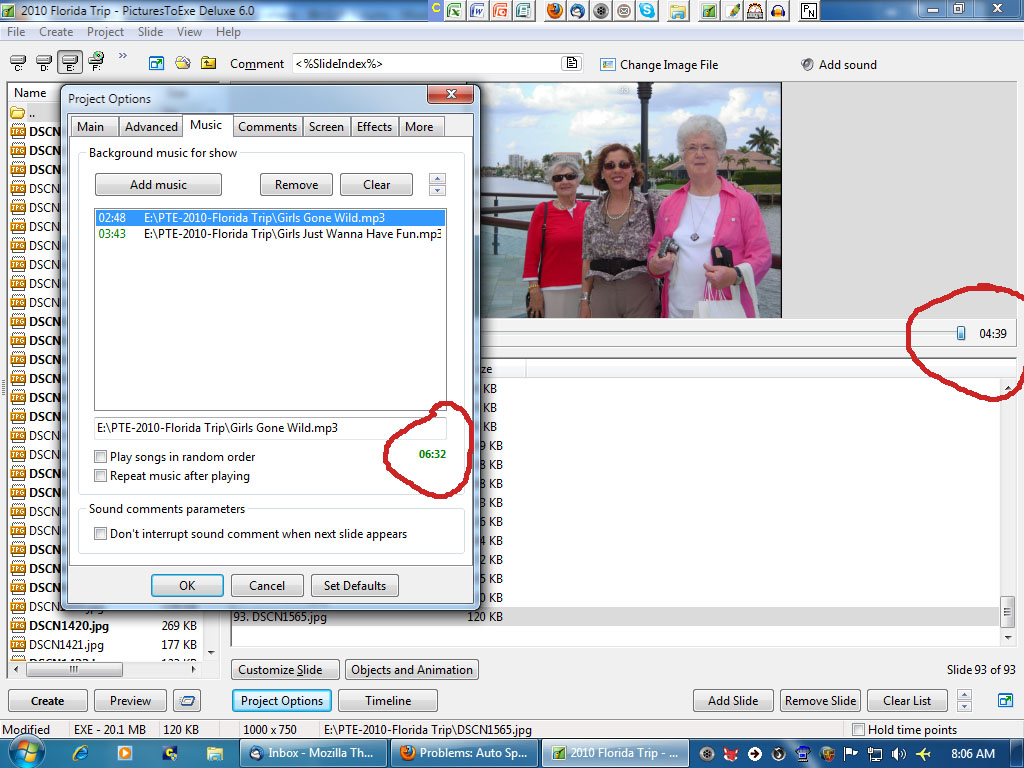
Greetings... Another strange thing that I don't think occurred in past versions. I have attached another screenshot. It shows that the total music length is 6:32(the first MP3 is 2:48 in length; the second MP3 is 3:43 in length) but the preview window shows the length of the show to be only 4:39 (I changed the music selection since my first post). When played in the preview window, the music cuts off before finishing the second music selection at 4:39, showing the last slide. So the slides are not being spread over the full 6:32 music's length. I have made plenty of shows in the past and I have not had or noticed these problems before. Gary
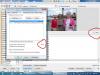
-
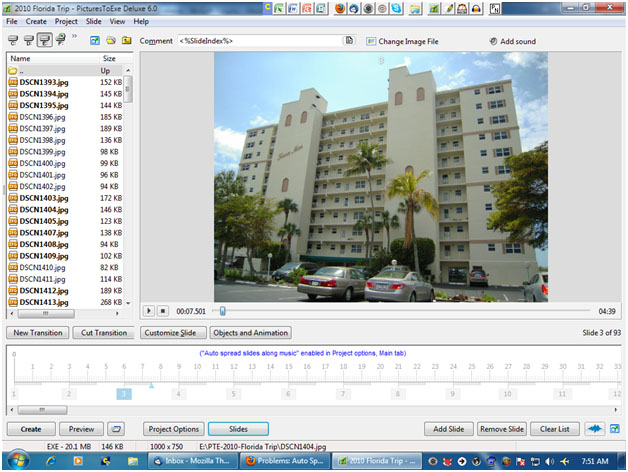
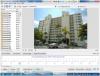
Greetings, Thanks all for responses. I don't even see the Timed Points icon anymore. I have attached a screenshot where I would expect to see it. And, nobeefstu, there isn't any 'Set End of Last Slide at End of Music'. I had looked for that too. Something must be corrupted in my version? RogerN...No, the MP3 is not from iTunes. The music plays just fine. I did run them through Audacity to remove some silence at the end of the song and Exported it as an MP3. Thanks... Gary ========================================
-
Greetings, I just started creating a new slideshow. I am a bit perplexed on what is going on...or not going on. Using Ver 6.04, I dropped in a bunch of images and some MP3 music files. I also set it to 'Auto Spread' and 'Sync Music and Slides' as I normally do. First question is that the Auto Spread does not seem to be working. While the music lasts for 5:38, the Timeline shows 6:03. The music stops at 5:38 (at the end of the last song) and there is no music from that point until the 6:03 point. So it is not Auto Spreading the images over the length of the music, 5:38. Then I notice that in the Timeline, I don't see the 'Timed Points/Arrange All Points' menu. I used to be able to use the Arrange All Points to insure all the images were spread to the end of the music. The Timed Points menu is not there anymore. What happened? What am I missing? Gary P.S. I do notice that the images are spread to the end of the music when played with Preview but not when played in the 'miniwindow' (correct name?). In the past, I thought it would play correctly in both. And I do see that there is a note under the Auto Spread that says "..applies to created slideshow only". Why can't it show the correct Auto Spread in the miniwindow???
-
Greetings, I've made these suggestions before but never received a thumbs-up from Igor yet. Since 6.5 is coming soon, I'd like to bring up these suggestions again. 1-Put an icon for the Desktop with the C:\ D:\, etc. 2-Fix the problem that Wav files will not play in the Mac executable file. 3-Fix the problem where text will shift unexpectedly. (This occurs when you have text in one slide; then you copy and paste that slide with the text as the next slide. You then make the text in the second slide to zoom. That text in the second slide will jump up or down very slightly just before the zoom. Others have concurred that this happens.) Thanks... Gary
-
Blu Ray Burner or DVD Burner - Which one to use?
goddi replied to Ronniebootwest's topic in General Discussion
============= Ronnie, I had already viewed your really well done PDF. It is just unfortunate that my 'Nero Vision 5 Essentials' (that came with my Nero 8) just does not have the AVCHD capability. Maybe it is a crippled version since it might have came with my PC. It is strange that the Nero people told me that if I purchased Nero 9, I'd also have to purchase a plug-in to get the AVCHD capability. Not real sure what the truth is yet. You're lucky that your Nero 9 has it. Gary -
Blu Ray Burner or DVD Burner - Which one to use?
goddi replied to Ronniebootwest's topic in General Discussion
====================== Hi Ronnie... My Nero 8 does not have the menu to create an AVCHD file. After reading your previous postings, I had called the Nero tech people to find out what was going on. They told me that Nero 9 would have this capability but I would have to purchase an 'AVCHD plug-in' for $9.99 to make it work. And this 'plug-in' would not work with earlier versions. I did download the trial version of Nero 9. If I remember correctly, the AVCHD did not work...maybe because I did not purchase this plug-in. I did not like the behemoth size of Nero 9 or the need to buy a plug-in just to be able to try out the AVCHD process, so I just dumped it. Maybe Nero 10 would go smoother but I'm not ready to jump on board with it yet. Please let us know your experience if you do. I'll have to research it a bit more. Thanks... Gary -
On Executable Versus MP4 - Quality of Playback
goddi replied to Lin Evans's topic in General Discussion
====================== Greetings Lin, I put your Alley Cat shows on a memory stick and brought it to my computer store. I compared the MP4 format and the Mac format. I did see a difference. The Mac format was smoother. The MP4 was good but in comparison to the Mac, I could detect a perceptible difference; the MP4 was not as smooth. (I played it on a 2GB Ram, 2.26GHz Intel Core 2 Duo Processor MacBook). My PTE shows are not as complex as your Ally Cat so I have not detected any difference with them. But this is good to know and understand. But I hope Igor will sort out the problem with the Wav files causing a problem in the Mac format, if it can be done. Thanks for the demo. Gary -
============= Tom and Peter, I think we have figure out the problem. The problem is with the Wav files in the PTE show. I went back into several PTE shows and removed all of the Wav files. Some were put in the Music tab and some were in the added to individual slides with the Add Sound icon. I went back to my computer store and played them on the MacBook. After all the Wav files were removed, and I created the "Executable Show for Mac", they play just find on a MacBook. (I thought that one of the shows quit while playing it on the MacBook but my eyes were getting glazed over during these test. I played it again and it played through without stopping. So, I am not sure what happened. Maybe something similar to what Peter had happen?) Anyway, it is clear to me that the Wav sound effects files were causing the problem. When I play the same shows on the MacBook that were created as an MP4, with the Wav files, there are no problems playing the slideshows. So I hope Igor will figure out how to resolve this problem. Thanks very much for helping figure out what was going on. Sincerely, Gary
-
=========== Thanks Tom. I will make a couple more Mac files and take them to the computer store just to see what happens. I will make sure these don't have any Wav files, only Mp3s. Gary
-
================ Tom and Peter, Thanks for getting into this problem. I would not have expected Wavs would cause any problems. Most sound effects files are in Wav format. I hope that Igor will take a look at this sound problem (and the missing blue box icon file). Sincerely, Gary
-
============================== Peter, As far as the music goes, I do have an Mp3 music file, and I also have 2 sound files that are Wavs. Maybe they are what is causing the problem? Thanks for looking into this. Attached is the Mediafire link. http://www.mediafire.com/file/urzzqnqiug0/Wild Thing-16x9z_Mar18-2010_14-51-09.zip Gary
-
==================== Tom, Thanks for taking a look at it. I just got back from the Mac store at a Mall. I tried the files (made fresh new ones) but, again, the same thing happened. It played the first image for only a second and the music was garbled. Then the slideshow shut down. The Mac guy at the store took my thumbdrive to the back to consult with other Mac people. They could not figure out what the problem was. I am using PTE 6.0.4 and my OS is Windows7 (32 bit). They told me to just use the MP4 file because all Macs should be able to read it. It appears from this Forum that some people are able to play the PTE shows created for a Mac but I don't know if they are using the "Create Executable for a Mac" (as a ZIP) process or the MP4 file. Gary