goddi
-
Posts
3,593 -
Joined
-
Last visited
-
Days Won
26
Everything posted by goddi
-
======================== Tom, Sorry...I think I didn't get the entire link. Let me try this one. http://www.mediafire.com/file/tnmmojqmjin/Wild Thing-Mac-16x9z.zip Gary
-
========================== Thanks Peter, Yes, that works too. I think it would be nicer if we were able to just delete the Rectangle and insert our own image. But the work-around works, too. I didn't think of the copy/paste trick for the buttons. Music capability would be nice. Just had another idea about using this feature. In the Forum discussion about "A Suggestion About Titles", information about a slideshow could be placed in a button called "Info" (just rename the "Help" button in this Start-up Window). Your suggested information example, such as: "Topic Title: Carnival of Venice, Topic Description: 17.4MB, 3m42s, 4:3, 1920x1280, Camera clubs and AV groups" could be placed there, also. Gary
-
================= Greetings, But why put a lid on the pot? If you can cook, you might spice things up! Gary
-
============================ Greetings, Thanks for revealing another neat option that PTE has. I just never got around to playing with this feature. But a question... I'd like to replace the 'rectangle' with an image and keep the other objects. If I delete the 'rectangle', everything gets deleted. Is there a way to replace the 'rectangle' but keep the text and buttons? I know I can insert in image and bring these items to the 'front' but I am hoping there is an easier way. Is there? Maybe if Igor would change this so that the items under the 'rectangle' were not 'children'? Also, is there a way to add music to this Startup Window? Thanks...Gary
-
===================== Hi Peter, Tom, Brian and others, Thanks for the offer. Below is the MediaFire link to the Mac ZIP file that I had brought to the computer store. The salesman did click on the file and it created a couple other files but, like I mentioned before, the first image played only for a second and then it shut down. I'd appreciate it if you would play it and see what happens. http://www.mediafire.com/file/tnmmojqmji I can understand that quality is the goal here. I am surprise to hear that the Mac ZIP file is higher quality than the MP4. When I play the MP4 on my PC or my 40" LED, the quality is equal or better than the PTE's exe PC file. Have you made a comparison like this? If the Mac ZIP file eventually works, I see its smaller file is an advantage. For example, the upload I just made of my slideshow is only 8Mb for the Mac ZIP and it is 30Mb for the same file as an MP4. Thanks...Let me know what you find. Gary
-
================= Hi Bill, I see that you are viewing the PTE slideshows in the Mac format. I am a PC user and want to send a PTE slideshow to a friend who has a Mac. I took a test slideshow that I created with the "Executable file for Mac, in ZIP" to a local store that has Macs to see what would happen. It would not play (played only the first image for a second, then shut down). I don't know why. But the salesman said the Mac needed a 'Zip player'. Anyway, I also tried the same slideshow that was created in PTE in MP4 format and it played just fine on the Mac. So my question is, can you play MP4 files on your Mac? And, if so, would you, as a Mac user, prefer an MP4 file or the 'Executable file for Mac, in ZIP' format??? Thanks... Gary
-
============================= Hi Peter and others... Yes, it should be simple. However, it has not been. I'm using PTE 6.04 and I am using the 'Create Executable for a Mac' (as a ZIP). I created the Mac ZIP file of one of my shows. I just brought it to my BestBuy story that has Macs. I played the Mac ZIP file at the store but it played for only a second. At showed the first image for a second then it stopped and kicked out of the show. It was being played on a MacBook. The salesman said something like 'it needs to have a ZIP player'. Is he saying that MacBooks can't automatically handle a ZIP file??? Then, I tried playing one of my MP4 shows that I normally play on my PC. It played just fine on the MacBook. So....I don't know what is going on here. If Macs play MP4s, why bother with the 'Create Executable for a Mac' (as a ZIP)? Gary
-
=================== Greetings all and thanks for the replies, Yes, I don't want to play the Windows version of PTE on a Mac. I want to create a Mac version. However, here is where I get confused: Tom says "The Mac OS must be 10.4 or higher and his Mac must have an Intel cpu. A dedicated graphics processor (nvidia/ati) is better than the integrated intel gma950 gpu used in the older Macbooks and Mac minis." Henri says "In PtE you can make a 'Mac' exe-file that perfectly runs on a Apple computer with Intel processor. Are you saying the same thing? To me, it does not seem to be. From what I have read in the Forum, it appears that you have to have a "Mac", not an Apple; and the operating system on the Mac has to have a particular upgrade... What don't I understand??? Thanks... Gary PS I just had a great idea. I should take my Mac-executable-zipped file down to my local Apple/Mac store at the Mall and just see what it plays on and maybe I see what happens there?
-
Greetings, I want to create a PTE show, using my Windows PC, that will be playable on a Mac. I have read through the Forum on this subject but I did not find an answer, at least one that I could understand. I don't have a Mac to test things out on so I am at a disadvantage. 1st question: What is the difference in choosing "HD Video for PC and Mac (MP4)" and "Executable file for Mac" when you want to create a slideshow to play on a Mac? 2nd question: I don't know the difference between a Mac and a Big Mac. So, can you tell me exactly which Mac these files will play on? Which Mac OS is needed? The person that I want to send it to says he has a "Mac". He is hard to reach so that is all I know at the moment. Thanks...Gary
-
================== Peter, Speaking of getting the best out of this Forum, I'd like to ask a question about the Search function. Many times I have tried to search on words that are 4 letters or less in length, such as "MP4". But I get the warning: "One or all of your search keywords were below 4 characters or you searched for words which are not allowed, such as 'html', 'img', etc, please go back and increase the length of these search keywords or choose different keywords." Is there a good reason for this restriction? Can it be removed? It really puts a crimp in trying to find information. Thanks...Gary
-
Greetings, Sad, indeed. When I would read one of his postings, I hardly could grasp what he was up to. But I knew he was pushing PTE to new heights, new possibilities, new discoveries. I marveled at his understanding of PTE and his devotion to make it better. What a loss. Sincere sympathies to his family. Sincerely, Gary
-
================= Peter, I, too, would like to keep my filenames short. But as I have progressed in learning and in technology, they are getting longer and longer. For example, when I started using PTE, it was simple. I created an exe with an aspect ratio (AR) of 4:3 for the computer screen. So the filename was “filename.exe”. Then, I got into making them with an AR of 16:9. So the filename was “filename-16x9.exe”. Then, I did not like the black bars on the right and left sides. I decided to zoom in on each image to extend the images left and right to remove the black bars and crop off the top and bottoms of each image to get the full 16:9 effect. So the filename was “filename-16x9z.exe”. Then, I got into making the MP4s. I use the 16x9z exe file and choose ‘HD1920x1080’ and ‘Low Quality’ (I see no difference between HQ and LQ, saves space) and turn off the ‘Pan and Scan’. The filename is now “filename-16x9z-HD1920x1080LQ-PSN.mp4. This is the only way I can keep track of what is going on and remember what the heck I did while I am converting all of my previous versions. Gary :blink:
-
Finding the 'Desktop' in the Folder window...
goddi replied to goddi's topic in Suggestions for Next Versions
============================ Yachtsman1... Yes, but there are limitations on how small you can make them. I'd rather not have the second file panel taking up any space at all. I just need a quicker way to get to the Desktop. Thanks...Gary Nobeefstu... Bingo!!! I think that just adding an icon for the Desktop would be very useful and a simple way of addressing the problem. It would not change the current setup but would add functionality. I hope Igor is listening. Thanks... Gary -
Finding the 'Desktop' in the Folder window...
goddi replied to goddi's topic in Suggestions for Next Versions
======================= Greetings, I have tried your settings. What I don't like is that 'Show Tree' inserts a second window that takes up space. I don't see why we can't just get the full file/folder listing without the second window. I now see that Peter had the 'Show Tree' checked, so he also had both file panels opened. It seems logical for me that when you have the C:\ chosen (without Show Tree checked), that you should be able to click on 'One Level Up' and get the Desktop. Or, we should be able to get the entire hard drive's file/folder listing in file panel. The 'Show Tree' takes up too much monitor space. I now see what I have to do to get to the Desktop (without using 'Show Tree'), but I don't think it is user-friendly or intuitive. Thanks...Gary -
Finding the 'Desktop' in the Folder window...
goddi replied to goddi's topic in Suggestions for Next Versions
================== Peter, Thanks for the screenshot. Interesting. When I look at my listing, it only shows the folders in C:\ (down to the Xilisoft folder). But no drives or Desktop. So I must have something set differently from your settings. So, I went into 'View' and clicked on 'Show Tree'. Ok...I get the full tree listing with all my drives and Desktop, etc. (down to the Xilisoft folder plus the drives and Desktop). Great. But...it keeps the other first file listing too. How can I get rid of the first one listing and keep the second one, so it looks like yours??? Take a look at my attachment. You will see the 2 listings. The one on the right shows what I usually get; only the folders in C:\. The file listing on the left shows what I get when I click on 'Show Tree'. How do I get it to look like your single list of files and drive and the Desktop? Thanks... Gary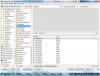
-
Bluray quality on DVD. Im a convert now
goddi replied to coopernatural's topic in General Discussion
=============== Ronnie, Ok...I downloaded/installed the Trial version of Nero 9. I did notice that on their webpage they say: "AVCHD authoring and playback as well as MPEG-4 and BD-AV formats are not supported in the Nero 9 trial version.". Gee, thanks Nero!!! I opened the Nero 9 program and looked for the AVDHD menu. It now does not have the 'Nero Vision 5' menu as show in your PFD (or in my Nero 8 version). The 'new' Nero 9 has the following menu items with the heading of 'Nero 9' (not 'Nero Vision 5'): -Make DVD -Make AVCHD -Make Blu Ray Disc When I click on any of these, it tells me I have to purchase the full version. So there is no way of testing the AVCHD process with the trial version. And since they are selling the AVCHD plugin for $9.99 additionally, that only works with Nero 9, they are certainly trying to squeeze few more bucks from us. Gary -
Bluray quality on DVD. Im a convert now
goddi replied to coopernatural's topic in General Discussion
================ Ronnie... Yes, they have been bad boys. The tech guy said I'd have to purchase the AVCHD plugin to do something with the AVCHD. The connection was not good so I am not sure what he was referring to. But I think that they have removed the AVDHD option in Vision 5s so that we'd have to purchase the AVCHD plugin. I don't know for sure. Maybe I'll download the trial version and take a look. I'll let you know if I do this and the results. Yes, they said they will credit my credit card for the plugin purchase. Gary -
Finding the 'Desktop' in the Folder window...
goddi replied to goddi's topic in Suggestions for Next Versions
============== Peter, I don't see what what you mean. Scrolling down in any of the folder tree panel views does not give me the 'Desktop'. Can you be more specific? I have fiddled with just about every possibility but I don't see a 'simple' way to view the Desktop without a bunch of keystrokes. Maybe my Windows7 works differently from your OS? If you have clicked on the C:\ icon, does a subsequent click on the 'One Level Up' icon do anything??? It does not make sense to have to click on the 'Open My documents' icon and then the '..' or back to the 'One Level Up' icon to get to the Desktop. Gary -
=============== Yacchtsman1, Try 'Help', then 'About PicturesToExe'. Gary Later...ooppsss, I just noticed Ken already posted the same info.
-
Greetings, Sometimes I want find some image files on the Desktop when I am in the Folders window. If I am in the C:\ folder listing, and I click on the 'One Level Up', I expect to be able to see the Desktop in the listing. However, nothing happens. I have to then click on the 'Open My document' icon and then go back and click on the "One Level Up' to see the Desktop (and the other folder items that appear when I had previously clicked on 'Open My documents' icon). Having these extra steps to get to the Desktop does not make sense to me. I think that a user should be able to just click on 'One Level Up' to get to the Desktop and the other folder listings from the C:\ icon. Or...put in a "Desktop" icon next to the C:\, D:\, etc. I see that after you click on 'Open My documents', you can click on the '..' and the resulting listing will include the Desktop, but this too is not an obvious way to find the Desktop. Also, in my Windows7, my 'Documents' folder is under 'Desktop/Library' folder. So it makes even more sense for the 'One Level Up' to go directly to the Desktop and, from there, I can browse to the 'Documents' folder, if I need to. I know you can right-click and get to the Explorer, but that does not do what is needed. Thanks... Gary P.S. I am using 6.0.4.
-
Bluray quality on DVD. Im a convert now
goddi replied to coopernatural's topic in General Discussion
========================== Ronnie, I finally got to go through your PDF. It is clear and concise. Thanks much. However, I have discovered a bit of a problem. Not yours, but with Nero. I have the Nero 8 program, with its 'Nero Vision 5' subprogram. When I go into my Nero Vision 5's subprogram and click on 'Make DVD', I do not get the submenu with 'AVCHD'. From looking at Nero's site, I found the availability of an 'AVCHD Plugin'. I purchased it for $9.99 and tried to get the downloadable file. However, the purchase confirmation email with the download link failed to show up. I called Nero and they told me that the Nero 5 Vision does not come with the AVCHD capability anymore and this plugin will not work with Nero 5 Vision. Nero tech said that the only way to get the AVCHD capability is to purchase Nero 9 and I will also need to purchase the AVCHD plugin. This puts a crink in trying out the process. I don't know yet if I want to go through the upgrade to Nero 9. Thanks... Gary -
===================== Dave... I was not too excited about getting an HDTV since my old analog was working just fine with the HD converter box. But...I am so glad I made the purchase. It is really an incredible picture...and I am using my 20 year-old Radio Shack antenna that is inside my attic. I create my .pte/.exe file with the 16x9 setting. Then I create the MP4 file using the 1920x1080 format. I have found that I don't see a difference between the HQ and the LQ setting, so I have been using the LQ (low quality) setting and save space on my memory stick. I use the Media Player Classic-Home Cinema program to play my MP4 on my PC. I also see that my Windows Media Player (in my Windows7) plays MP4 very well, also. I don't like using Quicktime. The screen opens too large and I have to fix it each time. I just tried a few of my MP4 files with the Media Player Classic (MPC) on a friends PC and it stopped and started every so often. An error came up about updating a DirectX or something like that. Maybe that is your problem. I did not try it with their Windows Media player. Also, when I create my 16x9 PTE show, I 'zoom' in on each image while in the O&A so that the left and right edges of the image are to the far left and right of the format, and will therefore lose a portion of the top and/or bottom of the image. But I can make the choice which part of the image I will keep or lose (top or bottom). At first, I did not like having to make this decision but now I like it 98% of the time. It really looks so much better that the 4:3 format I used to use on my PC. I used to shoot slides and have slideshows with the screen and projector. Having PTE being able to create MP4 shows that are shown full screen on my HDTV from a memory stick (or from a WD HD media player), WOW!!!! You'll never go back. Hope this helps. Gary P.S. I also notice that when I play my MP4 file (created at 16x9, zoomed in, and at 1920x1080) with the MPC program on my PC, I get smaller black lines on the top and bottom than compared to the same file created as the .exe. So I prefer to play my MP4s on my PC using MPC.
-
Greetings, There has been much discussion about using a media player (such as the WD HD Media Player) to play PTE's MP4 files on HDTVs. However, I just made a discover with my recently purchased Samsung LED 40" HDTV. Since I got this TV, I have been playing my PTE MP4 files through my WD HD Media Player, which is excellent. However, I wondered what the 'Media.P' button was for on my TV's remote. So I plugged in my memory stick directly in the TV's USB port and pushed the 'Media.P' (Media Player). I discovered that the MP4 files came up and played just as well as when I used the WD HD Media Player. I had no idea that this would be possible. So, in case others have not tried this on their HDTV, I just want make you aware of this possibility. The WD HD Media Player is great to have (its portability is nice, too), but it was also a nice discover for me that my HDTV will play PTE's MP4 files directly thorough its USB port using a memory stick. Maybe your HDTV will do this too? Gary
-
Input Filename before the Create MP4 Process
goddi replied to goddi's topic in Suggestions for Next Versions
================ Greetings, Thanks for your concurrence on this issue. It seems more and more users are getting into making the MP4 files and they would fine the current procedure to be a bit frustating. I am surprised there has not been more discussion about this file management issue. It would be nice when someone provides an 'Idea or Suggestion', that Igor's group would give it a thumbs up or thumbs down. I know he is busy with his improvements. I will just have to wait for his next version to see if he has incorporated this 'Idea'. Kinda like waiting to open a Christmas present... Thanks...Gary