davegee
-
Posts
9,363 -
Joined
-
Days Won
60
Everything posted by davegee
-
Tom, There isn't a simple answer to this. If you normally make 4:3 shows for your club's projector at 1440x1080 they will fit perfectly on that projector. However, my experience is that the same show, converted to MPEG4 and played on the TV via its Media Player would be stretched (distorted) to fit the 1920 Width. If you make your 1440x1080 4:3 shows on a 1920x1080 background then, on your club's 1024x768, you would have a letterbox format with the 4:3 in the middle - not ideal. You could use the ZOOM to make it fill the screen? Not best quality. But the MPEG4 file from the same show would fit your television's height and give you a 4:3 show in the centre of the width (un-distorted). If you are going to make MPEG4 shows then the best possible scenario is to adopt the 16:9 format - that way you will FILL the screen. If you DON'T want to adopt the 16:9 format then superimpose whatever AR you decide upon on a 16:9 1920x1080 BG. DG
-
As long as it fits comfortably you'll be OK. If it is any help, I would advise using 1920x1080 screen options for EVERYTHING if you are going to play the MPEG4 files this way. If you want to make a 3:2 show superimpose it on a 16:9 background otherwise the show will be distorted to 16:9 by the Media Player. That's my experience anyway. DG
-
Tom, I think that you will find that the WD unit will NOT play EXE files. However the spec (DABS.co.uk) shows that it will play MPEG4 files so converting in PTE will produce a high quality video which will play on the WD. The price is the higher file sizes necessary. (Approximately 10 times as big). The TV spec shows that it has 2 USB inputs so the MPEG4 files, JPEGs and Audio files etc will play via a USB memory key saving on the need for connecting cables etc. It's not a major consideration but you might want to try it out to see what quality to expect before getting the WD. I've been working this way with a 16Gb key for around 6 months and I'm well pleased. DG
-
1920x1080 for most purposes including MPEG4 and PAL DVDs. Remember to UNTICK Fixed Size of Slide when making a PAL DVD and the images will "Fit To Screen" in the correct AR on HD TVs. For the "ultimate" quality on your own TV use a Laptop/PC connected via HDMI to play the EXE or (if your TV supports it) use a USB memory key to play the MPEG4. DG
-
Personally, I didn't reply to the OP because I was undecided if he was an "infiltrator" pushing an alternative piece of software. He hasn't returned, so I'm beginning to think that I might have been correct? DG
-
Check your JUNK E-MAIL box - these things have frequently ended up there. There is a procedure for starting a query here: http://www.wnsoft.com/support.htm Do this in addition to checking your Junk E-Mail Box. If your Junk E-Mail is separated at your supplier's end then you also need to check there. Peter and I were typing at the same time. DG
-
Mike, I think that you need to specify a few more details - price? Most of my friends and I have opted for SONY and there is a good range of prices there. One of the main factors (in our case) is that HDMI output is standard. Reliability, IMHO is as good as you'll get anywhere. DG
-
Suggestion: It is NOT a good idea to use what appears to be your e-mail address as a user name? DG
-
PLEASE show the better quality available with V7? DG
-
Igor, You also mentioned that V7 would bring better quality of images. Any news on that? DG
-
Until Smokie has a chance to explain properly, it COULD be that his show is meant to run "in the background" while the party/meal is going on? Just like BG Music but with "snaps"?
-
Tom, You are, perhaps, missing a point. By going into SETTING UP in ANIMATION / Linear or SMOOTH etc, you can choose SEPARATE HERE and you can achieve your objective witth ANY of the choices - LINEAR, SMOOTH etc. DG
-
http://www.picturestoexe.com/forums/index.php?showtopic=12652&view=findpost&p=81670 The second part of STARDEALER's post. DG
-
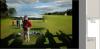
Something like this?
-
The beauty of Igor's proposals are that the video will be able to be shown IN CONJUNCTION WITH 3D animation etc. If you just want to show a video from your DSLR there are other ways of doing it - but to be able to combine it with a still image inside of a PTE show - that's something else! DG
-

Does anybody turn off "Hardware acceleration" option?
davegee replied to Igor's topic in General Discussion
Like Paul, I was of the opinion that to run a MENU show which calls up other slideshows the option TURNING OFF Hardware Acceleration for the MENU show was necessary. There were many posts which recommended this some time ago. Can anyone explain (in simple terms) what, if anything, has changed and now makes this step unnecessary? DG -
If you develop a system based on TEMPLATES you could possibly save yourself a lot of work. Saving a Template at the end of a session creates a Template Folder which contains all images etc used up to the point of saving. Once created it can be overwritten and remain in the one location. The next time that you work on it (and SAVE) it will add any new images to the Template Folder. Your system sounds nice but the percieved wisdom in this forum is to keep everything related to a project IN ONE FOLDER. DG
-
OK Xaver, I think that I understand a little better what you are trying to explain. Interesting. DG
-
Gentlemen, If you were viewing your JPEG in CS4 (on your computer monitor) and you were not able to distinguish between the various shades of Gray, what would you do? You would calibrate your monitor and not complain to Adobe. Each of the inputs on your TVs will (should) have independent Picture Controls. I have different controls for Mode (Standard), Backlight, Brightness, Contrast and Colour for each of the inputs on my TV. So, therefore I can have different settings for viewing Satelite TV via HDMI and Terrestrial TV via normal Aerial input and also for the USB input. Getting the picture to your satisfaction on one of the inputs does not necessarily mean that all inputs will give the same satisfactory picture. I spent some time on my TV when it was new setting up these different inputs to give a satisfactory picture on each of the different inputs and found that for viewing pictures (JPEGs) and MPEG4 video required slightly different Picture Settings to the other inputs - just as the HDMI input needed different settings to the Terrestrial input. The test that you suggested was a good way of proving that clipping was not occuring at either end of the scale and I can see the difference between zero and 8 just as I can see the difference between pure white and the next step down WITH MY SETTINGS in place. Another comparison which I have done is to play the same PTE show into the TV firstly as an EXE from my Laptop via HDMI and then from the USB key as an MPEG4 and I can see no difference whatsoever in the shadows or highlights. I intend to try your gray patches test at the first possible opportunity. DG
-
Peter, I have e-mailed you and attached my JPEG. I couldn't find a way of doing it via the forum. DG
-
Xaver, Interesting test!! I tried it on my Sony and found that whilst the Zero and 8 readings were very close there was a clear difference between all of the patches. I also included the opposite end of the scale i.e. 100 downwards and the differences between all patches were VERY clearly seen. I deduce from this that H.264 is adequate (for me) and that you might possibly look at the settings of your TV? DG
-
OK, then I'll offer you a suggestion. Instead of using a "preset" why not use the CUSTOM setting and make sure that everything is IDENTICAL in both of the shows that you are converting? Also, why not try creating the MP3 files at the same Bit Rate - get rid of any anomalies and then compare the two versions? DG
-
Peter, As you know I have been using this method (USB) for some time now and whilst I can't offer any words of wisdom I can give an example of one of the shows on my 16Gb USB Memory Key. Time = 10m 35s Resolution = 1920x1080 MP3 file = 9.7Mb at 128kbps Video details: 1920x1080 / 24fps / 2 Passes Bitrate / Bitrate = 10000 Final MPEG4 size = 769Mb Quality = SUPERB. I have also been using my Sony TV's Media Centre for playback of MP3s and JPEGs. The slideshow function is basic compared to PTE but allows for reviewing of images for family consumption. B+W JPEGs just JUMP out at you! DG
-
You can use Sow Down (or any other) if you go into Setting Up and click on SEPARATE HERE for each of the intermediate keypoints. DG
-
http://www.wnsoft.com/apr/order.htm (Upgrades for Existing Users of PicturesToExe) DG