CorVdK
-
Posts
336 -
Joined
-
Last visited
-
Days Won
1


CorVdK's Achievements

Advanced Member (5/6)
-
See
-
Quick Search in Styles and Transitions in V12
CorVdK replied to Igor's topic in PTE AV Studio 12 Beta
Works as intended. Useful feature, thanks. Greetings, Cor -
See Online Help: Dragging images into the Timeline View is NOT advised. This is best done in the Slide List View. The DROP point overrides the Project Options / Slide Duration default and can lead to confusion.
-
Works perfect. Lightning fast. Adding of e.g. "_2" to the duplicate e.g. picture name "IMG_3010.JPG" resulted in name of duplicate "IMG_3010_2.JPG" "We'll soon add support for creating project ZIP archives larger than 2 GB." Great!
-
Rather low volume of new sound effects [SOLVED]
CorVdK replied to CorVdK's topic in PTE AV Studio 12 Beta
Perhaps the "Integrated Loudness (LUFS)" and "True Peak (dB)" values are set significantly different (or not) for the music compared to the sound effects? Just a thought. -
Regarding the volume of the new special effects, I do have the impression that the volume is rather low, even at a setting of 200. Compared to the standard music volume (100), I think a sound effect should be audible above this volume. So, to be audible, the volume should be adjusted (setting higher than 200). Or the volume of the special sound effect should be at least as loud as the standard music volume (100), with the option of increasing it to 200, as is currently possible with the music. Greetings, Cor
-
It's good that past bugs are being addressed. Features should work as they should. As the feature indicates, a color correction filter should solve or at least improve the problem; one should be able to rely on it being done correctly. The hue, saturation, and brightness settings are useful to have, and although they work like Photoshop, for in-depth adjustments, they only become worthwhile when color profile management is also used. I don't think the average user is concerned with these, and those who are truly involved in photography will likely have made relevant adjustments in photo editing software before. Moreover, it's also possible to connect PTE to external editing programs for those who wish. Regarding your question, "I need to know how often this parameter (Saturation) was used this way in V11 or earlier by different users." The answer might be that these features (although undoubtedly very valuable in combination with other features in PTE) are used very little by the average PTE user. Probably also the reason why "the old bug" did not immediately receive much attention and remained somewhat under the radar. Greetings, Cor
-
Quick Search in Styles and Transitions in V12
CorVdK replied to Igor's topic in PTE AV Studio 12 Beta
Hello Igor, It was not me who posted a reply to this thread. The last reply I saw was from chanfi22. Greetings, Cor -
Thank you very much Igor for the explanation. Good to know.
-
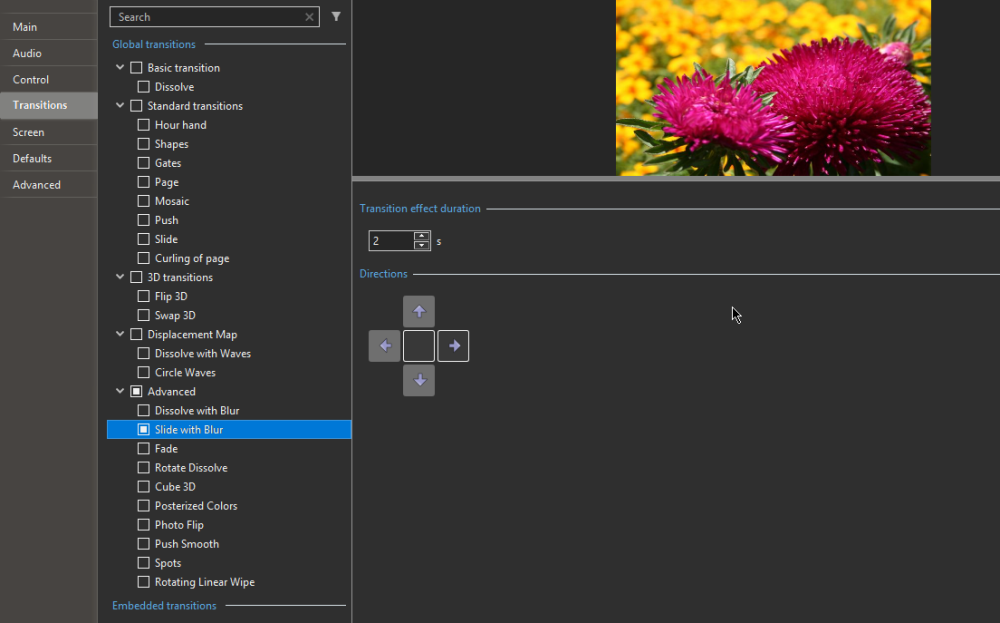
Additional test: With version 11 opened separately, all transitions work perfectly. With version 12 opened separately, all transitions work perfectly. Apparently, I have a problem with the buttons not working properly when both versions are open on my computer. (I did this to compare and verify functions for the translation.) So the problem is solved when I don't start both versions at the same time. Sorry for the inconvenience.
-
After activating a specific direction (clicking the button), for example to the right, the preview in project options shows a transition upward, left, or right, sometimes in the correct direction, sometimes not. Also the selected button gets stuck sometimes (I can not always deselect it), hence probably sometimes multiple directions being executed incorrectly, similar to a kind of random memory sequence. It's only the transitions with directional buttons that don't work well for me.
-
The new transitions in version 12 work quite well, in my opinion. But I have the impression that the transitions already present in previous versions don't respond well when clicking on the buttons. The buttons are difficult to click, and the transition doesn't follow the desired direction on the screen.
-
I tried with a JPG file. Your image of the plane is a PNG file, and indeed, only the lightness setting works there in v12. Greetings, Cor
-
Hallo Pascal, I see color in v11 and v12 with the same image and settings in Hue/Saturation. My impression is only a small difference in brightness (which actually shouldn't be the case of course). Greetings, Cor
-
Also Happy Holidays. Merry Christmas and a Happy 2025! Health, Love, Happiness,... Thank you for the Christmas present: PTE Video Optimiser, a wonderful addition to PTE AV Studio. I wish you and WnSoft Ltd. a lot of success with it. Cor