All Activity
- Today
-
Funny thing I do have Styles and Transitions folder in the Documents > PicturesToExe folder and I ALSO have Slide Styles folder in Documents > PTE AV Studio folder along with a bunch of other stuff in that folder. In any case it looks like PTE AV did find the various Styles but not the couple of Themes I had created but I can re-import those.
-
I saw that you fixed the problematic style related to the folder size, but you didn’t explain why the folder size increased when the style was created.
-
Thanks Igor, I wasn't aware of the reason; now it's clear.
-
Thanks Igor - great info! DG
-
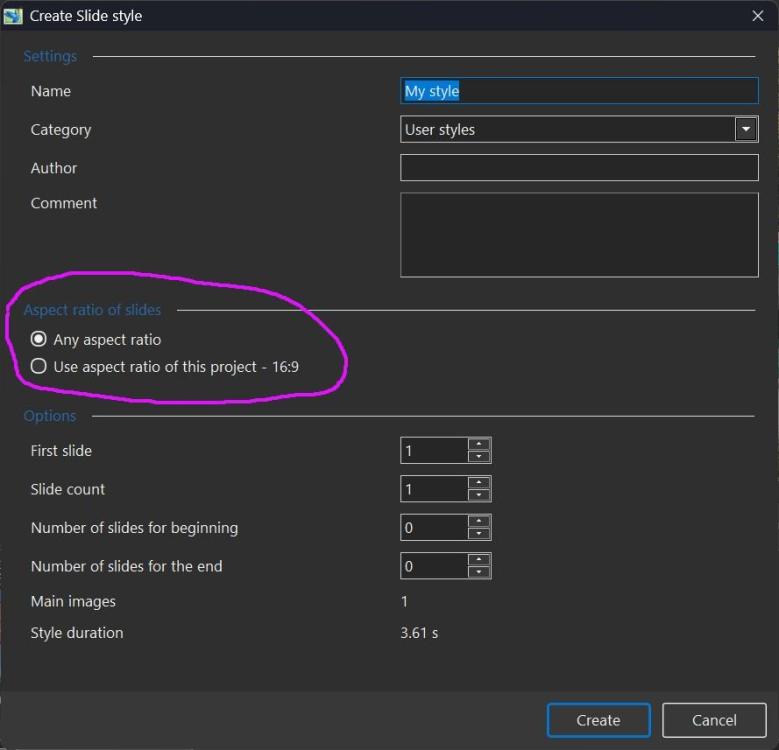
A created slide style (and exported style) contains TWO variants if the author chooses the "Use aspect ratio of this project.." option and then creates another slide style under the same name with a different aspect ratio option ("Any aspect ratio" or "Use aspect ratio of this project - 4:3", for example). The two styles will be combined and displayed as one virtual style. In other words, author creates 2-3 visually optimized slide styles for "16:9" projects and for “1:1” (or 4:3, etc.) projects under the same name. When the user applies this smart style, PTE will automatically choose the optimized version according to the current project’s aspect ratio (or the nearest variant for a non-standard aspect ratio). Generally, I recommend to create a single universal style with the "Any aspect ratio" option. The exported style will then contain only one version, for projects with any aspect ratio.
-
This I have already done, please see above. When building a Style it is inevitable that there will be interim versions. Instead of overwriting, it is probably best to give each a unique number. DG
-
Thanks for checking!
-
By default, all custom slide styles, themes and transitions are located in the folder: Documents > PicturesToExe > Styles and Transitions To transfer them, find the location of the "Styles and Transitions" folder on your old computer and copy all of its contents to the "Styles and Transitions" folder on your new computer. Note that PTE AV Studio must be closed when you make any changes to this folder.
-
No, there will be only one style in the PicturesToExe folder. The files will not be overwritten. Instead, the existing files will be added to the folder, causing its size to double. To prevent this from happening, you need to start a new project.
-
Windows update crashed my maching and needed to go back to pretty much fresh install of Windows. I also had to reinstall PTEAV Studio but it does not have all of the various styles, transitions, themes, etc that were there before. Do I need to import everything again or was there some INI file somewhere that has this info. I have disk backup from a day ago so maybe there are some files or folders that can be moved to the new WNSOFT PTEAV12 program folder??
- Yesterday
-
Rebuilt Version: Snowing 16_9 - 2.ptestyle DG
-
I agree with the discussion - the Main Component of the Style is the Snow Video and its size is 5.7Mb. I did notice that on one occasion the Style was just written when I expected an "Overwrite" warning. Could there be two Styles with the same Title? Maybe I will try deleting the Style and rebuilding it. DG
-
Thanks for sharing Agreed, we’ll check tomorrow.
-
Thank you very much for sharing this style; it’s always a great choice, especially for the upcoming season. While I’m at it, I’d like to mention something—I’ve run into the same issue quite a few times: the file size is 10.75 MB, even though it should be about half that. I’m not sure why it sometimes ends up duplicating the style. It’s not a major problem, but since I don’t know why it happens, I thought I’d bring it up. I’ve included an image.
-
Thanks that seems to have fixed the issue. Doug
-
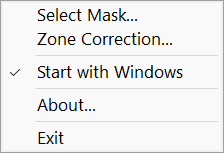
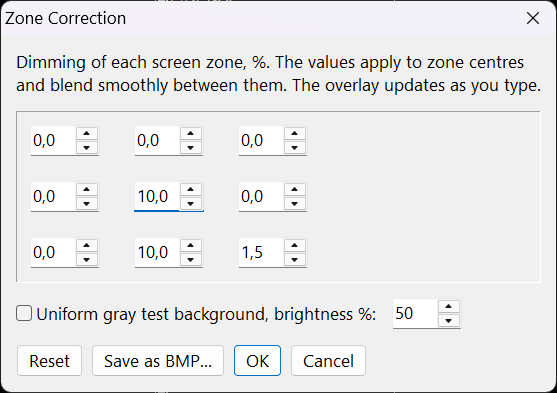
 Hi, Many monitors are unevenly lit, a corner, an edge or the center is brighter than the rest. It's easy to see on a white background. I wrote a small free utility for Windows 10/11 that fixes this in software. It puts a transparent, click-through layer over the screen and darkens only the areas that are too bright, so the screen looks more even. I have used it for several years with my Dell U2417H, which has a bright spot in the center of the screen. - Easy setup: set the dimming for 9 screen zones, with a live preview. - For advanced users: load your own grayscale mask (BMP). - Works in all programs. No noticeable effect on speed. - Turns off automatically in fullscreen games and doesn't appear in screenshots. - Free and open source (MIT). Portable, no installation. Digitally signed (by WnSoft). Note: it fixes brightness only, not color tints, and only on the main monitor. Download (Windows 10/11): https://github.com/Aleksid1/FixMonitorUniformity/releases/latest/download/FixMonitorUniformity.exe More info and screenshots: https://github.com/Aleksid1/FixMonitorUniformity Igor
-
- 3
-

-
Snowing 16_9.ptestyle Please see Rebuilt version lower down. DG
-
Please try thew version: https://files.wnsoft.com/test/pteavstudio-setup.exe Now themes export should work correctly.
- Last week
-

Populate the 'File Name' window automatically
goddi replied to goddi's topic in Suggestions for Next Versions
Greetings...I don't think Templates has anything to do with my suggestion. If you want to do a File Open of a .pte, the Files list does not go to that folder containing the .pte show to show the images in that project. You have to hunt for it. Gary -
Hi, Thanks, we recently discovered this problem, and it will be fixed soon, likely within several days.
-
Not sure if I was doing something wrong but I was trying to export a Theme using PTEAV Studion Pro 12 and it never actually created the Theme file. I went to my old Version 11 and it worked so not sure if this is some quirk in 12?
-
Hi Prof I messaged you a Theme that has about 8 variations of Pans and Zooms that might be what you are looking for.
-
Thanks. I also created a dissolve version. I promise not to make a pan version. 😀 Tom Step Dissolve.pteeff
-
Many thanks for all your replies - most if not all of my earlier shows had pan&zoom, not much but just enough to give some movement. I'll have a look at these styles and in the meantime if anyone has a simple theme/template I could use???
-
PTE Video Optimiser 1.0.3 is available: Added support for HDR video in Dolby Vision with HLG. Improved audio synchronization for video files recorded with variable framerate. Diapositif PTE Video Optimiser is now built on the PTE AV Studio 12 codebase. Download https://www.wnsoft.com/pte-video-optimiser/download/ The About window shows: 1.0.3 Build 1. It is the same build as the latest Beta version.