All Activity
- Today
-
Hello, when in the “Timeline” section, if an image is added, the previous image changes the viewing time.
-

Quick Search in Styles and Transitions in V12
denisb replied to Igor's topic in PTE AV Studio 12 Beta
I don't think there is a special option -

Changing the speed of a video is broken in several ways [SOLVED]
Igor replied to mhwarner's topic in PTE AV Studio 12 Beta
Thanks for your messages! We know several issues with time values (duration). We need some time to fix it. Speed is not applied to the preview in Trim and Adjust Speed window yet. We'll fix it. -
Thanks for these examples. I've understood. We'll think how to implement it correctly. There is a problem - some languages have symbols which should not be de-normalized (without accents). For example, German or Norwegian.
-
Denis, does it work automatically (without a special option)?
-
Changing the speed of a video is broken in several ways [SOLVED]
denisb replied to mhwarner's topic in PTE AV Studio 12 Beta
Hi, For me, we can increase the speed and it works well. Original duration is 0 at the first opening If we reopen "Trim and Adjust Speed " some values are not correct. Original duration is 0 at the first opening Denis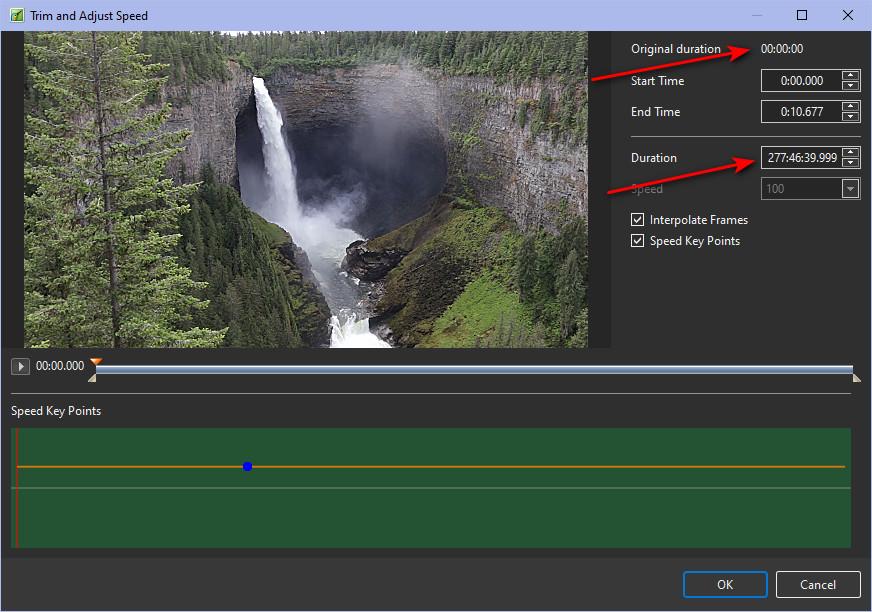
-
Quick Search in Styles and Transitions in V12
denisb replied to Igor's topic in PTE AV Studio 12 Beta
Hi In French, a search in Windows give results with and without diacritical symbols and with and without capital letters Denis I -
Yes, in the search filter, to display a list of styles that use one image, two images, three images, etc. Search for: “Pagina” and in the results displayed: Pagina and Página “Arbol” and displayed: Arbol and Árbol “Cancion” and it shows: Cancion and Canción “Camara” and it shows: Camara and Cámara “Musica” and it shows: Musica and Música It should also not take into account upper and lower case letters, although it already does this, but I don't know if it does so for accented words. Yes, other programs I have used also do not take into account “diéresis” umlauts (¨), such as in pingüino. They do take into account the “Virgulilla” tilde (~), and the PTE searches for it, but there are keyboards that do not have the letter Ñ, ñ.
-
Rather low volume of new sound effects [SOLVED]
Igor replied to CorVdK's topic in PTE AV Studio 12 Beta
Thanks for the confirmation -
Rather low volume of new sound effects [SOLVED]
chanfi22 replied to CorVdK's topic in PTE AV Studio 12 Beta
Hi Igor just tested and now the volume of the sounds effects is correct. Good -
Hi, Please wait - did I understand rightly that if you remove all custom transitions, any builit-in transitions are applied to a slide quickly and without delay? So, you select a built-in transition (i.e. Default transition or Dissolve), click the OK button, and the Slide Options window quickly closes? Does the issue occur only if there are some imported (or created) custom transitions in the library, even if they are not currently in use? In your first video in the 1st message above, I saw a delay in closing the Slide Options window, but I didn't see any custom transitions in the list of available transitions. If I understand all rightly, could you please send me all the custom transitions you use in PTE AV Studio? It would be better if you send a ZIP copy of the entire "Styles and Transitions" folder. Write me a personal message through the forum with the download link. Thanks in advance,
-
I guess that you speak about search filter for slide styles, not transitions? It's an important point, thank you. My native language doesn't have diacritical symbols, so I didn't know about this point. Can you give me 4-5 examples so we can check how this should work? How this implemented in other programs? Are diacritical symbols also ignored in search?
-
 I have tried Beta 5. I did successfully publish the video without it freezing. Increasing the speed of a video in the Trim and Adjust Speed Window STILL DOES NOT WORK. THE SPEED DOES NOT INCREASE. It gives a changed duration for the length of the video, but if you change the slide duration to that number, the video ends prematurely in playback. Take the project I sent you and run it through v 11 to see how much more quickly the downhill speed through the canyon increases. This just does not happen in v 12 Beta 5. I have tried other number percentages and other videos, particularly ones that were not trimmed or otherwise altered, but it does not seem possible to increase the speed of a video above 100%. Decreasing the size of a video, however, does seem to work just fine.
 - Yesterday
-
Hello, this search option is interesting and useful. I agree with alexroma's request to add a filter to show transitions and styles by number of slides. I would also ask, if possible, that it not differentiate between accented and unaccented letters, to avoid having to do two searches. Thank you.
-
Hello, I have removed all transitions, and using only those built into the program, the transition window does not experience any delay. I created a project from the main menu > File > Templates > Create Template, and the window closes properly, and the main program window works immediately. But I've been doing more tests with the transitions I had before removing them, and when I press only the “Close” button in the “Transitions” window, it behaves differently. Let me see if I can explain. With all the custom and built-in transitions, I'm going to use only the ones built into PTE. 1. I add a transition to the slide (I click “OK” and the window closes slowly). 2. I display the Transitions window, the cursor is on the transition I have added (I close the “Cancel” window without changing the cursor, the window closes quickly). 3. I display the Transitions window, I move the cursor to another transition (I close the “Cancel” window, the window closes slowly). Every time I apply a transition, it closes slowly. Every time I close the Transitions window without changing the cursor to another transition, it closes quickly; if I change the cursor, even if I don't apply the transition, it closes slowly. And with version 12, the same thing happens: I have set all the transitions and the Transitions window becomes slow when closing.
-
Igor, Thank you for the clear explanation of the bits to use.
-
Now V12 Beta 5 can create project ZIP archives larger than 2 GB.
-
Changing the speed of a video is broken in several ways [SOLVED]
Igor replied to mhwarner's topic in PTE AV Studio 12 Beta
Hi, Please try the new Beta 5. The program will no longer freeze during video encoding for projects containing trimmed video objects. If you change a speed of a video object, the result will be visible in MP4 video export, mini-player, full-screen preview, and the Objects and animation window. It is not yet available in the Trim and Adjust Speed window preview - we will add this in a future Beta. -
Rather low volume of new sound effects [SOLVED]
Igor replied to CorVdK's topic in PTE AV Studio 12 Beta
Try new Beta 5. We correctly normalized all sound files in the library (-3 dB). -
Beta 5 is available See the download links above. Added support for creating ZIP archives of projects larger than 2 GB. Sound library: improved audio volume consistency. Fixed an issue where video export would freeze when a project contains a trimmed video object. Updated Dutch, French translations.
-
Hi, Thanks for your reply. The Controlled Folder Access option works regardless of the chosen antivirus. This option prevents files from being written to system folders and some user folders, including Documents and Desktop. Let me clarify just in case - does the long delay on closing Slide Options (transitions tab) occur even when there are no imported custom transitions? Only built-in transitions. If yes, can you try to manually delete Styles and Transitions folder from Documents > PicturesToExe? Close PTE AV Studio before deleting the folder. Try also create a new project template (main menu > File > Templates > Create template... Please note how quickly the template creation window closes and whether the main program window interface will work immediately after closing. Could you try the new PTE AV Studio 12 Beta and compare the speed of closing the Slide Options window?
-
While it is not the page curl, it is very effective. Well done.
- Last week
-
Hello, That delay was also present in the previous version. The hard drive is an NVMe M.2 SSD. Regarding Controlled Folder Access, I can't tell you how it is, since I have Defender disabled and I use ESET instead. It's funny, I tried moving the transitions to another hard drive, and when I made that change, the Transitions folder remained in the C:\Users\user\Documents\PicturesToExe\Styles and Transitions folder. Now I've reconfigured the transitions in the Documents folder, and the Transitions folder has remained on the other hard drive. The files are transferred, but only that folder remains, as if it were blocked. It's true that Windows 11 sets all folders to read-only, but it moves the rest of the folders, except for the transitions folder. With Defender disabled, I don't know if changing “Controlled folder access” from PowerShell would work.
-
Sorry, it is not my album. I only provided a link to the original author. Kieron
-
Hi, Honestly, I'm puzzled by this problem. Please check if you have Controlled Folder Access enabled in Windows 11 (10). To check this, open Windows Security (search for it in Start menu), go to Virus & Threat protection, then click on Manage ransomware protection. Look for Controlled Folder Access setting and let me know if it's turned On or Off. Don't change it now. Do you have a local hard drive or SSD? Did you have this delay BEFORE v11.0.20?