
tom95521
-
Posts
3,699 -
Joined
-
Last visited
-
Days Won
49
2 Followers

Recent Profile Visitors
34,155 profile views





tom95521's Achievements

Advanced Member (6/6)
-
PTE is amazing that it can already import many image formats including HEIC and AVIF. Jpeg XL is an improved open source version of jpeg with higher quality and smaller file sizes. Many photo editors like Nitro (Mac), Acorn (Mac), RapidRAW, Luminar, ON1, Photoshop 26.8, and Affinity can export jpeg xl .jxl files. The software is available for Pascal. https://github.com/Xelitan/JPEG-XL-encoder-decoder-in-pure-Pascal-for-Free-Pascal-Delphi-Lazarus Thanks, Tom
-
I have been using ChatGPT for photo enlargements. I also have Topaz Photo AI 3 (old version), but I think ChatGPT does a better job from my limited testing. AI seems to be everywhere now. Original image with prompt "enlarge this image 4 times and improve quality" https://cleanshot.com/share/xFfSPhYt ChatGPT 4x results with description "Seagull Gliding Over Sparkling Blue Ocean" https://cleanshot.com/share/NCTtdGk5
-
AI like ChatGPT can recover much more detail. After AI identifies the subject (or you describe it), then it can add more detail to the feathers because it knows what a Night Heron looks like. You can use a budget low resolution camera and get good results by enhancing with AI. AI masking, sky replacement, resizing, and noise reduction is common in most photo editors today. I almost always use AI to help identify new birds I have never seen before.
-
Interesting. That was a clue that I missed.🙂
-
The Picture comment for videos is fixed on both Mac and Windows. Thanks! Tom
-
I should have posted this here. Thanks, Tom
-
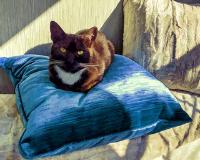
I sometimes have problem focusing my digital camera (Nikon P950) on birds when they are nesting in trees. My camera does not have a manual focus ring. In Affinity I select the bird and create a mask, then use a Live Filter Light layer with texture option which creates a bump map of the image. I have found this method helps to recover detail that unsharp mask does not. I think Photoshop also has a light filter. https://www.affinity.studio/ https://www.affinity.studio/help/filters-lighting-effects/ Thanks, Tom Example (I probably recovered too much detail in this example)
-
Backlight Frame Style - 16:9 aspect ratio
tom95521 replied to tom95521's topic in Styles & Templates
Very nice. I like your version better. I have many ideas but sometimes I get distracted and don't finish what I started. Thanks, Tom -
Simple backlight frame using two masks and gaussian blur. LED backlight is sometimes known as Ambilight available on certain model Philips HDTVs. https://www.philips.co.uk/c-e/so/tv-buying-guide/what-is-ambilight-tv It is slightly different than the Border Simple Style in PTE AV Studio. Thanks, Tom Update: New version should work with any aspect ratio. LED Backlight Frame.ptestyle
-
Male Superb Fairy Wren - Long and Slow Version
tom95521 replied to digartal's topic in Slideshows & AV Shows
I ordered a P950 and probably a monopod next. This photo of a Sandpiper sunning on a rock at high tide was taken with my old FZ150 a few days ago. We also have many ducks, pelicans, herons, and egrets at our local wildlife sanctuary, https://photos.app.goo.gl/1z59MEWwsT9irKnT8 Thanks, Tom -
Male Superb Fairy Wren - Long and Slow Version
tom95521 replied to digartal's topic in Slideshows & AV Shows
Very nice. I like the animation. I am thinking about purchasing a Nikon P950 for wildlife photography. Thanks, Tom -
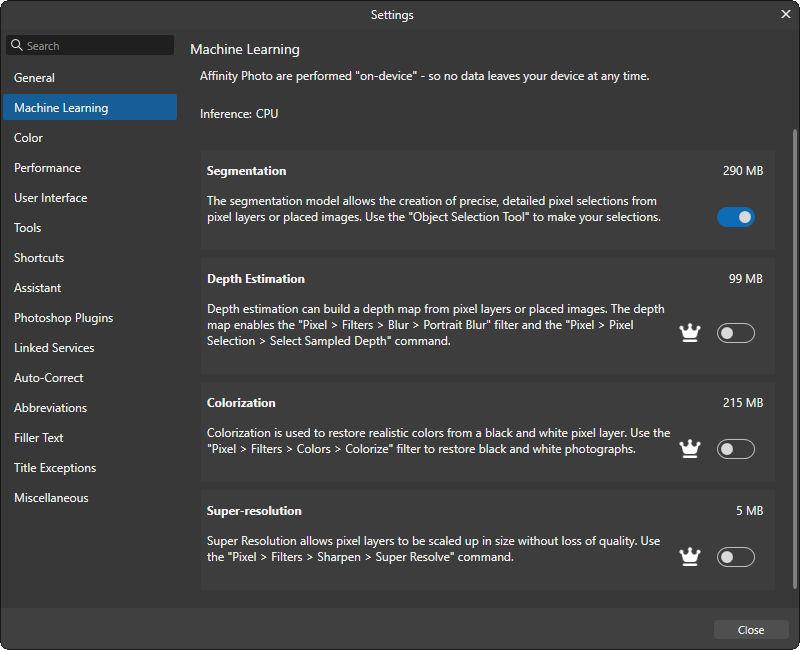
The new Affinity all in one app (Pixel, Vector, Publisher) is now available and basic functionality is free. If you want the AI features then it is US $15/month subscription. I don't know if AI is local or cloud based. Canva is a competitor to Adobe. https://www.affinity.studio/get-affinity
-
- 1
-

-
That should be interesting. Thanks, Tom
-
Topaz is considered by many to be one of the best AI image resizing software but recently switched subscription. If you are looking for alternatives to subscription based image resizing then you might try Upscayl which is free open source software and available for Mac and Windows. Like most AI software it works best on a Windows computer if you have a good graphics card or a Mac silicon computer. https://github.com/upscayl If you install Gimp open source image editor on a Windows or Linux Vulcan compatible GPU then this is one of my favorite free AI upscale options. https://www.gimp.org/ https://github.com/Nenotriple/gimp_upscale?tab=readme-ov-file Example of a popular non-subscription AI software. https://www.aiarty.com/ (Part of Digiarty which also sells VideoProc Converter AI) This is a good free online image scaler if you have just a few photos. https://imgupscaler.ai/ Here are a few samples for comparison. https://share.cleanshot.com/LZc2XWxp https://share.cleanshot.com/K3LtRNf3 Tom
-
- 1
-
-
My list of image comparison software that supports Mac and Windows. For the Mac and Windows there is the free XnView MP image viewer. https://www.xnview.com/en/xnview-mp/ For Windows there is the free FastStone Image Viewer and IrfanView. https://www.faststone.org/FSViewerDetail.htm https://www.irfanview.com/ If you want to purchase software there is ACDSee Photo Studio which has image comparison option. https://www.acdsee.com/en/photo-editing-software/ Sample Comparisons Irfanview https://share.cleanshot.com/mM1X6Vl3 XnView Windows https://share.cleanshot.com/1BsSw8Dd XnView Mac https://share.cleanshot.com/vxLzy7cF Software that I have been testing recently. AI is now very common for image resizing, subject masking, and noise reduction. Win/Mac Free RapidRAW https://github.com/CyberTimon/RapidRAW Mac Image Restore AI https://www.neuralmoon.ai/image-restore-ai Tom
-
- 3
-
