Leaderboard



Popular Content
Showing content with the highest reputation on 01/15/2026 in Posts
-
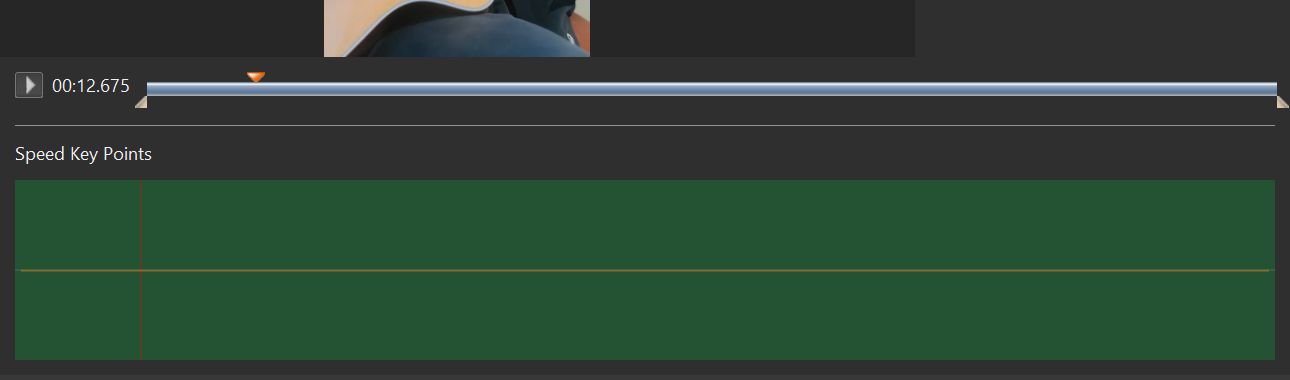
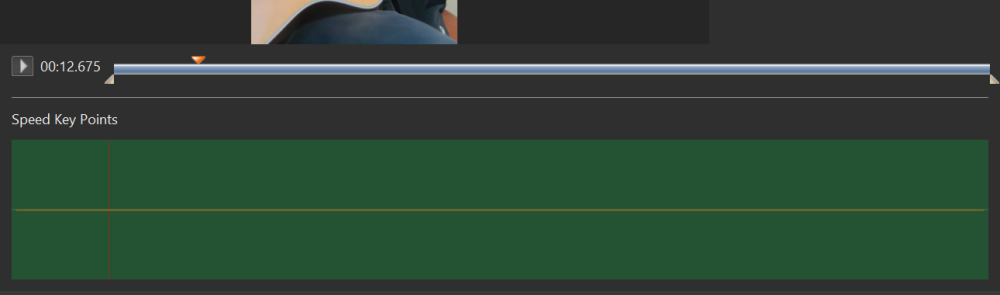
Greetings, Trying to figure the Trim function in this menu. As I play the video, I want to pause it to establish the beginning trim point. So the red triangle is at the point of the beginning trim position. How can I move the lower white triangle to where the red triangle is at? This has been the problem with the previous version. If I click on the white triangle to move it to the position of the red triangle, the red triangle will reposition back to the white triangle and I lose that set trim position. How do I get the white triangle to move to where I placed the red triangle? And I have no idea how to use the other items, like Interpolate Frames, Speed Key Points and Speed. Is there a video on how to use them? Gary
 1 point
 -
Hi Igor, I'm glad to hear you're working on this feature! It's a very important one. The mask option is perfectly fine for me; sometimes a mask is needed to use a specific area, but for full display there's always the built-in rectangle mask. But I wouldn't be opposed to other options as long as they're technically feasible within the program's capabilities. Thank you for your work on this feature!1 point
-
Gary, We plan to add special two buttons to set start and end points for trimming according triangle cursor. It will appear in Beta 3 or 4. I'll publish a small tutorial soon. We need to add some improvements for this window, and then I'll write the tutorial. I recommend to try now a new "Interpolate frames" option. Use some video footage with fast motion scene (cars, train, waterfall). Set video speed between 5% and 20% and enable "Interpolate frames" option. Check the result. Real my demonstation here: https://www.pteavstudio.com/forums/topic/52571-frame-interpolation-for-slow-motion-video/1 point
-
In my opinion, PTE shoul behave in a similar way as Photoshop (PS). In PTE we have nested structures using the Parent-Child-Construction. In PS we obtain nested structures of layers using (nested) Groups, and we have a kind of correspondence between the PTE-Parent-Objects and particular PS-Groups. It seems to me that PTE could use the PS blending mechanism. Regarding blending, groups of PS seem to be rendered independently if you avoid "Pass through". Furthermore, blending of parent objects in PTE and blending of the corresponding groups in PS should be the same. Perhaps, as a first step, you may study the situation where all groups and all parent objects have mode "Normal". Applying this method to your example above, Img2 would be multiplied with Img1 (overlapping parts) inside the Parent-Child-Group, but not with the black background image. It would just cover the background, provided that the blending mode of Img1 is "Normal".1 point
-
Could this then be placed inside another Mask? It is a long time since I have used Blend modes, I do all of my photo editing inside PTE & have not used Photoshop for several years. But it would be good to have them within PTE. As long as we can still use Masks within Masks then I think either option will work ok. Jill1 point
-
Hi Igor, Either option would work for me. With A. will you still have a Mask shape? Circle/Square etc? Or would it just be an image acting as the Stencil? I use Masks a lot to merge images or with the same image to remove unwanted parts. To have Blend Modes would be really useful Jill I think that usually I would only want to Blend a part of an image, so would be using Masks anyway1 point