Leaderboard

Popular Content
Showing content with the highest reputation on 07/27/2026 in all areas
-
Hi everybody, The idea of the Slideshow was the illustration one of the new PTE V.12 feature-Blending Modes. This is basically variations of the one Style--Screen Blending Mode. The set of pictures placed in the Stencil Container and the Background Composition-in the Mask Content. There's some whistles and bells here and there also to make it looks more cinematic. To my mind, of course. If you like it--there's The Link. Just replace the files marked "Replace Me" with yours Media. Best Alex551 point
-
Hi, In PTE AV Studio 12 we've added a new "Blending" mode to the Mask container with support for 9 blend operations: Linear Dodge (Add), Subtract, Multiply, Screen, Lighten, Darken, Overlay, Hard Light, and Soft Light. To use: place the first image into the Stencil, and the second image into the Content of the Mask container. You can add video, text object, rectangle object, or multiple objects (several images, for example). Watch a video example. Click the play button: BlendMode.mp4 BlendMode.zip
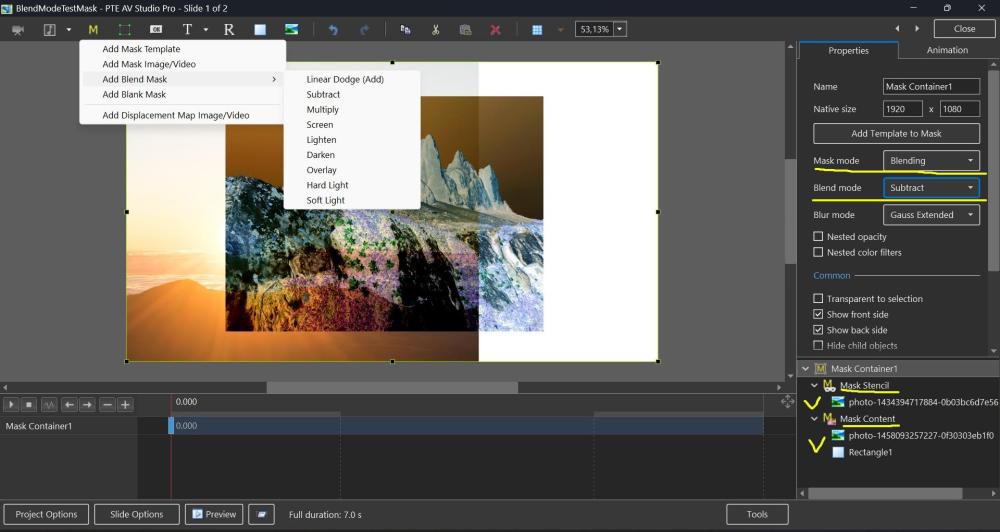 1 point
 -
Testing...1 point