Igor
-
Posts
13,676 -
Joined
-
Last visited
-
Days Won
288
Everything posted by Igor
-
Really strange, almost modern video card! And a very good CPU.
-
Ken, Please remind me what video card you have installed in your PC and what CPU? I'm afraid high quality rendering works very slowely on old video cards and probably I'll use second graphical engine (CPU based) on such systems. On my Geforce 6800 creating of 4 minutes DVD-Video discs takes 12 minutes. Our high quality rendering gives similar quality as Bicubic resizing in Adobe Photoshop.
-
Sorry for late response! I received all your emails. We're discussing this problem and searching for ways. I'll write you in 1-2 days, because I need to think more about this problem. Thanks for your patience,
-
After these problems we've choosed another DVD library which creates DVD folder and menu. As we found many coompanies use this new commercial library and I hope it will produce fully compliant DVD discs. Speed of rendering depends on video card. For example Geforce 7600 PCI-E may render video in 10 times faster than Geforce 2 AGP. Also we render video with highest quality and many filters of post processing. So it takes additional time. http://www.picturestoexe.com/forums/index.php?showtopic=5053 But in the next betas I'll add several optimizations to speed up rendering.
-

Holograms with help of projector and PicturesToExe
Igor replied to Igor's topic in Slideshows & AV Shows
Yes, it's inverted horizontally. But I just found that projector allows to compensate it in the settings. The background of picture should be black that becomes invisible in this second projection. -
Holograms with help of projector and PicturesToExe
Igor replied to Igor's topic in Slideshows & AV Shows
Please look at attached schema This second tree is not projected on wall, but located in the middle of the room (in the space)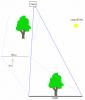
-
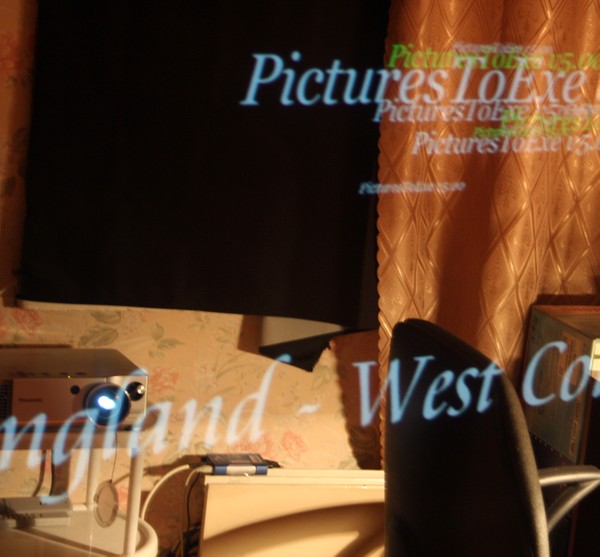
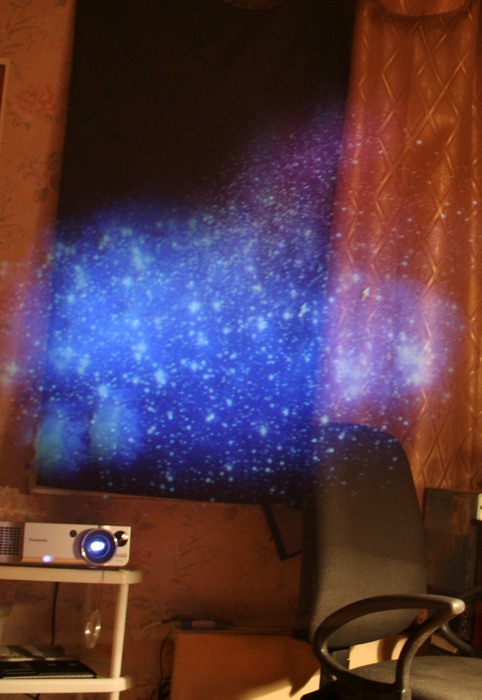
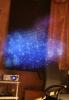
Having rest at weekend I did several funny experiments with my LCD projector, PicturesToExe and large glass of wardrobe You can see these "holograms" over room in true 3D space when watching through glass (but not directly to projector and glass doesn't cross the ray of projector) In case of two glasses it looks better especially if watch stars and galaxies as on this photo. Especially impressive I found "Chariots of Fire" slide show, and Star Wars titles.
-
In the next beta #8 slide show and editor will work on any video card (but slowely without hardware accelleration). There is an unpleasant problem on Matrox G400/450/500 cards. In latest drivers they just don't support several main functions of DirectX and because of this slide show and editor can't use hardware accelleration on your system. But old drivers dated by 2002 works fine. It's a exceptionally strange thing that I didn't expect from Matrox and they also ignored our letter.
-
Please visit main menu | View | Advanced to change behavior of Video button: - Create AVI (as in previous betas and versions) - Create DVD - Dialog window with two buttons (now in beta #7)
-
PicturesToExe wma, png & jp2 lossless file support
Igor replied to Dimitri Papadopoulos's topic in General Discussion
Dimitri, Thank you for your suggestions! In v5.00 we use lossless re-compression of PNG and BMP because in our format re-packed PNG images load in two times faster that really necessary for slide show. Please use PNG or BMP format if you need to have lossless quality of images. Other lossless formats like Jpeg 2000 takes a lot of CPU time to load such image that not acceptable for slide show purpose. I did many test and found that better compression in Jpeg2000 required more CPU resources. Previous v4.48 supports WMA format. Current v5.00 beta temporarily doesn't support but will do it in nearest beta versions. -
Rainer, 1280x720 is not DVD-Video. So we don't suggest this resolution in this version. When war between HD-DVD vs. Blue-Ray will be finished, we'll add support of HD video (1280x720, 1920x1080) in DVD Builder. In AVI video output we support all HD resolutions in v5.00 beta
-
We just found old DVD player where reproduced one problem because of menu.
-
I exactly know there is some real problem in our VOB files but we're still trying to find DVD player where we will able to reproduce this problem. Today we visited five shops. We tested: Sony, Samsung, BBK, Pioneer, LG, Sharp, Toshiba, Akai, ZZX, Scott, Rolsen, Panasonic, Atlanta, JVC, Huynday, Vitek and several noname players. and all worked fine.
-
In the next beta #8 slide show use on 5-25% lesser volume of video memory. My colleague Akeksey finished works on more smart usage of memory.
-
Type mpeg4x.zip in Google and you'll find MPEG4 encoder. It's only 130 KB. Quality is very good and file size is small. Windows 98, Me, 2000, XP, Vista can natively play .avi with MPEG4 codec. No additional software or decoders are not required. Unfortunately Microsoft stoped distribution of this encoder and went to own WMV format.
-
The code of slide show viewer same in beta #7 as in previous beta #6 p.s. The next beta #8 will be soon and slide shows will work even on very old video cards like v4.48 So slide show with simple effects (Fade in/out and no animation) will have same quality and speed as in previous v4.48
-
Comparison of picture in AVI. Beta 7 vs. all old versions
Igor replied to Igor's topic in General Discussion
The only cost of this improved quality - on 60% more long time of encoding (for more precisious rendering and post-filters) -
Thank you all for the help! It seems that problem in VOB/IFO files in VIDEO_TS folder. So please temporarily don't use Create DVD folders, Create ISO image, and Burn DVD-Video disc options. We're working on solution now. If you wish you can use option Create MPEG2 files.
-
Robert, Thank you for testing! 1) If you take DVD folders created by DVD Builder and burn at in Nero (File | New | DVD | DVD-Video) will it play on your DVD player? 2) Can you take VIDEO_TS folder from some another successfully burned DVD disc which plays fine, copy files to hard drive and burn again in our DVDTest.exe utility? Will this disc work now? For example this DVD folder: http://www.wnsoft.com/test/Another_DVDFolder.zip (3 MB) 3) What DVD-RW drive you have and what DVD player?
-
Tom, Please download this utility and try to add DVD folder (you already created): http://www.wnsoft.com/test/DVDTest.zip (670 KB) Will recorded disc in this utility plays now?
-
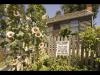
I've attached two screenshots. It's a good example of advantage quality of video that renders beta #7 for AVI and DVD. New beta doesn't produce jaggies on sharp details of an image. The original image was 1280x1024 with strong unsharp filter and it very good illustrates case of hard task for rendering of video. Usually difference not so noticeable.

-
Den, Is it possible that where was not enough space on a disc where located temp folder? It means that one or two MPEG2 file couldn't be created. We'll add more informative text messages to prevent this situations. Jeff, Don't worry about it, my colleague Aleksey works on synchronization of music for PTE. DVD Builder didn't delay it even on one day. I almost finished my part of code and I'm waiting when Aleksey will finish works on music synchronization and when Artem finish works on second graphical engine.
-
Jean-Pierre, I think it's mistake, our MPEG2 files definitely have 4:3 aspect ratio or 16:9 as you set. All MPEG2 utilities confirm this value.
-
See PicturesToExe Deluxe beta on main forum.
-
Jean-Pierre, Send me please screenshot where you seen aspect ratio as 0.8 It's impossible. Media Player Classic, Media Player 10, special MPEG2 tools shows 4:3 as expected. Try other MPEG2 files created in another program. p.s. long time because as I said we use high quality rendering to prevent appearing of jaggies on a picture. But you can disable this parameter if you wish: sav_hiqualityvideo in apr.ini file.