thedom
-
Posts
2,323 -
Joined
-
Last visited
-
Days Won
6
Everything posted by thedom
-
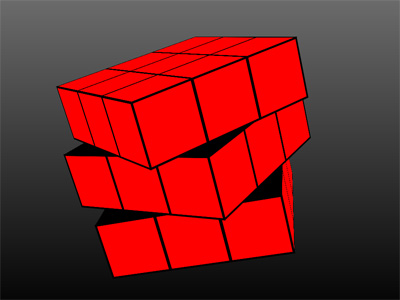
Here is an animation but I didn't find a way to make it simple. That's why the animation is on several slides. And I kept each face identical. There is still a lot of work to make the 6 sides of the cube not the same. Pictures objects have to be rotated and flipped. It would be easier if I had a rubik's cube at home but I don't. If somebody want to continue it, he is welcome because I think I will stop it here. I am quite sure somebody like JPD of Jean-Cyprien could do it. They have math in blood. RubiksCube_PteProject.zip RubiksCube_EXE.zip
-
LOL, may be I will give it a try. Like Peter, I like challenges. We are very far away from slideshows but it's fun to use PTE. I think I have an idea to make the cube simple.
-
Thanks Jim, but I have to buy a french version for the guarantee, the manual (i need it in french) and the electric voltage. It would be my first DSLR. I have a bridge right now (fuji s100fs). Do you think it would be appropriate ? I don't want to be disgusted by something too complex and would like to have the pleasure to take pictures right away. And after, learn and improve my technique little by little. I know it's a shame, but is there an auto mode for begginers (you just have to press on the button). In case you used it, how is the autofocus for video ? Thanks.
-
Gary, I think Tom has the answer. To move the text, be sure to enable the option "Ignore objects not selected" (in O/A window, Tools button at the bottom right). Then select the [ PIC06 TEXT ] object in the objects list. This object has only one keypoint but it's out of the timeline (sorry for this, I didn't pay attention and realize it might be confusing). Change the keyframe Time of this object and set it to 18.000 (instead of 81.806). (By doing this, you make the text "visible" - Try to move slowly the keypoint along the timeline, you will understand what I mean). Now you can pan the object (or even zoom it) with your mouse. Hope it helps. Lin, Thank you for the explanations, you have a natural gift to explain.
-
There is no reason you couldn't drag the text objects to a new location. Are you sure you selected the keypoint of the text object before moving it ? Great idea to make a screensaver. I'm wondering if I will not make one for me too.
-
Hi Tom, I used the pictures you send me. Here is the result : - With the template (a variation of the "inside the cube" template), I made it in a couple of minutes. There are 6 panoramas in this demo, I left the same animation for all of them but as you have to modify the Pan Z/angle X/ Angle Y of a single object to make the animation you want, it's very easy to modify.
-
Pourquoi chacun des utilisateurs aurait il à justifer d'une licence personnelle ? Qui demanderait une telle justification ? Et en réalité, il s'agit d'une licence globale pour 25 utilisateurs. Chacun d'eux aura la même clef de façon uniquement à débloquer la version d'essai de PTE. j'ai l'impression que je ne répond pas correctement à votre question... Why would each of the user have to justify a personal licence ? Who would ask for such a justification ? And actually, it's not a personal licence, it's a global licence for 25 users. Each of them will have the same key only to unlock the trial version. I got the feeling I don't answer to your question correctly... It is !
-
Si je m'en référe à la page d'achat, il y a une réduction pour les achats groupés de la version deluxe de PicturesToExe. 25 licences pour 450 € (soit 18€ par licence). J'ai tendance à penser qu'une clef unique d'enregistrement vous sera envoyée (à l'adresse email indiqué sur le formulaire d'achat). Il vous suffira alors de faire suivre cette clef aux 25 membres, chacun activant le logiciel installé sur son PC. Est-ce que cela répond à votre question ? If I refer to the purchase page, there is a discount if you buy multiples PTE Deluxe licences. 25 licences for 450 € (18 € per licence). I am not sure but I think a single key will be send to you (actually to the email address you will provide). Then you just will have to transfer this key to the 25 members, and each one will activate the software installed on his PC. Do I answer to your question ?
-
Tom, the most difficult part is to take the pictures. After, it's piece of cake to apply those pictures as the inner sides of the cube. I made a test with the photo you provided. I limited the size of the screen because of the very low resolution of the pic. Thedom-3DCube-Panorama.zip
-

[3D Transformation] Improved Play capability
thedom replied to fh1805's topic in Suggestions for Next Versions
Peter, You're right, it could be improved but you already can. Click "Play" then click underneath the timeline (just under the black line). -
Igor, A little issue with beta 22 with Border / Canvas Size options. Here is how to reproduce he problem : Add an image in the slide list. This image is 1024x768. Enable border. Leave Canvas size to 0 (left, top, right and bottom). Click on the folder icon (in the Properties tab) to replace the original image with a bigger one (1280x1024). => Canvas Size is automatically set to 256 for right and bottom (1280-1024=256 and 1024-768=256).
-
Igor, you modified the "Z position" to "Pan Z". It seems very logical to me. Thank you to JPD for this suggestion. What about "Angle X" / "Angle Y" to replace with "Rotate X" / "Rotate Y" ? It might help people to realize that the speed options for those parameters have to be set in the "rotate" speed options (like you have to set it in the "Pan" speed options for "Pan Z").
-
I uploaded a modified version of the "3D cube rotation" to make it more like a template. The animation is a little bit different. It allows to see the pictures better and is shorter. I corrected it too because I realized three of the pictures were flipped. This template still can be very easily updated to modify the cube rotation as you wish. For those of you who are interested, they can download this FREE template HERE. To open the template, you need PTE Version 6 beta 21 (or higher).
-
Hi Lin, Good luck with your ranch, I hope everything will be back in order quickly and with minor pain.
-
Lin made a slideshow of a 3D cube rotation ( download his version here ). I tried to make one too using a different method and was amazed how easy it is now with PTE version 6 beta 21 (and next betas/versions). If you like this slideshow and want to make such an effect with your own pictures and text, the template is available HERE on TheDom Shop. The template is FREE. Please download the exe for a much better output quality than the video. - Here is an other 3D Cube effect but this time you are INSIDE the cube. This is very dynamic and it will give your audience a real impression of depth and immersion. The template is for 6 pictures, available in 4:3 AND 16:9 screen format, for 4:3 AND 3:2 pictures format. You can purchase it here on TheDom Shop. To see what this animation looks like, please download the demo (exe file) for a much better quality compared to the video. -
-
Thanks Ken. Only two of them are my kids. The others are my nephews and nieces.
-
Here is a variation of the 3D Cube rotation. But this time you are INSIDE the cube. What do you think ? You can watch the video but I really recommend to download the exe for a much better output quality. - Tom, as Ken, I do not notice a distortion on your cubes. Anyway, they look natural to me.
-
I started to watch the video and was very very impressed. Then I red some reviews and this camera seems absolutely amazing ! I am very interested in a very good camera that has a good movie mode. It might be the one. Now I have to find the money... Thank you very much for pointing it out. Do you think you will buy it ?
-
Lin, I think the link you provided is not correct. Hi Dom, I edited it above - hope it's correct now... Only for exceptions, imho, this effect should not be included in a slideshow. But it demonstrates how easy it is now to build objects with a realistic depth. It gives me ideas for other demonstratrions. I will try a make a complete 3D book animation better than my previous version ( http://www.thedom.fr...ile&file_id=304 ) Eric, you should try to download the exe instead of watching the YouTube video. It's perfectly smooth on my system. Adda, you're welcome about the pte project. But the 3D cube rotation is not my idea. Hehehe, I tried to make realistic shadows, for the cube and the text but didn't succeeded. I gave up.
-
Hi Lin, I made it an other way but I am totally unable to explain how. Compared to your version, I only added a text description for each side of the 3d cube and a black border around each image. But the result is the same. This is so easy now with 3D transformations ! Please download the exe for a much better output quality than the exe. - For those of you who are interested, they can download the FREE template. To open the template, you need PTE Version 6 beta 21 (or higher).
-
Hi Lin, It is very well explained as usual. May be it's important to mention that what you show in your tutorial about how Z position works is only available since version 6 beta 21 (released yesterday). This last beta (release candidate) can be downloaded here : http://www.picturestoexe.com/forums/index.php?showtopic=10117 (Igor, I edited your topic description from "beta 20" to "beta 21" ).
-
Article in "Photography Monthly" (UK), Nov 2009
thedom replied to Igor's topic in General Discussion
If it's legal (is it ?), is it possible for somebody to scan the page(s) and to upload it here ? I would be very interested to read the article. -
I'm using 64 bit too and no problem either with version 5.6.4 and several betas of version 6 installed. Why do you ask barry ?
-
LOL, so true, happened to me too. +1 for this suggestion.
-
Eric, unless I didn't understand Daniel's explanation, that's exactly what he describes : when you begin to work on a project, this project has no name except the name by default "project1" given by pte. The normal way to save your project for the first time is to "save as" and to give a specific name and path.