

Georges
-
Posts
66 -
Joined
-
Last visited
-
Days Won
1
Georges's Achievements

Average Member (3/6)
-
Hello. The transitions aren't working for me. When I load the transition file “Numeros 76-100.ptef” into PTE, I get an error message saying “video not found.” Also, only the numbers 76 through 100 are available. How can I get other numbers (from 1 to 30, for example)? Could you please help us by explaining: 1) the steps to follow to make the transitions work 2) how to get the numbers from 1 to 75 Thank you Georges
-
Bonjour, C'est très original, recherché, très créatif. J'admire la maîtrise que vous avez de PTE. BRAVO. Et merci pour le partage. Georges Hello, This is very original, sophisticated, and creative. I admire your mastery of PTE. Well done. And thank you for sharing. Georges
-
Thanks Igor, Nice style
-
congratulations to the whole team for the 25th anniversary of this project which improves with each version
-
Hello Thank you for sharing. The styles are too beautiful. What a great gift for Christmas! Kind regards Georges
-
Free PTE AV Studio Pro Template - Block and Puzzle Slideshow
Georges replied to Bad Dancer's topic in Styles & Templates
Bad Dancer, Thanks for sharing the template. As usual, it's a great work. Sincerely Georges -
Personal message sent.
-
Hi Igor, I went through all the steps you described. The one that worked was the last one. I moved the folder where the custom styles and transitions are stored. I reopened PTE AV Studio and the transition worked. Then, as you said, I deleted the new folder automatically created "Styles and Transitions", and replaced it with my original folder. And then it didn't work again. I did the same thing again, but instead of completely replacing the new automatically created folder, I kept the newly created ".ini" files and just copied and pasted my other original files. And it's working for the moment. Thanks for taking the time to reply. Georges
-
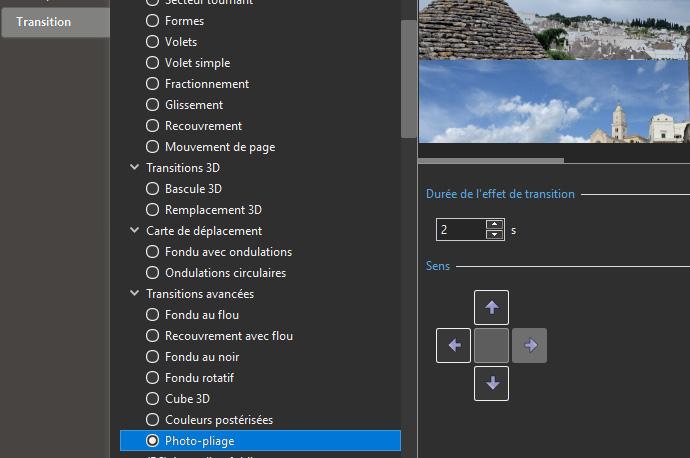
Hello Thank you for your message. I've opened a new project1 but it doesn't work. The directional arrows of the advanced "photo-fold" transition are inactive and there is no photo folding. I've noticed that this transition more or less reproduces the effect of the standard "slide" transitions with the down arrow activated. I installed PTE versions 11.0.4 and 11.0.6 and now the transition works. As soon as I install version 11.0.8 the transition stops working.
-
Hello Thank you for your message. I've opened a new project1 but it doesn't work. The directional arrows of the advanced "photo-fold" transition are inactive and there is no photo folding. I've noticed that this transition more or less reproduces the effect of the standard "slide" transitions with the down arrow activated.
-
Hello, Thank you for your reply. I installed version 11.0.6 and everything works. But it doesn't work when I reinstall version 11.0.8. What other solution would you suggest? Thank you Georges
-
transition (photo folding) in PTE AV Studio 11 does not work In my PTE AV Studio 11 Pro (latest installed update 11.0.8) - Windows 11 an advanced transition does not work (photo-folding). This transition works in your typical project, but it's impossible to make it work in a new project. Whatever arrow you use, the image only moves downwards. Should I uninstall and reinstall the software? Thanks for your help Georges _____________ (I moved these new posts into a new topic from the old topic. Igor)
-
Free PTE AV Studio Pro Template - Water Slideshow ID 01032023
Georges replied to Bad Dancer's topic in Styles & Templates
As usual, it is full of imagination. Nice work. Bravo Georges -
The Golden Years-PTE Project with free styles
Georges replied to Alex55's topic in Styles & Templates
Thank you Alex ! As always, it's a great job. Thanks for sharing and for your generosity Georges -
Thank you for sharing these beautiful transitions Georges

