Paiche59
-
Posts
134 -
Joined
-
Last visited
-
Days Won
10
Everything posted by Paiche59
-
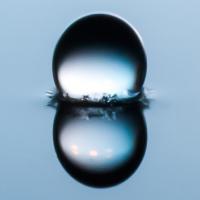
Here is an example of my last series of transitions using the threshold mask principle. This transition shows the second view separated from the first by a colored border (white and blue). 11 other transitions of this type are available on DiaporaShop. I also explain how to change the color of the border. You can create your own effects based on the example in this post. To obtain the colored border effect between the two transition views, I use three groups of threshold masks stacked on top of each other. Each of these groups embeds exactly the same pattern and therefore produces the same animation. The three groups contain from the highest to the lowest: the final image the secondary color of the border (blue) the main border color (white) The colored border appears due to the time shift of the key points of the different mask groups. The larger the time difference between the mask groups, the thicker the coloured border. Enjoy, Pascal. White border.pteeff
-
Slide Styles for transitions by threshold effect.
Paiche59 replied to Jean-Cyprien's topic in Styles & Templates
Thank you Jean-Cyprien for this great work of pedagogy and formalization about the technique of the threshold mask. I hope that this technique will open up new perspectives for creativity, not only for transition effects but also for other animations to be integrated into the views. A brief remark about the rendering between softness (denevele) and blurred: I prefer the rendering of the blur effect to that of the denevele (difference between the values of the black and white points), but the blur leaves the edge of the image of the second view slightly transparent. As a result, at the end of the transition, the full display of the second view causes a slight start. That's why I use the denevele for transitions. Best regards, Pascal. -
Bonjour Jean-Cyprien, Of course, you can use the template and/or the structure of the template. I look forward to seeing how you will use it. I'm sure the result will be amazing, as you've got us used to it Pascal.
-
The tutorial (in French) on DiaporaShop website that describes how to create a threshold mask transition has been updated. To avoid all the tedious work of creating the threshold effect, you can download two ready-to-use transition templates for free from the shop (You will need to have a user account). Best regards, Pascal.
-
Hello Denis, The technique of threshold masks is an opportunity to create new and interesting effects with PTE. This technique can be used not only for transition effects but also for animations. This is the case with the Brush Strokes and Watercolor styles available in the post https://www.picturestoexe.com/forums/topic/20674-power-of-color-filters/?tab=comments#comment-137019. Both styles use soft masks with threshold effect. I think there is a real creative field ahead of us. Pascal.
-
Thank you Dave for helping to raise awareness of threshold masks. Denis, thank you for your relevant comments. The configuration of the threshold effect as described in the tutorial does not allow more than 30 levels to be obtained. I improved the technique to obtain a clean threshold effect with the possibility of having 256 levels. In the example below, I have configured only 128 levels. By configuring a clean threshold, the effect obtained is too hard for me but it can be suitable with some kind of pattern. By discarding the value of the black and white level, a softer effect is obtained (example 3). I still need to improve the soft version, and I will update the tutorial on DiaporaShop. Best regards, Pascal. Threshold_Feb8-2019_14-45-28.zip
-
Bonjour Jean-Cyprien, Congratulations for this style, the effects are spectacular, well designed and pleasant to watch come to life. Thank you. Best regards, Pascal.
-
Paint It - A Style To Be Developed Further
Paiche59 replied to Lin Evans's topic in Styles & Templates
Hi Lin, Thank you for this demonstration. Indeed, the use of a video mask is a possibility that needs to be explored further. Personally, in the case of a complex animation like this one, instead of using a video mask I use the dynamic mask technique as I did with Brush Strokes styles in this post I consider that using a dynamic filter offers more flexibility than a video and allows you to keep the synchronization of animations when the slide duration changes. I explain (in French) how the dynamic filters on my site work on this page. Best regards, Pascal -
Thank you all for these messages of thanks. Thank you Lin for this wonderful sunset slideshow. @Gogs, in fact I first applied the actions to a single confetti. Then I used an Excel macro to generate the other confetti in a pseudo random way. The 300 confetti are created in less than 5 minutes. Best regards, Pascal.
-
How to put PTE to the test? With this style, each confetti is an object with its own complex movement (pano, rotation, etc.) and color parameters. Each explosion has 300 confetti. With two confetti throws, PTE has to manage 600 objects at the same time. Other free styles like this one are available on Diaporashop.com. Regards, Pascal. 2 Multicolor confetti.ptestyle
-
A PicturesToExe Sample Wedding Show on SSC
Paiche59 replied to Lin Evans's topic in Slideshows & AV Shows
Thank you Lin for this demonstration. I have a wedding slideshow to prepare, I will largely draw inspiration from your example to realize it. Best regards, Pascal. -
Hi Igor, I'm glad to know you liked my styles. Of course, you can include them in the future PTE version. It is a pleasure for me to contribute a little bit to the development of PTE. Best regards, Paiche.
-
Watercolor effect : Watercolor.ptestyle
-
Thank you Igor for these styles. The color filters available under PicturesToExe 9 actually offer the possibility to create amazing effects. I used a variation of the black and white levels applied to a BW image to get a "dynamic mask". For example, these settings allow the appearance of an image with a brushstroke and watercolor effect. Regards. Brush Strokes.ptestyle
-
Hello MUR, Yes absolutely, it's a good tip I used to generate many patterns that appear randomly. Pascal.
-
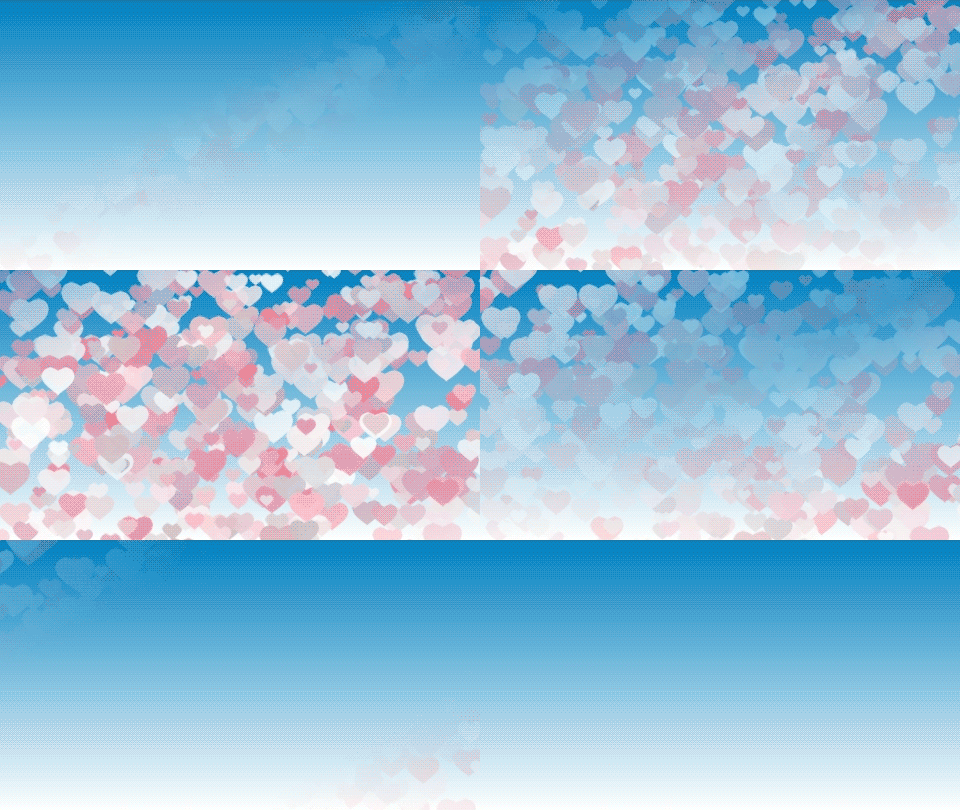
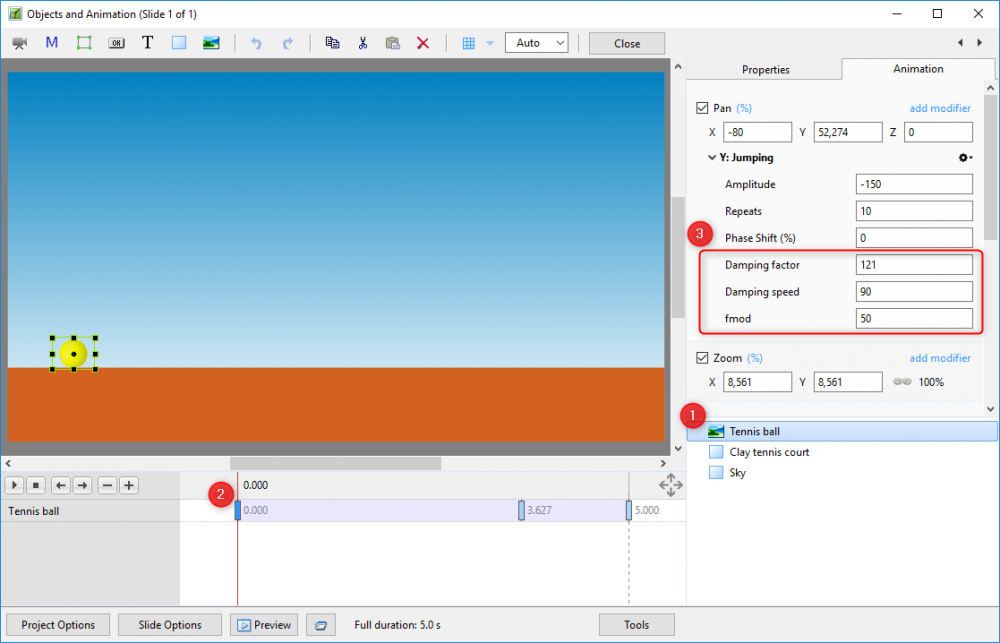
A little more information: All additional parameters (Damping factor, Damping speed and fmod) can be changed in Objects and Animation interface. So, you can easily change the behavior of the bounce. Regards, Pascal.
-
You know it because you read these lines, PTE is an impressive software. Version 9 is really accomplished and has greatly facilitated the creation of custom styles and transitions. In the Objects and Animation window, when you copy an object you can obviously paste it into the list of objects. As you may have already noticed, if you paste the contents of the clipboard into a text editor, the description of the object and the settings of the animation appear "readable". You can easily change the values of the parameters in the editor then copy and paste in the list of objects in PicturesToExe to see a new modified object appear. What is surprising is that it is also possible to change the functions « add modify » : Oscillation, Jumping, Ping pong and Shift. All of these functions use the Amplitude, Repeat, and Phase Shift parameters. For fun, I wanted to simulate the movement of a ball that bounces with a progressive damping until the complete stop. For that I modified the Jumping function by adding the parameters Damping factor, Damping speed and fmod (frequency modulation). However, I do not advise to use this new function in a style (other than for fun), because I'm not sure that this possibility is sustainable with future versions of PTE. Tennis ball.ptestyle Regards Pascal
-
Hello Dave, Thank you for your work. Your styles are really interesting and I will probably be inspired by this setup for my next styles. Pascal
-
French website about styles and transitions
Paiche59 replied to Paiche59's topic in Styles & Templates
Hello Phil, It is completely possible to create an account and order/payment in English. The payment is only possible with PayPal. Pascal. -
French website about styles and transitions
Paiche59 replied to Paiche59's topic in Styles & Templates
Thank you very much Ted, I am happy to know that the proposed effects on DiaporaShop pleased you. I hope that my next creations will also please you. Best regards, Pascal. -
French website about styles and transitions
Paiche59 replied to Paiche59's topic in Styles & Templates
Several free styles for PicturesToExe V9 are available on diaporashop.com : • Two styles with a 3D effect featuring the fall of a series of five and six square pictures • A dozen very simple styles showing a legend on a photograph. A tutorial (in French) explains how to customize the first two styles. To download the styles, you will need an account on DiaporaShop. If you do not have one yet, register under MON COMPTE (MY ACCOUNT). The free styles are available in the shop, place them in the shopping cart then proceed to the command to get the download link. No payment will be required. Best regards, Pascal. -
I just created the diaporashop.com website on which we find styles and transitions to download for PicturesToExe. The website is composed of a blog written in French and a shop. It includes articles about styles and transitions to download as well as tutorials of creations of its own animations. Styles and transitions are structured with objects named in English for ease of understanding. I hope these styles and transitions will please you. Yours sincerely.