Ken Cox
-
Posts
8,069 -
Joined
-
Last visited
-
Days Won
2
Everything posted by Ken Cox
-
WAY BACK WHEN WE WERE TRYING TO GET TO THE CURRENT STATE - with the request of Igor guiding me, i was recording temps of the mob, processor usage when running early shows i used the ASUS mob temp monitor that comes on the MOB disk,an early version of TaskInfo and to measure the temp of the ATI all in wonder board i bought a non contact hand held temp monitor - there was a definite increase in MOB temp, very little increase in the graphics board -- i then bought a 2006 256 ati all in wonder but it does not monitor the temp -- believe you have to go real hi end to get that feature you might be interested in the info here http://www.guru3d.com/ http://www.guru3d.com/article/atitraytools/189/ ken
-
mario try http://www.picturestoexe.com/forums/index....amp;#entry38365 the components are 5 mb +- in a zip file they are no longer at rapidshare if you have tutorial 2 you must have more info you can send write me at my email addie and will send the components ken
-
see http://en.wikipedia.org/wiki/Decompiler http://www.google.ca/search?hl=en&q=de...earch&meta= http://www.9rays.net/Products/Spices.Decom...CFRSSIwodcVBP0A ken
-
ashb we have all been in your shoes i ran into the same problem as you doing a road race - and the colour/placement had to be changed quite often to overcome background/runner's placement ken
-
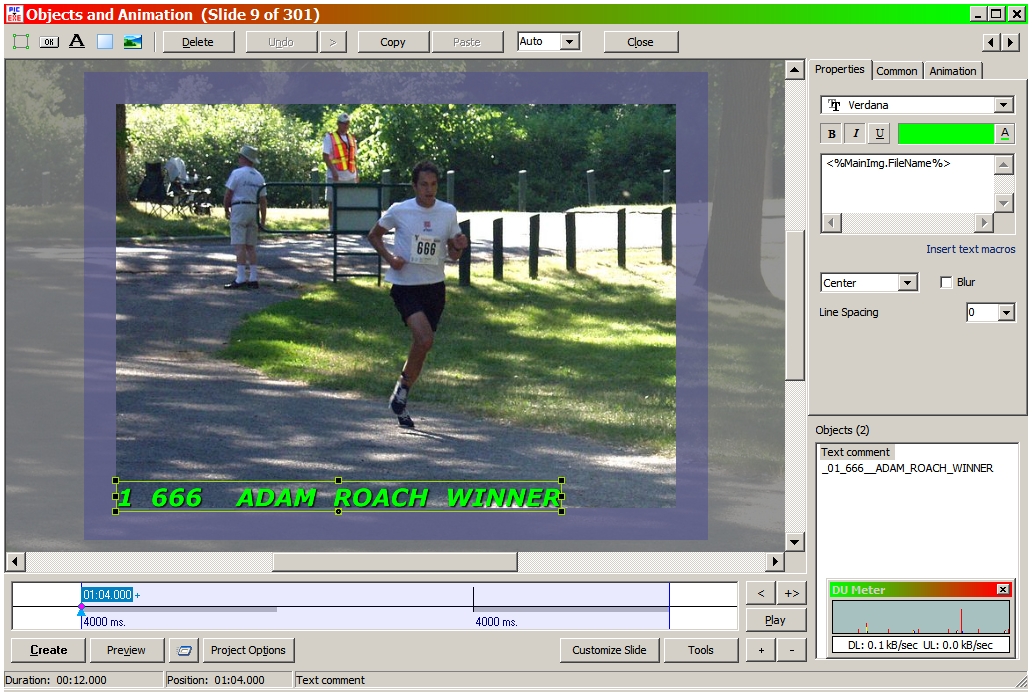
ASHB if you look at the green name in my screen shot using objects and animation screen you click it and move it wherever you want and you can also change the words see page 21 for starters in the PTE USER GUIDE COMPLETED, PDF format PicturesToExe User Guide and there other instances on the pdf ken
-
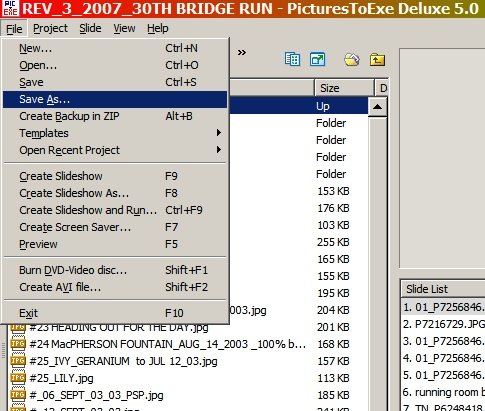
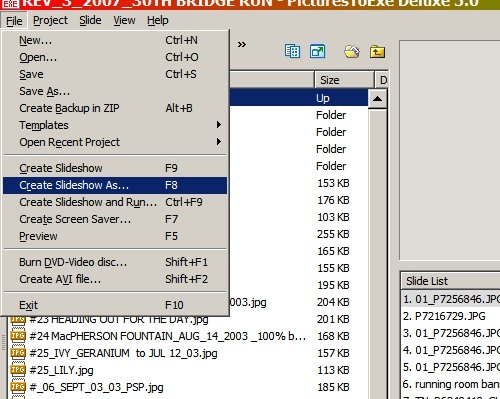
Bohemia, for this exercise lets say your show is called Bohemia first save as command and it should save as a pte and if you saved in the folder you were working in you should now have a file called Bohemia.pte then create slideshow as command and it should default as Bohemia.exe and it should go in the same folder so now you should have a small bohemia.pte file and a quite larger bohemia.exe file see if the exe file will run as you set the commands in the pte file report back to forum for next step ken
-
for starters see http://www.picturestoexe.com/forums/index.php?showtopic=7288 but why are you putting it on a dvd --a screensaver is an exe in reality and will not play on a normal tv/dvd player ken
-
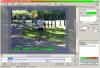
ASSUMING YOU HAVE THE TEXT TICKED FOR EXAMPLE THE SLIDE NAME and have the said slide showing click objects and animation the slide appears with the text showing click the text and in top right corner of screen properties should show the type/name of text used and colour click the little A right side of box to change colour ken asb - i edited the the title to read "slide" ken
-
DAVE IF you convert an exe as Igor suggested then r mouse the new *.scr all the commands are there to test install etc I had never tried a p2e exe before so i just did it to a small show and r mouse'd the test label and away it went ken
-
try menu button on remote ken
-
big difference between video and still photography if he wants a frame hi quality he does not have to rip the video i shoot continuous shots with my digital at max zoom to cover my butt -- very difficult to keep on action subjects hand held or even moving ships camera specs see http://tinyurl.com/2jghd7 ken
-
danny from the hotmail help section/ and my archive that isent to others ken From: [email protected] Subject: REASON HOTMAIL STRIPS URLS Date: Thu, 9 Aug 2007 16:22:59 -0400 FYI ONLY I use hotmail as a tool and a storage place - recently found out that it strips urls the reason described below I can't download or send attachments Windows Live Hotmail doesn't support all file types. If you send an attachment that Windows Live Hotmail doesn't support, the e-mail recipient won't be able to download or open the attachment. To send or receive an unsupported file type as an attachment, use one of the following methods, or ask the person sending you the attachment do so: Compress the file Use a zipped folder or a third-party compression program to compress the file, and then attach it as a .zip file. See your software documentation for information about how to compress a file. Change the file extension to .txt Locate the file that you want to attach, right-click the file, and then click Rename. Type txt in place of the original file extension, and then press ENTER. Attach the renamed file to your e-mail message. Note Remember to tell the recipient how to change the file extension back after they download the attachment to their computer. The following file extensions are not supported: .ade .adp .asp .bas .bat .chm .cmd .com .cpl .crt .exe .hlp .hta .inf .ins .isp .its .js .jse .lnk .mdb .mde .mdt .mdw .msc .msi .msp .mst .pcd .pif .reg .scr .sct .shb .shs .tmp .url .vb .vbe .vbs .vsd .vsmacros .vss .vst .vsw .ws .wsc .wsf .wsh
-
stu on my system you can have text lined up perfect but when you do a burn it tends to cut off the right side text in the menu - so i do not get greedy as to the size of text and/or i make another line to be safe picts do not seem to suffer this problem ken
-
Paul a moving show neat ken
-
Keith -- during that couple years many people said p/z can be fine but DO NOT OVERDO IT-- during that couple years many people said p/z can be fine but DO NOT OVERDO IT your quote Imagination is more important than knowledge" many moons ago a Bell and Howell rep told me that the only 2 things that will stop one in the quest of learning Photography is your imagination and your wallet! i think it holds true for a lot of things in life ken
-
before you do anything else save all documentation -- correspodance and key to a dvd or floppy and store it in a safe place remember Jesus saves ken
-
couple years ago NEARLY everybody that was on the forum regularily had the hots for pan and zoom we worked out butts off helping Igor achieve it -- i used 100+ dvd's between trying to get it right and then trying to burn it we get it and now the criticism starts -- during that couple years many people said p/z can be fine but DO NOT OVERDO IT we also hear we want MORE FADES/TRANSITIONS yet when was the last time we seen any of the special fades that Igor and crew developed then Dom, Lin and a few others start developing Templates for us -- and what do we hear "thks but we want more" Igor must have no hair left hope you all have a quiet Labour Day i going to go play in my sandbox ken
-
thks Ray ken
-
EPA - Environmental Protection Agency? yes am not worrying about global warming - just the wasted energy watch your email - sending a note for Tom ken
-
Andrew my complaint is i would fire the engineroom crew and captain for not properly tending the fires -- 'tis a wonder the EPA does not fine them for emmissions ken
-
JEB I was able to get the download rapidshare is kind of different
-
SEE http://www.picturestoexe.com/forums/index....art=#entry39314 KEN
-
still think a carrier is best or a trained goat c/w cart goat will both mow the lawn and fertilize it ken
-
LE SITE DU DIAPORAMA CRÉATIF COURT NUMÉRIQUE
Ken Cox replied to korporal-kloggy's topic in Slideshows & AV Shows
the secret is to practice "RAT" read all threads when you do visit ken -
LE SITE DU DIAPORAMA CRÉATIF COURT NUMÉRIQUE
Ken Cox replied to korporal-kloggy's topic in Slideshows & AV Shows
kloggy for the latest episode see http://www.picturestoexe.com/forums/index.php?showtopic=7192 ken