JRR
-
Posts
1,462 -
Joined
-
Last visited
-
Days Won
23
Everything posted by JRR
-
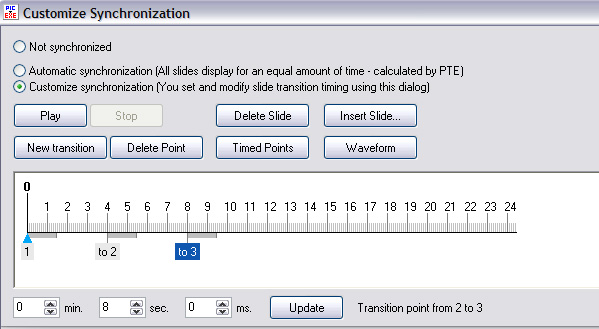
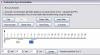
I have been off the forum for quite a while due to connection issues, but after a search today I could not find any reference to this in the forums. I hope I am not asking an already answered question... I am using ver 6.0 (I know it is not the latest version - see note below) and am in the midst of 15 minute show with some seemingly tricky synchronization. When I need to adjust the placement of an image on the timeline, I find it difficult to do with a high degree of accuracy by the click and drag method. (Maybe the real issue is I am getting too old, or my mouse is sticky.. ) In the "old days" of version 4.8 there was screen (see pic) that allowed us to enter the time start co-ordinates and "update". No need to use the click and drag method. While I have managed without since 4.8 (maybe ver 5.xx?) I sure would like it now. Have I missed finding the function in 6.0 ? Thanks xxxxxxxxxxxxx For those who question my sanity :) anytime I ask about older versions... One reason I am slow to upgrade to the latest version is that I have well over 60 AV shows that I are presented frequently. They are presented by using a "Launch page" (using O&A in a standalone show) and you get the smoothest start if the show being launched is the same version as the launch page version. I find it too tedious to re-compile all the shows each time an update comes out. So I switch to an upgrade grudgingly at times.
-
Got it Barry Thx Ken Cox also sent me a copy. As to why I want 4.48... Yes I completely the new version is MUCH better, to explain why 4.48/4.49 would just get to complicated so I'll leave it at thanks for the usual fast reply. At least I didn't ask for version 2 !!!!! :D
-
To make a long story short, I need the install files for PTE ver 4.8. I thought I had kept a copy (way back then) but I seem to not have. Does anyone have a copy, or can they direct me to where I can get a copy? Thanks
-
Bill: Thanks for sending me the files. With them and Igor's assessment I think I have resolved the issue for you. See e-mail I sent you
-
Ken and Nobeefstu Bill called me at home with his problem before he posted. This is his 2nd or 3rd PTE show he has done. The file was originally a MP4, which he converted to an MP3. He had worked the file in audacity several times and it always worked in the main window of PTE, but not in the PREVIEW or when CREATED AS an exe. (I thought maybe the originating as an MP4 might be an issue, but it did play in PREVIEW. He added it via PROJECT OPTIONS, and then tried ADD SOUND at the top. I suggested a few things: - re-boot the computer after turning it off and flicking the switch on the back of it to OFF for 30 seconds. - try another file (I should have suggested one that worked in another show) - convert it to a WAV and see what happens. I have not heard back from him whether any of those worked. I know have had issues with sound files which we accidentally created as 22,000mhz(Or whatever the term is) but they always played back in all modes, but just did not synch correctly) Any other thoughts you might have will be welcome
-
Eire: Welcome to PTE The short answer to your question is "NO". But the developers have it in their plans for an upcoming release. No dates yet
-
Saved "last used image folder" in project file
JRR replied to fh1805's topic in Suggestions for Next Versions
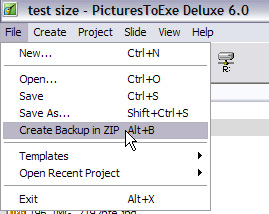
Peter: I agree with you (again ) Like Ken I throw everything into a new folder when working with a PTE, but the odd time I absentmindedly slip to another folder for an "extra". I would prefer to have the pte file point to the folder I designate. Also sometimes that folder will change as the show evolves. It can get very big (e.g. when using PhotoShop's layers to create multi-image screens, or upteem sound bites that evolve from mp3 from wav etc etc), or can have a good number of images, or different versions of images, I end up not using and so on. So I do a zip backup, and start a new "cleaner" folder. By being able to designate that new folder, life will be much simpler. -
Saved "last used image folder" in project file
JRR replied to fh1805's topic in Suggestions for Next Versions
Peter: Yes please !!! It has always bothered me that I have to go hunting for the folder when I open an existing project. It confuses the heck out of newbies when I am helping someone learn PTE. Glad you suggested it, only question is why no one (including myself) had not suggested it before -
Dave: Can't say I am as up on this as others, but I would have expected what you did - no need to worry about 6.0 vs 6.01 vs 6.02 etc for menus. I guess I am lucky as I haven't upgraded beyond ver 6.0 and have re-compiled all my shows to 6.0 to get smoother starts than using RUN APPLICATION Thanks for the warning though as I am not sure I want to re-compile all my shows (50-55) that are actively used if I happen to do a menu on a newer version of ver 6.
-
Problem Displaying PtoE Slideshow on HDTV [SOLVED]
JRR replied to Pat Ball's topic in General Discussion
Gary: I think it applies anytime your images might be shown at a res/size you don't think they could handle. Yes projecting it will make it obvious, but the lack of image quality also shows on my monitor if I take one of the 800x600 and let it get too big. Again these were not the best scans of some slides that were used in a true SLIDE projector show -
Problem Displaying PtoE Slideshow on HDTV [SOLVED]
JRR replied to Pat Ball's topic in General Discussion
Gary: I use FIXED SIZE to prevent my images being enlarged beyond what I think they can handle. For example I have some OLD shows done at 800x600, which I used to show on a 800x600 projector, my projector is now 1024x768. So I allow a fixed size of 1024x768 and the pictures are still OK But sometimes they are shown on a projector that is 1400x1050 and there is no way the images would stand up to that (They were scans and not done well) so the 1024x768 keeps them projected at 1024x768 even on a larger res projector -
At least it is a relatively quick punishment :D Normally 578 images would run at about an hour. One image per 6 seconds on average. Showing 578 one by one with discussions would keep your family and relatives glued to the screen for well over a half day if you didn't run them as an AV. (Or maybe you would have to glue them to their seats B) ) I agree with Ronnie that most shows run at 5-8 minutes and most of mine do. But I have some, designed for specific audiences that run as long as 25 minutes. They have voice-overs to keep people awake (and interested hopefully).
-
Rob: If it works that's great But it sure seems to be a little messy way of doing it. "normally" one merges all the sounds into a single MP3 track. (I work with wav files until I am happy with the mix) That one track is loaded in via PROJECTION OPTIONS > MUSIC tab And of course Synchronize slides to music is ON. Doing a mixture like you are doing one has to be careful they are all at a frequency of 44,100, otherwise the timing can be off (been there done that ! )
-
Nothing like a nice small show to start you off (Assuming this is a first AV for you Rob ) 1.Have you got Music Sync turned on: PROJECT OPTIONS > MAIN> SYNCHRONIZE MUSIC AND SLIDES 2. Is it one music track ? You say "compiled" using audacity, so I am assuming it is. 3. How did you add the music ? PROJECT OPTIONS > MUSIC tab ? or attach it to the first slide or ? 4. What are the "specs" on the track ? How many mbs ? MP3 or WAV, at freq of 44,100 ? I suspect it might be a VERY large file and the computer might be having issues dealing with it. 5. What size are your images (pixels and mbs?) 6. DId it work OK on the PREVIEW Maybe a few clues like that might help xxxxxxxx Following up on Ken's posting that went at same time as mine, if they are seprate tracks and making them all MP3's does not help, merge them all together into a single track using audacity
-
Andrew: I have four of my shows on VIMEO that I uploaded through PTE: CREATE > PUBLISH ON VIMEO A website, for which I did the shows, have a link to the VIMEO location. You can see how it works here (I am not a techie, so I don't know the intricacies ) These, I must admit, are not all new shows. They also have royalty-free music so there is no problem having them open to public viewing. I have the VIMEO settings set to not allow download. xxxxxxxxxxxxxx PS: Eric Some people don't want their shows on Beechbrook or Mediafire as they then lose control of their work because the AVs have to be downloaded from those sites. Believe me, it has happened to me with some of my shows ending up somewhere I never would have allowed. But don't get me wrong I wholeheartedly support Beechbrook (and Mediafire) and the great shows that Bill gives us access to
-
Eric With only a 500GB drive onboard, I assumed you would have external drives with more data etc on them. Unless I am not understanding the specs correctly, the external drives can only be connected via the 6 USB ports. USB is "realtively" slow at transferring data. E-sata ports are as fast as an internal connection. I believe you can get a combo USB and E-sata port
-
Eric: I am not sure what you mean by "cube" PC, but I take it you mean something relatively small and portable. I am no expert in this but what about E-sata (spelling ?) connections. As you only have a 500gb drive, the E-sata would allow connection to an external drive at virtually the same speed as an internal drive.
-
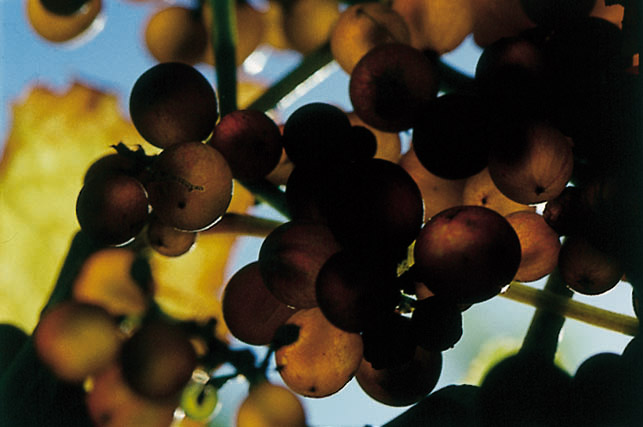
Ken: I just realized I mis-spoke myself I clicked on the TN, it expanded within the forum page, I clicked on SAVE at bottom right of picture, it then opened as a new tab in FIREFOX. THEN I right clicked and SAVE IMAGE AS and it downloaded to my desktop as an jpg image 643x427 pixels. I tried doing what I think you tried (I have never done it this way) I dragged the thumbnail directly from the forum posting into PhotoShop. It popped open as .bmp file and stayed at 100x67 pixels (Thumbnail sized)
-
Dave you are absolutely right it should sRGB as PTE is not a colour managed software. I was in a bit of a hurry this morning and only looked at the PhotoShop terminology for the MODE. I should have caught myself and talked about sRGB as well. Adobe RGB will work too, but the colours might not be quite the same as the maker saw them in PhotoShop (or other photo editing software all (?) of which should be colour managed) sRGB has a smaller colour space than ADOBE RGB and is what non-coloured managed software best deals with.. I use sRGB for all my images as I only use my shots for AV or for sending over the web. If I am going to print something then I switch it to Adobe RGB Ken: I right clicked on the image and selected SAVE IMAGE AS, it downloaded to my desktop and I opened it in PhotoShop (CS3) and immediately checked the MODE under the IMAGE tab
-
Boogie: It is in CMYK colour space. Guess PTE only likes RGB colour space. Change it to RGB and you should be OK Attached version shows fine in PTE for me

-
Ray: Nicely done. (BTW, I am on a cable connection and it downloaded in 90 seconds) Ran very smoothly on my not too new PC.
-
Allan: (My reply - typed while they were posting theirs !! - is in-line with Ed's and Dave's, but has a few other thoughts) This topic has come up in the past under various guises. It always generates various answers. You don't really want to re-do your various shows for specific resolutions of someone else's equipment. You only want to do them once. I would opt for a image size that is on the larger size (see below). If the shows are run on projectors or monitors with smaller resolution, the shows will still run fine. If you happen upon a projector with a larger resolution, you will still be OK. You have the option when setting up your show of fixing the "screen" size (PROJECT OPTIONS>SCREEN>FIXED SIZE OF SLIDE) you can leave that off and your images will be enlarged to the projector's max, or you can fix it to the actual image size in which case there will be a black area left around your image. (or move the projector farther to the screen and throw the black margin off the screen ) Personally, I get overly concerned (some would say needlessly paranoid )about not having control of my image projected quality if I allow it to go larger so I fix the size. But having said that I have some older shows that I have re-compiled and allow them to be enlarged on the fly. They work fine. Currently, I make my image resolution so as to generate an exe file that will be less than 100mb for a 6-10 minute show (less then 100mb makes it easy to transfer around, allows for excellent files of both image quality and sound. But there is nothing magical about that 100mb.) I choose to use 1280x960 as that is the size of my monitor and allows me to meet the 100mb file size. I have over the years moved from 800x600, to 1024x768 and now 1280x960. (Obviously unlike others I am not looking at HD and going 1920x1080) The 1280x960 is a larger resolution than my projector (1024x768), smaller than our photo club's projector (1400x1050). (My main audiences see the shows via my projector and not at my photo club) Of course the resolution is only a partial factor of the file size for an image, the quality or compression factor plays a large part. There have been several threads on this issue as well with the feelings running from quality 5 to 8. Me ? I tend to ignore the quality and just aim at 500kb file size. Is that rational? Maybe not, but that is what I have developed as my work flow. I could change it and likely argue for different numbers. xxxxxxx By the way, 1280x960 is not the standard ratio of my images from the camera, I have to crop all mine. Which can be a large pain, but I still do it for various reasons.
-
Andrew: I just noticed something else strange with your file. The screen print attached says the file is 1920x1080 and yet only 58kb ?!?!?!?! What file size does the file show in EXPLORE ? Surely it is bigger than 58kb unless it is one solid colour I just did a test in PhotoShop and a one colour image (plain white or black) at quality 6 is 58kb.
-
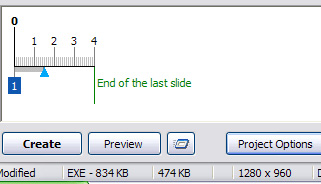
Andrew: Post the zip back up file for it. I tried it with one 474kb slide and I am showing 834kb for the exe. The compiled exe file was 914kb Are you sure there is no music attached anywhere?
-
PTE Made Easy tutorials - Continuously Updated
JRR replied to Lin Evans's topic in Tutorials & Video Lessons
Nix: You ask about PDF's of Lin's tutorials, I know you are used to getting Ed's and Mine at the Photo Club, but I find Lin's "movies" quite helpful and better that our PDFs. They run in Windows Media Player, I watch them all the way through then I open PTE and re-run Lin's show, pausing it while I go to PTE and try to replicate what he just showed. I go back and forth between the two while working through his demo. You can always drag the control point on the avi back a little to watch something again if you are having trouble understanding something.