Lin Evans
-
Posts
8,206 -
Joined
-
Last visited
-
Days Won
12
Everything posted by Lin Evans
-
Hi Gary, Your images show the O&A screen as an overlay on the Slide View. I'm totally confused as to what the issue is I'm afraid.... Best regards, Lin The O&A screen should look like this - there is no "slide list" on my system in the O&A screen....
-
Hi Gary, You've got me scratching my head. How do you advance from image to image in O&A in the "Slide View?" To my knowledge, there is no "Slide View" in the Objects and Animations screen. Do you mean when you are advancing from image to image in the Slide View rather than in Objects and Animations? Best regards, Lin
-
LOL - Davy, They have a special room reserved for you and me - it has rubber walls and people look in through a tiny window every so often to make sure we have not "slipped" our bonds and run amuck! Loved it! It speaks to me! Best regards, Lin
-
Hi SG, The video card is likely at least part of the problem. If you go here: http://www.videocardbenchmark.net/ Click on the "Search For Your Video Card" and type in "6530D" you will find that it ranks 258th with a G3D rating of 540. A decent video card today will have a G3D rating of probably better than 1400 and the top one is 3958 so probably investing in a new video card would definitely help. Laptops are generally worse than desktops and one has to be careful when choosing a laptop to get one with a good video card as well as good CPU and RAM performance. On your desktop, before you do anything, check and see if you have an open slot to plug in a video card (yours "could" be built into the motherboard) and also that you have available power cables from the power supply. I had to buy a new power supply for my Dell Inspiron 530 because it had no available power - all leads were used. I put a micro quiet 750W power supply in (had to shoehorn it into the case) and the new video card (this was about four years or more ago) and it made all the difference in the world for animation smoothness and video. Best regards, Lin
-
Hi, I too have the Nikon D7000 and my videos run glass smooth in PTE regardless of resolution. I'm wondering if perhaps there may be some issue with drivers or possibly video card. I'm running Win XP with 4 gig RAM and an older nVidia 8800 GT with 512 meg RAM. Best regards, Lin
-
Hi Igor, There is no need to apologize for the camera - those are beautiful images in every way! What a wonderful place to visit, so serene and peaceful. Thank you for sharing your experience with us and thank Robert and Maureen for showing you one of the most beautiful places in the U.K. Best regards, Lin
-
Hi David, VideoPad Video Editor (free version) allows rudimentary audio editing. You can fade-in, fade-out, mute and adjust volume on audio tracks with it. I primarily use it to do fades.... Best regards, Lin
-
Hallo Karl, Die Mediafire Download funktioniert nicht für mich. Erstens, bitte entschuldigen Sie meine Google Übersetzen - ich spreche kein Deutsch. Ich sah Ihre Präsentation auf Vimeo. Ich glaube nicht, dass ich richtig verstanden habe den Punkt Ihrer Präsentation. Ich konnte keine Informationen im Internet über Karlus, Vorhersagen und 1551. Es scheint jedoch, dass Sie eine sehr schöne Aufgabe mit dem Entfernen von Objekten und Personen aus Szenen und ersetzt sie getan. Es scheint jedoch, dass die Größe der ausführbaren größer als erforderlich ist. Vielleicht ist die Morphing braucht viel mehr Dateigröße als erwartet? Willkommen auf der PTE-Foren und hoffentlich kann einer unserer deutschen Muttersprachlern als Vermittler zu helfen mir zu verstehen, die Präsentation besser zu handeln. Mit freundlichen Grüßen, Lin
-
Hi Gary, This also might help you understand the 29.97 versus 30 numbers being bantered about: " About Drop Frame and Non-Drop Frame Timecode NTSC video (black-and-white) originally had a frame rate of 30 fps, so the timecode counted at 30 fps. However, NTSC color video (the only kind of NTSC video in use today), has a frame rate of 29.97 fps. This subtle difference between 30 fps and 29.97 fps seems practically negligible and, in many cases, ignoring this discrepancy is fine. But not always. What editors needed, especially in expensive broadcast markets, was timecode that accurately reflected the exact duration of a program on tape. There are two types of 30 fps timecode for use with NTSC video: non-drop frame and drop frame. Non-drop frame timecode is simple: for every frame of video, there is a corresponding timecode number. The timecode increments without any compensation. In almost all cases, timecode is non-drop frame. In fact, drop frame timecode only matters in the case of NTSC video. Drop frame timecode compensates for the fact that the NTSC format has a frame rate of 29.97 fps, which is .03 fps slower than the nearest whole number frame rate of 30 fps. Timecode can only be represented by whole numbers, so timecode numbers are periodically skipped in drop frame timecode. This way, the timecode number always matches the seconds and minutes of video that have played. NTSC can use either drop frame or non-drop frame timecode. Important: No video frames are dropped when you use drop frame timecode. Only the associated timecode numbers are skipped. You can think of drop frame timecode as being like leap years on the calendar. In the case of leap years, an extra day is added every 4 years except when the year is divisible by 400. This compensates for the fact that the way days are measured and the way years are measured do not align exactly. Even though the difference is slight, an unacceptable error accumulates over time unless regular adjustments are made to the count. More About Drop Frame Timecode and the NTSC Frame Rate NTSC video has a frame rate of 29.97 fps, but the timecode counts at 30 fps. To better understand this subtle distinction, remember that the main purpose of timecode is to uniquely label and address each video frame, not to tell time (another name for timecode is address code). Consider what it would be like if frames were labeled a different way, without any reference to time. For example, if each frame had a unique address coded with five letters of the alphabet, starting at AAAAA, AAAAB, AAAAC, and so on until ZZZZZ, editors would refer to shots and scenes by their individual five-letter codes. A director requesting a particular shot could look in the log notes and tell the editor to find frame ABAAA on a particular tape. On tape or disk, each frame lasts 1/29.97 of a second. Since there is an address affixed to each frame, the timecode moves at the same rate as the video (29.97 fps). Now, instead of using a five-letter code to uniquely tag each frame, consider using an address code in the format 00:00:00:00. Remember that these numbers don’t reflect time; they are simply unique identifiers. The first frame of NTSC video is labeled 00:00:00:00. The 29th frame is labeled 00:00:00:29, and the 30th frame is labeled 00:00:01:00. Again, just because a frame is labeled 00:00:01:00 does not mean that 1 second has passed. The frame could just as easily have been named AAABD, in which case there would be no temptation to read the label as a time value. Only the frame rate of the video can determine how much time has passed by the 30th frame. In the case of NTSC video, 0.999 seconds have passed by frame 30. By frame 1800, 60.06 seconds have passed." Best regards, LIn
-
Hi Gary, The only one I'm certain of is 30 fps is actually 29.97 fps. "Probably" the others are likewise, but I can't say from experience because I only use 30 and 60 myself. I'm far from an expert on video and I tend to stick with what I find to work well. Best regards, Lin
-
Hi Tom, It snowed here yesterday, but it didn't stick long - hopefully better weather coming soon - I'm headed for New Mexico for a week on the 11th so hopefully it will clear up. It was almost 90 a couple days ago, then snow and cloudy and cold. I hear from a friend in the San Francisco area that they have had rain too so it must be up and down the coast.... Best regards, Lin
-
Hey Ken, Thanks! LOL - probably - I didn't hear it when the cabin started smoking! Lin
-
Hi Guys, An "expressed" frame rate of 30 fps is "actually" 29.97 fps. The number "30" is commonly used for convenience. Lin
-
A little Rodney Crowell tune and fun animation.... Starts with fireplace then sequentially we light the candle to the right of the fireplace on the hearth, the candle on the far left (as viewer sees the mantle) of the mantle. The candles to the right and then we back up and light a fire in the little cabin so smoke can come out of the chimney. A slow pan both ways lets the audience see Colorado snow out the windows of the cabin's room and the television is turned on for Frosty The Snowman. After Frosty finishes, the tv is turned off and we end with a little animated text ad for PicturesToExe and PanosFX. http://www.lin-evans...smaproject2.zip (zipped Windows exe) about 24 meg http://www.lin-evans.org/sample/plasmaproject2mac.zip (zipped MacIntosh native exe) about 24 meg Lin
-
Hi guys, One of the things which you will eventually run into is the need to "stabilize" your videos. Though there are numerous software "solutions" out there for that purpose, Adobe After Effects has, by far, the finest way of doing it. It's called "warp." Of course After Effects is over $1,000.00 U.S. and beyond my means, but they do "rent" the software for about $40 per month. I have a friend who does videos on the west coast (San Francisco area) and he does them that way. He simply saves his work which needs stabilizing (walking around hand -held shots or not too smooth head on tripod, etc) then when he has a dozen or so, he rents After Effects and does the stabilization. Also there is a 30 day free trial available. After Effects will not work with any Windows OS less than Vista, so we old XP folk are out of luck. Best regards, Lin
-
I would agree with Peter - You really don't need the multiple pictures at all. You actually only need the two as described. Also, I would suggest upgrading to 7.0 because you have lots of nice features available now such as the ability to add video clips. If you post two images (one of the box closed and one of it opened) I'll be glad to make a really quick sample you can use to see how it's done. The "secret" is to use your photo editing software to make the PNG file of the lid itself with everything else being transparent. Once you have that done (if you don't know how to do this, just say so and we can show you how) the rest is very easy to do and you will have a very smooth opening box. Best regards, Lin
-
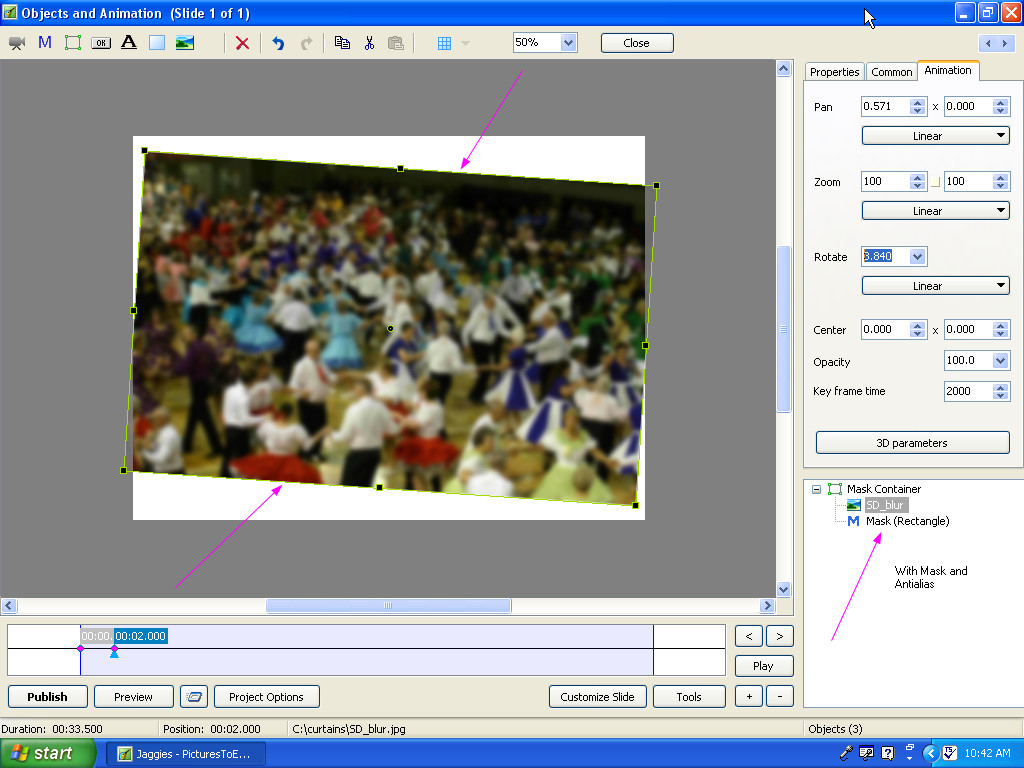
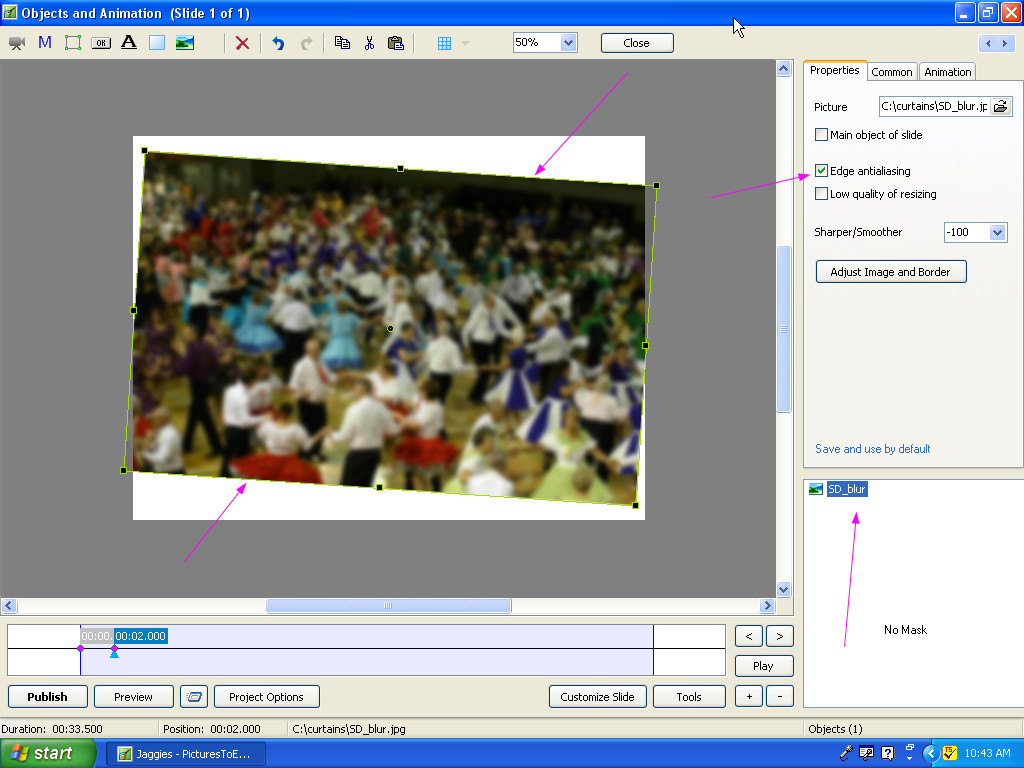
Hi Jean, I'll have to work with it some more. It looks as if the aliasing might be the mask rectangle rather than the image. Xaver is rotating the mask container rather than the image inside a mask so that may have some relationship to the problem. I'm using a CRT so it may not be as sensitive for display of aliasing as an LCD display. I can't see that the anti-aliasing feature is having any effect when checked regardless of a mask. Perhaps the problem is that the anti-aliasing itself is just not working? Best regards, Lin
-
Hi Jean, If you resize the image by distorting the XY axis with the shift key, make it the same size in dimensions as the image inside the mask and rotate it with or without the mask, I see the same aliasing. The mask, at least on my system, has no influence on the aliasing unless you use a bit of blur and then it hides the aliasing. I'm just not seeing that the aliasing is in any way related to the masking. Best regards, Lin
-
This is what I get with and without the image being in a mask.... Best regards, Lin
-
Hi Xaver, I don't think the mask has any relationship to the problem. If you remove the mask entirely and rotate that image there is still jagged edges. Best regards, Lin
-
Multiple pictures and Video on one Slide
Lin Evans replied to tidwellc's topic in General Discussion
Hi, Actually, it's fairly easy to do this but the explanation is a little convoluted. What you do is you set the video as "Master" which keeps it playing for each slide which can then have pictures running on "separate slides" in the background (you add the video as "master" on each slide - just copy and paste your mask container). But since you want the pictures to run "beside the video" you may want to run the video "and" the pictures inside masks. Give me a few minutes and I'll make you a quick sample which you can then work from. Assuming you want the video to run it's full length, then your accompanying "slides" would be set up to give equal time to the video divided among the various slides. If the video ran for 3 minutes, and you had 12 slides, then each slide would be set for 15 seconds. So 3 minutes or 180 seconds for the video to run and it would "appear" unbroken on each of the 12 slides which would run for 15 seconds each. Then the "rest" of your slideshow would proceed as normal. Be sure to use either a fade or "quick, not transition" to prevent the entire page from being affected by the transition. As I said, I'll make you a quick sample and post a link to the exe and PTE files so you can see how to proceed. O.K. - here's the sample. I didn't spend much time getting the masks equal or putting enough slides to finish the length of the video so it ends abruptly, but you can see how it's done. You don't actually "need" a mask for other than the video or really even the video but it's "convenient" because you can copy and paste without having to mess with setting the pan, zoom and so on for each independent slide. The "easy way" to do it is to get the first slide absolutely correct for size, placement, etc., with or without a mask, then copy and paste that slide in the slide list as many times as you have slides. Then simply exchange the image in the "properties" tab for each slide with the one copied and pasted. Do this via little file icon in the upper right. Just click on your copied slide name in the objects list, then click on the file icon and navigate to and double click the slide to replace this "copied" slide with. The "mask" isn't really necessary - I just used it for convenience. What is important it to make the video the master and link to it via the choices and then copy and paste after you have the size and position set. Likewise with the adjacent images you want to show on each slide while the video continues to play uninterrupted. Let me know if you get in trouble and I'll help you straighten it out. http://www.lin-evans...lewithvideo.zip (exe sample) http://www.lin-evans...ithvideopte.zip (pte file to look at) Best regards, Lin -
I'm glad you've given your "permission" for others to try this product... It seems to me that Brian didn't "recommend it," but rather gave the Mac user's a "head's up" about the product. Since you have "dismissed" it as "not having" the "bells and whistles" of course you can tell us your experience with it, can't you? Or are you simply dismissing it out of hand because you have a crystal ball and know all things "Mac?" It seems to me that you always have negative comments or attempt to "correct" anyone who says anything about a MacIntosh. Did someone appoint you as the resident "expert" in all things MacIntosh, or have you simply elevated yourself to that position? It would seem to me to be polite and tell people just which "bells and whistles" this product doesn't have "if" you really "do" have experience with it, rather than answering a question with a question as you did. I think it's fine to offer help and advice when asked, but you seem to be a bit overly enthusiastic with your quick corrections which have not proven to be always correct at all. Just saying..... Lin
-
Two things: In PTE go to: Project Options - Main Tab - Aspect Ratio - set it to 16:9 Crop your images to 16:9 aspect ratio. You can size them at 1280x720 or 1920x1080 (both are 16:9 aspect ratio) and when you create the movie for YouTube with PTE, make it HD 1280x720 Best regards, Lin
-
Hi Jerome, The typical Youtube video is at 16:9 aspect ratio. If you make your video at 1280x720 it will have quite sufficient quality and you will not have crop issues. What you see on PTE will be identical to what you see on Youtube. Best regards, Lin
-
Hi Davy, I thoroughly enjoyed this. It must have been very difficult to find this great selection of images. These remind me of when I was a child and fascinated by the art found in some of the old bibles, which is the only place, outside of museums, where I have seen pictures like these. Very well done! Thanks! Lin